
1. Introduction
Thank you for choosing the WUBEN L50 Tactical Flashlight and F5 Camping Lantern bundle. This manual provides detailed instructions for the safe and effective use, setup, operation, and maintenance of your new lighting devices. Please read this manual thoroughly before use and retain it for future reference.
2. Package Contents
Verify that all items are present in your package:
- WUBEN L50 Tactical Flashlight
- WUBEN F5 Camping Lantern
- Rechargeable Battery (for L50)
- USB-C Charging Cable
- Spare O-rings (for L50)
- Lanyard (for L50)
- User Manual
- Warranty Card
- Quality Certificate
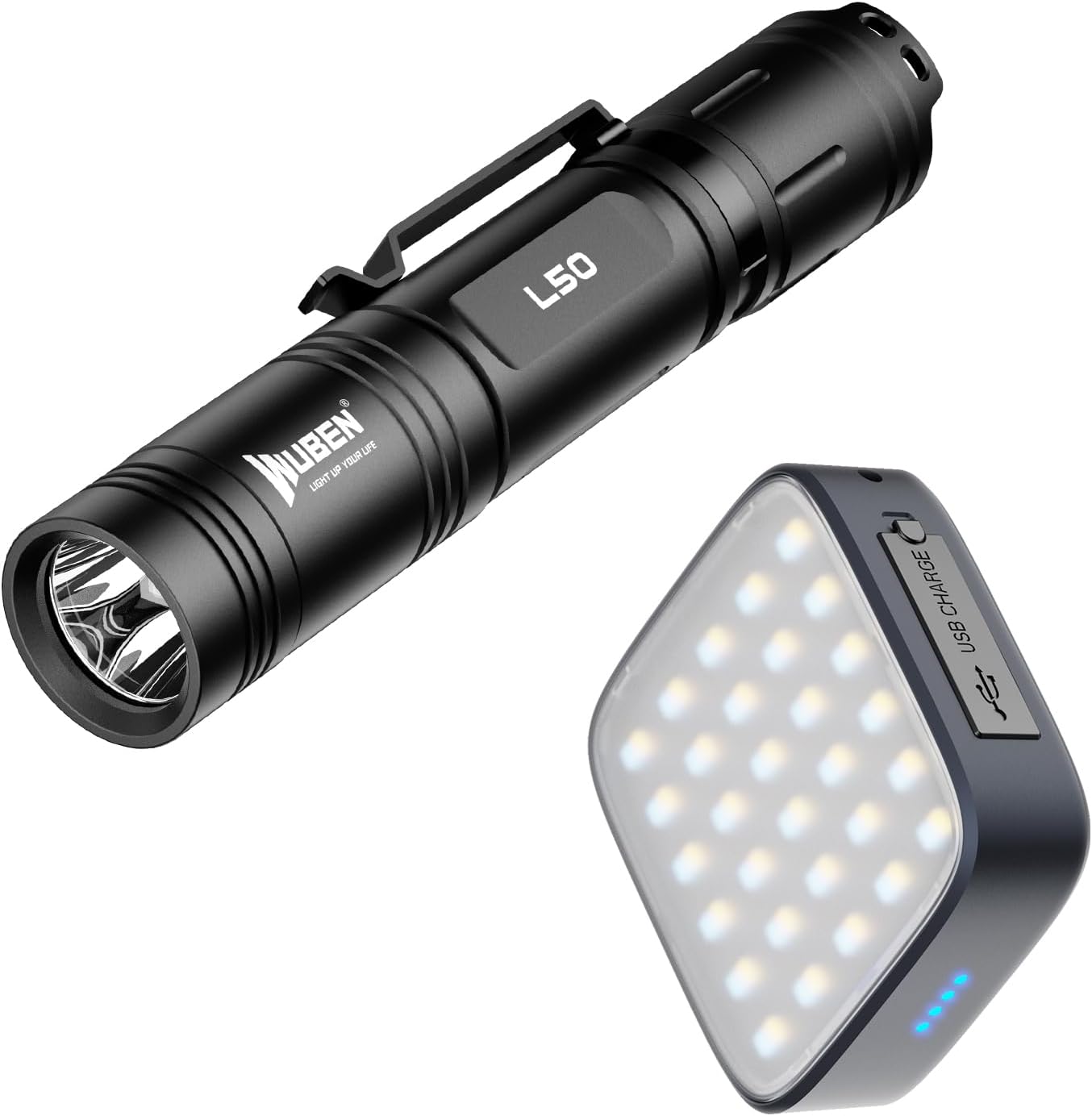
Figure 2.1: The WUBEN L50 Tactical Flashlight and F5 Camping Lantern included in the bundle.
3. Product Overview
3.1 WUBEN L50 Tactical Flashlight
The WUBEN L50 is a high-performance tactical flashlight designed for various outdoor and emergency situations. It features a powerful LED and multiple lighting modes.
- High Lumens Output: Up to 1200 lumens for bright illumination.
- Long Beam Distance: Reaches up to 200 meters (656 feet).
- Multiple Modes: High, Medium, Low, Eco, and SOS for versatile use.
- Rechargeable: Equipped with a USB-C charging port and a 2600mAh battery.
- Durable Design: Waterproof (IP68) and impact-resistant up to 1.5 meters.

Figure 3.1: The WUBEN L50 flashlight demonstrating its long-range illumination capability.

Figure 3.2: The compact size and dimensions of the WUBEN L50 flashlight, highlighting its portability.
3.2 WUBEN F5 Camping Lantern
The WUBEN F5 is a versatile camping lantern designed to provide ambient lighting and serve as a portable power source for outdoor activities.
- Adjustable Brightness: Up to 500 lumens with stepless dimming.
- Three Color Temperatures: White (5700K), Natural (4500K), and Warm (3000K) light options.
- Power Bank Function: Built-in 5200mAh rechargeable battery with USB-A discharge for charging mobile devices.
- Long Runtime: Up to 500 hours on the lowest setting.
- Portable Design: Compact with reliable hanging rings and a 1/4 inch thread hole for mounting.

Figure 3.3: The WUBEN F5 lantern providing illumination for a camping area.

Figure 3.4: The WUBEN F5 lantern functioning as a power bank to charge a smartphone.
4. Setup and Initial Use
4.1 Charging the WUBEN L50 Flashlight
- Unscrew the tail cap of the L50 flashlight to access the battery compartment.
- Insert the provided 2600mAh rechargeable battery with the positive (+) end facing the head of the flashlight.
- Screw the tail cap back on securely.
- Locate the USB-C charging port on the side of the flashlight (usually under a rubber cover).
- Connect the USB-C charging cable to the flashlight and a suitable USB power source (e.g., wall adapter, computer USB port).
- The indicator light will show charging status (typically red for charging, green for fully charged). A full charge takes approximately 3 hours.
4.2 Charging the WUBEN F5 Camping Lantern
- Locate the TYPE-C charging port on the F5 lantern.
- Connect the USB-C charging cable to the lantern and a suitable USB power source.
- The indicator lights will show charging progress.
- To use the F5 as a power bank, connect your mobile device to the USB-A discharge port on the lantern using your device's charging cable.
5. Operating Instructions
5.1 WUBEN L50 Flashlight Operation
- Power On/Off: Press the tail switch completely to turn the flashlight on or off.
- Mode Switching: With the flashlight on, lightly tap the tail switch to cycle through the modes: High → Medium → Low → Eco. The flashlight has a memory function and will turn on in the last used mode.
- SOS Mode: From any mode, quickly double-tap the tail switch to activate SOS mode. Double-tap again to return to the previous mode.

Figure 5.1: Visual representation of the WUBEN L50's five distinct lighting modes: High, Medium, Low, Eco, and SOS.
5.2 WUBEN F5 Camping Lantern Operation
- Power On/Off: Press and hold the power button for approximately 1-2 seconds to turn the lantern on or off.
- Brightness Adjustment (Stepless Dimming): With the lantern on, press and hold the power button to smoothly adjust the brightness from 1% to 100%. Release the button at your desired brightness level.
- Color Temperature Switching: Press the 'W' button to cycle through the three color temperatures: White (5700K) → Natural (4500K) → Warm (3000K).
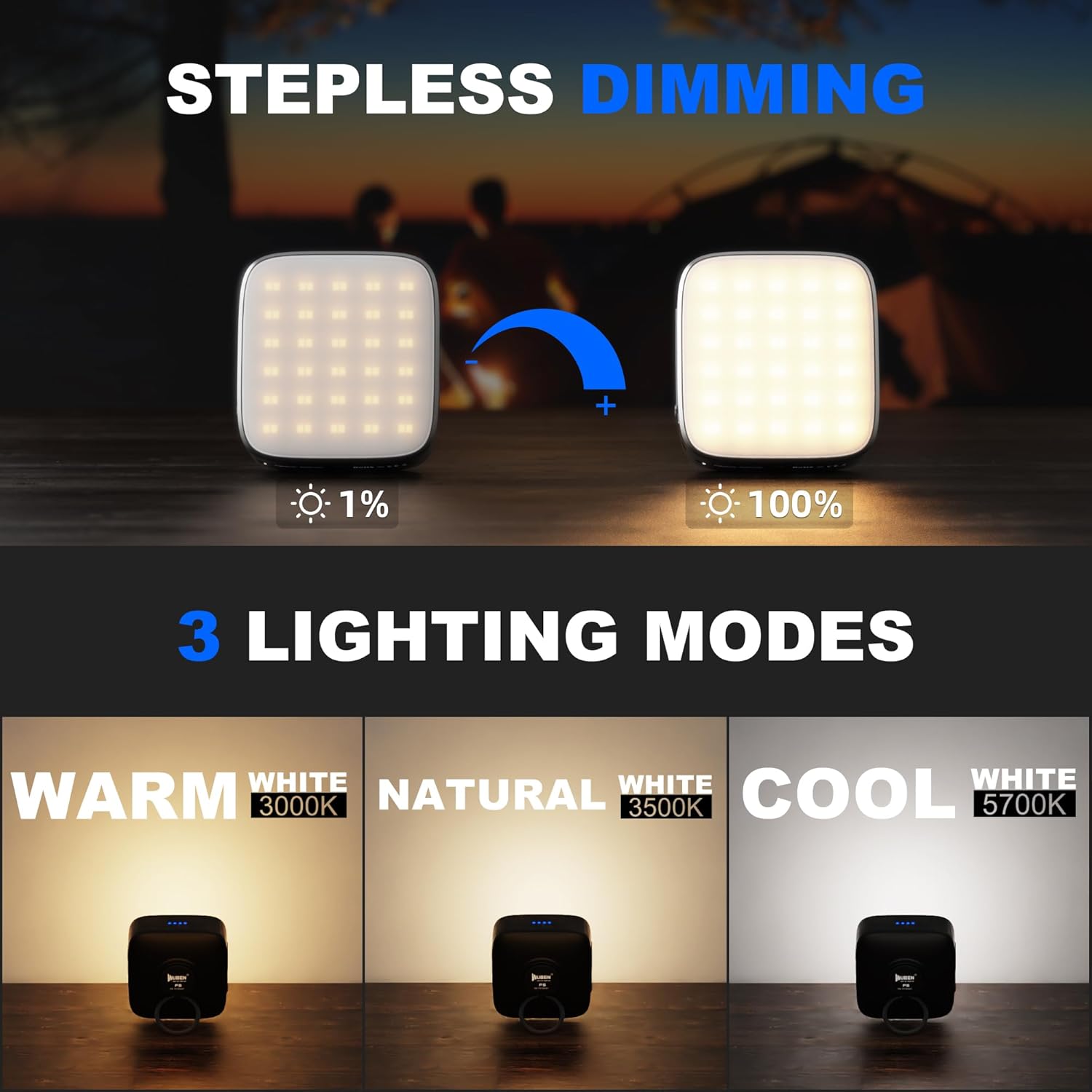
Figure 5.2: The WUBEN F5 lantern's stepless dimming feature and its three selectable color temperature options.
6. Maintenance
Proper maintenance ensures the longevity and optimal performance of your WUBEN L50 and F5 devices.
- Cleaning: Wipe the devices with a soft, damp cloth. Do not use abrasive cleaners or solvents.
- O-ring Maintenance (L50): Periodically inspect and lubricate the O-rings on the L50 flashlight with silicone grease to maintain its waterproof rating. Replace worn O-rings with the provided spares.
- Battery Care: Recharge the batteries regularly, even if not in use, to prevent deep discharge. Store devices with a partial charge (around 50%) if storing for extended periods.
- Storage: Store the devices in a cool, dry place away from direct sunlight and extreme temperatures.
7. Troubleshooting
If you encounter issues with your WUBEN L50 or F5, refer to the following common problems and solutions:
- Device Not Turning On:
- Ensure the battery is fully charged.
- For L50, check that the tail cap is screwed on tightly and the battery is inserted correctly.
- For F5, ensure the power button is pressed and held for the required duration.
- Dim Light or Short Runtime:
- The battery may be low. Recharge the device fully.
- Ensure the battery is not old or damaged.
- Charging Issues:
- Verify the USB-C cable is securely connected to both the device and the power source.
- Try a different USB-C cable or power adapter.
- Ensure the charging port is clean and free of debris.
- Water Ingress (L50):
- Immediately turn off the flashlight and remove the battery.
- Inspect the O-rings for damage or improper seating. Replace if necessary.
- Allow the flashlight to dry completely before reassembling and using.
If the problem persists, please contact WUBEN customer support for assistance.
8. Specifications
8.1 WUBEN L50 Tactical Flashlight Specifications
| Parameter | High | Med | Low | Eco | SOS |
|---|---|---|---|---|---|
| Output | 1200LM | 400LM | 75LM | 5LM | 200LM |
| Runtime | 1.5h | 2.5h | 8.5h | 143h | - |
| Beam Distance | 200m | 116m | 50m | 13m | - |
| Intensity | 10008cd | 3325cd | 665cd | 45cd | - |
| LED | 1 x P9 | ||||
| Impact Resistance | 1.5m | ||||
| Waterproof Level | IP68 (2 meters underwater for 1 hour) | ||||
| Weight | 90g (without battery) | 138g (with battery) | ||||
| Dimension | 138.6mm x 26mm (Length x Diameter) | ||||
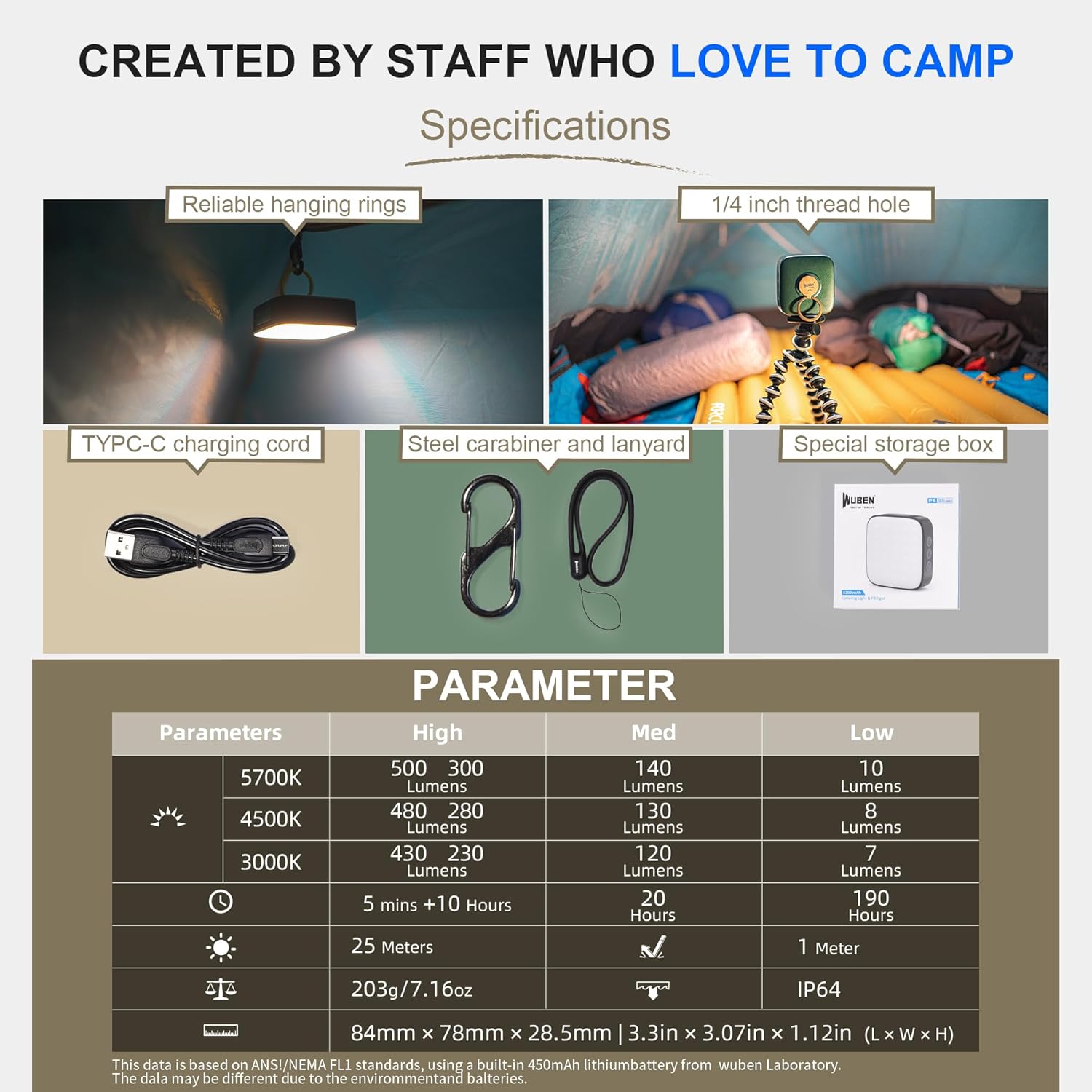
Figure 8.1: Detailed technical specifications for the WUBEN L50 Tactical Flashlight.
8.2 WUBEN F5 Camping Lantern Specifications
| Parameter | High | Med | Low |
|---|---|---|---|
| 5700K (White) | 500 Lumens | 140 Lumens | 10 Lumens |
| 4500K (Natural) | 480 Lumens | 130 Lumens | 8 Lumens |
| 3000K (Warm) | 430 Lumens | 120 Lumens | 7 Lumens |
| Runtime | 5 mins + 10 Hours | 20 Hours | 190 Hours |
| Beam Distance | 25 Meters (High) | 1 Meter (Low) | ||
| Weight | 203g / 7.16oz | ||
| Waterproof Level | IP64 | ||
| Dimension | 84mm x 78mm x 28.5mm (3.3in x 3.07in x 1.12in) | ||

Figure 8.2: Detailed technical specifications for the WUBEN F5 Camping Lantern.
9. Warranty and Support
WUBEN products are manufactured with high-quality materials and craftsmanship. For information regarding warranty coverage, terms, and conditions, please refer to the warranty card included in your package or visit the official WUBEN website. For technical support or service inquiries, please contact WUBEN customer service directly.
You can visit the WUBEN store for more information: WUBEN Official Store


