
DOSS Extreme Boom Pro D100
DOSS Extreme Boom Pro D100 Bluetooth Speaker User Manual
Model: Extreme Boom Pro D100 | Brand: DOSS
Introduction
Thank you for purchasing the DOSS Extreme Boom Pro D100 Bluetooth Speaker. This manual provides essential information for setting up, operating, and maintaining your speaker to ensure optimal performance and longevity. The DOSS Extreme Boom Pro D100 delivers powerful 70W sound with enhanced bass, features beat-sync lights, and is IPX6 waterproof, making it ideal for both indoor and outdoor use.
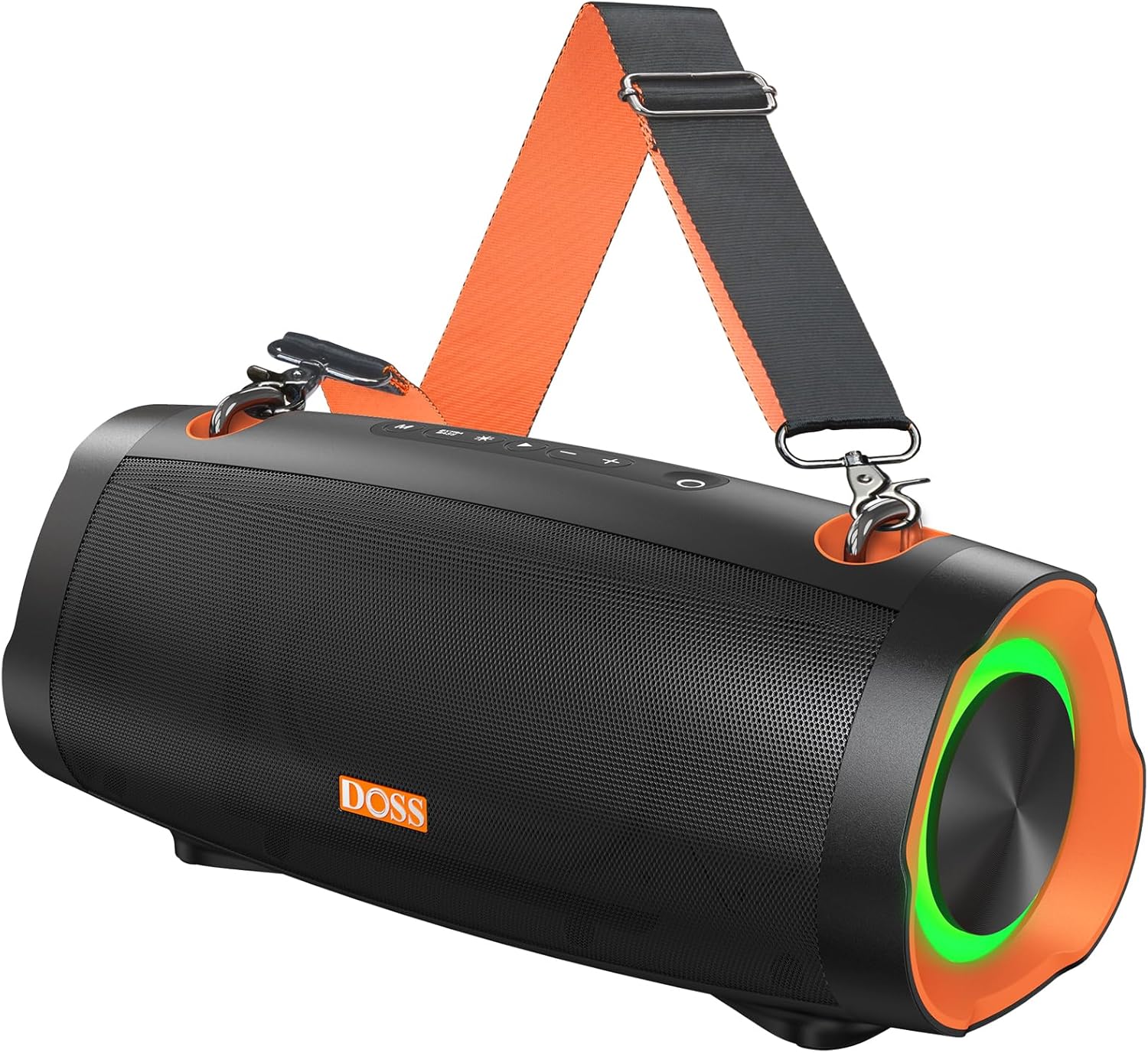
Image: The DOSS Extreme Boom Pro D100 Bluetooth Speaker, showcasing its robust design and integrated shoulder strap for portability.
Package Contents
Please check the package for the following items:
- DOSS Extreme Boom Pro D100 Bluetooth Speaker
- USB-C Charging Cable
- Adjustable Shoulder Strap
- User Manual (this document)
Product Overview & Controls
Familiarize yourself with the speaker's layout and controls:

Image: An exploded view illustrating the internal components of the DOSS Extreme Boom Pro D100, highlighting its 70W sound system with full-range drivers and tweeters.
Control Panel (Top View)
- Power Button: Press and hold to power on/off. Short press to check battery status.
- Bluetooth Button: Short press to enter Bluetooth pairing mode. Press and hold to disconnect current device.
- Volume Down (-): Short press to decrease volume. Press and hold for previous track.
- Play/Pause Button: Short press to play/pause music.
- Volume Up (+): Short press to increase volume. Press and hold for next track.
- Bass Boost Button: Short press to activate/deactivate Extra Bass mode.
- Light Mode Button: Short press to cycle through light modes. Press and hold to turn lights on/off.
- TWS Button: Press to initiate True Wireless Stereo pairing.
Ports (Rear/Side View)
- USB-C Charging Port: For charging the speaker.
- USB-A Output Port: For using the speaker as a power bank to charge other devices.
- AUX-in Port: For wired audio connection.
Setup
1. Charging the Speaker
Before first use, fully charge the speaker. Connect the provided USB-C charging cable to the speaker's USB-C port and the other end to a compatible USB power adapter (not included). The LED indicator will show charging status and turn off when fully charged.
2. Powering On/Off
Press and hold the Power Button for 2 seconds to turn the speaker on or off. A sound prompt will indicate the power status.
3. Bluetooth Pairing
- Turn on the speaker. It will automatically enter Bluetooth pairing mode, indicated by a flashing blue LED.
- Enable Bluetooth on your device (smartphone, tablet, etc.).
- Select "DOSS Extreme Boom Pro D100" from the list of available devices.
- Once connected, the LED indicator will turn solid blue, and you will hear a confirmation sound.
If the speaker does not appear, ensure it is not connected to another device or press the Bluetooth button to force pairing mode.
Operating Instructions
Music Playback
- Play/Pause: Short press the Play/Pause Button.
- Volume Up/Down: Short press the Volume + or Volume - buttons.
- Next Track: Press and hold the Volume + button.
- Previous Track: Press and hold the Volume - button.
Extra Bass Mode
Press the Bass Boost Button to toggle the Extra Bass mode on or off. This enhances low frequencies for a deeper, richer sound experience.
Dynamic Light Show
The speaker features dynamic LED lights that sync with the music. Short press the Light Mode Button to cycle through different light patterns. Press and hold the Light Mode Button to turn the lights on or off.

Image: The DOSS Extreme Boom Pro D100 speaker displaying its dynamic light show, enhancing the atmosphere at a social gathering by a pool.
True Wireless Stereo (TWS) Pairing
You can pair two DOSS Extreme Boom Pro D100 speakers together for an immersive stereo sound experience.
- Ensure both speakers are powered on and not connected to any Bluetooth device.
- On one speaker (this will be the primary speaker), short press the TWS Button. The speaker will enter TWS pairing mode.
- The primary speaker will automatically search for the secondary speaker. Once connected, you will hear a confirmation sound, and the TWS indicator will illuminate on both speakers.
- Now, connect your device to the primary speaker via Bluetooth as described in the "Bluetooth Pairing" section.

Image: Two DOSS Extreme Boom Pro D100 speakers positioned outdoors, demonstrating their True Wireless Stereo (TWS) capability for enhanced audio.
Using as a Power Bank
The DOSS Extreme Boom Pro D100 can charge other devices using its built-in battery.
- Connect your device's charging cable to the USB-A output port on the speaker.
- The speaker will automatically begin charging your device.
Note: Using the speaker as a power bank will reduce its audio playback time.
Shoulder Strap Usage
Attach the adjustable shoulder strap to the designated loops on the speaker for convenient portability, especially during outdoor activities like hiking or camping.

Image: A person carrying the DOSS Extreme Boom Pro D100 speaker using its detachable shoulder strap, highlighting its portability for outdoor use.
Maintenance
Cleaning
Wipe the speaker with a soft, damp cloth. Do not use harsh chemicals or abrasive cleaners. Ensure all ports are dry before charging or connecting other devices.
IPX6 Waterproof Rating
The DOSS Extreme Boom Pro D100 is IPX6 waterproof, meaning it is protected against high-pressure water jets from any direction. It is suitable for use in rainy conditions or near water bodies like pools and beaches. However, it is not designed to be submerged in water. Ensure the charging port cover is securely closed before exposing the speaker to water.

Image: The DOSS Extreme Boom Pro D100 speaker being splashed with water, illustrating its IPX6 waterproof capability, suitable for outdoor environments.
Storage
Store the speaker in a cool, dry place away from extreme temperatures and direct sunlight. If storing for an extended period, charge the battery to about 50% every few months to preserve battery life.
Troubleshooting
| Problem | Possible Cause | Solution |
|---|---|---|
| Speaker does not power on. | Low battery; Power button not held long enough. | Charge the speaker fully. Press and hold the Power button for 2 seconds. |
| Cannot pair via Bluetooth. | Speaker is already connected to another device; Bluetooth is off on your device; Speaker is too far from device. | Disconnect from previous device or press Bluetooth button to force pairing. Ensure Bluetooth is enabled on your device. Move speaker closer to device (within 10 meters). |
| No sound or low volume. | Volume too low on speaker or device; Speaker not connected properly. | Increase volume on both speaker and connected device. Re-pair Bluetooth connection. |
| TWS pairing fails. | Speakers are too far apart; One speaker is already connected to a Bluetooth device. | Ensure both speakers are within 5 meters of each other. Disconnect any Bluetooth devices from both speakers before initiating TWS pairing. |
| Light show not working. | Lights are turned off; Speaker is in a mode that doesn't support lights. | Press the Light Mode button to cycle through modes or press and hold to turn lights on. |
Specifications
| Feature | Detail |
|---|---|
| Model Name | Extreme Boom Pro D100 |
| Speaker Type | Outdoor |
| Sound Output | 70W RMS (140W Peak) |
| Special Feature | Bass Boost, Beat-Sync Lights, Power Bank Function |
| Connectivity Technology | Bluetooth |
| Audio Output Mode | Stereo (with TWS) |
| Battery Life | Up to 24 Hours |
| Waterproof Rating | IPX6 |
| Product Dimensions | 34.7D x 16.4W x 17.4H Centimetres |
| Weight | 2.39 kg |
| Compatible Devices | Gaming Console, Karaoke Machine, Laptop, Smartphone, Tablet, Television |
Safety Information
- Do not expose the speaker to extreme temperatures, direct sunlight, or open flames.
- Do not disassemble, repair, or modify the speaker. This will void the warranty.
- Keep the speaker away from children and pets.
- Use only the provided charging cable or a certified equivalent.
- Avoid dropping or subjecting the speaker to strong impacts.
- Ensure the charging port cover is securely closed when not charging, especially when near water.
Warranty and Support
DOSS products come with a limited warranty. For detailed warranty information, product support, or technical assistance, please visit the official DOSS website or contact their customer service. Keep your purchase receipt as proof of purchase.
Official DOSS Store: Visit the DOSS Store on Amazon
Related documentsExtreme Boom Pro D100


Ask a question about this manual
Ask about setup, troubleshooting, compatibility, parts, safety, or missing instructions. Manuals+ will review the question and use this page’s manual context to help answer it.