Introduction
Thank you for purchasing the Rockville K-GO Portable Karaoke Bluetooth Speaker and IPS20 Tablet/Phone Tripod Stand package. This manual provides important information regarding the setup, operation, and maintenance of your devices. Please read it thoroughly to ensure proper use and to maximize the performance of your speaker, microphone, and stand.
The Rockville K-GO is a versatile, waterproof portable Bluetooth speaker with a wireless microphone, designed for karaoke, music playback, and hands-free communication. It features voice-changing effects, Bluetooth 5.3 connectivity, and various mounting options for convenience. The included IPS20 stand provides a stable platform for your tablet or smartphone, enhancing your karaoke experience.
Package Contents
- Rockville K-GO Portable Bluetooth Speaker
- Wireless Microphone with Voice Changer
- Rockville IPS20 Tablet/Phone Tripod Stand
- USB-C Charging Cable
- Bicycle Bar Mounting Bracket
- Carabiner Clip
- Hanging String
- User Manual (this document)
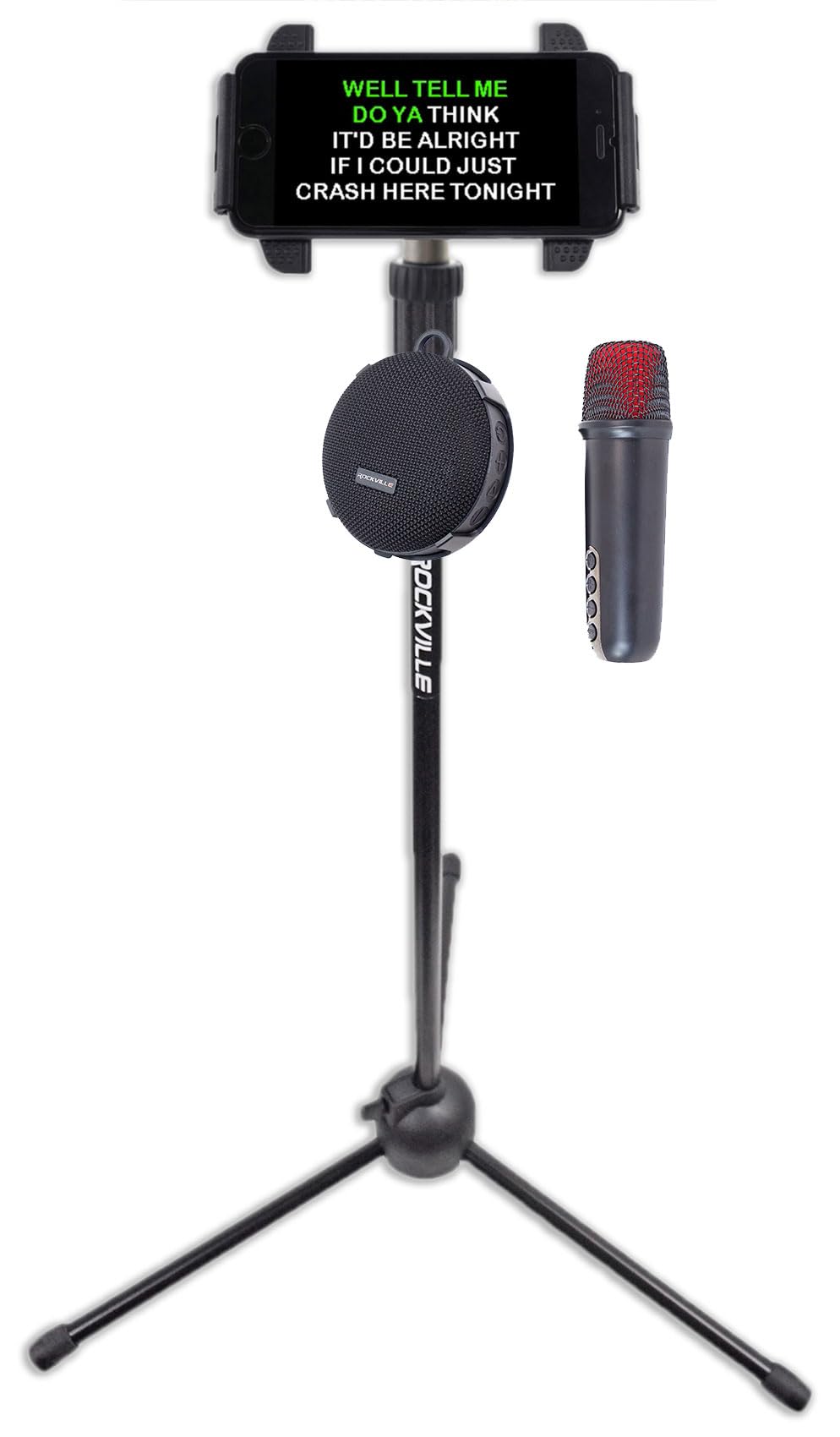
Image: Rockville K-GO speaker and wireless microphone. The image shows the compact, round speaker with a mesh grille and control buttons on the side, alongside the wireless microphone with a red mesh head and control buttons on its body.

Image: Rockville IPS20 Tablet/Phone Tripod Stand. This image displays the tripod stand with a smartphone mounted at the top, showing karaoke lyrics. The K-GO speaker and microphone are positioned near the base of the stand, illustrating the complete karaoke setup.
Important Safety Instructions
- Do not expose the unit to extreme temperatures or direct sunlight for extended periods.
- Do not attempt to disassemble or modify the device. This will void the warranty.
- Use only the provided charging cable or a certified equivalent.
- Keep the device away from strong magnetic fields.
- Ensure all ports are securely closed when using the speaker in wet environments to maintain its IP67 waterproof rating.
- Dispose of batteries according to local regulations.
Setup
Charging the Speaker
- Locate the USB-C charging port on the K-GO speaker.
- Connect the provided USB-C cable to the speaker and to a USB power adapter (not included) or a computer's USB port.
- The charging indicator light will illuminate. Once fully charged (approximately 2.5-3 hours), the light will change or turn off.
Note: Ensure the charging port cover is securely closed after charging to maintain waterproofing.
Setting up the IPS20 Tripod Stand
- Unfold the tripod legs to create a stable base.
- Extend the telescopic pole to your desired height (from 35.5" to 63") and secure it with the locking mechanism.
- Attach your tablet or smartphone (4.7" to 12.9" screen sizes) to the adjustable mounting bracket at the top of the stand. Ensure the device is securely held.
Mounting Options for K-GO Speaker
The K-GO speaker offers several ways to be mounted or carried:
- Bicycle Bar Mounting Bracket: Attach the bracket to your bike handlebars and secure the speaker.
- Carabiner Clip: Use the carabiner clip to attach the speaker to a backpack, belt loop, or other gear.
- Hanging String: Loop the string through the designated eyelet on the speaker for hanging.

Image: Rockville K-GO speaker demonstrating multiple mounting options. The image shows the speaker attached to a backpack strap with a carabiner, mounted on bicycle handlebars, and held by hand with a wrist strap, illustrating its versatility.
Operating Instructions
Speaker Controls
Familiarize yourself with the buttons on the K-GO speaker:
- Power Button: Press and hold to turn the speaker on or off.
- Play/Pause Button: Press to play or pause music.
- Volume Up (+): Press to increase volume. Hold to skip to the next track.
- Volume Down (-): Press to decrease volume. Hold to go to the previous track.
- Mode Button: Press to switch between Bluetooth, TF Card, and USB modes.

Image: Rockville K-GO speaker ports and controls. This close-up view shows the side of the speaker with its control buttons (Power, Play/Pause, Volume Up/Next, Volume Down/Previous, Mode) and the covered ports for USB-C charging and TF card slot.
Bluetooth Pairing
- Turn on the K-GO speaker. It will automatically enter Bluetooth pairing mode, indicated by a flashing LED light.
- On your smartphone or other Bluetooth device, enable Bluetooth and search for "K-GO".
- Select "K-GO" from the list of available devices to pair. Once connected, the LED light will stop flashing and remain solid.
- You can now play audio from your device through the K-GO speaker.
Using the Wireless Microphone
- Ensure the microphone is charged and turned on.
- The microphone will automatically connect to the K-GO speaker when both are powered on and within range.
- Voice Changing Effects: Press the dedicated button on the microphone to cycle through various voice effects (e.g., male, female, child, monster).
- Echo/Reverb: Adjust the echo or reverb level using the corresponding button on the microphone.
- Volume Control: Use the volume buttons on the microphone to adjust your vocal output level.
Note: For optimal performance, keep the microphone within a reasonable distance from the speaker to avoid feedback.
TF Card and USB Playback
- Insert a TF (microSD) card or a USB drive (via adapter, if needed) containing MP3, WMA, or WAV audio files into the respective port on the speaker.
- Press the "Mode" button on the speaker to switch to TF Card or USB mode.
- The speaker will automatically begin playing music from the inserted storage device.

Image: Rockville K-GO speaker demonstrating TF card and USB playback options. The image highlights the USB-C port and TF card slot on the speaker, showing a hand inserting a TF card and another hand connecting a USB-C cable, indicating various music input methods.
Hands-Free Calling
When connected via Bluetooth to a smartphone, the K-GO speaker can be used for hands-free calls:
- Answer Call: Press the Play/Pause button to answer an incoming call.
- End Call: Press the Play/Pause button again to end a call.
- Reject Call: Press and hold the Play/Pause button to reject an incoming call.
Maintenance
- Cleaning: Wipe the speaker and microphone with a soft, damp cloth. Do not use abrasive cleaners or solvents. For the IPS20 stand, wipe metal and plastic parts with a dry or slightly damp cloth.
- Storage: Store the devices in a cool, dry place away from direct sunlight when not in use for extended periods.
- Battery Care: To prolong battery life, fully charge the speaker before first use and recharge it at least once every three months if not used regularly.
- Waterproofing: Always ensure the rubber flap covering the charging port and TF card slot on the speaker is securely closed when near water to maintain the IP67 rating.
Troubleshooting
| Problem | Possible Solution |
|---|---|
| Speaker does not turn on. | Ensure the battery is charged. Connect to a power source and try again. |
| Cannot pair via Bluetooth. |
|
| No sound from speaker. |
|
| Microphone not working. |
|
| Poor sound quality or distortion. |
|
| IPS20 stand is unstable. |
|
Specifications
Rockville K-GO Speaker
| Model | K-GO |
| RMS Power | 8W |
| Peak Power | 16W |
| Bluetooth Version | 5.3 |
| Bluetooth Range | 40 feet |
| Waterproof Rating | IP67 (submersible) |
| Battery Type | Rechargeable Lithium-ion |
| Battery Capacity | 5V 1800mAh |
| Charging Time | 2.5 - 3 hours |
| Battery Life (approx.) | Up to 24 hours (low volume), 12 hours (medium), 5 hours (max) |
| Frequency Response | 100Hz - 16kHz |
| Speaker Dimensions | 4" x 4" x 2" |
| Microphone Dimensions | 5.08" x 1.54" x 1.54" |
| Speaker Weight | 0.6 lbs |
| Supported Audio Formats | MP3, WMA, WAV (via TF card/USB) |
Rockville IPS20 Tablet/Phone Tripod Stand
| Model | IPS20 |
| Adjustable Height | 35.5" to 63" |
| Compatible Screen Sizes | 4.7" to 12.9" |
Warranty and Support
For warranty information or technical support, please refer to the official Rockville website or contact their customer service directly. Keep your proof of purchase for any warranty claims.
Rockville Official Website: www.rockvilleaudio.com