1. Introduction
Thank you for choosing the HONOR CHOICE Portable Bluetooth Speaker. This speaker is designed for portability and durability, allowing you to enjoy high-quality audio wherever you go. With a long-lasting battery providing up to 10 hours of continuous playback and an IP67 rating for water and dust resistance, it is ideal for outdoor activities such as beach trips, poolside relaxation, or hiking.
2. Package Contents
- HONOR CHOICE Portable Bluetooth Speaker
- USB-C Charging Cable
- User Manual
3. Product Overview
Familiarize yourself with the speaker's components and controls.
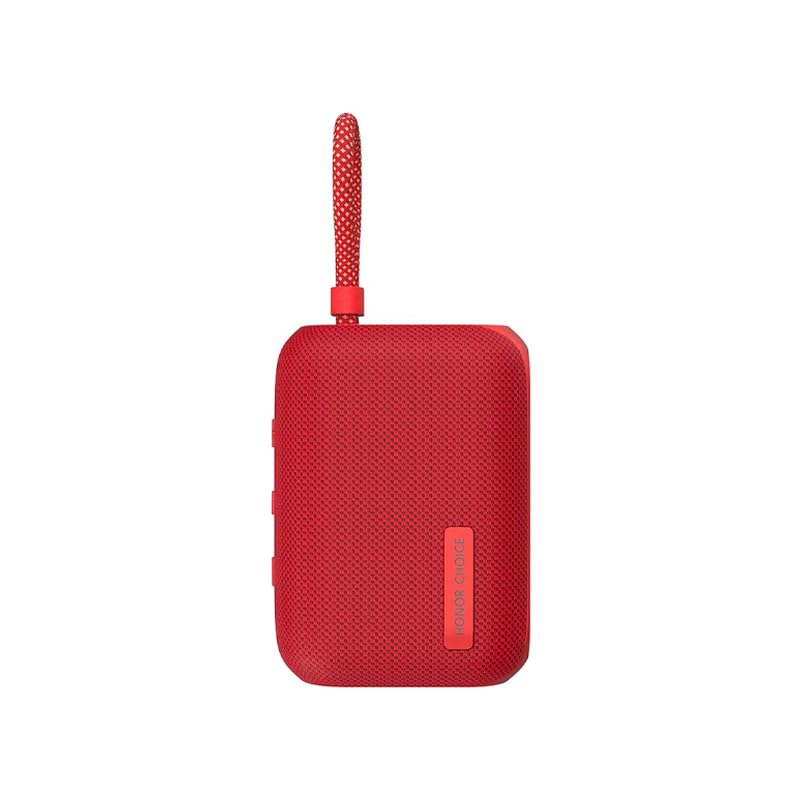
Figure 3.1: Side view of the HONOR CHOICE Portable Bluetooth Speaker, highlighting the USB-C charging port and the integrated carrying strap.

Figure 3.2: Top view of the HONOR CHOICE Portable Bluetooth Speaker, displaying the control buttons for power, volume, and playback.
Controls and Indicators:
- Power Button: Press and hold to turn on/off.
- Volume Up (+): Increases volume.
- Volume Down (-): Decreases volume.
- Play/Pause Button: Controls music playback and call handling.
- Bluetooth Indicator: Shows Bluetooth connection status.
- Charging Port: USB-C port for charging.
4. Setup
4.1 Charging the Speaker
- Connect the provided USB-C charging cable to the speaker's charging port.
- Connect the other end of the cable to a USB power adapter (not included) or a computer's USB port.
- The charging indicator light will illuminate during charging and turn off when fully charged.
Note: For optimal performance, fully charge the speaker before first use.
4.2 Initial Bluetooth Pairing
- Ensure the speaker is fully charged.
- Press and hold the Power Button for 2-3 seconds to turn on the speaker. The Bluetooth indicator will flash, indicating it is in pairing mode.
- On your mobile device, enable Bluetooth and search for available devices.
- Select "HONOR CHOICE Speaker" from the list of devices.
- Once connected, the Bluetooth indicator will stop flashing and remain solid.
5. Operating Instructions
5.1 Power On/Off
- To Power On: Press and hold the Power Button for 2-3 seconds.
- To Power Off: Press and hold the Power Button for 2-3 seconds.
5.2 Bluetooth Connection
- After initial pairing, the speaker will automatically attempt to connect to the last paired device when powered on.
- If connection fails, ensure Bluetooth is enabled on your device and the speaker is within range.
5.3 Music Playback
- Play/Pause: Press the Play/Pause Button once.
- Volume Up: Press the '+' button.
- Volume Down: Press the '-' button.
- Next Track: Press and hold the '+' button.
- Previous Track: Press and hold the '-' button.
5.4 Call Handling
- Answer/End Call: Press the Play/Pause Button once.
- Reject Call: Press and hold the Play/Pause Button for 2 seconds.
5.5 IP67 Water and Dust Resistance
The speaker is rated IP67, meaning it is protected from dust ingress and can withstand immersion in water up to 1 meter for 30 minutes. Ensure the charging port cover is securely closed before exposing the speaker to water or dust.
6. Maintenance
6.1 Cleaning
- Wipe the speaker with a soft, damp cloth.
- Do not use abrasive cleaners or solvents.
- Ensure the speaker is dry before charging.
6.2 Storage
- Store the speaker in a cool, dry place away from direct sunlight and extreme temperatures.
- If storing for an extended period, charge the battery to approximately 50% every three months to prolong battery life.
7. Troubleshooting
| Problem | Possible Cause | Solution |
|---|---|---|
| Speaker does not turn on | Low battery | Charge the speaker fully. |
| No sound | Volume too low; Not connected via Bluetooth | Increase speaker and device volume; Re-pair the speaker with your device. |
| Cannot pair with device | Speaker not in pairing mode; Device Bluetooth off; Too far from device | Ensure speaker is flashing Bluetooth indicator; Turn on device Bluetooth; Move speaker closer to device. |
8. Specifications
- Brand: HONOR
- Model: HONOR CHOICE Portable Bluetooth Speaker
- Color: Red
- Dimensions (L x W x H): 4.25 x 10.5 x 7.7 cm
- Weight: 250 g
- Battery Life: Up to 10 hours
- Battery Type: Lithium-ion (1 cell, 3.7 Watt-hours)
- Water & Dust Resistance: IP67
- Connectivity: Bluetooth
- Charging Port: USB-C
9. Safety Information
- Do not disassemble, repair, or modify the product.
- Keep the speaker away from extreme heat sources, direct sunlight, and open flames.
- Do not expose the speaker to strong magnetic fields.
- Use only approved charging cables and adapters.
- Dispose of the product and its battery responsibly according to local regulations.
10. Warranty and Support
For warranty information and customer support, please refer to the warranty card included in your package or visit the official HONOR website. Keep your proof of purchase for warranty claims.