
1. Product Overview
The Foxpark S4C Magnetic Wireless Backup Camera system provides a convenient and reliable solution for enhanced visibility when operating various vehicles, including RVs, trailers, trucks, campers, SUVs, and cars. It features a 7-inch HD 1080P monitor and a magnetic camera designed for quick, tool-free installation. The system offers stable wireless transmission, extended battery life, and robust all-weather durability.

Figure 1.1: Foxpark S4C Magnetic Wireless Backup Camera System
This image displays the complete Foxpark S4C system, including the 7-inch HD 1080P monitor and the magnetic wireless camera unit. The monitor shows a clear view of a truck towing an RV, highlighting the system's primary application.
Key Features:
- 1-Minute Magnetic Installation: Tool-free attachment to any metal surface with a scratch-proof rubber-coated base.
- Stable Wireless Signal: Advanced digital chip and frequency-hopping technology ensure stable 2.4GHz transmission up to 50 feet.
- Extended Battery Life: Over 20 hours of continuous operation on a single charge with automatic activation.
- Smart Energy-Saving Mode: Low power consumption design with automatic sleep mode to extend battery life.
- 30-Feet IR Night Vision: Two high-performance infrared LEDs provide clear visibility in complete darkness.
- Dual-Channel Monitoring: Supports simultaneous viewing of rear and side views (second camera not included).
- Wide-Angle Coverage: Minimizes blind spots with a broad field of view.
- IP69K All-Weather Durability: Operates reliably in extreme temperatures (-22°F to 176°F) with waterproof and dustproof standards.
2. What's in the Box
Verify that all components are present in the package before proceeding with installation.
- 1 x Backup Camera Unit
- 1 x 7-inch HD 1080P Monitor
- 1 x Magnetic Base (pre-attached to camera)
- 1 x Power Cable (for monitor)
- 1 x Installation Tool (if applicable, for minor adjustments)

Figure 2.1: Main Components of the S4C System
This image provides a detailed view of the wireless camera unit and the 7-inch monitor, showcasing their design and key features like the antenna and screen.
3. Setup and Installation
3.1 Camera Installation
The S4C camera features a strong magnetic base for quick and easy attachment to any metal surface on your vehicle. The base is coated with soft rubber to prevent scratches.
- Identify a suitable flat metal surface on the rear or side of your vehicle (e.g., trailer hitch, bumper, RV frame).
- Ensure the surface is clean and free of debris.
- Place the camera's magnetic base firmly onto the chosen metal surface. The strong magnet will secure it in place.
- Adjust the camera angle as needed to achieve the desired field of view.
3.2 Monitor Setup
The 7-inch monitor is designed for dashboard mounting.
- Attach the monitor to its dashboard mount.
- Place the mounted monitor on your vehicle's dashboard in a position that does not obstruct your view of the road.
- Connect the monitor's power cable to a 12V power source (e.g., cigarette lighter socket) in your vehicle.
- Ensure the monitor powers on and establishes a connection with the camera.
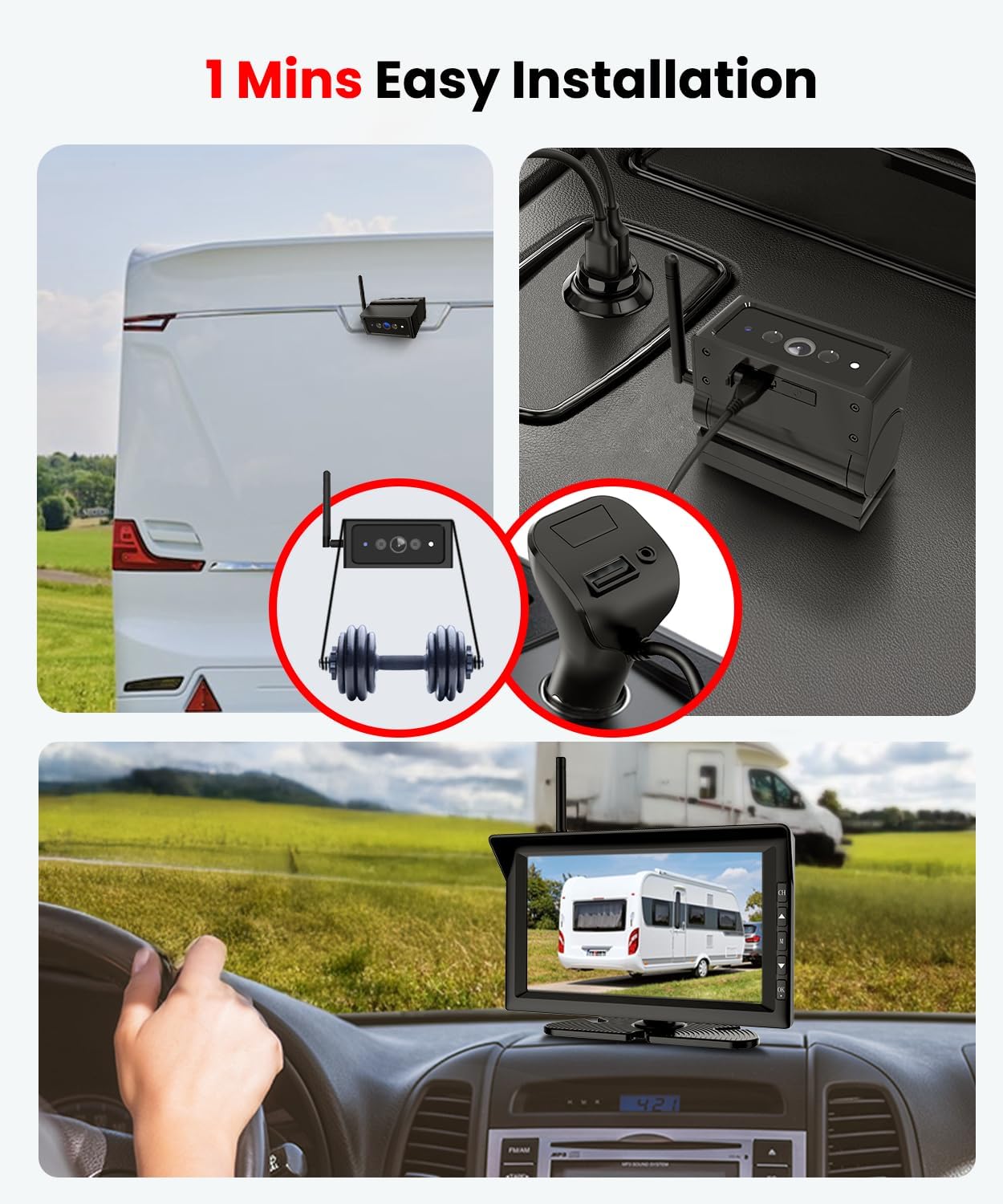
Figure 3.1: Installation and Setup Overview
This image illustrates the simplicity of the magnetic camera installation on the rear of an RV, the monitor's placement on a vehicle dashboard, and the power connection via a car adapter.
3.3 Charging the Camera
The camera is powered by an internal high-capacity battery and can be charged using various USB power sources.
- At Home: Use a standard USB wall adapter (not included) to charge the camera.
- In the Car: Connect the camera to a USB port in your vehicle or a car charger adapter.
- Outdoor: Use a portable power bank or a solar charger (not included) for charging in remote locations.

Figure 3.2: Camera Charging Options
This image demonstrates the versatility of charging the S4C camera, showing it being charged via a wall outlet at home, a USB port in a car, and a portable power source for outdoor use.
4. Operating Instructions
4.1 Powering On/Off and Automatic Activation
The camera automatically activates when parking, eliminating the need for manual power-on. The monitor will display the camera feed once both units are powered and connected.
4.2 Signal Range and Stability
The system utilizes 2.4GHz wireless transmission with frequency-hopping technology to ensure a stable signal up to 50 feet without interference. This allows for reliable performance across various vehicle types, including long trailers and RVs.

Figure 4.1: Wireless Signal Coverage
This image visually represents the 50-foot strong signal range between the camera and the monitor, along with various application scenarios such as horse trailers, boat trailers, reverse parking, and in-car monitoring.
4.3 Battery Life and Energy Saving
The camera's high-capacity battery provides over 20 hours of continuous operation. The system is designed with low power consumption technology and automatically enters a sleep mode when idle, significantly extending battery life and reducing charging frequency.

Figure 4.2: Extended Battery Life Features
This image highlights the camera's internal battery, emphasizing its high capacity for extended use, low power consumption, and the convenience of not requiring manual shutdown.
4.4 Night Vision
Equipped with two high-performance infrared LEDs, the camera provides clear visibility up to 30 feet in complete darkness, enhancing safety during nighttime operations.

Figure 4.3: 1080P Infrared Night Vision
This image shows the camera's infrared LEDs in action, demonstrating its ability to provide clear 1080P video even in low-light or dark conditions, as seen with a boat trailer and horses at night.
4.5 Dual-Channel Monitoring and Split Screen
The monitor supports dual-channel monitoring, allowing you to view feeds from two cameras simultaneously (a second camera is not included). You can switch between full-screen view of one camera or a split-screen view of both.
- Full Screen: Displays the feed from a single selected camera.
- Split Screen: Divides the monitor into two sections, showing feeds from two cameras side-by-side.

Figure 4.4: Dual-Channel Display Options
This image illustrates the monitor's capability to display either a full-screen view from one camera or a split-screen view from two cameras, enhancing monitoring flexibility for vehicles like trailers.
4.6 Adjustable Guidelines and Image Flip
The system offers six adjustable parking guideline options to assist with precise maneuvering. These guidelines can be customized for left/right, width, and height, or turned off entirely. The camera also supports four image flip options (normal, mirror, flip, mirror-flip) to accommodate various mounting orientations.

Figure 4.5: Customizable Display Features
This image demonstrates the monitor's adjustable parking guidelines, allowing users to modify left/right, width, and height settings. It also shows the four image flip options (normal, mirror, flip, mirror-flip) for flexible camera installation.
5. Maintenance
5.1 All-Weather Durability
The Foxpark S4C system is built to IP69K waterproof and dustproof standards, ensuring reliable operation in harsh environments and extreme temperatures ranging from -22°F to 176°F. The hydrophobic lens coating helps repel raindrops, maintaining clear visibility.

Figure 5.1: All-Weather Performance
This image showcases the system's robust IP69K durability, illustrating its ability to perform reliably in various challenging weather conditions, including snowy, desert, and dusty environments.
5.2 Cleaning and Care
- Wipe the camera lens and monitor screen with a soft, damp cloth. Avoid abrasive cleaners.
- Ensure the magnetic base is clean before attachment to prevent scratching vehicle paint.
- Store the system in a dry, temperate environment when not in use for extended periods.
6. Troubleshooting
If you encounter issues with your Foxpark S4C system, refer to the following common problems and solutions:
| Problem | Possible Cause | Solution |
|---|---|---|
| No image on monitor | Monitor not powered; Camera battery low/off; Signal interference; Camera out of range. | Ensure monitor is connected to power. Charge camera battery. Reduce distance between camera and monitor. Check for large metal obstructions. |
| Image flickering or unstable | Weak signal; Excessive interference; Obstructions. | Move camera closer to monitor. Avoid placing near strong electromagnetic sources. Reposition camera/monitor to clear line of sight. |
| Night vision unclear | IR LEDs obstructed/dirty; Camera lens dirty. | Clean camera lens and ensure IR LEDs are clear. |
| Camera not holding charge | Battery degradation; Improper charging. | Ensure proper charging cable and power source are used. If issue persists, contact customer support. |
If the problem persists after attempting these solutions, please contact Foxpark customer support for further assistance.
7. Specifications
Detailed technical specifications for the Foxpark S4C Magnetic Wireless Backup Camera system:
| Feature | Specification |
|---|---|
| Model Number | S4C |
| Product Dimensions | 10 x 10 x 4 inches |
| Item Weight | 3.63 pounds |
| Batteries | 2 Lithium Ion batteries (included) |
| Display Technology | LCD |
| Screen Size | 7 Inches |
| Connectivity | Wireless (2.4GHz), USB |
| Color | Black |
| Installation Type | Dashboard Mount (monitor) |
| Voltage | 12 Volts |
| Optical Sensor Technology | CMOS Infrared |
| Lens Type | Wide Angle |
| Real Angle of View | 120 Degrees |
| Waterproof Rating | IP69K |
| Operating Temperature | -22°F to 176°F |
8. Warranty and Support
8.1 Product Warranty
This Foxpark product comes with a standard manufacturer's warranty. Please refer to the warranty card included in your product packaging for specific terms, conditions, and duration. Keep your purchase receipt as proof of purchase for warranty claims.
8.2 Customer Support
For technical assistance, troubleshooting, or warranty inquiries, please contact Foxpark customer support. Visit the official Foxpark website for the most up-to-date contact information and support resources.
Online Resources: Foxpark Official Store on Amazon