
OUKITEL P2001 Plus
Contents
OUKITEL P2001 Plus Portable Power Station User Manual
Model: P2001 Plus
1. Introduction
The OUKITEL P2001 Plus is a high-capacity portable power station designed to provide reliable power for various applications, from outdoor activities to home backup during outages. Featuring a 2048Wh LiFePO4 battery and 2400W rated power, it can support a wide range of electronic devices and appliances. This manual provides essential information for safe and efficient operation of your power station.

Figure 1: OUKITEL P2001 Plus Portable Power Station, showcasing its compact design and multiple output ports.
2. Safety Information
Please read all safety warnings and instructions carefully before using this product to prevent injury or damage.
- Do not disassemble, repair, or modify the unit.
- Do not expose the unit to fire or high temperatures.
- Do not use or store the unit in direct sunlight or in hot environments.
- Keep the unit away from water, moisture, and corrosive substances.
- Ensure proper ventilation during use to prevent overheating.
- Keep out of reach of children and pets.
3. Product Features and Components
The OUKITEL P2001 Plus is equipped with advanced features and multiple ports to meet diverse power needs.
3.1 Key Features
- High Capacity: 2048Wh LiFePO4 battery for extended power supply.
- High Output: 2400W rated power, capable of powering 99% of common appliances.
- Fast Charging: 0-80% in 1 hour via 1800W AC input.
- UPS Function: Uninterrupted Power Supply with 0.01s switchover time.
- Versatile Outlets: 13 output ports including AC, USB-A, USB-C, DC, and car lighter.
- Durable Battery: LiFePO4 battery with 3500+ life cycles, offering over 10 years lifespan.
- Smart Control: Compatible with a smart app for remote monitoring and control via Wi-Fi and Bluetooth.

Figure 2: Overview of the 13 versatile output ports on the OUKITEL P2001 Plus, including AC, USB, and DC options.

Figure 3: Illustration of the safe and long-lasting LiFePO4 battery technology used in the P2001 Plus, highlighting its durability and safety features.
3.2 Package Contents
Upon unboxing, please verify that all items are present:
- OUKITEL P2001Plus portable power station
- AC charging cable
- Car charging cable
- Solar charging cable
- User manual (this document)
4. Setup
Before first use, ensure the power station is fully charged.
4.1 Initial Charge
Connect the provided AC charging cable to the AC input port on the power station and then to a standard wall outlet. The LCD display will show the charging status. For optimal battery health, it is recommended to fully charge the unit before its first use.
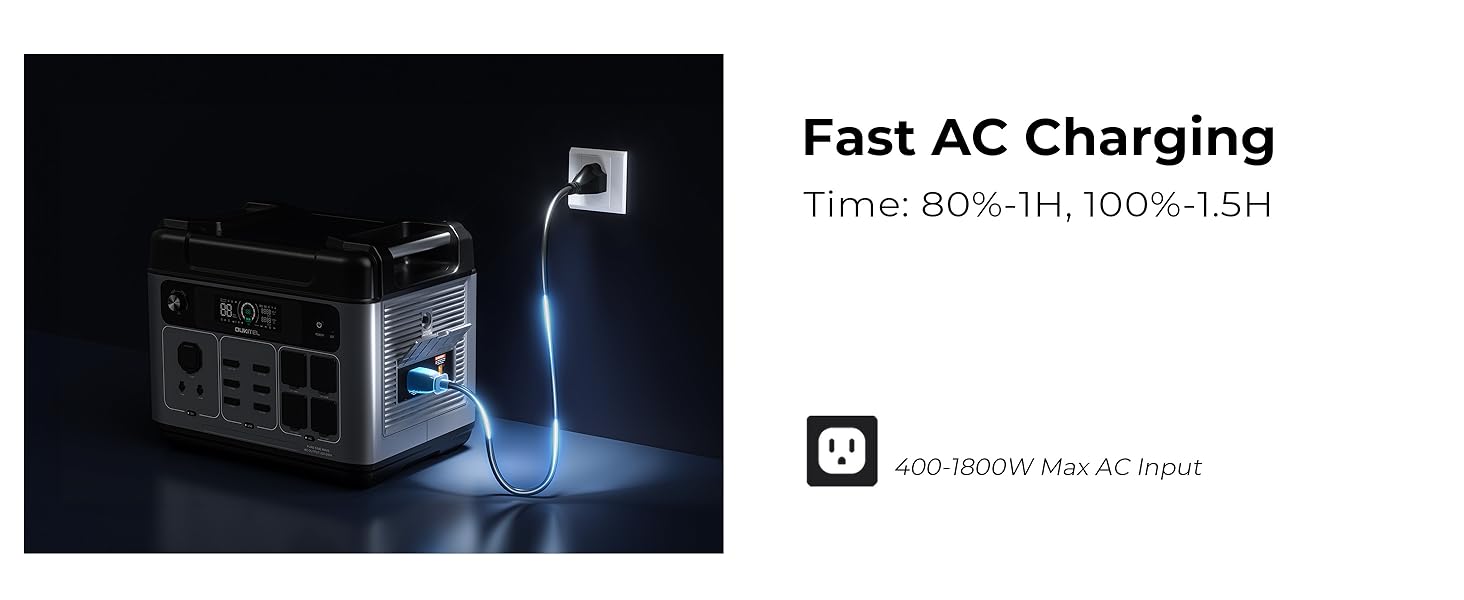
Figure 4: The power station connected to a wall outlet for fast AC charging, illustrating the quick charge capability.
5. Operating Instructions
5.1 Powering On/Off
Press and hold the main power button for a few seconds to turn the unit on or off. The LCD display will illuminate, showing battery level and output status.
5.2 Charging the Power Station
The P2001 Plus offers multiple charging methods:
- AC Wall Outlet: Use the included AC charging cable. Supports 400W-1800W input, adjustable via the knob.
- Solar Panels: Connect compatible solar panels (up to 500W max input) using the provided solar charging cable.
- Car Charger: Use the included car charging cable to charge from your vehicle's 12V outlet.
- AC + Solar: Combine AC and solar input for the fastest charging, up to 2300W.

Figure 5: The power station connected to a portable solar panel for efficient solar charging, ideal for off-grid use.
5.3 Using the Output Ports
To use an output port (AC, USB, DC), press the corresponding power button for that section. The indicator light will turn on, signifying that the ports are active. Connect your devices to the appropriate ports.

Figure 6: The power station supplying electricity to various household appliances, demonstrating its capability for home backup.
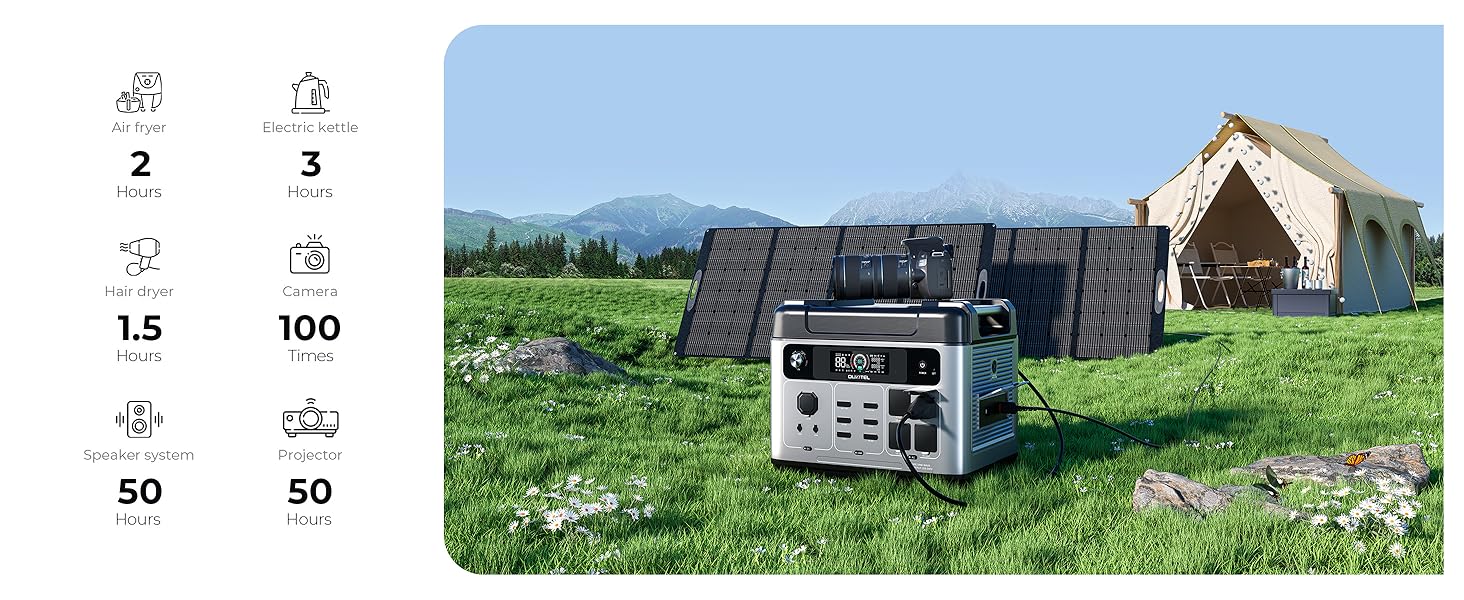
Figure 7: The power station providing power for outdoor equipment during a camping trip, showcasing its portability and versatility.
5.4 Uninterrupted Power Supply (UPS) Function
When the P2001 Plus is connected to an AC wall outlet and devices are plugged into its AC output ports, it can function as a UPS. In case of a power outage, the unit will automatically switch to battery power within 0.01 seconds, ensuring continuous operation for connected devices.

Figure 8: The power station providing continuous power to a computer setup, demonstrating its Uninterrupted Power Supply (UPS) capability during a simulated power outage.
5.5 Smart App Control
The OUKITEL P2001 Plus can be controlled and monitored via a dedicated smartphone application. Download the app from your device's app store and follow the in-app instructions to connect your power station via Wi-Fi or Bluetooth. The app allows you to check battery status, control output ports, and adjust charging parameters remotely.

Video 1: Demonstration of the OUKITEL P2001 Plus Power Station, highlighting its features and various use cases, including smart app control and portability for outdoor activities.
6. Maintenance
Proper maintenance ensures the longevity and optimal performance of your power station.
- Storage: Store the unit in a cool, dry place, away from direct sunlight and extreme temperatures.
- Charging Frequency: If storing for extended periods, charge the unit to 50-80% every 3-6 months to maintain battery health.
- Cleaning: Use a dry, soft cloth to clean the exterior. Do not use harsh chemicals or abrasives.
- Ventilation: Ensure the ventilation vents are clear of dust and debris.
7. Troubleshooting
If you encounter issues with your OUKITEL P2001 Plus, refer to the following common problems and solutions:
| Problem | Possible Cause | Solution |
|---|---|---|
| Unit does not turn on | Battery is depleted. | Charge the unit using AC, solar, or car charger. |
| AC output not working | AC output not enabled. Overload protection activated. | Press the AC power button. Reduce connected load; restart the unit. |
| Slow charging speed | Input power setting is low. Solar input insufficient. | Adjust AC input power knob to a higher setting. Ensure solar panels are in direct sunlight and correctly connected. |
| LCD display not working | Unit is off. Display error. | Turn the unit on. If issue persists, contact customer support. |
8. Specifications
| Feature | Specification |
|---|---|
| Model Name | P2001 Plus |
| Battery Type | LiFePO4 |
| Capacity | 2048Wh |
| Rated AC Output Power | 2400W (Pure Sine Wave) |
| Peak AC Output Power | 7200W |
| AC Input Voltage | 100-120V~ (50Hz/60Hz) |
| AC Charging Input | 400W-1800W (Adjustable) |
| Solar Charging Input | 12V-60V/10A, 500W Max |
| Car Charging Input | 12V/8A |
| USB-A Output | QC3.0 x 2 |
| USB-C Output | PD 20W x 2, PD 45W x 1, PD 100W x 1 |
| DC Output | DC5521 x 2 (12V/3A) |
| Car Lighter Output | 12V/10A |
| UPS Switchover Time | 0.01s |
| Dimensions (L x W x H) | 15.7"L x 11.3"W x 12.6"H |
| Weight | 49 Pounds |
9. Warranty and Support
The OUKITEL P2001 Plus Portable Power Station comes with a 2-year warranty from the date of purchase. This warranty covers defects in materials and workmanship under normal use.
For technical support, warranty claims, or any inquiries, please contact OUKITEL customer service through the following channels:
- Website: Visit the official OUKITEL website for support resources and contact information.
- Email: Refer to your product packaging or the official website for the customer support email address.
Please have your purchase receipt and product model number (P2001 Plus) ready when contacting support.
Documents and downloads
Ask a question about this manual
Ask about setup, troubleshooting, compatibility, parts, safety, or missing instructions. Manuals+ will review the question and use this page’s manual context to help answer it.