
1. Introduction
The OUPES Mega 5 Power Station, combined with the B5 Extra Battery, is a high-capacity, expandable solar generator designed to provide reliable power for various applications. With a total capacity of up to 10.08kWh, it serves as an ideal solution for home backup during power outages, as well as for outdoor activities such as camping and RV use, and emergency power needs.
This manual provides essential information for the safe and efficient operation, maintenance, and troubleshooting of your OUPES Mega 5 Power Station.
2. Safety Instructions
Read all safety warnings and instructions carefully before using this product. Failure to follow these instructions may result in electric shock, fire, serious injury, or property damage.
- Do not disassemble, repair, or modify the unit. Incorrect reassembly may cause fire or electric shock.
- Do not place the unit near fire or expose it to heat. Keep out of direct sunlight.
- Do not charge, use, or store the unit in a bathroom or in an area exposed to water or moisture.
- Do not drop, strike, or subject the unit to severe shocks.
- Do not insert foreign objects into the ports or openings.
- Use only original or certified cables and accessories.
- Keep the unit away from children and pets.
- Ensure proper ventilation during use and charging to prevent overheating.
- Store the unit in a cool, dry place away from flammable materials.
- In case of fire, use a dry powder fire extinguisher. Water may cause electric shock.
3. Package Contents
Verify that all items are present in your package:
- OUPES Mega 5 Power Station
- OUPES B5 Extra Battery
- Connected Cable (for connecting Mega 5 and B5)
- Warranty Card
- AC Charging Cable
- User Manual (this document)
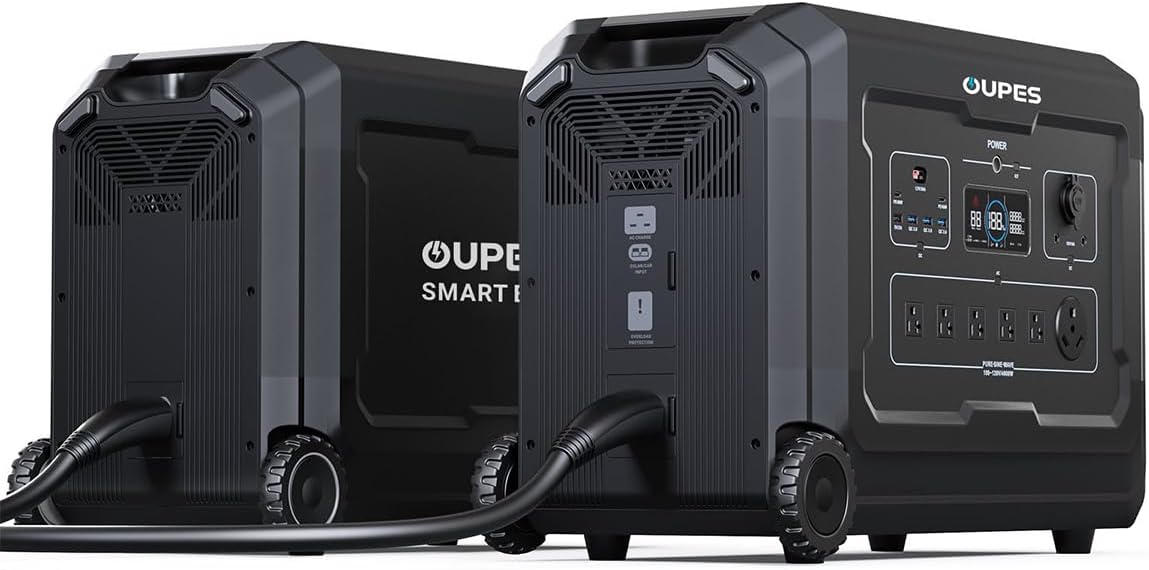
Image: The OUPES Mega 5 Power Station (right) connected to the B5 Extra Battery (left). Both units are black with wheels for portability.
4. Product Overview
4.1 Key Features
- Expandable Capacity: The Mega 5 can be expanded with up to 8 B5 Extra Batteries, reaching a total capacity of 45.36kWh.
- High Power Output: Provides 4000W rated power and 7000W surge power, capable of running multiple high-demand appliances simultaneously.
- LiFePO4 Battery: Equipped with EV-grade LiFePO4 batteries, offering 3500+ charge cycles to 80% capacity and a lifespan of over 10 years.
- Multiple Recharging Options: Supports AC, solar, car, EV, and gas generator charging. Dual recharge (AC + Solar) can achieve full charge in 1.3 hours.
- Silent Operation: Operates at a low noise level of 0-40dB, ensuring quiet backup power.
- Smart App Control: Monitor and operate the power station remotely via the OUPES mobile application.
4.2 Components and Ports
The OUPES Mega 5 Power Station features a comprehensive array of input and output ports to accommodate various devices and charging methods.

Image: Front panel of the OUPES Mega 5 Power Station showing various output ports including Anderson, Type-C, Car, DC, USB-A, AC TT-30, and standard AC outlets, along with an LCD display.
- Anderson Output Port: 12V/30A
- Type-C Output Ports: PD 60W
- Car Output Port: 12V/10A
- 5.5mm DC Output Ports: 12V/10A
- USB-A Output Ports: QC 3.0
- AC TT-30 Output Port: 120V/4000W
- AC Output Ports: 120V/4000W (standard outlets)
- LCD Display: Shows real-time power status, fault codes, remaining power, and port status.
5. Setup
5.1 Initial Charging
Before first use, fully charge the OUPES Mega 5 Power Station. Connect the provided AC charging cable to the AC input port on the unit and then to a standard wall outlet. The LCD display will indicate the charging status.
5.2 Connecting the B5 Extra Battery
To expand the capacity, connect the B5 Extra Battery to the Mega 5 Power Station using the dedicated connected cable. Ensure the connection is secure. The system will automatically recognize the additional battery.

Image: Visual representation of the OUPES Mega 5 Power Station's expandable capacity, illustrating how additional B5 batteries can increase total energy storage from 5.04kWh up to 45.36kWh.
5.3 Solar Panel Connection (Optional)
For solar charging, connect compatible solar panels to the solar input port on the Mega 5. Ensure the solar panels are positioned to receive maximum sunlight. The unit supports up to 2100W solar input.
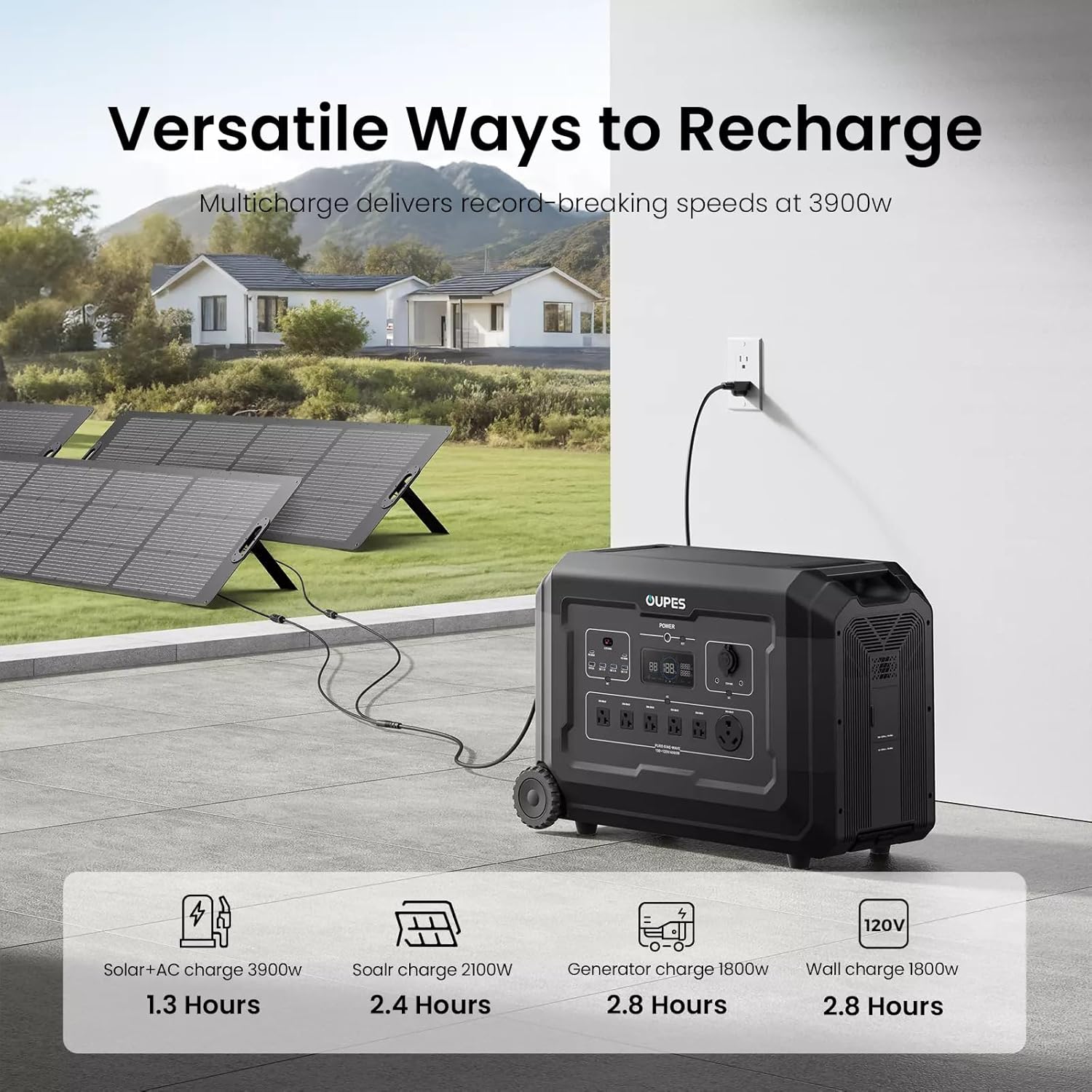
Image: The OUPES Mega 5 Power Station demonstrating versatile recharging methods, including solar charging via panels and AC wall charging.
5.4 Integration with Home Circuits (Optional)
The OUPES Mega 5 can be integrated into your home's essential circuits using an OUPES Mega 5 Pro/Iron 2" Transfer Switch Kit and NEMA TT-30P to L14-30R Cord (sold separately). Consult a qualified electrician for proper installation to ensure safe and compliant operation as a home backup system.

Image: The OUPES Mega 5 Power Station connected to a home's electrical panel, illustrating its capability for home circuit integration to provide backup power.
6. Operating Instructions
6.1 Powering On/Off
Press and hold the main power button on the control panel to turn the unit on or off. The LCD display will illuminate upon activation.
6.2 Using Output Ports
Once the unit is powered on, activate the desired output sections (AC, DC, USB) by pressing their respective buttons on the control panel. Plug your devices into the appropriate ports. The LCD display will show the output wattage.

Image: The OUPES Mega 5 Power Station depicted in a kitchen setting, illustrating its ability to power multiple high-demand appliances such as a microwave, washer, hair dryer, and coffee maker.
6.3 Recharging the Power Station
The Mega 5 supports multiple charging methods:
- AC Wall Outlet: Connect the AC charging cable to a standard wall outlet. (Approx. 2.8 hours for full charge)
- Solar Panels: Connect compatible solar panels to the solar input port. (Approx. 2.4 hours for full charge with 2100W solar)
- Car Charger: Use a 12V car charging cable (not included) to charge from your vehicle's cigarette lighter port.
- EV Charging: Connect to an EV charging station using an appropriate adapter (not included).
- Gas Generator: Charge using a gas generator with the AC charging cable.
- AC + Solar Dual Recharge: Combine AC and solar input for the fastest charging speed. (Approx. 1.3 hours for full charge with 3900W dual input)

Image: A diagram showcasing six different methods to recharge the OUPES Mega 5 Power Station: AC Charging, Solar Charging, AC + Solar Charging, EV Charging, Car Charging, and Gas Generator Charging.
6.4 Smart App Control
Download the OUPES app from the App Store or Google Play to monitor and control your Mega 5 Power Station remotely. The app provides real-time data on input/output status, battery level, and allows for remote operation.

Image: A person outdoors monitoring the OUPES Mega 5 Power Station's status via the OUPES mobile application on their smartphone.
7. Maintenance
7.1 Battery Care
The OUPES Mega 5 uses a durable LiFePO4 battery designed for longevity. To maximize battery lifespan:
- Avoid fully discharging the battery frequently.
- Charge the unit to at least 50% every 3-6 months if not in regular use.
- Store in a cool, dry environment between 0°C and 40°C (32°F and 104°F).

Image: A graphic illustrating the superior lifespan of the OUPES LiFePO4 battery, rated for 3500+ charge cycles, significantly more than the industry average.
7.2 Cleaning and Storage
- Clean the unit with a dry, soft cloth. Do not use abrasive cleaners or solvents.
- Ensure all ports are free of dust and debris.
- When storing for extended periods, ensure the unit is charged to approximately 50-80% and stored in a cool, dry place.
8. Troubleshooting
If you encounter issues with your OUPES Mega 5 Power Station, refer to the following common troubleshooting steps:
| Problem | Possible Cause | Solution |
|---|---|---|
| Unit does not turn on. | Battery is fully discharged; Power button not pressed long enough. | Charge the unit; Press and hold the power button for 3-5 seconds. |
| No output from AC/DC/USB ports. | Output section not activated; Overload protection triggered; Cable issue. | Press the respective output button; Reduce connected load; Check cable connections. |
| Unit not charging. | Charging cable not properly connected; Charger fault; Extreme temperature. | Ensure secure connection; Try a different charging method/cable; Move to a suitable temperature environment. |
| LCD display shows an error code. | Internal fault or specific issue. | Note the error code and refer to the OUPES support website or contact customer service. |
9. Specifications
| Feature | Detail |
|---|---|
| Model Name | Mega 5 + B5 |
| Model Number | S5 |
| Brand | OUPES |
| Capacity (Mega 5 + B5) | 10.08 kWh (5040 Wh for Mega 5) |
| Rated Output Power | 4000W |
| Surge Output Power | 7000W |
| Voltage | 120 Volts |
| Battery Type | LiFePO4 |
| Life Cycles | 3500+ cycles to 80% |
| Item Weight | 110 Pounds (Mega 5) |
| Product Dimensions | 25.2"L x 11.9"W x 17.2"H (Mega 5) |
| Sound Level | 0-40 dB (operating) |
| Recharge Time (AC+Solar) | 1.3 Hours (3900W) |
| Recharge Time (AC) | 2.8 Hours (1800W) |
| Recharge Time (Solar) | 2.4 Hours (2100W) |
10. Warranty & Support
10.1 Warranty Information
The OUPES Mega 5 Power Station comes with a 5-year warranty from the date of purchase. This warranty covers defects in materials and workmanship under normal use. Please retain your proof of purchase for warranty claims.
The warranty does not cover damage caused by misuse, abuse, unauthorized modification, natural disasters, or improper storage.
10.2 Customer Support
For technical assistance, troubleshooting, or warranty inquiries, please contact OUPES customer support. You can find contact information on the official OUPES website or through the warranty card included in your package.
Visit the official OUPES website for the latest product information, FAQs, and support resources: www.oupes.com