
Rolanstar hq-chj013-01
Rolanstar Full Size Bed Frame with Charging Station and LED Lights
Model: hq-chj013-01
Brand: Rolanstar
1. Important Safety Information
Please read and understand all instructions before assembly and use. Retain this manual for future reference.
- Weight Capacity: This bed frame is designed to support a maximum weight of 1200 lbs (including mattress and occupants). Do not exceed this limit to prevent structural failure and potential injury. The product's shipping weight is approximately 103 lbs.
- Proper Assembly: Ensure all components are correctly assembled and tightened according to the instructions. Loose connections can lead to instability.
- Pinch Points: Be mindful of potential pinch points during assembly and when operating drawers or adjusting the frame.
- Sharp Edges: Handle components with care to avoid injury from sharp edges.
- Children and Pets: Keep children and pets away from the assembly area. Small parts can be a choking hazard.
- Tools: Use appropriate tools as specified in the assembly section.
2. Package Contents
Verify that all parts are present before beginning assembly. If any parts are missing or damaged, please contact customer support.

Figure 2.1: Overview of bed frame components and dimensions.
- Headboard with integrated LED lights and charging station
- Bed frame side rails and support beams
- Metal bed slats
- Four (4) sliding storage drawers
- Hardware pack (screws, bolts, Allen wrench, etc.)
- Power adapter for LED lights and charging station
- Instruction Manual
3. Assembly Instructions
Assembly is designed to be straightforward with a bolt-free quick-lock system for the slats. Two people are recommended for easier assembly.
Step-by-Step Guide:
- Unpack and Identify Parts: Lay out all components on a clean, soft surface (e.g., carpet) to prevent scratches. Refer to Figure 2.1 to identify each part.
- Assemble the Headboard: Attach the upholstered backrest to the headboard frame. Connect the LED light strip and charging station components as indicated in the diagram.
- Construct the Main Frame: Connect the side rails and footboard to the headboard using the provided hardware. Ensure all connections are secure.
- Install Metal Slats: The bed frame features a bolt-free quick-lock assembly system for the metal slats. Simply align and insert the slats into the designated slots on the side rails until they click into place. Ensure all slats are evenly spaced and firmly seated.
- Assemble Storage Drawers: Assemble the four storage drawers. Each drawer is equipped with rolling wheels for easy movement.
- Integrate Drawers: Slide the assembled drawers under the bed frame. The frame includes a fixed drawer board and a drawer fixture system to prevent the mattress from sliding and to keep the drawers in place. Secure the drawers using the fixture system as shown in Figure 3.1.
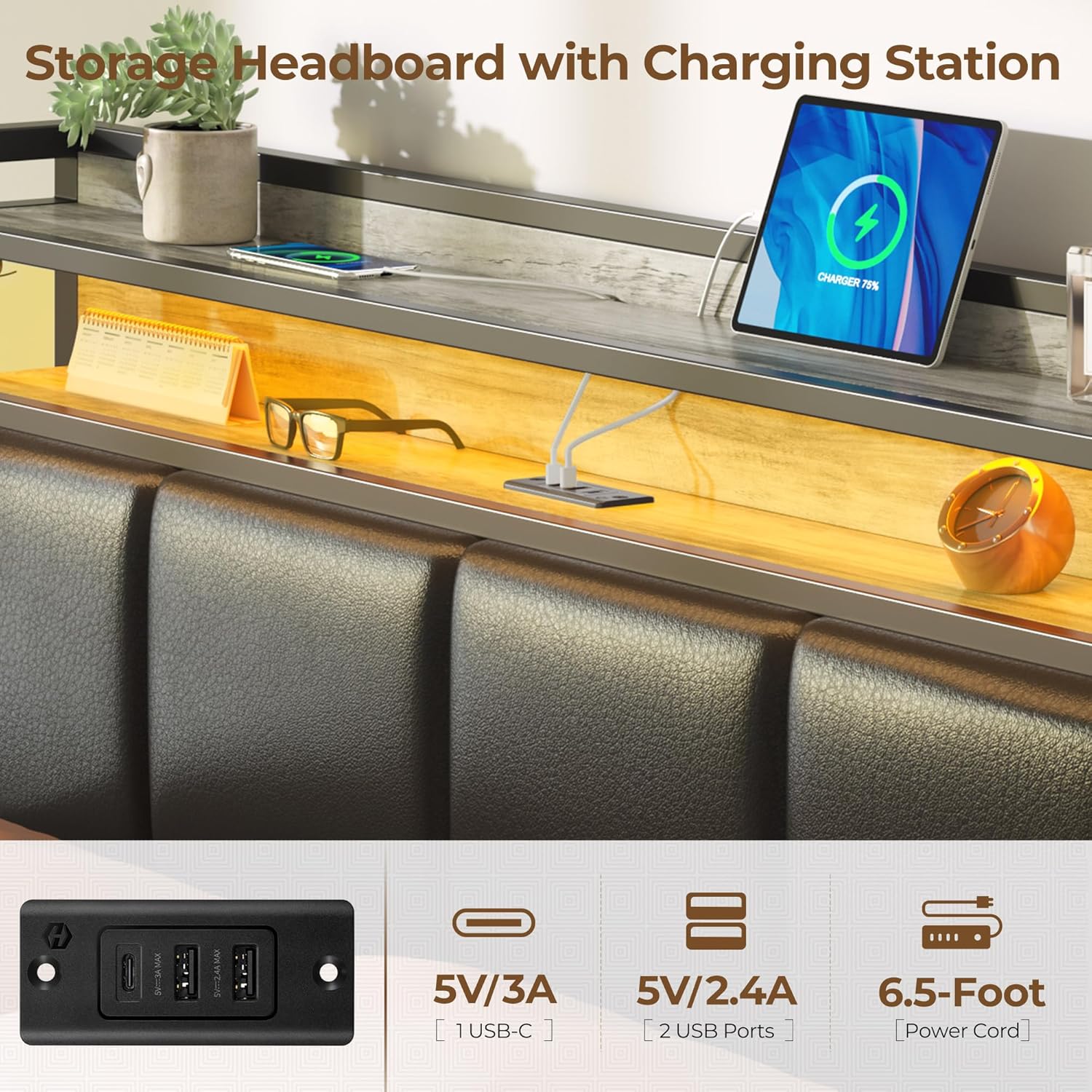
Figure 3.1: Detail of storage drawers and fixture system.

Figure 3.2: Bolt-free system and mattress anti-slide feature.
4. Operating Instructions
4.1. RGB LED Lights
The bed frame features integrated RGB LED lights in the headboard and footboard, controlled by a panel conveniently located on the headboard.

Figure 4.1: RGB LED lights and control panel.
- Power On/Off: Press the power button on the controller to turn the LED lights on or off.
- Color Selection: Cycle through 7 static colors using the color button.
- Scene Modes: The lights support 12 scene modes. Use the scene mode button to select your desired dynamic lighting effect.
- Speed Adjustment: For dynamic modes, adjust the speed with 3 available levels.
- Brightness Adjustment: Adjust the brightness of the lights with 3 available levels.
4.2. Charging Station
The headboard includes a built-in charging station for your electronic devices.

Figure 4.2: Headboard charging station.
- Connect Power: Ensure the bed frame's power cord is securely plugged into a functional wall outlet.
- USB Ports: Two (2) standard USB ports (5V/2.4A) are available for charging smartphones, tablets, and other USB-powered devices.
- Type-C Port: One (1) Type-C port (5V/3A) is available for faster charging of compatible devices.
- Usage: Simply plug your device's charging cable into the appropriate port.
5. Maintenance and Care
- Cleaning: Wipe the bed frame surfaces with a damp cloth. Avoid harsh chemicals or abrasive cleaners that may damage the finish or upholstery.
- Upholstery Care: For the upholstered headboard, spot clean with a mild fabric cleaner if necessary. Test on an inconspicuous area first.
- Tighten Connections: Periodically check all bolts and screws to ensure they remain tight. Retighten as needed to maintain stability.
- Electrical Components: Keep the charging station and LED light components dry. Do not attempt to repair electrical parts yourself.
6. Troubleshooting
- LED Lights Not Working:
- Ensure the power cord is securely plugged into both the bed frame and a working wall outlet.
- Check the connection of the LED strip to the controller.
- Verify the wall outlet is receiving power.
- Charging Station Not Working:
- Confirm the bed frame's power cord is plugged in and the outlet is active.
- Try a different charging cable or device to rule out cable/device issues.
- Ensure the device is properly connected to the USB or Type-C port.
- Bed Frame Squeaks:
- Check and tighten all bolts and screws on the frame.
- Ensure all metal slats are properly seated in their quick-lock positions.
- Verify the mattress is correctly positioned and not causing friction.
- Mattress Sliding:
- Ensure the fixed drawer board at the foot of the bed is correctly installed, as it helps prevent mattress movement (refer to Figure 3.2).
- Consider using a non-slip mattress pad between the mattress and the slats.
- Drawers Do Not Slide Smoothly:
- Check for any obstructions under the bed or in the drawer's path.
- Ensure the drawer wheels are clean and free of debris.
- Verify the drawers are assembled correctly and not overloaded.
7. Specifications
| Feature | Detail |
|---|---|
| Model Number | hq-chj013-01 |
| Size | Full |
| Product Dimensions | 82.7"L x 54.4"W x 42.5"H |
| Item Weight | 103 pounds |
| Maximum Weight Capacity | 1200 lbs |
| Color | Vintage Grey and Black |
| Material | Metal, Upholstered (PU Leather), Wood (FSC-Certified) |
| Special Features | RGB LED Lights, Charging Station (2 USB, 1 Type-C), Storage Headboard, 4 Sliding Drawers, No Box Spring Needed, Bolt-Free Assembly |
| Power Cord Length | 6.5-Foot (for charging station) |
| Product Care | Wipe with Damp Cloth |
8. Warranty and Support
Rolanstar products are manufactured with quality and durability in mind. This product comes with a standard manufacturer's warranty against defects in materials and workmanship. For specific warranty details, claims, or technical support, please refer to the warranty card included with your purchase or contact Rolanstar customer service directly.
For assistance, please visit the official Rolanstar website or contact their customer support channels.
Related Documents - hq-chj013-01
 |
Rolanstar End Table ED002-YW-RR Installation Guide This guide provides detailed instructions for assembling the Rolanstar End Table with Charging Station, model ED002-YW-RR. It includes general guidelines, notes on product usage, warnings for safe assembly, and a comprehensive list of accessories and step-by-step assembly instructions. |
 |
Rolanstar BC007-YW6-RR Bookcase Assembly Manual Detailed assembly instructions, parts list, and safety guidelines for the Rolanstar BC007-YW6-RR bookcase. Learn how to assemble your new bookcase safely and efficiently. |
 |
Rolanstar TVS015 Television Stand Installation Guide Comprehensive installation instructions for the Rolanstar TVS015 television stand, detailing assembly steps, parts list, and LED light setup. This guide ensures safe and proper assembly for your entertainment center. |
 |
Rolanstar TVS001-BK180-RR / TVS001-YW180-RR Television Stands Assembly Guide Comprehensive assembly guide for Rolanstar TVS001-BK180-RR and TVS001-YW180-RR television stands. Includes general guidelines, notes, warnings, and step-by-step installation instructions with detailed textual descriptions of diagrams. |
 |
ROLANSTAR Height Adjustable Desk Instructions - User Manual This user manual provides comprehensive instructions for assembling, operating, and troubleshooting the ROLANSTAR Height Adjustable Desk. Learn how to set up memory positions, adjust height, and resolve common errors for optimal use. |
 |
ROLANSTAR Height Adjustable Desk User Manual | Models CPT007-YW120-RR, CPT007-BK120-RR, CPT007-BO120-RR Comprehensive user manual for ROLANSTAR Height Adjustable Desks (CPT007 series), including assembly instructions, operation guidelines for height adjustment and memory settings, troubleshooting common errors, and safety warnings. |
Ask a question about this manual
Ask about setup, troubleshooting, compatibility, parts, safety, or missing instructions. Manuals+ will review the question and use this page’s manual context to help answer it.