LOX ROX Truck Bed Extender User Manual
Model: F150 Dedicated car Truck Bed Extender
Introduction
This manual provides comprehensive instructions for the installation, operation, and maintenance of your LOX ROX Truck Bed Extender. Designed for Ford F150, F250, and F350 models from 2007 to 2024, this bed extender offers a convenient solution to expand your truck's cargo capacity without requiring drilling for installation. Its durable construction and versatile flip design make it an essential accessory for managing various loads.

Image: LOX ROX Truck Bed Extender in extended position, showcasing increased cargo space.
Safety Information
- Always ensure the bed extender is securely latched in place, whether flipped in or out, before driving.
- Do not exceed your vehicle's maximum payload capacity when using the bed extender.
- Distribute cargo evenly to maintain vehicle stability.
- When the bed extender is flipped out, ensure all cargo is properly secured to prevent shifting or falling during transit.
- Exercise caution when operating the flip mechanism to avoid pinching hands or fingers.
- Regularly inspect the bed extender for any signs of wear, damage, or loose components. Do not use if damaged.
Package Contents
Verify that all components are present before beginning installation:
- 1 x Truck Bed Extender
- 1 x Installation Manual
- 1 x Drilling Templates (Note: Drilling is not required for F150 2009-2022 models, but templates may be included for other applications or modifications.)
- 2 x Brackets
- 2 x Quick Mount Bracket Sets
- 2 x Strap Buckle Assembly
Installation Guide
The LOX ROX Truck Bed Extender is designed for no-drill installation on compatible Ford F150, F250, and F350 models (2007-2024). Installation utilizes existing factory holes behind the taillights.
Step 1: Prepare the Tailgate Area
Ensure the truck bed and tailgate area are clean and free of debris.
Step 2: Remove Tail Lamps
Carefully unscrew and remove both tail lamps from your truck. This will expose the factory mounting holes required for the bed extender brackets.
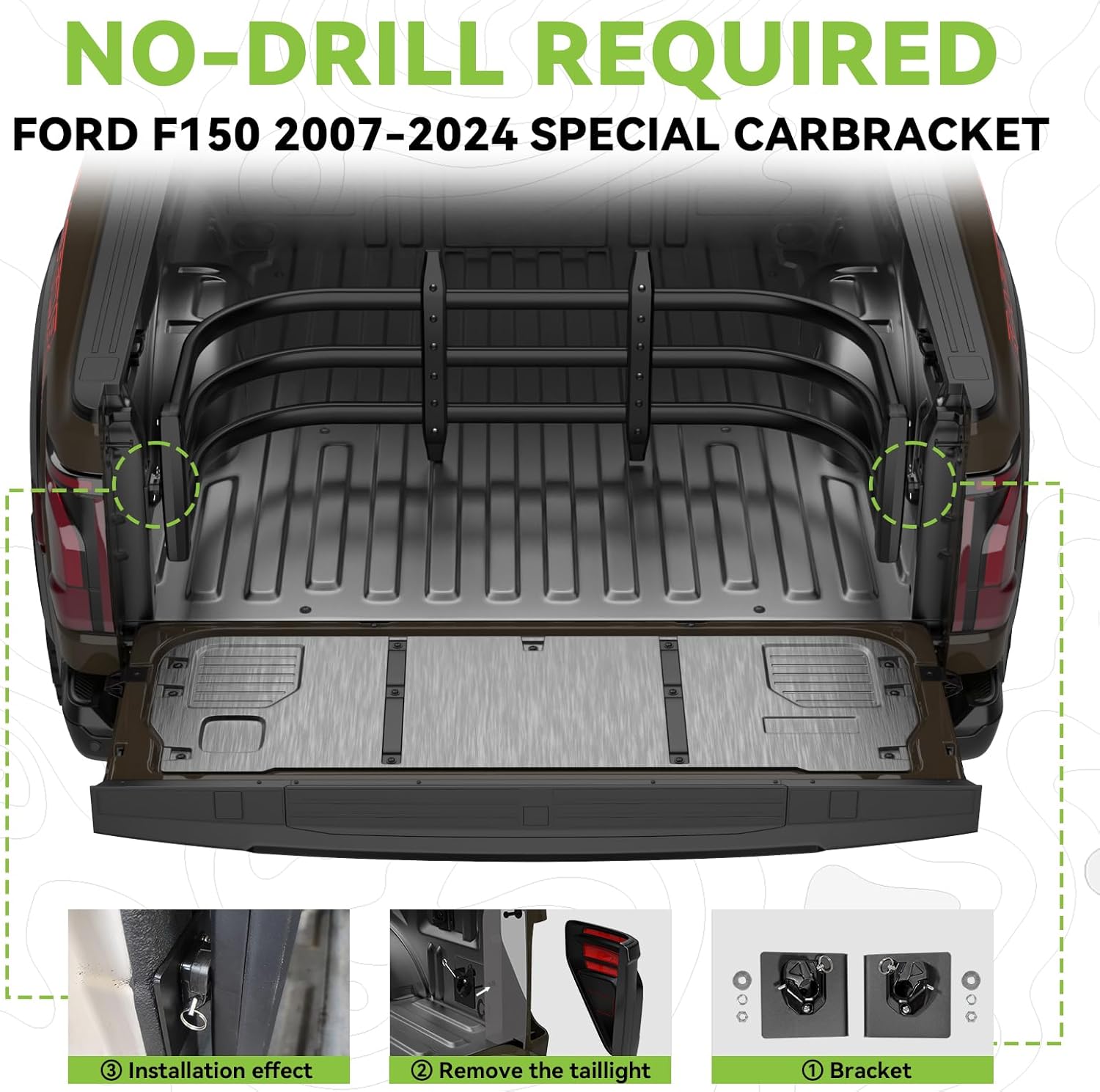
Image: Rear view of a truck bed, indicating the installation points near the taillights.

Image: Visual guide for no-drill installation, showing taillight removal and bracket positioning.
Step 3: Install Brackets
Attach the provided brackets to the exposed factory holes. The design ensures a secure fit without the need for drilling new holes. Use the quick mount bracket sets for easy attachment.

Image: Detail of the bed extender bracket.

Image: Installed bracket, demonstrating the secure attachment point.
Step 4: Attach Bed Extender
Align the bed extender with the installed brackets and secure it using the pin system. This system allows for fast attachment and uninstallation.
Step 5: Reinstall Tail Lamps
Once the bed extender is securely attached, reinstall your truck's tail lamps.
Note:
- If your truck has a drop-in bedliner, it may be necessary to cut the bedliner at the mount position to accommodate the brackets.
- The bed extender is compatible with most bed covers.
Operating Instructions
The LOX ROX Truck Bed Extender features a versatile 180-degree flip design, allowing it to function in two primary modes:
Mode 1: Flip Out (Bed Extension)
When the tailgate is open, flip the bed extender outwards. This extends the effective length of your truck bed, providing additional space for longer cargo such as lumber, ladders, or recreational equipment. Secure cargo using the provided strap buckle assemblies.

Image: The bed extender flipped out, extending the cargo area for long items.

Image: Examples of cargo that can be transported with the bed extender in the extended position.
Mode 2: Flip In (Cargo Management)
With the tailgate closed, flip the bed extender inwards. It acts as a barrier to keep smaller items, such as groceries, tools, or luggage, from sliding to the front of the truck bed during transit. This helps prevent damage to cargo and makes retrieval easier.

Image: The bed extender flipped inwards, securing items within the truck bed.
Maintenance
- Cleaning: Clean the bed extender regularly with mild soap and water. Avoid abrasive cleaners or solvents that could damage the finish.
- Inspection: Periodically check all mounting points, bolts, and the flip mechanism for tightness and proper function. Tighten any loose fasteners.
- Lubrication: Apply a small amount of silicone spray or a similar lubricant to the pivot points of the flip mechanism if movement becomes stiff.
- Damage: If any part of the bed extender becomes bent, cracked, or otherwise damaged, discontinue use and contact customer support for replacement parts or advice.
Troubleshooting
| Problem | Possible Cause | Solution |
|---|---|---|
| Bed extender does not fit properly. | Incorrect model year or truck type. Bedliner interference. | Verify your truck's make, model, and year against the product's compatibility list. If using a drop-in bedliner, ensure it is trimmed to allow bracket installation. |
| Bed extender is loose or wobbly after installation. | Brackets not securely fastened. Pins not fully engaged. | Recheck all mounting bolts and ensure they are tightened according to instructions. Confirm that the quick-release pins are fully engaged in the brackets. |
| Flip mechanism is stiff or difficult to operate. | Lack of lubrication. Debris in pivot points. | Clean any debris from the pivot points. Apply a silicone-based lubricant to the moving parts. |
| Bed extender appears too short or too long for the truck bed. | Incorrect model or installation. | Ensure the product is specifically designed for your truck's model and year. The extender has an adjustable length of 59" to 71.5". Verify proper adjustment. |

Image: Visual comparison of common bed extender issues and the LOX ROX solution.
Specifications
- Model: F150 Dedicated car Truck Bed Extender
- Compatibility: Ford F150, F250, F350 (2007-2024 models)
- Material: High-grade Aluminum tubes, PA6 Nylon Pillar/Rubber pads
- Finish: Fine Textured Black (Powder coated for rustproof and weather resistance)
- Dimensions (L x W x H): Approximately 31.5 x 7 x 7 inches (folded/packaged)
- Adjustable Length: 59" - 71.5" (when extended)
- Item Weight: 12 Pounds
- Installation: No-drill required for compatible models, utilizes factory holes.
- Features: 180° Flip Design, Quick Mount Pin System, UV-resistant, Anti-corrosion, Does not rust.

Image: Features of the heavy-duty, rustproof material used in the bed extender.

Image: Compatibility and adjustable length details of the bed extender.
Warranty and Support
For warranty information and customer support, please refer to the documentation included with your purchase or contact LOX ROX directly through their official website or the retailer where the product was purchased. Specific warranty terms and conditions may vary.
Official Product Videos:
No official product videos from the seller are available for this product at this time.


