
Danfoss MCX06D
Danfoss MCX06D Programmable Controller User Manual
Model: MCX06D (Part Number: 080G0111)
1. Introduction
This manual provides essential information for the safe and efficient installation, operation, and maintenance of the Danfoss MCX06D Programmable Controller. The MCX06D is a versatile controller designed for various industrial applications, featuring 6 relays, 24V communication, and CANBUS connectivity.
Please read this manual thoroughly before installing or operating the device to ensure proper functionality and to prevent damage or injury.
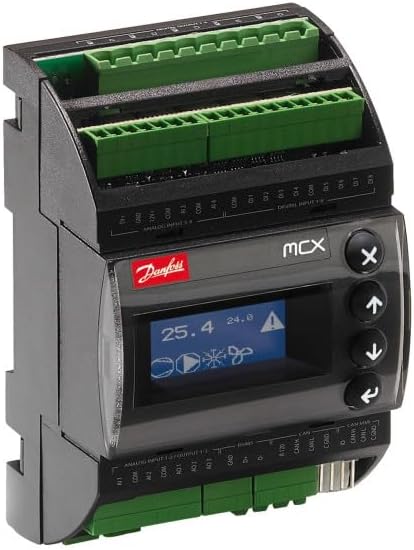
Figure 1: Front view of the Danfoss MCX06D Programmable Controller, showing the display, control buttons, and connection terminals.
2. Safety Information
Always observe the following safety precautions to reduce the risk of electric shock, fire, or injury:
- Installation and servicing must be performed by qualified personnel only.
- Disconnect all power to the controller before performing any installation, wiring, or maintenance.
- Ensure proper grounding of the device as per local electrical codes.
- Do not operate the controller if it appears damaged or has been exposed to moisture.
- Use only specified voltage and current ratings for power supply and connections.
3. Setup and Installation
3.1 Mounting
The MCX06D controller is designed for DIN rail mounting. Ensure a secure and stable mounting location with adequate ventilation to prevent overheating.
3.2 Electrical Connections
All electrical connections should be made according to the wiring diagrams provided and local electrical regulations. The controller operates on 24V. Ensure correct polarity for DC connections.
The Connection Kit 080G0179 may be required for specific wiring configurations.
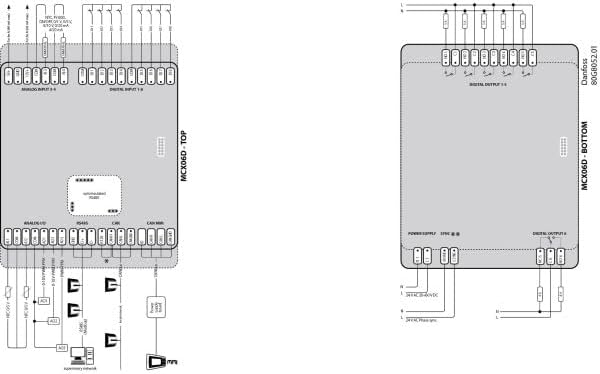
Figure 2: Example wiring diagram for the Danfoss MCX06D, illustrating typical input, output, and communication connections. Refer to the official product documentation for detailed and application-specific wiring instructions.
3.3 Initial Power-Up
After all connections are securely made, apply power to the controller. The display should illuminate, indicating successful power-up. Follow the programming guide for initial configuration.
4. Operation
The MCX06D controller features a user-friendly interface with a display and navigation buttons. Programming and specific operational modes depend on the application software loaded onto the controller.
4.1 Display and Navigation
The integrated display provides real-time status and parameter values. Use the arrow buttons (↑, ↓) to navigate through menus and adjust values. The 'Enter' button (↵) confirms selections, and the 'Escape' button (X) cancels operations or returns to the previous screen.
4.2 Programming
The MCX06D is a programmable controller. Custom application programs can be uploaded via the communication ports (e.g., CANBUS). Refer to the Danfoss MCX programming software documentation for detailed instructions on creating and deploying applications.
5. Maintenance
The Danfoss MCX06D controller is designed for reliable operation with minimal maintenance. However, periodic checks can help ensure longevity and optimal performance.
- Cleaning: Keep the controller free from dust and debris. Use a soft, dry cloth for cleaning. Do not use abrasive cleaners or solvents.
- Connections: Periodically inspect all wiring connections to ensure they are secure and free from corrosion.
- Environment: Ensure the operating environment remains within the specified temperature and humidity ranges.
6. Troubleshooting
This section provides basic troubleshooting steps for common issues. For more complex problems, contact Danfoss technical support.
| Problem | Possible Cause | Solution |
|---|---|---|
| Controller does not power on. | No power supply; incorrect wiring; faulty power supply. | Check power connections and voltage. Verify wiring according to the diagram. Test power supply. |
| Display is blank or shows error. | Software error; hardware malfunction. | Perform a power cycle. If error persists, consult the programming guide or contact support. |
| Communication issues (CANBUS). | Incorrect wiring; termination issues; software configuration. | Verify CANBUS wiring and termination resistors. Check software communication settings. |
7. Specifications
The following are the technical specifications for the Danfoss MCX06D Programmable Controller (Model: 080G0111):
- Manufacturer: Danfoss
- Model: MCX06D (080G0111)
- Relays: 6
- Communication: 24V, CANBUS
- Item Weight: 10.4 ounces (approx. 0.3 kg)
- Product Dimensions: 7 x 9 x 5 inches (approx. 17.8 x 22.9 x 12.7 cm)
- Connection Kit: 080G0179 (sold separately)
- ASIN: B0DLLC297Q
- Date First Available: October 4, 2024
8. Warranty and Support
For warranty information, please refer to the official Danfoss warranty policy available on their website or contact your authorized Danfoss distributor. Technical support is available through Danfoss customer service channels.
For further assistance, visit the official Danfoss Store on Amazon or the Danfoss corporate website.
Related documentsMCX06D


Ask a question about this manual
Ask about setup, troubleshooting, compatibility, parts, safety, or missing instructions. Manuals+ will review the question and use this page’s manual context to help answer it.