
Introduction
Welcome to the YIFAN Zigbee 3.0 Range Extender user manual. This device is designed to expand your Zigbee network's reach, ensuring stable signal coverage throughout your home. By boosting your Zigbee signal, it helps smart devices maintain reliable connections, even in areas previously affected by weak signals.
Safety Information
- Do not expose the device to water or moisture.
- Do not attempt to disassemble or repair the device.
- Use only with compatible power sources (USB-C or USB-A adapter).
- Keep out of reach of children.
- Operate the device within its specified temperature and humidity ranges.
Package Contents
- YIFAN Zigbee 3.0 Range Extender x 1
- USB-C to USB Adapter x 1
- User Manual x 1
Product Overview
The YIFAN Zigbee 3.0 Range Extender is a compact device designed to boost your Zigbee signal. It features a built-in power amplifier for enhanced coverage and supports the Zigbee 3.0 standard for broad compatibility with smart home ecosystems.


Setup Instructions
Powering the Device
The Zigbee Range Extender can be powered via its USB-C port. An included USB-C to USB-A adapter allows for connection to standard USB-A ports.
- Connect the USB-C end of the extender directly into a USB-C power source, or use the provided USB-C to USB-A adapter to connect to a USB-A power source (e.g., a wall adapter, smart socket, or USB port on a device).
- Ensure the power source is active. The indicator light on the extender will illuminate, typically a solid blue, indicating it is powered on.
Adding the Device to a Compatible Zigbee Hub/App
This device requires a Zigbee gateway (hub) and a compatible smart home application, such as the "Smart Life" app, for full functionality.
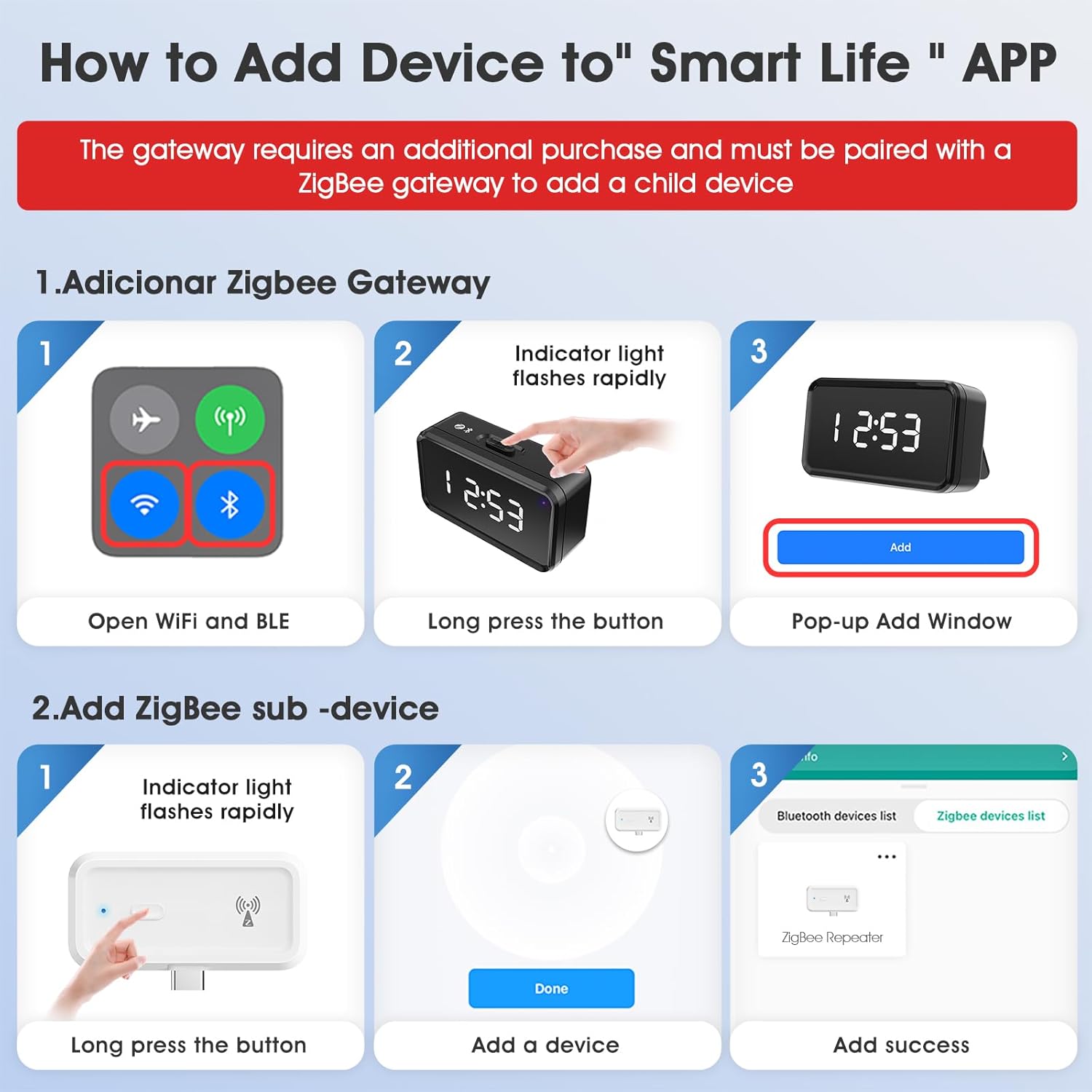
- Prepare your Zigbee Gateway: Ensure your Zigbee gateway is powered on and connected to your smart home network.
- Open the Smart Life App: Launch the "Smart Life" application on your smartphone.
- Enter Pairing Mode: On the Zigbee Range Extender, press and hold the button for approximately 5 seconds until the indicator light flashes rapidly. This indicates the device is in pairing mode.
- Add Device in App: In the "Smart Life" app, navigate to the "Add Device" section. Select the option to add a Zigbee sub-device. The app should detect the flashing extender.
- Confirm Pairing: Follow the on-screen prompts to complete the pairing process. Once successful, the indicator light on the extender will stop flashing and remain solid, and the device will appear in your app.
Operating Instructions
Signal Extension
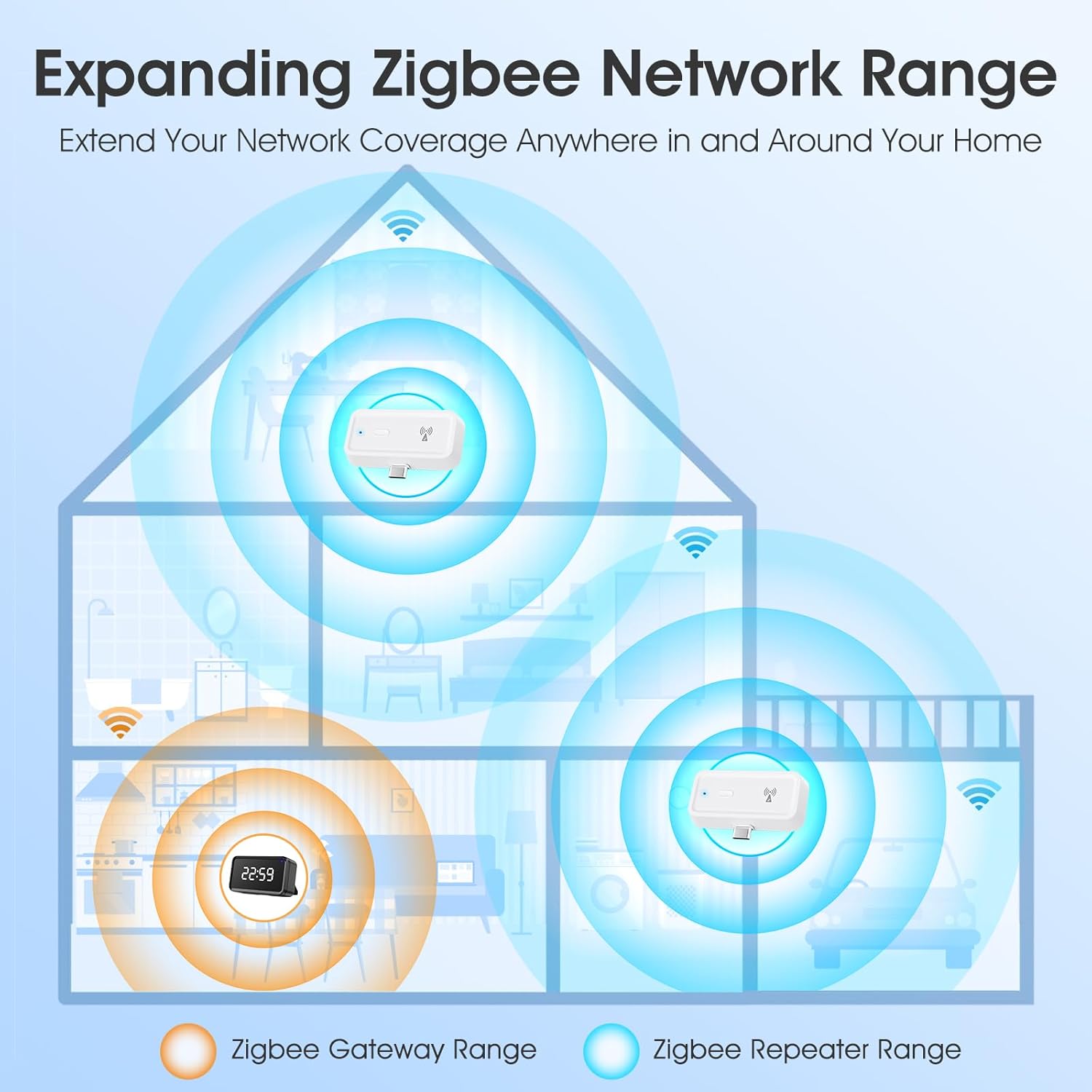
Once successfully paired with your Zigbee gateway, the YIFAN Zigbee 3.0 Range Extender will automatically begin extending your Zigbee network's signal. Place the extender strategically between your Zigbee gateway and devices that experience weak signals to maximize coverage.
Real-time Signal Monitoring
The companion app allows you to monitor the signal strength of your Zigbee network and connected devices in real-time, providing insights into your network's health.
Offline Notifications
Receive notifications if your Zigbee Range Extender or connected devices go offline, allowing for prompt action to restore connectivity and maintain your smart home's functionality.

Voice Control
The YIFAN Zigbee 3.0 Range Extender is compatible with Amazon Alexa and Google Home when integrated through a compatible Zigbee gateway. This allows for convenient hands-free control of your smart home network.
To enable voice control, ensure your Zigbee gateway is linked to your Alexa or Google Home account. Once linked, you can use commands such as:
- "Alexa, turn on Zigbee repeater."
- "Google, turn off Zigbee repeater."
- (Specific commands may vary based on your gateway and app configuration.)
Device Sharing
The device sharing function allows multiple family members to control the Zigbee Range Extender and connected smart devices through their own accounts in the smart home app, enhancing convenience for all users.
- In the smart home app, navigate to the device settings for the Zigbee Range Extender.
- Look for a "Share Device" or "Family Management" option.
- Add family members by entering their account details (e.g., email or phone number associated with their app account).
- They will receive an invitation to access and control the device.
Maintenance
The YIFAN Zigbee 3.0 Range Extender requires minimal maintenance to ensure optimal performance and longevity.
- Keep the device clean and free from dust. Use a soft, dry cloth for cleaning.
- Ensure proper ventilation around the device to prevent overheating.
- Avoid placing the device in direct sunlight or near heat sources.
- Periodically check for firmware updates through your smart home app to ensure the device has the latest features and security enhancements.
Troubleshooting
| Problem | Possible Cause | Solution |
|---|---|---|
| Device not powering on | No power supply | Ensure the USB-C or USB-A adapter is securely connected to a working power source. Try a different USB port or power adapter. |
| Device not pairing | Not in pairing mode; Gateway issue | Press and hold the button for 5 seconds until the indicator flashes rapidly. Ensure your Zigbee gateway is online and in pairing mode. Move the extender closer to the gateway during pairing. |
| Weak signal extension | Improper placement; Obstructions | Relocate the extender to a central position between your gateway and weak signal areas. Avoid obstructions like thick walls, large metal objects, or other electronic devices that may cause interference. |
| Device frequently goes offline | Unstable power; Network interference; Distance | Check power connection. Ensure the device is within effective range of the Zigbee gateway and away from other 2.4GHz interference sources (e.g., Wi-Fi routers, microwaves). |
| Voice control not working | Gateway not linked; Incorrect commands | Verify your Zigbee gateway is correctly linked to Amazon Alexa or Google Home. Use the exact voice commands as configured in your smart home app. Check the app for any error messages. |
If issues persist, consult the support section of your smart home application or contact YIFAN customer support.
Specifications
- Model: Zigbee 3.0 Range Extender
- Brand: YIFAN
- Wireless Protocol: Zigbee 3.0
- Frequency Band: 2.4 GHz
- Output Power: Up to 20dB
- Indoor Coverage: Up to 7,600 sq.ft
- Connectivity: USB-C (with USB-A adapter included)
- Compatible Devices: Smart home devices, routers, modems (via Zigbee gateway)
- Dimensions: 2.4 x 1.54 x 0.59 inches
- Item Weight: 0.634 ounces
Warranty and Support
For warranty information, please refer to the documentation provided with your purchase or contact YIFAN customer support directly. Warranty terms and conditions may vary by region and retailer.
For technical assistance, product inquiries, or further support, please visit the YIFAN official website or contact their customer service department through the contact information provided on their website or product packaging.