Introduction
This manual provides detailed instructions for the safe and effective use of your COMFIER Cordless Hand Massager CF-4403. Please read this manual thoroughly before operating the device and retain it for future reference. The hand massager is designed to provide compression and heat to the hands, fingers, and wrists.
Safety Information
- Always follow the safety precautions provided in the user manual.
- Do not use the massager while sleeping or taking a bath.
- Keep the massager away from water and heat sources.
- Do not use the massager if you have a pacemaker or other electronic medical devices.
- Consult your doctor before use if you have any health conditions or are pregnant.
- Store the massager in a cool, dry place away from direct sunlight and heat sources.
- Unplug the massager when not in use.
- The massager will automatically shut off after 15 minutes of use to prevent overheating.
Package Contents
Upon opening the package, please ensure all items are present and in good condition:
- COMFIER Cordless Hand Massager (CF-4403)
- Type-C Charging Cable
- User Manual
Product Overview
The COMFIER Cordless Hand Massager CF-4403 is designed to provide targeted relief and relaxation for your hands, fingers, and wrists. It features a cordless design for portability and convenience, allowing use at home or on the go. Key features include:
- Rapid Heat Function: Provides warmth to improve circulation and relieve pain, reaching 125°F in 1 minute. Equipped with overheat protection and auto shut-off.
- Ergonomic Design: Accommodates larger hands with dimensions of 7.41×9.64×3.93 inches, suitable for both men and women.
- Intense Hand Compression: Offers 5 levels of compression intensity and 3 massage modes (M1: Comprehensive, M2: Ladder, M3: Alternating) for full hand and wrist care. Note: This device uses compression only, no kneading function.
- Comprehensive Full Hand Massage: Targets each finger, the top of the hand, and the palm with rhythmic pressure.
- Cordless and Portable: Equipped with a rechargeable Lithium-Ion battery, providing 3-4 hours of use on a full charge. Features a 15-minute timer and Type-C charging.

Image: The COMFIER Cordless Hand Massager CF-4403, showcasing its ergonomic design and control panel.
Setup
- Unpack: Carefully remove the hand massager and all accessories from the packaging.
- Initial Charge: Before first use, fully charge the device using the provided Type-C charging cable. Connect the cable to the charging port on the massager and a suitable USB power source (e.g., laptop, power bank, adapter). The battery indicator lights will show charging status.
- Familiarize: Review the control panel buttons and their functions as described in the "Operating Instructions" section.
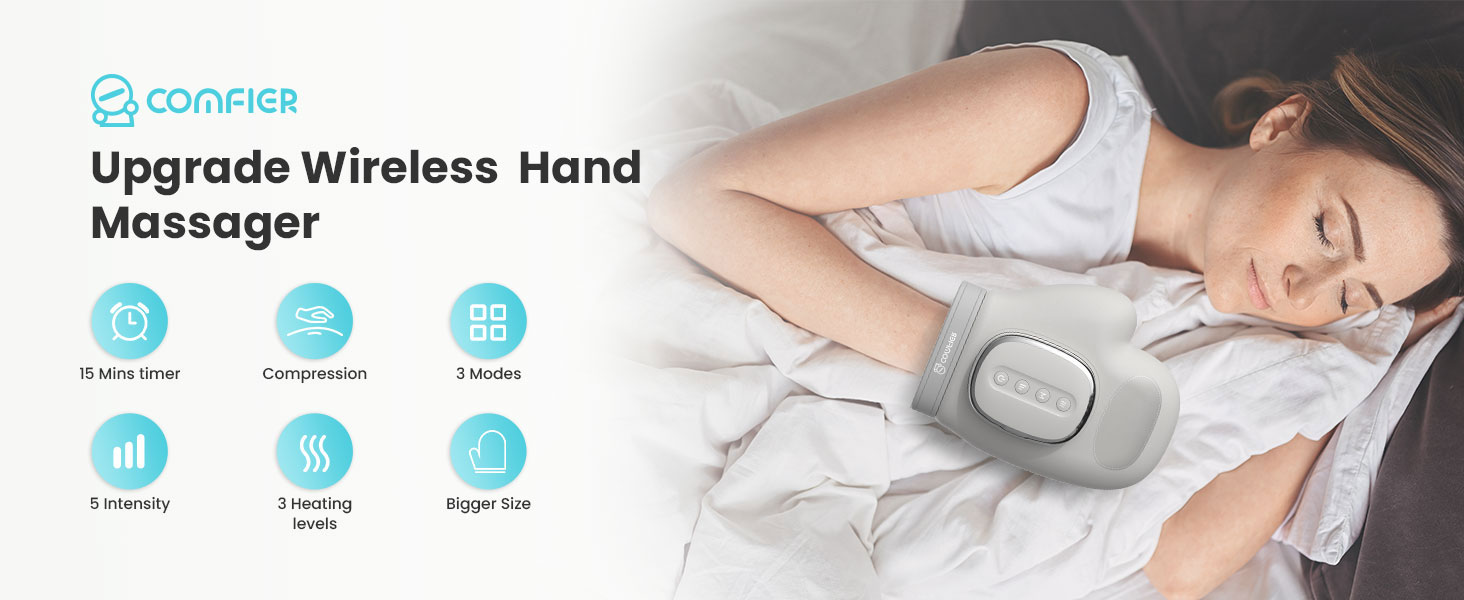
Image: The hand massager connected to a power source via its Type-C charging cable.
Operating Instructions
Follow these steps to use your COMFIER Cordless Hand Massager:
- Power On: Press and hold the power button (⑂) to turn the massager on. A short press will pause or activate the massager.
- Position Hand: Place your hand inside the massager. For optimal results, ensure your palm is facing up or the button side of the product is facing downward, allowing full contact with the internal air compression chambers.
- Select Mode: Press the 'M' button to select one of the three massage modes:
- M1 (Comprehensive): Targets fingers, palm, and wrist simultaneously. (Green light)
- M2 (Ladder): Sequential compression from fingers to palm to wrist. (Blue light)
- M3 (Alternating): Alternating compression across fingers, palm, and wrist. (Red light)
- Adjust Intensity: Press the intensity button (three vertical bars) to choose from 5 levels of compression intensity (M1-M5).
- Activate Heat: Press the heat button (three wavy lines) to select a low, medium, or high heat setting, or to turn it off. The heat function provides warmth to improve circulation.
- Automatic Shut-off: The massager is equipped with a 15-minute timer and will automatically shut off after each session for safety.
- Power Off: Press and hold the power button to turn the massager off completely.

Image: Detailed view of the control panel buttons for power, mode, intensity, and heat settings.
App Control
The COMFIER Hand Massager CF-4403 may support app control for additional customization. If your device supports this feature, download the COMFIER app from your device's app store. The app may offer additional modes (Relax, Recovery, Therapy) and finer control over pressure, heating, and vibration intensity. Follow the app's instructions to connect via Bluetooth.
Video: Demonstration of the COMFIER hand massager in use, highlighting its features and modes.
Maintenance
- Cleaning: Wipe the exterior of the massager with a soft, damp cloth. Do not use abrasive cleaners or immerse the device in water.
- Storage: Store the device in a cool, dry place away from direct sunlight and extreme temperatures.
- Battery Care: To prolong battery life, avoid fully discharging the device frequently. Charge it regularly, even if not in constant use.
Troubleshooting Guide
| Trouble | Possible Causes/Solutions |
|---|---|
| Unable to start the product | Please confirm whether the battery is low; Please confirm that the 'Power button' has been pressed. |
| Cannot charge or no charging light | Please check whether the TYPE-C charging cable is properly connected to the charging port of this device. |
| The product suddenly stops while working | Check if the product is low on power; The device will switch off when the timer runs out; Over-heat protection function activated. Device is switched off for your safety. Please rest device for 15-30 minutes before restarting. |

Image: A table outlining common issues and their solutions for the hand massager.
Specifications
| Feature | Detail |
|---|---|
| Product Dimensions | 9.64 x 7.4 x 3.93 inches |
| Item Model Number | CF-4403 |
| Batteries | 1 Lithium Ion batteries required (included) |
| Item Weight | 2 Pounds |
| Power Source | Battery Powered |
| Material | Plastic |
| Manufacturer | Comfier |
Warranty and Support
For warranty information, product support, or any inquiries regarding your COMFIER Cordless Hand Massager CF-4403, please contact COMFIER customer service directly. Refer to the contact details provided on the product packaging or the official COMFIER website.


