
1. Introduction
This manual provides essential instructions for the safe and efficient operation of your Baofeng UV-5R 8W Dual Band Two Way Radio. Please read this manual thoroughly before using the device to ensure proper functionality and to prevent damage.
2. Package Contents
Verify that all items listed below are included in your package. If any items are missing or damaged, please contact your retailer.
- 6 x BAOFENG UV-5R 8W Radio with Antenna
- 6 x 3800mAh Li-Ion Battery
- 6 x Headset
- 6 x Charger
- 6 x Belt Clip
- 6 x Hand Strap
- 1 x English Manual

Figure 2.1: Included Components
3. Product Overview
Familiarize yourself with the various parts and controls of your Baofeng UV-5R radio.

Figure 3.1: Baofeng UV-5R Component Diagram
Video 3.1: Baofeng UV-5R Radio Overview. This video demonstrates the physical appearance and various angles of the UV-5R radio.
4. Setup
4.1 Battery Installation and Charging
- Align the battery pack with the grooves on the back of the radio.
- Slide the battery upwards until it clicks into place.
- To charge, place the radio with the battery attached into the charging cradle. Ensure the charging contacts on the battery align with those on the cradle.
- The charger's LED indicator will show charging status (typically red for charging, green for fully charged).
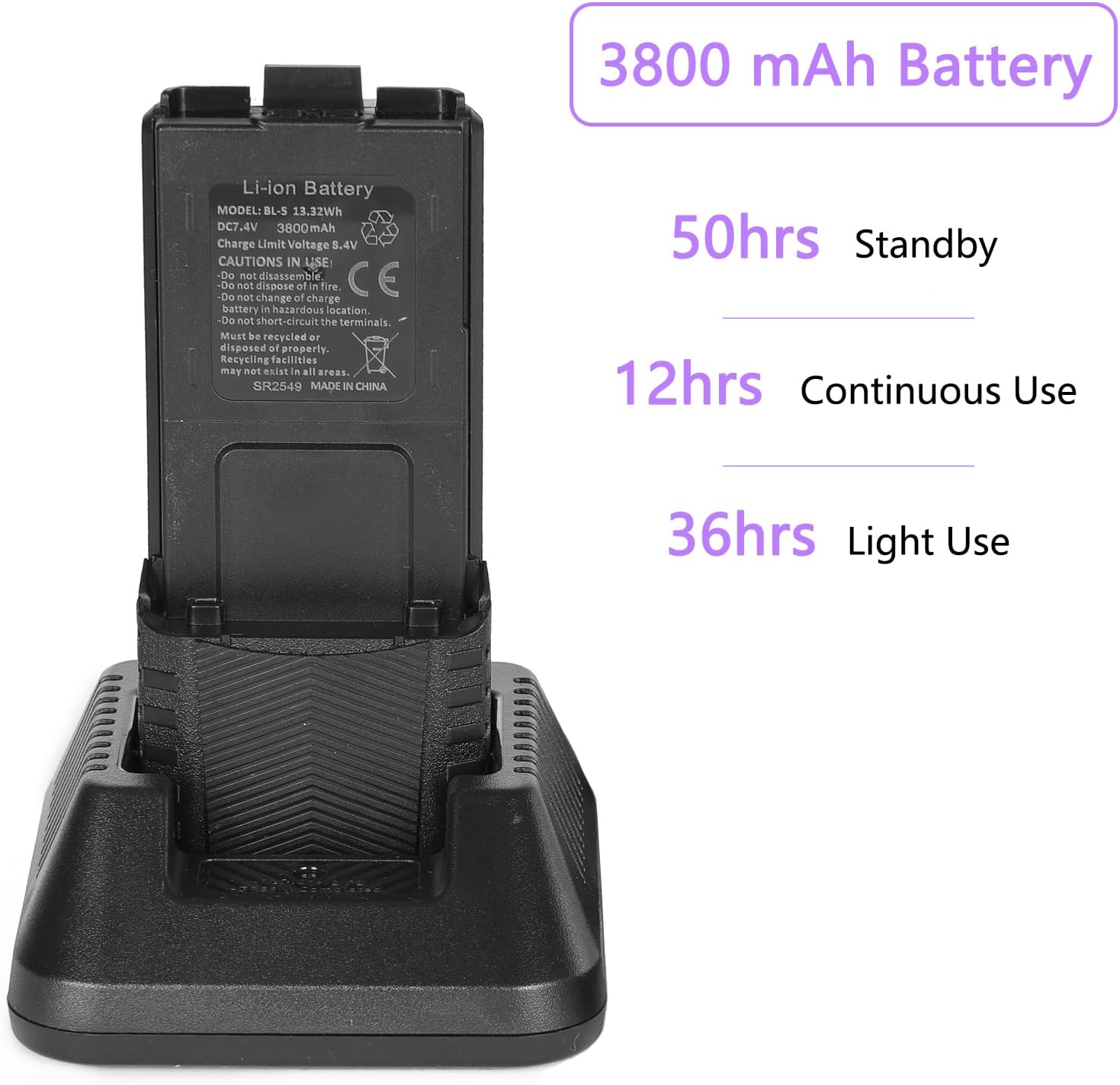
Figure 4.1: Battery Charging
4.2 Antenna Attachment
Screw the antenna clockwise into the connector on the top of the radio until it is finger-tight. Do not overtighten.
4.3 Belt Clip and Hand Strap
Attach the belt clip to the back of the radio using the provided screws. Secure the hand strap through the designated loop on the radio for portability.
5. Operating Instructions
5.1 Power On/Off and Volume
- To power on, rotate the Knob clockwise.
- To power off, rotate the Knob counter-clockwise until it clicks.
- Adjust volume by rotating the Knob.
5.2 Channel/Frequency Mode Selection
- Press the VFO/MR button to switch between Frequency (VFO) mode and Channel (MR) mode.
- In VFO mode, enter frequencies directly using the keypad.
- In MR mode, use the UP/DOWN arrow keys to select stored channels.
5.3 Transmitting and Receiving
- To transmit, press and hold the PTT button (Push-To-Talk) on the side of the radio. Speak clearly into the microphone.
- Release the PTT button to receive.
5.4 Dual Watch Function
The Dual Watch function allows monitoring two different frequencies or channels simultaneously. The radio will automatically switch to the active channel when a signal is detected.
5.5 Squelch Adjustment
The squelch level can be adjusted in 9 levels to filter out weak background noise. Access this setting via the MENU button.
5.6 VOX (Voice Operated Transmit)
VOX allows hands-free transmission. When enabled, the radio will transmit automatically when it detects your voice. Adjust VOX sensitivity via the MENU.

Figure 5.1: Clear Sound and CHIRP Programming
6. Advanced Features
6.1 CTCSS Tones and DCS Codes
The radio supports 50 CTCSS tones and 210 DCS codes for selective calling, allowing you to communicate with specific groups and filter out unwanted transmissions. These can be set via the MENU.
6.2 Repeater Shift
Configure repeater shift settings to communicate through repeaters, extending your radio's range. This involves setting an offset frequency and direction (positive/negative).
6.3 SOS Emergency Function
Activate the SOS function in emergencies to transmit an alarm tone and/or a pre-programmed message. Refer to the full manual for specific activation steps.
6.4 DTMF Function
The DTMF (Dual-Tone Multi-Frequency) function allows for remote control of repeaters or other devices by sending specific tone sequences.
6.5 Time Out Timer (TOT) and Busy Channel Lockout (BCL)
- TOT: Prevents excessively long transmissions by automatically stopping transmission after a set time.
- BCL: Prevents transmission on a channel that is already in use, avoiding interference.

Figure 6.1: Main Features Overview
7. Maintenance
7.1 Cleaning
Clean the radio's surface with a soft, damp cloth. Do not use harsh chemicals or abrasive cleaners. Ensure the radio is powered off and the battery is removed before cleaning.
7.2 Battery Care
- Avoid fully discharging the Li-Ion battery frequently.
- Store the battery in a cool, dry place when not in use.
- Do not expose the battery to extreme temperatures or direct sunlight.
- If the battery is not used for an extended period, charge it periodically to maintain its capacity.
7.3 Water Resistance
This device is Not Water Resistant. Avoid exposure to water or high humidity to prevent damage.
8. Troubleshooting
| Problem | Possible Cause | Solution |
|---|---|---|
| Radio does not power on | Battery is low or not installed correctly | Charge the battery or re-install it properly. |
| Cannot transmit or receive | Incorrect frequency/channel, antenna not attached, or low battery | Verify frequency/channel, ensure antenna is secure, charge battery. |
| Poor audio quality | Weak signal, incorrect squelch setting, or damaged accessory | Move to an area with better signal, adjust squelch, check headset/microphone connection. |
| Keypad locked | Keypad lock feature is active | Press and hold the '#' key to unlock the keypad. |
9. Specifications
- Brand: BAOFENG
- Model: UV-5R
- Number of Channels: 128
- Frequency Range: VHF/UHF
- Talking Range Maximum: 8 Kilometer
- Voltage: 7.4 Volts (DC)
- Water Resistance Level: Not Water Resistant
- Special Features: Dual Band, Emergency Alarm, Keypad Lock, Long Range, Rechargeable
- Battery: 3800mAh Li-Ion (included)
10. Warranty and Support
For any questions or support needs, please contact us via Amazon. We offer a 30-day return and exchange policy, and a 12-month warranty from the date of purchase.