
Introduction
This manual provides essential instructions for the safe and effective use of your VONYX MEG0120 120W Megaphone. This powerful megaphone is designed for clear voice amplification over distances up to 1600 meters, making it suitable for events, sports matches, public gatherings, and emergency signaling. It features a retractable handle, a shoulder strap for portability, and integrated functions such as siren, recording, and playback. Additionally, it includes Bluetooth connectivity and an MP3 player with USB and SD card support for versatile audio playback. Please read this manual thoroughly before operating the device.
Safety Instructions
- Do not expose the megaphone to rain or moisture to prevent electric shock or fire.
- Avoid directing the sound output directly at people's ears from close range, as the high volume can cause hearing damage.
- Use only the specified battery type (8 x C-type batteries) or a compatible rechargeable battery pack.
- Remove batteries if the device will not be used for an extended period to prevent leakage.
- Do not attempt to disassemble or modify the megaphone. Refer all servicing to qualified personnel.
- Keep out of reach of children.
Package Contents
Verify that all items are present upon unpacking:
- 1 x VONYX MEG0120 120W Megaphone
- 1 x Detachable Handheld Microphone
- 1 x Shoulder Strap
- 1 x User Manual (this document)
Product Overview
Familiarize yourself with the components of your VONYX MEG0120 Megaphone:

Image: Overall view of the VONYX MEG0120 Megaphone with its detached handheld microphone, showing the main body, horn, handle, and control panel.
- Megaphone Horn: The main sound output component.
- Main Handle: Ergonomic handle for carrying and operating the megaphone.
- Control Panel (on main body): Includes Mode button, Volume controls (V+/V-), and Track controls (Previous/Next).
- Media Ports: AUX input, USB port, and SD card slot for MP3 playback.
- Battery Compartment: Located at the rear, houses 8 x C-type batteries or compatible rechargeable battery.
- Shoulder Strap Attachment Points: For securing the included shoulder strap.
- Detachable Handheld Microphone: Connects via a coiled cable. Features a talk button, siren button, record button, and play button.
- ON/OFF/Volume Knob: Located on the side of the main body, controls power and overall volume.

Image: Close-up view of the control panel on the megaphone body, highlighting the Mode button, volume/track controls, AUX input, USB port, and SD card slot.
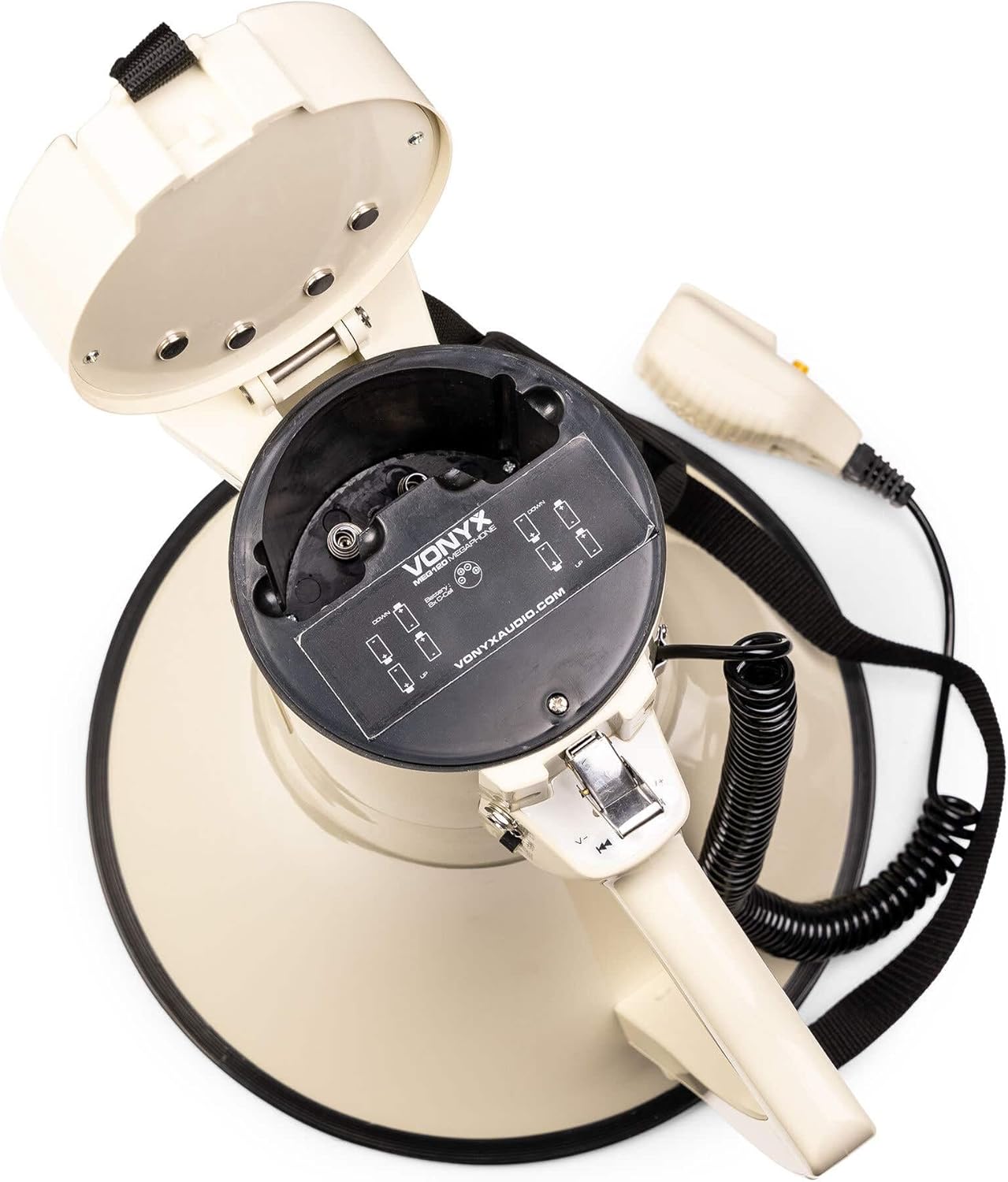
Image: The open battery compartment of the VONYX MEG0120 Megaphone, showing the correct orientation for inserting 8 C-type batteries.
Setup
1. Battery Installation
- Locate the battery compartment cover at the rear of the megaphone.
- Twist or slide the cover to open it.
- Insert 8 x C-type batteries, ensuring correct polarity (+/-) as indicated inside the compartment.
- Securely close the battery compartment cover.
- Alternatively, if using a compatible rechargeable battery pack (e.g., Vonyx MRB12, sold separately), insert it according to its specific instructions.
2. Attaching the Shoulder Strap
- Thread each end of the shoulder strap through the designated attachment points on the megaphone body.
- Adjust the strap length for comfortable carrying.

Image: The VONYX MEG0120 Megaphone suspended by its shoulder strap, demonstrating portability.
3. Connecting the Microphone
The handheld microphone is typically pre-connected via its coiled cable. Ensure the cable is securely plugged into the microphone input port on the megaphone body.
Operating Instructions
1. Power On/Off and Volume Control
- To power on, rotate the ON/OFF/Volume knob clockwise. The power indicator light will illuminate.
- Adjust the volume by continuing to rotate the knob: clockwise for louder, counter-clockwise for quieter.
- To power off, rotate the knob counter-clockwise until it clicks off.
2. Voice Amplification
- Ensure the megaphone is powered on and the volume is set to a suitable level.
- Press and hold the Talk button on the handheld microphone.
- Speak clearly into the microphone. Release the Talk button when finished speaking.
3. Siren Function
- Press the Siren button on the handheld microphone to activate the siren sound.
- Press the Siren button again to deactivate it.
4. Recording and Playback
- To record a message: Press and hold the Record button on the handheld microphone. Speak your message clearly. Release the button to stop recording.
- To play back a recorded message: Press the Play button on the handheld microphone. The last recorded message will play.
5. Bluetooth Connectivity
- Power on the megaphone.
- Press the Mode button on the megaphone body until "Bluetooth" mode is selected (an audible prompt or indicator light may confirm this).
- On your smartphone or other Bluetooth device, search for available devices and select "VONYX MEG0120" (or similar name).
- Once paired, you can play audio from your device through the megaphone.
- Use the V+/V- and track control buttons on the megaphone body to adjust volume and skip tracks during Bluetooth playback.
6. MP3 Player (USB/SD Card)
- Insert a USB flash drive into the USB port or an SD card into the SD card slot on the megaphone body.
- Press the Mode button to select "USB" or "SD" mode.
- The megaphone will automatically begin playing MP3 files from the inserted media.
- Use the V+/V- and track control buttons on the megaphone body to adjust volume and navigate tracks.
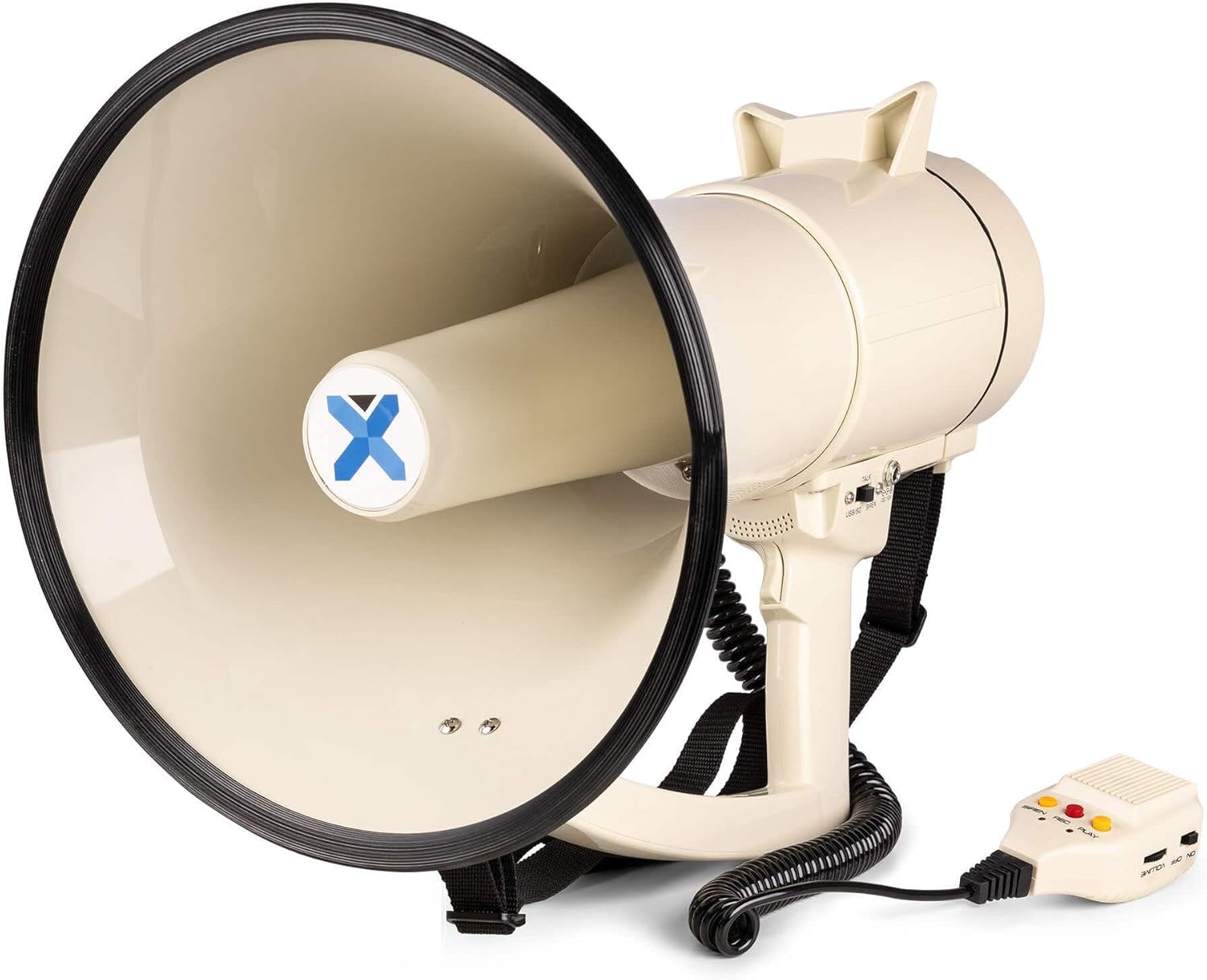
Image: Side view of the VONYX MEG0120 Megaphone, showing the main handle, horn, and the coiled cable connecting to the handheld microphone.
Maintenance
- Cleaning: Wipe the megaphone with a soft, dry cloth. Do not use abrasive cleaners or solvents.
- Battery Care: If the megaphone will not be used for an extended period, remove the batteries to prevent corrosion and leakage.
- Storage: Store the megaphone in a cool, dry place, away from direct sunlight and extreme temperatures.
Troubleshooting
| Problem | Possible Cause | Solution |
|---|---|---|
| No sound output. |
|
|
| Distorted sound. |
|
|
| Bluetooth not connecting. |
|
|
| Recording not working. |
|
|
Specifications
- Model: MEG120
- Power Output: 120 Watts (RMS)
- Effective Range: Up to 1600 meters (1.6 km)
- Power Source: 8 x C-type batteries (not included) or compatible rechargeable battery pack (e.g., Vonyx MRB12, sold separately)
- Dimensions (L x W x H): Approximately 30 x 30 x 45 cm
- Weight: 3.5 kg (without batteries)
- Functions: Voice amplification, Siren, Record, Playback, Bluetooth, MP3 Player (USB/SD/AUX)
- Manufacturer: Tronios B.V.
Warranty and Support
Specific warranty information and detailed support contacts are not provided within this manual. For warranty claims, technical support, or service inquiries, please refer to the documentation included with your purchase or contact your retailer or the manufacturer directly. You can typically find contact information on the manufacturer's official website, Vonyx Audio.


