
Monster Monster Cycle Plus Bluetooth Speaker
Monster Cycle Plus Bluetooth Speaker User Manual
Model: Monster Cycle Plus Bluetooth Speaker
Brand: Monster
1. Introduction
Thank you for purchasing the Monster Cycle Plus Bluetooth Speaker. This portable party speaker is designed to deliver powerful, high-fidelity audio with dynamic lighting effects, making it ideal for various indoor and outdoor settings. This manual provides detailed instructions on how to set up, operate, and maintain your speaker to ensure optimal performance and longevity.
2. Important Safety Information
- Read all instructions carefully before using the product.
- Keep this manual for future reference.
- Do not expose the speaker to extreme temperatures, humidity, or direct sunlight.
- Avoid dropping or subjecting the speaker to strong impacts.
- Do not disassemble, repair, or modify the speaker yourself. Refer all servicing to qualified personnel.
- Use only the provided charging cable and adapter.
- Keep the speaker away from water and liquids, especially during charging, unless specifically designed for water resistance (IPX6 rated for splashes, not submersion).
- Clean only with a dry cloth.
- Ensure proper ventilation when operating the speaker.
3. Package Contents
Please check the package for the following items:
- Monster Cycle Plus Bluetooth Speaker
- AUX Cable
- USB-C Charging Cable
- Quick Start Guide
- Warranty Letter
4. Product Overview
Familiarize yourself with the various parts and controls of your Monster Cycle Plus speaker.

Figure 4.1: Front view of the Monster Cycle Plus speaker, showcasing its dual woofers with dynamic lighting.
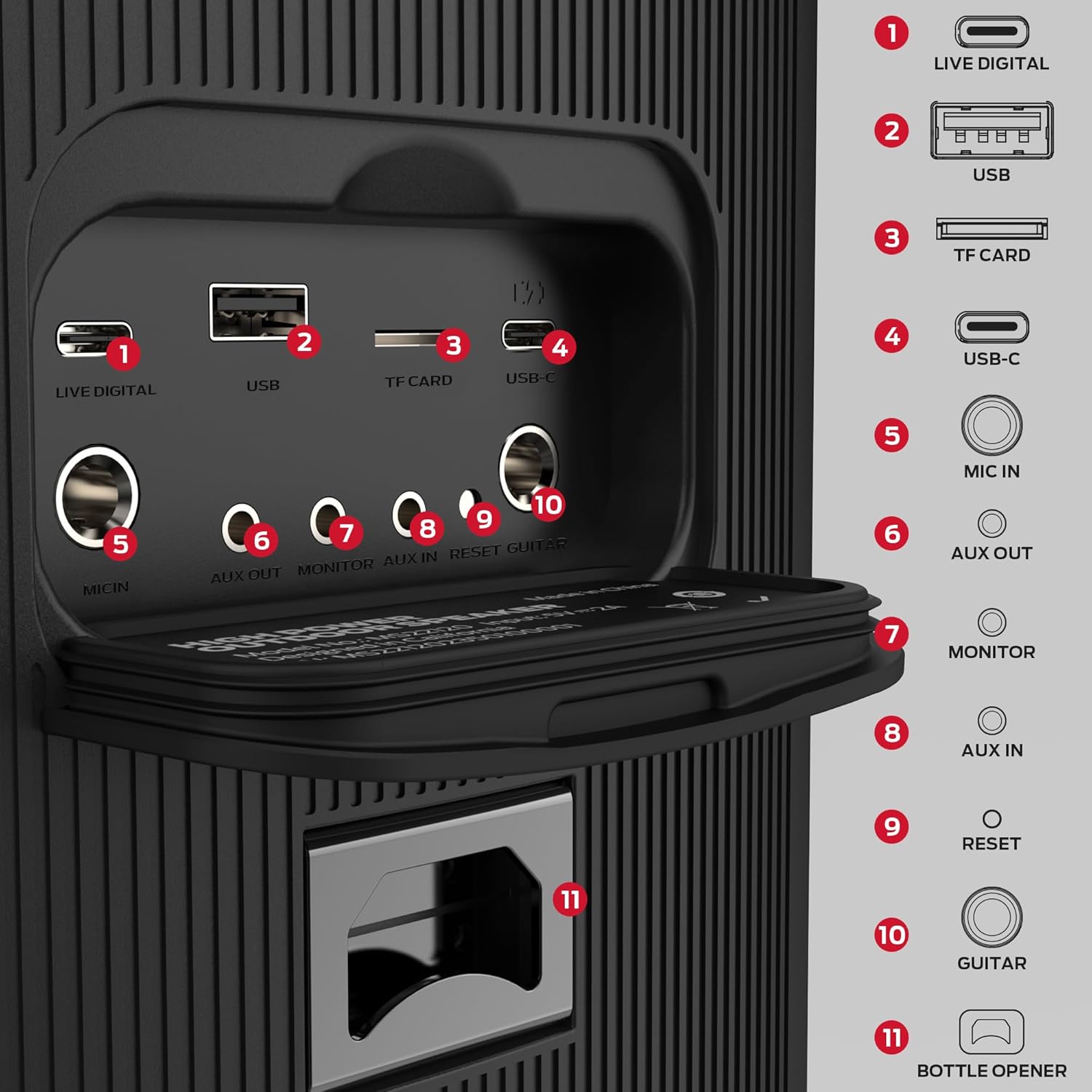
Figure 4.2: Rear panel connections and controls, including USB, TF Card, USB-C, Mic In, AUX Out, Monitor, AUX In, Reset, and Guitar inputs, along with a bottle opener.
Control Panel Layout:

Figure 4.3: Top control panel detailing buttons for Sound Mode (Bass Boost), Backup/Original Vocals Switch, Microphone Priority, and Light Mode.
- Power Button: Turns the speaker on or off.
- Bluetooth Button: Initiates Bluetooth pairing mode.
- Volume Knob: Adjusts the master volume.
- Light Mode Button: Cycles through different lighting effects.
- Sound Mode Button (Bass Boost): Toggles between EQ modes, including Bass Boost.
- Microphone Volume/Echo Controls: Adjusts microphone input volume and echo effect.
- Backup/Original Vocals Switch: For karaoke functions.
- Microphone Priority: Prioritizes microphone audio over music.
- USB Port: For USB drive playback.
- TF Card Slot: For TF (MicroSD) card playback.
- USB-C Port: For charging the speaker.
- MIC IN: 6.35mm input for microphone.
- AUX OUT: 3.5mm audio output.
- MONITOR: 3.5mm monitor output.
- AUX IN: 3.5mm audio input.
- RESET Button: Resets the speaker.
- GUITAR IN: 6.35mm input for guitar.
- Bottle Opener: Integrated utility feature.
5. Setup
5.1 Charging the Speaker
Before first use, fully charge the speaker. Connect the provided USB-C charging cable to the speaker's USB-C port and the other end to a compatible USB power adapter (not included). The charging indicator will show the charging status. A full charge provides up to 24 hours of playtime, depending on volume and audio content.

Figure 5.1: The speaker offers up to 24 hours of battery life for extended use.
5.2 Powering On/Off
Press and hold the Power button on the control panel to turn the speaker on or off.
5.3 Bluetooth Pairing
- Turn on the Monster Cycle Plus speaker. It will automatically enter Bluetooth pairing mode, indicated by a flashing Bluetooth indicator.
- Enable Bluetooth on your mobile device (smartphone, tablet, etc.).
- Search for "Monster Cycle Plus" in the list of available Bluetooth devices.
- Select "Monster Cycle Plus" to connect. Once connected, the Bluetooth indicator will stop flashing and remain solid.
- You can now play audio from your device through the speaker.

Figure 5.2: Bluetooth 5.3 connectivity ensures a stable and extended wireless range.
5.4 Connecting Multiple Speakers (Bluetooth Broadcast Link)
The Monster Cycle Plus supports connecting up to 100 units for a wider sound experience. Refer to the Quick Start Guide for specific instructions on initiating the Bluetooth Broadcast Link feature.
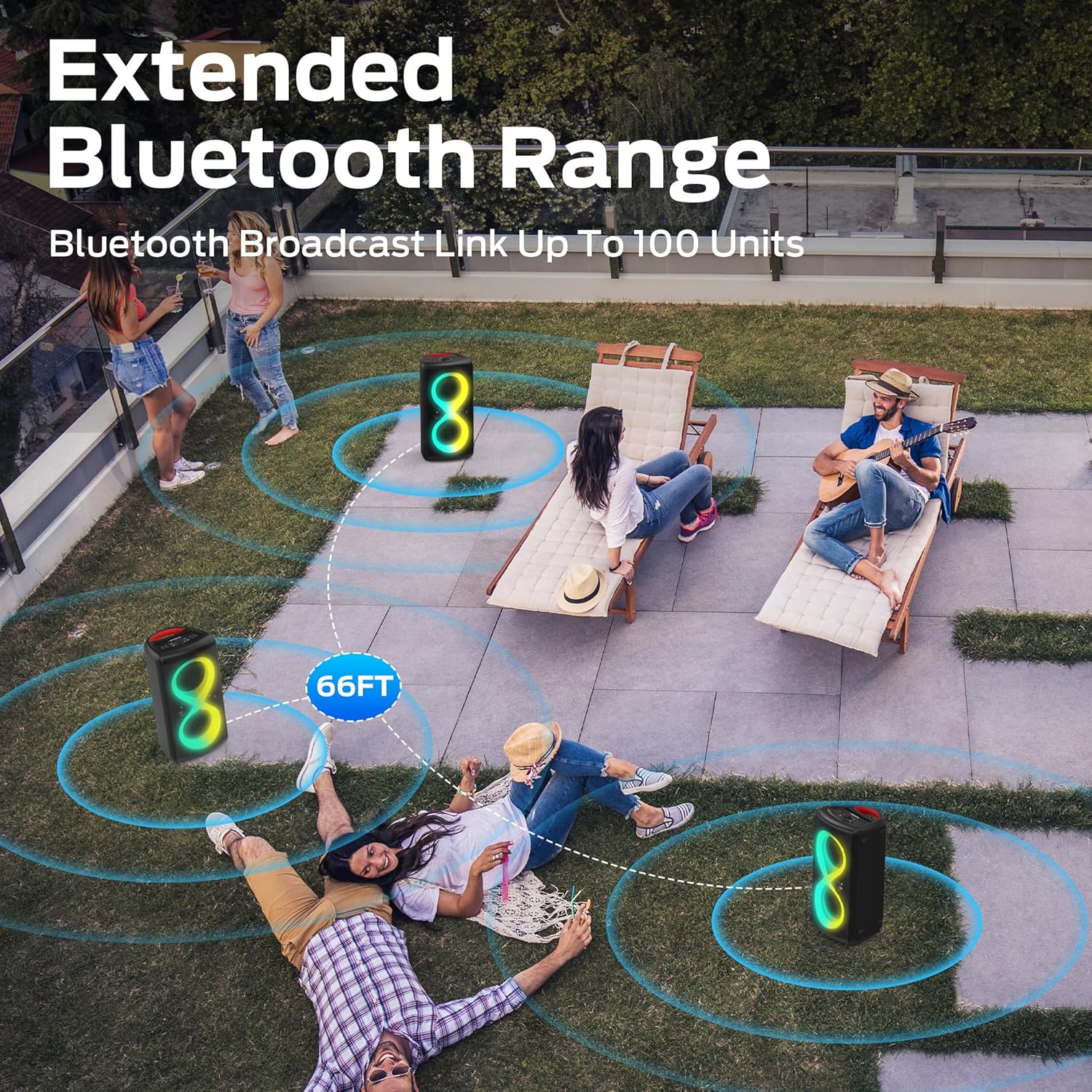
Figure 5.3: Extend your audio coverage by linking multiple speakers with an effective range of up to 66 feet.
5.5 AUX, USB, and TF Card Connections
- AUX Input: Use the provided AUX cable to connect external audio devices (e.g., MP3 players, laptops) to the speaker's AUX IN port.
- USB Playback: Insert a USB flash drive containing audio files into the USB port for direct playback.
- TF Card Playback: Insert a TF (MicroSD) card containing audio files into the TF Card slot for direct playback.
6. Operation
6.1 Basic Audio Controls
- Volume Adjustment: Rotate the master volume knob to increase or decrease the volume.
- Play/Pause: Press the Play/Pause button (usually integrated with the volume knob or a dedicated button) to pause or resume playback.
- Track Skip: Use the Previous/Next track buttons to navigate through your audio files.
6.2 EQ Modes and Bass Boost
The speaker features 3 EQ modes. Press the Sound Mode button (often labeled "Bass Boost") to cycle through available equalization presets, including a powerful Bass Boost mode for enhanced low-frequency sound.

Figure 6.1: Experience high-performance sound with 380W peak power output.
6.3 Dynamic Lighting Effects
The Monster Cycle Plus speaker features 7 dynamic lighting effects. Press the Light Mode button to cycle through these effects and enhance your listening experience with vibrant visuals.
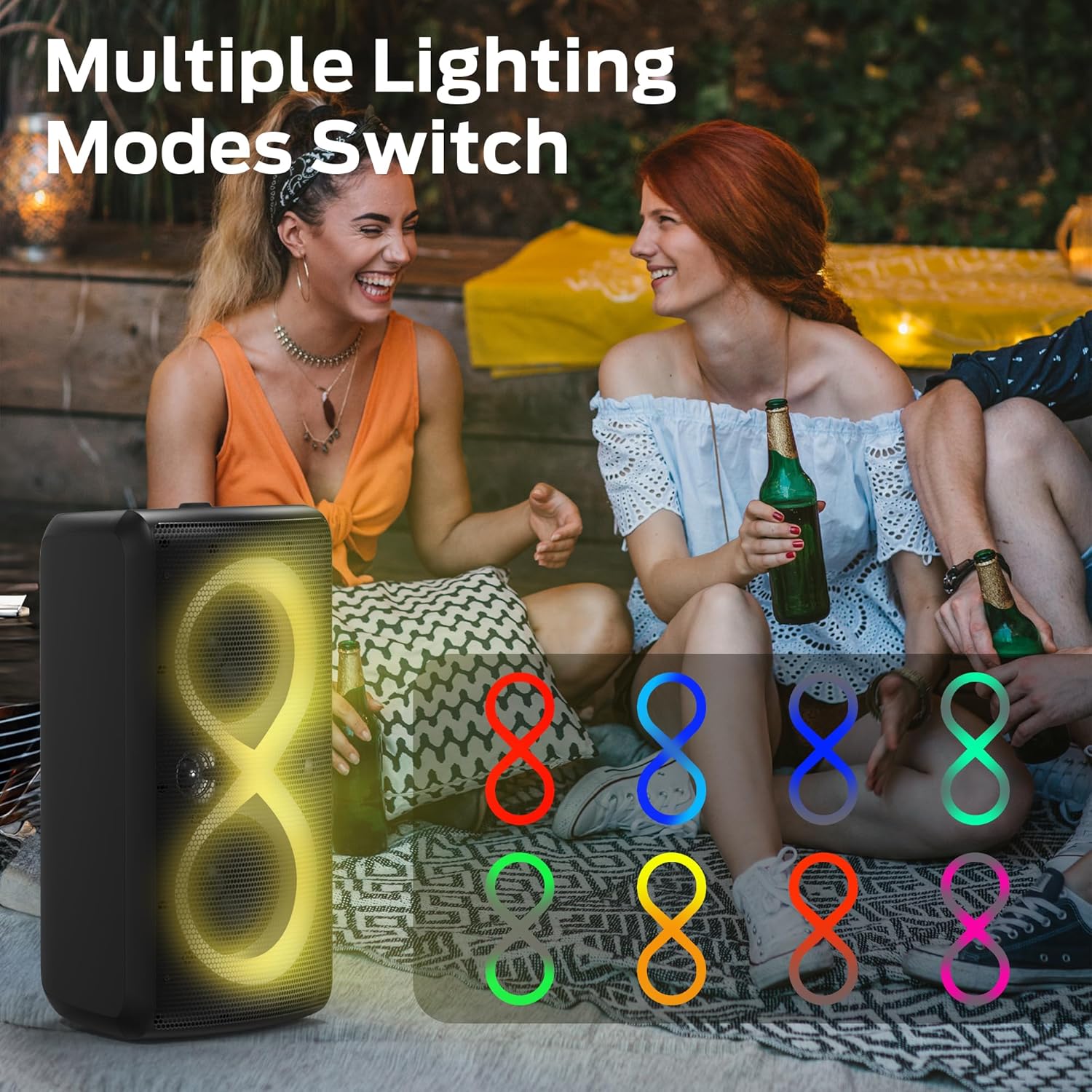
Figure 6.2: Explore multiple lighting modes to match your mood or party atmosphere.
6.4 Microphone and Guitar Input
Connect a microphone to the MIC IN port or a guitar to the GUITAR IN port. Use the dedicated volume and echo controls for the microphone to adjust the sound. The Microphone Priority function allows the microphone audio to take precedence over background music.
6.5 Mobile Phone Holder Function
The speaker is designed with an integrated slot on top to securely hold your mobile phone or tablet, providing a convenient setup for karaoke or media viewing.

Figure 6.3: Utilize the built-in phone holder for a hands-free experience.
6.6 Portability and Placement
The Monster Cycle Plus speaker features grab handles for easy single-handed or two-handed carrying. It can be placed vertically or horizontally to suit your space and audio projection needs.

Figure 6.4: The speaker is designed with convenient handles for easy transport.
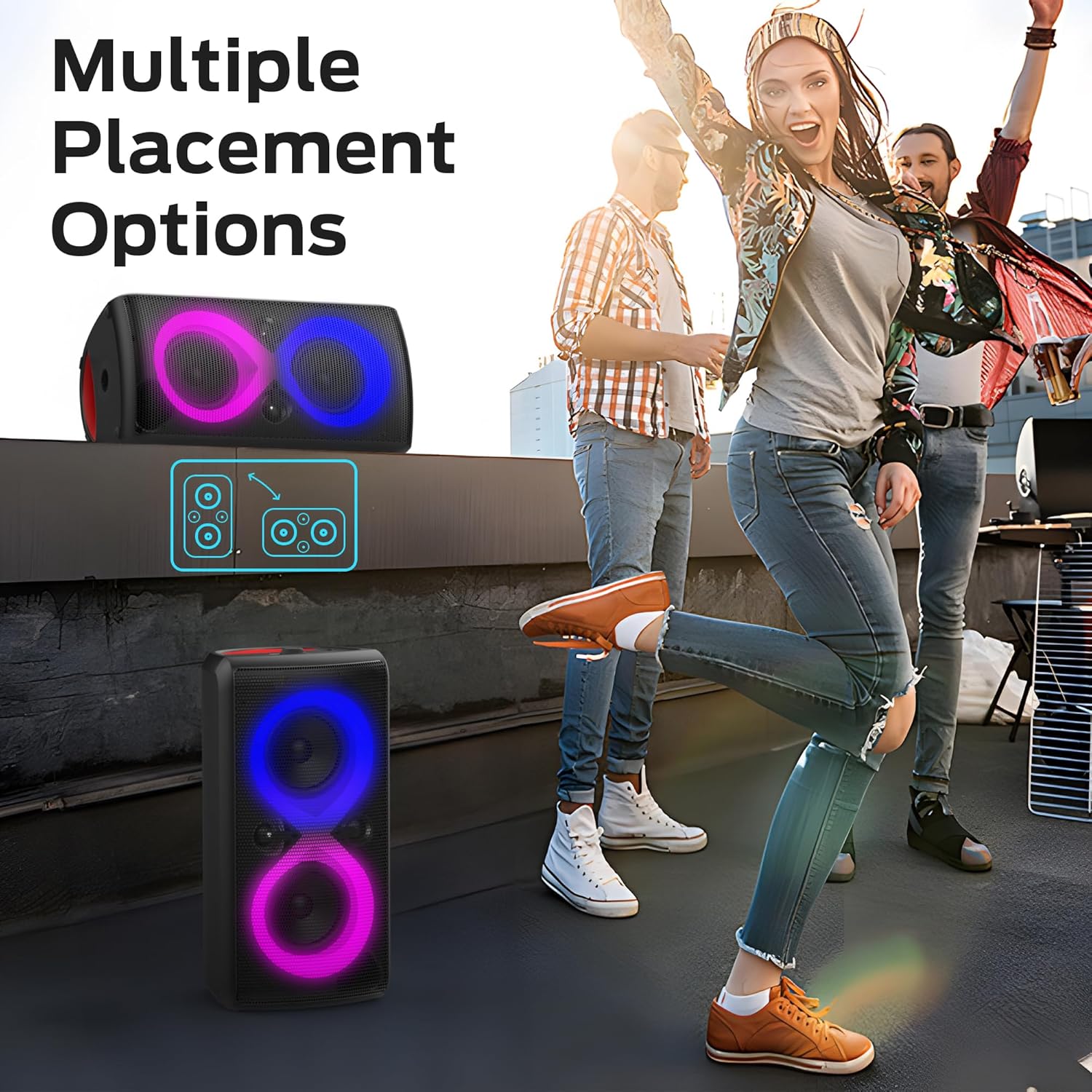
Figure 6.5: Multiple placement options allow for versatile use in any setting.
6.7 Water Resistance (IPX6)
The speaker is rated IPX6, meaning it is protected against powerful water jets. This makes it suitable for outdoor use and poolside environments, but it should not be submerged in water.

Figure 6.6: The IPX6 rating provides protection against strong water splashes.
7. Maintenance
- Cleaning: Wipe the speaker with a soft, dry cloth. Do not use abrasive cleaners, alcohol, or other chemical solvents, as they may damage the surface.
- Storage: When not in use for extended periods, store the speaker in a cool, dry place, away from direct sunlight and extreme temperatures.
- Battery Care: To prolong battery life, avoid fully discharging the battery frequently. Charge the speaker regularly, even if not in use.
8. Troubleshooting
| Problem | Possible Cause | Solution |
|---|---|---|
| Speaker does not turn on. | Battery is low or depleted. | Charge the speaker using the provided USB-C cable. |
| No sound from the speaker. | Volume is too low; Device not connected; Incorrect input mode. | Increase volume; Ensure Bluetooth is paired or AUX/USB/TF card is properly connected; Select correct input mode. |
| Bluetooth connection unstable or fails. | Device is too far from speaker; Interference; Speaker not in pairing mode. | Move device closer to speaker (within 66ft); Avoid obstacles; Re-enter pairing mode on speaker and device. |
| Microphone/Guitar input not working. | Cable not fully inserted; Volume too low; Microphone Priority not enabled. | Ensure cables are securely connected; Adjust MIC/GUITAR volume; Activate Microphone Priority if needed. |
| Lights are not working. | Light mode is off or set to a static color. | Press the Light Mode button to cycle through effects. |
9. Specifications
- Brand: Monster
- Model: Monster Cycle Plus Bluetooth Speaker
- Output Wattage: 380 Watts (Peak)
- Number of Channels: 2
- Connectivity Technology: Bluetooth 5.3
- Product Dimensions (L x W x H): 1.97 x 3.94 x 2.36 inches
- Item Weight: 21.2 pounds
- Batteries: 1 A battery required (included)
- Playtime: Up to 24 hours (subject to volume, environment, and audio content)
- Water Resistance: IPX6
- Color: Black
- UPC: 810079703395
10. Warranty and Support
Monster provides a worry-free shopping experience. Your product comes with a warranty letter included in the package. For specific warranty terms and conditions, please refer to the warranty letter or contact Monster customer service.
If you have any questions, require technical assistance, or need pre-sales or after-sales support, please feel free to contact our 24-hour customer service team. Contact information can typically be found on the warranty letter or the official Monster website.
Ask a question about this manual
Ask about setup, troubleshooting, compatibility, parts, safety, or missing instructions. Manuals+ will review the question and use this page’s manual context to help answer it.