1. Safety Information
Please read all instructions carefully before assembly and use. Retain this manual for future reference.
- Assembly should be done with care, following the provided instructions. Ensure all components are securely fastened.
- Do not exceed the maximum weight capacity of 265 lbs (120 kg). Exceeding this limit may cause damage to the chair or personal injury.
- Keep the chair away from liquids and excessive moisture to prevent electrical hazards and material damage.
- Ensure the power cord for the massage and heating functions is not pinched or damaged during use or adjustment.
- Avoid standing on the chair or using it as a step stool.
2. Product Overview
The Vinsetto 921-674V80CG Executive Massage Office Chair is designed for comfort and functionality in an office or home setting. It features a microfibre upholstery, double-tier padding, and a sturdy chrome-plated base with swivel wheels.
Key Features:
- Six-Point Vibration Massage: Provides targeted relief with five different modes.
- Lumbar Heating Function: Offers warmth to the lower back area.
- Reclining Backrest: Adjustable up to 135 degrees for relaxation.
- Retractable Footrest: Extends for leg support.
- Adjustable Seat Height: Customize to your preferred desk height.
- Padded Armrests: For enhanced comfort.
- 360-Degree Swivel: Allows for easy movement.

Image 1: The Vinsetto Executive Massage Office Chair in a reclined position with the footrest extended, demonstrating its relaxation capabilities.

Image 2: Close-up details of the chair's construction, including the microfibre fabric, swivel mechanism, thick padding, gas lift, and sturdy base.
3. Setup and Assembly
Assembly of the Vinsetto Executive Massage Office Chair is required. Please follow the included instructions carefully. Ensure all parts are present before beginning assembly.
Unboxing and Component Check:
Upon receiving your chair, carefully unbox all components and verify against the parts list in your physical manual. The video below demonstrates the unboxing process and shows the main components.
Video 1: An unboxing and assembly overview of the Vinsetto 921-674V80CG Massage Office Chair. This video provides a visual guide to the initial setup steps.
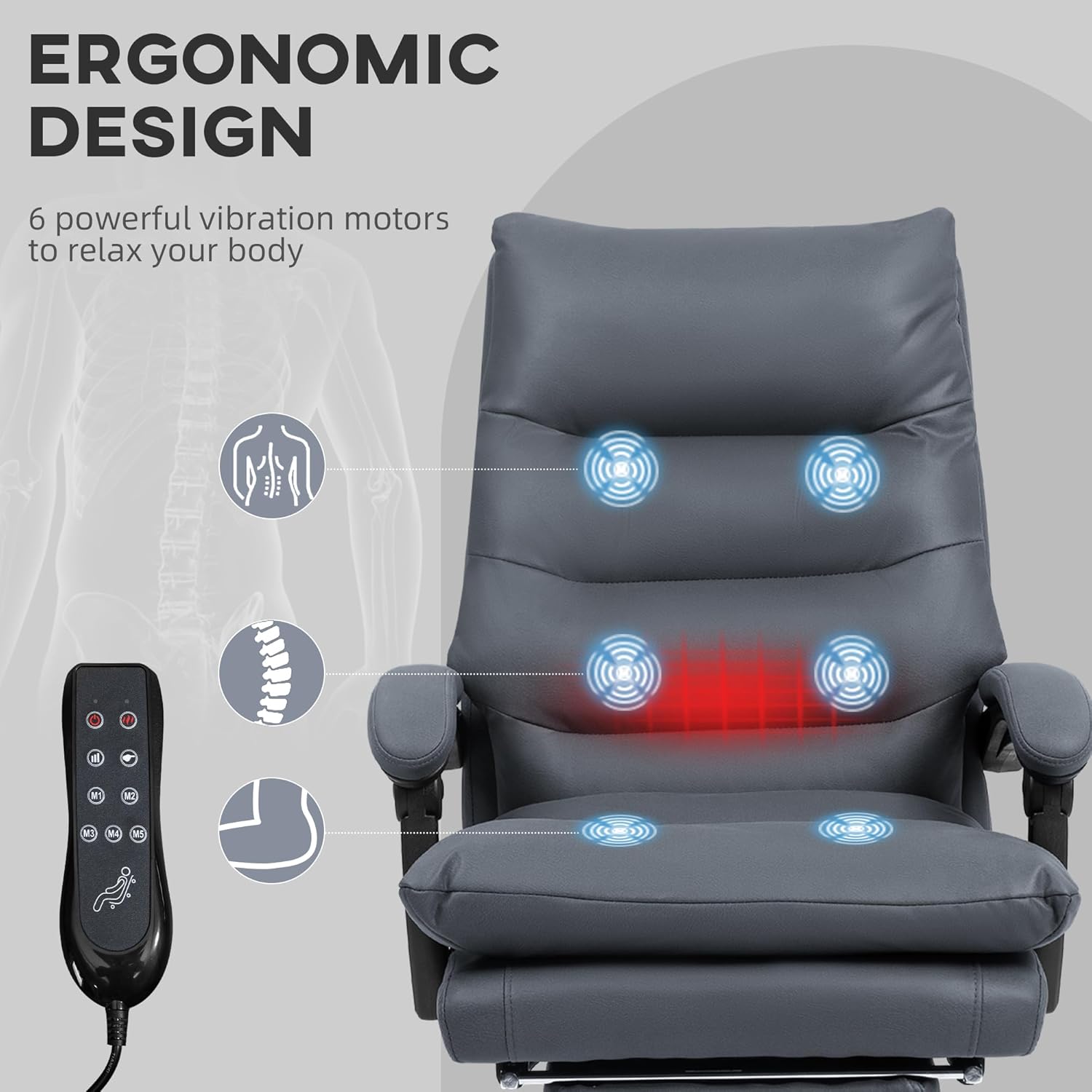
Image 3: Illustration of the chair's ergonomic design, highlighting the placement of the six vibration motors and the remote control for massage and heating functions.
4. Operating Instructions
4.1. Massage and Heating Functions
The chair features a six-point vibration massage system with five modes and a lumbar heating function. These are controlled via a wired remote.
- Locate the remote control, typically stored in a side pocket.
- Ensure the chair is plugged into a power outlet.
- Use the buttons on the remote to select massage modes (M1-M5), adjust intensity, and activate the heating function.
- Set a timer for the massage and heat duration as desired.
4.2. Reclining Function
The backrest can be reclined up to 135 degrees for a comfortable resting position.
- Locate the recline lever, usually on the side of the chair, beneath the seat.
- Pull the lever upwards to unlock the backrest.
- Lean back to the desired angle (up to 135 degrees).
- Release the lever to lock the backrest in place.
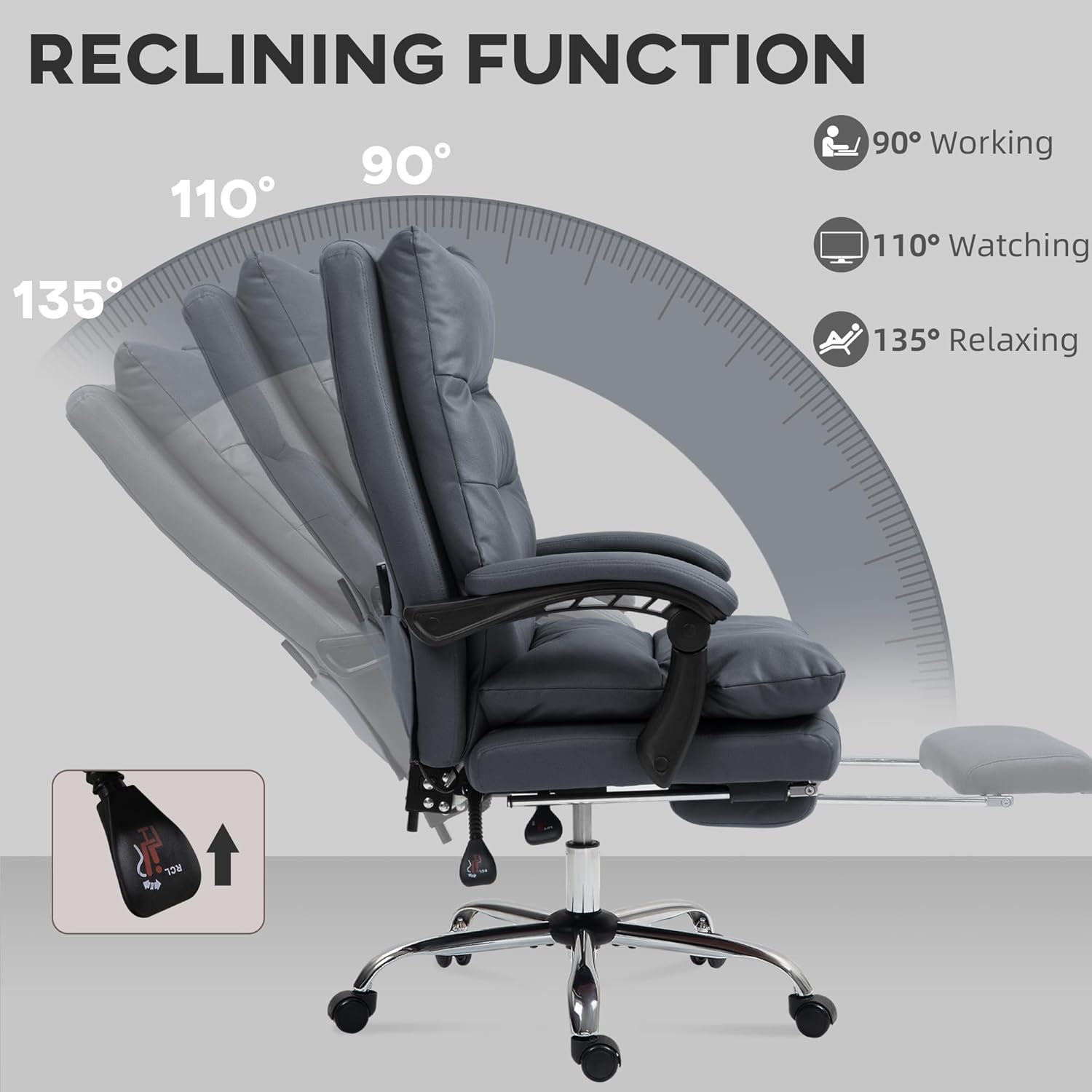
Image 4: Visual representation of the chair's reclining capabilities, showing various angles suitable for working, watching, and relaxing.
4.3. Footrest Operation
A retractable footrest is integrated for additional leg support.
- To extend, pull the footrest out from underneath the seat.
- Flip the padded section upwards to create a flat surface.
- To retract, flip the padded section down and push the footrest back under the seat until it is fully stored.

Image 5: A detailed image of the chair's retractable footrest in its extended position.
4.4. Height Adjustment
Adjust the seat height to match your desk and personal preference.
- Locate the height adjustment lever, typically on the right side beneath the seat.
- To raise the seat, lift the lever while taking your weight off the seat.
- To lower the seat, lift the lever while remaining seated.
- Release the lever to lock the seat height.

Image 6: Illustration demonstrating the adjustable seat height feature, showing how to raise the chair.
5. Maintenance
Proper maintenance ensures the longevity and performance of your Vinsetto office chair.
- Cleaning: Wipe clean with a damp cloth. Avoid harsh chemicals or abrasive cleaners that may damage the microfibre material.
- Inspection: Periodically check all screws and bolts to ensure they are tight. Re-tighten if necessary.
- Casters: Keep the swivel wheels free of debris to ensure smooth movement.
- Electrical Components: Ensure the power cord and remote control are not damaged. If damage occurs, discontinue use and contact customer support.
6. Troubleshooting
If you encounter any issues with your Vinsetto Executive Massage Office Chair, please refer to the following common solutions:
- Chair not adjusting height: Ensure the height adjustment lever is fully engaged and that you are applying appropriate weight (or lack thereof) when operating the lever.
- Massage/Heat not working: Check that the power cord is securely plugged into both the chair and a working power outlet. Inspect the remote control for any visible damage.
- Chair squeaks or wobbles: Re-tighten all assembly bolts and screws. Ensure the chair is on a flat, even surface.
- Casters not rolling smoothly: Check for hair or debris caught in the wheels and clean them.
For issues not listed here, please contact Vinsetto customer support.
7. Specifications
| Brand | Vinsetto |
| Model Name | Massage Office Chair |
| Model Number | 921-674V80CG |
| Color | Dark Gray |
| Material | 100% Polyester (Microfibre), Foam Fill, Steel Base |
| Overall Dimensions | 25.5" W x 28.25" D x 43" - 46" H |
| Seat Size | 22.5" W x 17.75" D |
| Seat Height | 21.75" - 24.75" |
| Backrest Width | 20 Inches |
| Backrest Interior Height | 28.75 Inches |
| Arm Height | 6.75 Inches |
| Reclining Angle | Up to 135° |
| Maximum Weight Capacity | 265 lbs (120 kg) |
| Item Weight | 42 lbs (19 kg) |

Image 7: Detailed dimensional drawing of the chair, providing measurements for various parts.
8. Warranty and Support
For warranty information or technical support, please refer to the documentation included with your purchase or contact Vinsetto customer service directly. Keep your proof of purchase for any warranty claims.


