
1. Introduction
The ULANZI A30 Tiny Mic Magnetic is a compact and lightweight wireless lavalier microphone system designed for high-quality audio recording across various devices. It features magnetic and clip-on wearing options, environmental noise cancellation, and broad compatibility, making it suitable for video recording, live streaming, and online meetings.

Figure 1: ULANZI A30 Tiny Mic Magnetic Wireless Lavalier Microphone System. This image displays the compact transmitter, receiver, and charging case, highlighting the product's sleek design.
2. Package Contents
Please check the package to ensure all items are present:
- Transmitter (TX) x2
- Receiver (RX) x1
- Charging Case x1
- Furry Windshield x2
- Carrying Bag x1
- USB-C to 3.5mm TRS Cable x1
- Charging Cable (USB-A to USB-C) x1
- USB-C to Lightning Connector x1
- Replaceable Cover (Black) x2
- Replaceable Cover (White) x2
- Mag Mount x2
- DIY Sticker x1
- User Manual x1

Figure 2: Detailed view of the ULANZI A30 package contents. This image shows all included accessories neatly arranged, such as the transmitters, receiver, charging case, cables, windshields, and user manual.
3. Product Features
- Ultra-Portable Design: Extremely compact and lightweight (11g), offering flexible wearing options with a magnetic clip for easy attachment.
- Wireless Freedom: Provides a stable wireless transmission range of up to 50 meters (unshielded) and 30 meters (shielded) for reliable audio capture.
- Exceptional Sound Quality: Delivers studio-grade audio with 48kHz/16bit format, ensuring clear and precise sound reproduction.
- Long Battery Life: Offers up to 20 hours of use with the charging case, 5 hours with Environmental Noise Cancellation (ENC) off, and quick recharging in under 1.5 hours.
- Wide Compatibility: Seamlessly works with DSLR cameras, iPhones, Android devices, and PCs, providing versatile usage across different platforms.
4. Setup
4.1 Charging the Device
Before first use, fully charge the transmitters and the charging case. Place the transmitters into the charging case and connect the charging case to a USB power source using the provided USB-C cable. The indicator lights will show charging status.
4.2 Pairing
The transmitters and receiver are pre-paired at the factory. If re-pairing is needed:
- Turn on the transmitter(s) and receiver.
- Place the transmitter(s) near the receiver. They should automatically connect. A solid blue light on the transmitter and receiver indicates a successful connection.
4.3 Connecting to Your Device
The ULANZI A30 offers broad compatibility:
- Smartphones (USB-C): Plug the receiver directly into your Android phone's USB-C port.
- iPhones/iPads (Lightning): Attach the USB-C to Lightning connector to the receiver, then plug it into your iOS device.
- DSLR Cameras/PCs (3.5mm TRS): Use the provided USB-C to 3.5mm TRS cable. Plug the USB-C end into the receiver and the 3.5mm end into your camera's microphone input or PC's audio input.

Figure 3: ULANZI A30 demonstrating universal compatibility. This image shows the microphone system connected to various devices including a laptop, smartphone, tablet, and camera, illustrating its versatile connectivity options.
4.4 Wearing the Microphone
The ULANZI A30 offers two primary ways to wear the transmitter:
- Magnetic Attachment: Use the included Mag Mount. Place the magnetic base inside your clothing and snap the microphone onto the outside.
- Clip-on: The transmitter has a built-in clip. Attach it directly to your collar or clothing.
For optimal audio quality, position the microphone approximately 6-8 inches (15-20 cm) from your mouth. Attach the furry windshield for outdoor use or in windy conditions to reduce plosives and wind noise.
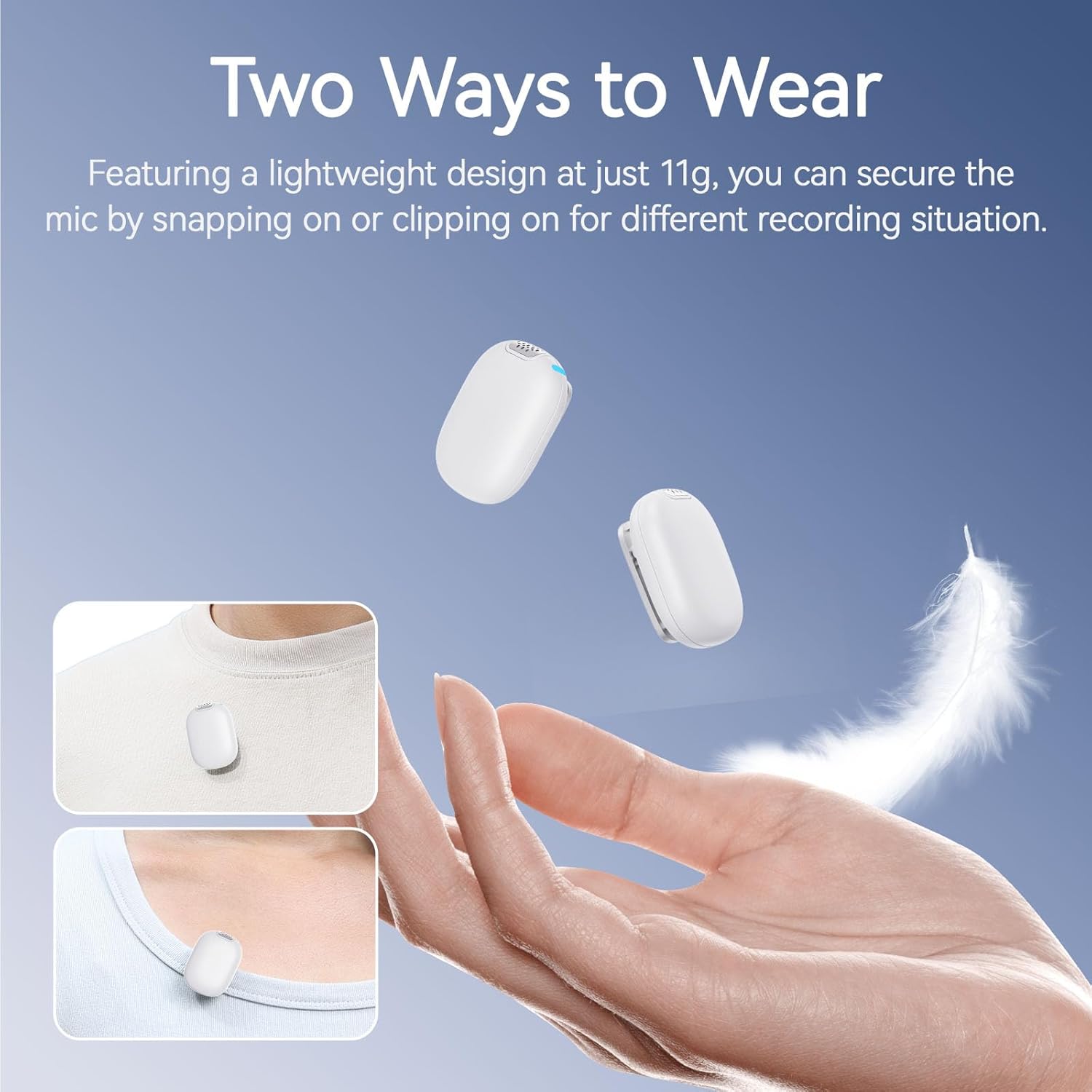
Figure 4: ULANZI A30 showing two ways to wear the microphone. This image illustrates both the magnetic attachment method on clothing and the traditional clip-on method, demonstrating the microphone's versatility.
5. Operating Instructions
5.1 Power On/Off
- Power On: Press and hold the power button on the transmitter(s) and receiver for 2 seconds. The indicator lights will illuminate.
- Power Off: Press and hold the power button on the transmitter(s) and receiver for 2 seconds. The indicator lights will turn off.
5.2 Environmental Noise Cancellation (ENC)
The ULANZI A30 features an Environmental Noise Cancellation function to reduce background noise for clearer audio.
- Activate ENC: Short press the ENC button (often marked with a waveform or noise reduction icon) on the transmitter. The indicator light may change color or pattern to confirm activation.
- Deactivate ENC: Short press the ENC button again.
Note: While ENC improves clarity in noisy environments, it may slightly alter the natural sound of your voice. Use it as needed.

Figure 5: ULANZI A30 demonstrating its noise cancellation capabilities. This image visually represents how environmental noise is reduced, showing a microphone with a furry windshield and a waveform illustrating noise reduction.
5.3 Status Indicators
Refer to the LED indicators on the transmitter and receiver for operational status:
- Solid Blue: Connected and operating normally.
- Flashing Blue: Searching for connection/pairing mode.
- Solid Red: Low battery.
- Solid Green (while charging): Fully charged.
- Breathing Red/Orange (while charging): Charging in progress.
5.4 Battery Life
The ULANZI A30 provides extended battery life for prolonged recording sessions.
- Up to 5 hours of continuous use per transmitter (with ENC off).
- Up to 20 hours of total use with the fully charged charging case.
- Full recharge of transmitters in the case takes less than 1.5 hours.

Figure 6: ULANZI A30 illustrating its long-lasting battery life. This image highlights the 5-hour battery life of the microphone and the 20-hour extended life with the charging case, along with the quick charging time.
5.5 Sound Quality
The ULANZI A30 captures audio at a 48kHz/16bit sampling rate, ensuring high fidelity and clarity for your recordings.

Figure 7: ULANZI A30 demonstrating studio-grade sound quality. This image visually compares a 'rough noise' waveform to a 'clear original sound' waveform, illustrating the microphone's ability to capture audio with accuracy.
5.6 Wireless Transmission Range
The system provides a robust wireless connection:
- Up to 50 meters (164 feet) in unshielded, open environments.
- Up to 30 meters (98 feet) in shielded environments (e.g., indoors with obstacles).

Figure 8: ULANZI A30 illustrating its wireless transmission distance. This image shows the microphone system operating over distances of 50m (unshielded) and 30m (shielded) in an outdoor snowy landscape.
6. Maintenance
6.1 Cleaning
Wipe the microphone and charging case with a soft, dry cloth. Do not use liquid cleaners or solvents, as they may damage the device.
6.2 Storage
Store the device in a cool, dry place away from direct sunlight and extreme temperatures. Use the provided carrying bag for protection during transport.
6.3 Battery Care
To prolong battery life, avoid fully discharging the device frequently. If storing for an extended period, charge the device to about 50% every three months.
7. Troubleshooting
| Problem | Possible Cause | Solution |
|---|---|---|
| No sound output | Microphone not powered on; Not paired; Incorrect connection; Device volume too low. | Ensure TX and RX are on; Check pairing status (solid blue light); Verify receiver is correctly plugged into recording device; Adjust device's input volume. |
| Poor audio quality/Interference | Too far from receiver; Obstructions; Strong electromagnetic interference; Low battery. | Reduce distance between TX and RX; Ensure clear line of sight; Move away from Wi-Fi routers or other wireless devices; Recharge batteries. |
| Microphone not charging | Charging cable or adapter faulty; Poor contact in charging case. | Try a different USB-C cable and power adapter; Ensure transmitters are correctly seated in the charging case. |
| ENC not working | ENC not activated. | Short press the ENC button on the transmitter to activate. |
8. Specifications
| Feature | Detail |
|---|---|
| Brand | ULANZI |
| Model Name | A30 (AA12) |
| Connectivity Technology | Bluetooth (Wireless) |
| Connector Type | USB Type-C |
| Special Feature | Magnetic Clip |
| Compatible Devices | Smartphones (iOS/Android), DSLR Cameras, PCs |
| Color | White |
| Polar Pattern | Unidirectional |
| Microphone Form Factor | Lavalier |
| Power Source | Battery Powered |
| Battery Type | 12V (included) |
| Number of Channels | 1 |
| Enclosure Material | Plastic or Lightweight Metal Alloy |
| Transmission Range | Up to 50m (unshielded), 30m (shielded) |
| Audio Format | 48kHz/16bit |
| Battery Life (TX) | 5 hours (ENC off) |
| Battery Life (with case) | Up to 20 hours |
| Charging Time | <1.5 hours (charging case) |
9. Warranty and Support
9.1 Warranty Information
This ULANZI product comes with a 1 Year Manufacturer Warranty from the date of purchase. This warranty covers defects in materials and workmanship under normal use. It does not cover damage caused by misuse, accidents, unauthorized modifications, or improper maintenance.
9.2 Customer Support
For technical support, warranty claims, or any questions regarding your ULANZI A30 Tiny Mic Magnetic, please visit the official ULANZI website or contact their customer service department. Please have your product model and purchase information ready when contacting support.