Introduction
This user manual provides detailed instructions for the setup, operation, and maintenance of your SANDY Remote Control, model B0DLGVV2LP. This remote is specifically designed to be compatible with Coocaa 108 cm (43 inch) Full HD LED Smart Coolita TV 2024 Edition, including the 43S3U Plus model. It offers seamless control over your TV's functions, including power, volume, channel selection, input switching, and direct access to popular streaming services.

Figure 1: Overview of the SANDY Remote Control.
Compatibility and Important Notes
This remote control is compatible with various Coocaa Smart LED TV models, specifically tested for the Coocaa 43S3U Plus. To ensure proper functionality, it is crucial that your original TV remote control is functionally identical to the SANDY remote control shown in this manual. This remote does not support voice commands or Google Assistant functionality.
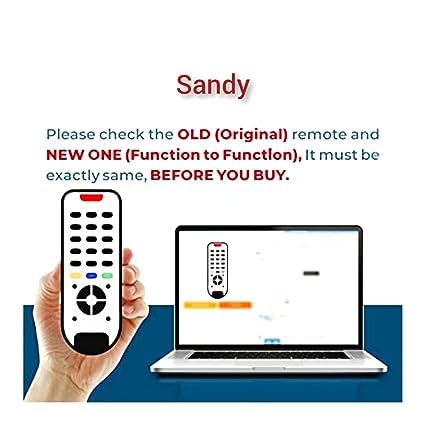
Figure 2: Visual guide for comparing your original remote with the SANDY remote to ensure compatibility. Both remotes must have the same button layout and functions.
Figure 3: This remote control does not include voice control or Google Assistant features.
Setup Guide
- Insert Batteries: Locate the battery compartment on the back of the remote control. Insert two AAA batteries, ensuring the correct polarity (+ and -) as indicated inside the compartment. Close the battery cover securely.
- No Programming Required: This remote control is pre-programmed for compatible Coocaa Smart LED TVs. No additional setup or pairing is required.
- Test Functionality: Point the remote control towards your Coocaa TV and press the Power button (⏻). If the TV turns on or off, the remote is ready for use.
If the remote does not respond, please check the battery insertion and ensure there are no obstructions between the remote and the TV's infrared receiver.
Operating Instructions
The SANDY remote control features an intuitive layout for easy navigation and control of your Coocaa Smart LED TV.

Figure 4: Key buttons and their functions on the SANDY Remote Control.
Key Functions:
- Power Button (⏻): Turns the TV on or off.
- Input/Source Button (⎚): Switches between different input sources (HDMI, AV, etc.).
- Mute Button (🔇): Mutes or unmutes the TV audio.
- Navigation Pad (Up, Down, Left, Right, OK): Used to navigate menus, select options, and confirm choices.
- Back Button (↩): Returns to the previous screen or menu.
- Home Button (🏠): Accesses the TV's main home screen or smart TV interface.
- Menu Button (☰): Opens the TV's settings or options menu.
- Volume Up/Down (VOL +/-): Adjusts the TV's volume level.
- Channel Up/Down (CH +/-): Changes TV channels (if applicable).
- Dedicated Streaming Buttons (YouTube, JioCinema, Prime Video): Provides direct access to these popular streaming applications on your smart TV.
Maintenance and Care
- Cleaning: Use a soft, dry cloth to clean the remote control. Do not use liquid cleaners or abrasive materials, as they may damage the surface or internal components.
- Battery Replacement: Replace batteries when the remote's responsiveness decreases or it stops functioning. Always replace both batteries at the same time with new AAA batteries.
- Storage: Store the remote control in a cool, dry place away from direct sunlight, extreme temperatures, and high humidity.
- Avoid Drops: While designed for durability, avoid dropping the remote control, as this can cause internal damage.
Troubleshooting
| Problem | Possible Cause | Solution |
|---|---|---|
| Remote not responding. | Dead or incorrectly inserted batteries. | Replace batteries with new AAA batteries, ensuring correct polarity. |
| Remote works intermittently. | Low battery power; obstruction between remote and TV; remote too far from TV. | Replace batteries. Remove any obstructions. Move closer to the TV. |
| Specific buttons not working. | Button stuck or damaged; TV model incompatibility for that specific function. | Ensure the button is not physically stuck. Verify your TV model's compatibility with all remote functions. |
| TV does not respond to any commands. | TV's IR sensor is blocked or faulty; remote is not compatible. | Ensure TV's IR sensor is clear. Confirm the remote's compatibility with your exact TV model as per the "Compatibility" section. |
Product Specifications
| Brand | SANDY |
| Model Number | B0DLGVV2LP |
| Compatible Devices | Coocaa 108 cm (43 inch) Full HD LED Smart Coolita TV (e.g., 43S3U Plus) |
| Connectivity Technology | Infrared (IR) |
| Power Source | 2 x AAA Batteries (not included) |
| Product Dimensions (LxWxH) | 40 x 20 x 160 mm (4 x 2 x 16 cm) |
| Item Weight | 80 g |
| Color | Black |
| Special Features | No Programming Required, Dedicated Streaming Buttons |
Warranty and Support
For information regarding product warranty or technical support, please refer to the documentation provided with your purchase or contact SANDY customer service through the retailer where the product was acquired. Ensure you have your purchase details and product model number (B0DLGVV2LP) ready when seeking support.