1. Introduction
The Weytoll 15-in-1 Smart Air Quality Monitor is a comprehensive device designed to provide real-time measurements of various indoor air quality parameters. This monitor helps you understand and manage your environment by detecting levels of Carbon Dioxide (CO2), Formaldehyde (HCHO), Total Volatile Organic Compounds (TVOC), Air Quality Index (AQI), Particulate Matter (PM0.3, PM1.0, PM2.5, PM10), Temperature, and Humidity. Additionally, it features time display, alarm, timer, and countdown timer functions for enhanced utility.
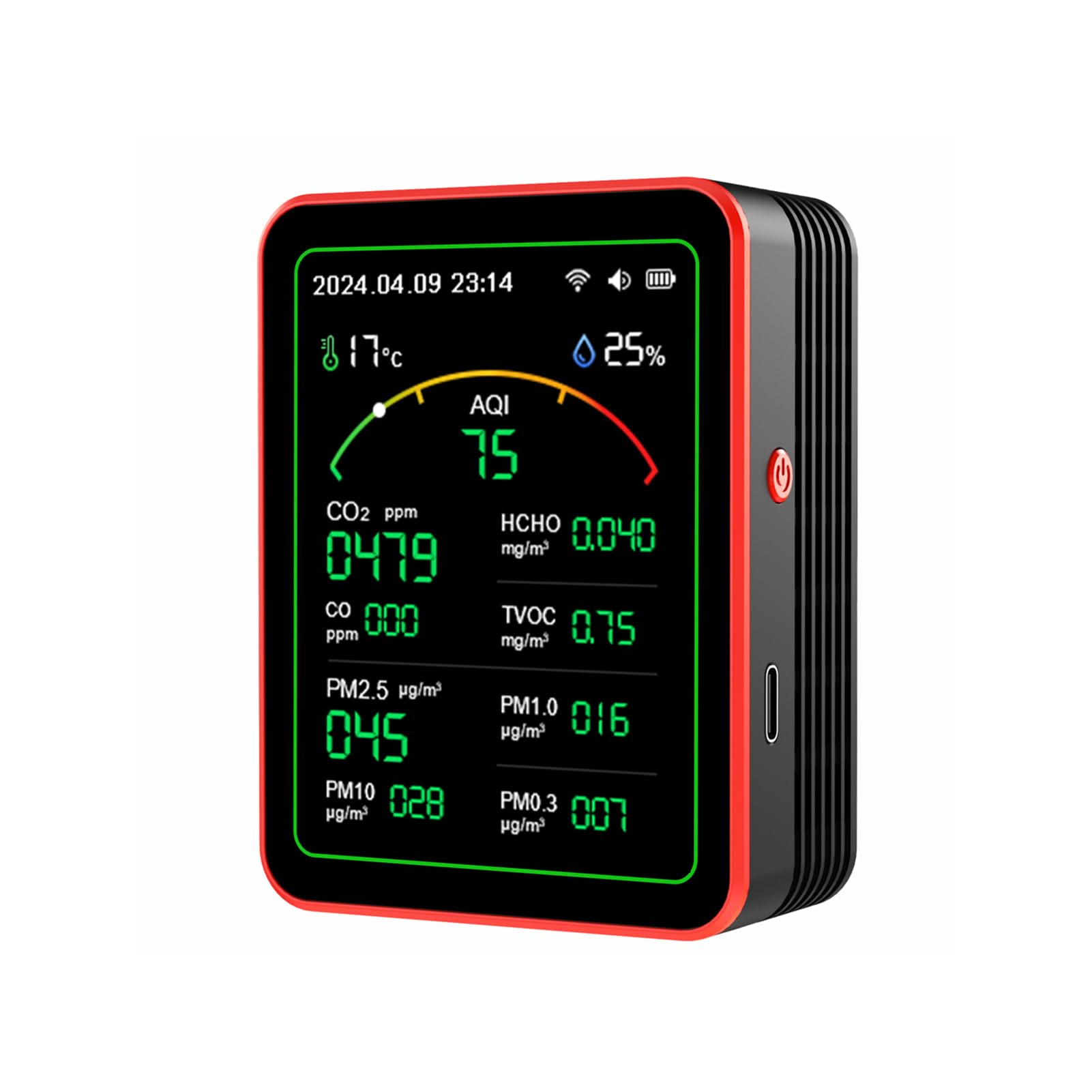
Image: The Weytoll 15-in-1 Smart Air Quality Monitor showing real-time readings for CO2, HCHO, TVOC, PM2.5, PM10, PM0.3, AQI, temperature, and humidity, indicating a healthy breathing environment.
2. Product Features
- Comprehensive Air Quality Testing: Measures AQI, CO2, PM0.3, PM1.0, PM2.5, PM10, HCHO, TVOC, temperature, and humidity. Includes time display, alarm, timer, and countdown timer functions.
- TFT Color Display and App Control: Features a 2.8-inch TFT color display for clear data visualization. Real-time monitoring and remote management of air quality are available via a dedicated mobile application.
- Custom Settings and Historical Data: Allows customization of alarm limits and sleep modes. Detailed historical data for air parameters can be browsed by day, month, or year. The app offers temperature unit switching and multi-functional timer settings for a personalized experience.
- Early Warning and Visual Alert: After Wi-Fi connection, users can set alarm thresholds. If measured data exceeds these standards, the device emits three emergency beeps, and the interface color changes (green for good, orange for warning, red for bad) to provide immediate visual alerts.
- Smart Connection Control: Can be integrated with a smart plug to control external devices. For example, an exhaust fan can be configured to activate when CO2 levels exceed 1500 ppm and deactivate below 800 ppm, promoting energy efficiency. Suitable for various indoor environments including homes, schools, hospitals, and offices.

Image: The monitor's display showing various environmental readings, emphasizing its role in achieving healthier indoor air.
3. Package Contents
Please check the package carefully to ensure all items are present and in good condition.
- 1 x Weytoll 15-in-1 Smart Air Quality Monitor
- 1 x USB Type-C Charging Cable
- 1 x User Manual (English)
- 1 x Packaging Box
4. Setup
4.1 Initial Charging
Before first use, fully charge the device using the provided USB Type-C cable and a DC5V/1A power adapter (not included). The charging port is located on the side of the device.
4.2 Power On/Off
Press and hold the power button located on the side of the device to turn it on or off. The display will illuminate upon activation.
4.3 Screen Protector Removal
Gently peel off the protective film from the display screen before use to ensure optimal visibility.
4.4 Wi-Fi Connectivity and App Pairing
For remote monitoring and advanced features, connect the device to your Wi-Fi network and pair it with the dedicated mobile application. Refer to the app's instructions for detailed pairing steps.

Image: The air quality monitor shown alongside a smartphone running its companion application, illustrating its Wi-Fi connectivity and smart features.
4.5 Unboxing and Initial Setup Video
Video: This video demonstrates the unboxing, initial setup, and power-on sequence of the air quality monitor, including peeling off the screen protector and showing the initial display.
5. Operation
5.1 Real-time Monitoring
Once powered on, the monitor will automatically begin detecting and displaying current air quality parameters. The 2.8-inch TFT color display provides clear, at-a-glance readings.

Image: A detailed view of the monitor's 2.8-inch TFT color HD display, showcasing real-time air quality test data.
5.2 Alarm Settings
Utilize the mobile application to set custom alarm limits for specific air quality parameters (e.g., CO2, HCHO). When a parameter exceeds its set limit, the device will emit an audible alarm and change the display color to indicate a warning or critical level.
5.3 Temperature Unit Conversion
The device supports switching between Celsius and Fahrenheit temperature units. This setting can typically be adjusted via the mobile application or a dedicated button on the device, if available.
5.4 Timer and Clock Functions
The monitor includes a clock, multiple alarm clocks, a timer, and a countdown timer. These functions can be configured through the device's interface or the companion app. Wi-Fi connectivity enables automatic time and date synchronization.

Image: The monitor's display showing its clock and alarm features, including time calibration, multiple alarm settings, and various timer options.
5.5 Energy Saving Mode
The device features an energy-saving design with an adjustable resting screen. You can set the monitor to enter a resting state after a specified period (e.g., 15 minutes) via the mobile app, where the detector continues to operate normally in the background while the screen is dimmed or off.
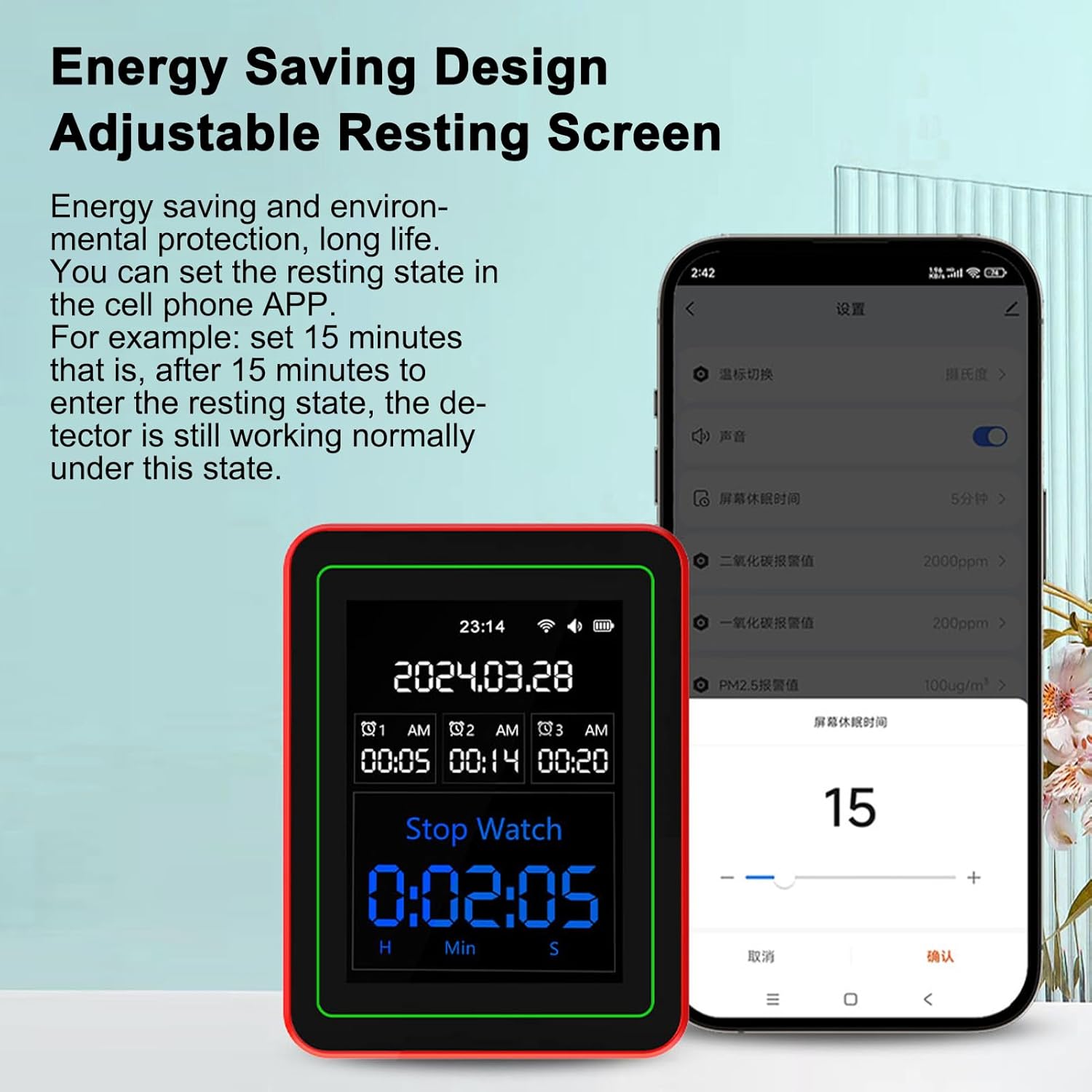
Image: The monitor in energy-saving mode, showing a stopwatch on its screen, alongside the mobile app interface for adjusting screen rest time settings.
6. Display Information
The monitor's display provides a clear overview of various air quality parameters. Understanding each reading is crucial for effective monitoring.
- AQI (Air Quality Index): A comprehensive index indicating overall air quality, often color-coded for easy interpretation (Green: Good, Orange: Warning, Red: Bad).
- CO2 (Carbon Dioxide): Measured in parts per million (ppm). High levels can indicate poor ventilation.
- HCHO (Formaldehyde): Measured in mg/m³. A common indoor pollutant that can cause respiratory irritation.
- TVOC (Total Volatile Organic Compounds): Measured in mg/m³. A mixture of various organic chemicals that can evaporate into the air, potentially causing health issues.
- PM0.3, PM1.0, PM2.5, PM10 (Particulate Matter): Measured in µg/m³. These numbers refer to the diameter of airborne particles in micrometers. Smaller particles (PM0.3, PM2.5) are more hazardous as they can penetrate deeper into the respiratory system.
- Temperature: Displays the ambient temperature, typically in Celsius or Fahrenheit.
- Humidity: Displays the relative humidity percentage. Optimal humidity levels are important for comfort and health.

Image: A detailed breakdown of the monitor's display, explaining the significance of humidity, temperature, HCHO, TVOC, and various particulate matter readings.
7. Specifications
| Parameter | Value |
|---|---|
| Brand | Weytoll |
| Model Number | FZO8027221854395NW |
| Material | ABS |
| Battery | 2000 mAh Polymer Lithium Battery |
| Working Voltage | 3.7V |
| Working Current | 260mA |
| Charging Mode/Interface | DC5V/1A, Type-C Interface |
| Product Dimensions | 90 x 70 x 35 mm (3.54 x 2.76 x 1.38 inches) |
| Item Weight | 160 g (5.64 oz) |
| Package Dimensions | 14.1 x 9.8 x 4.8 cm (5.55 x 3.86 x 1.89 inches) |
| Package Weight | 185 g (6.53 oz) |
8. Troubleshooting
- Device not turning on: Ensure the device is fully charged. Connect it to a power source using the provided Type-C cable.
- Inaccurate readings: Allow the device to stabilize for a few minutes after powering on. Ensure it is placed in an open area, away from direct airflow or heat sources.
- Wi-Fi connection issues: Verify your Wi-Fi network is active and the password is correct. Ensure the device is within range of your router. Restarting both the device and your router may help.
- App not connecting: Make sure the app is updated to the latest version. Re-pair the device with the app if necessary.
- Alarm not sounding: Check the alarm settings in the app to ensure thresholds are correctly configured and the alarm volume is not muted.
9. Safety Information
- Keep the device out of reach of children and pets.
- Do not expose the device to extreme temperatures, direct sunlight, or high humidity.
- Avoid dropping or subjecting the device to strong impacts.
- Do not attempt to disassemble, modify, or repair the device yourself. Contact customer support for assistance.
- Use only the provided charging cable or a compatible DC5V/1A Type-C charger.
- Dispose of the device and its battery according to local regulations.
10. Warranty and Support
The Weytoll 15-in-1 Smart Air Quality Monitor comes with a standard manufacturer's warranty. For specific warranty details, technical support, or service inquiries, please refer to the contact information provided in your product packaging or visit the official Weytoll website.
Please retain your proof of purchase for warranty claims.


