
Product Overview
The Douk Audio MX5 is a compact 4-channel line-mixing audio mixer designed for integrating multiple audio sources. It features independent stereo/mono switching for each channel, a 16-bit stereo dual-color LED level meter, and individual volume controls for precise audio management. This manual provides detailed instructions for setting up and operating your MX5 mixer.

Image: The Douk Audio MX5 mixer, showcasing its compact design and durable aluminum knobs. This unit is built to maximize isolation from external interference signals.
Setup Instructions
1. Power Connection
Connect the provided USB cable (Type-C) to the DC 5V/1A power input on the MX5 mixer. Connect the other end to a suitable DC5V power adapter (not included). Ensure the power adapter provides at least 0.5A.
2. Audio Input Connections
The MX5 features four groups of 6.35mm/3.5mm input jacks. Connect your audio sources (e.g., CD players, computers, phones, preamps, amplifiers) to these input jacks. Each input can accept either a 6.35mm or 3.5mm plug.
- Compatibility Note: The MX5 supports standard audio signals. It cannot directly connect phono turntables or microphones without an appropriate preamplifier.
3. Audio Output Connections
The mixer has one group of 6.35mm/3.5mm output jacks. Connect your headphones or main audio system to these outputs.
- Headphone Priority: If both the 3.5mm headphone jack and the 6.35mm OUT interface are connected, the 3.5mm headphone jack output will take priority, and the 6.35mm OUT interface will automatically disconnect.

Image: A detailed diagram illustrating the input and output connections of the Douk Audio MX5 mixer, including power input, 6.35mm/3.5mm audio inputs, and 6.35mm/3.5mm audio outputs.
Operating Instructions
1. Power On/Off
Press the POWER button to turn the mixer on or off. The power indicator light will illuminate when the unit is on.
2. Adjusting Input Levels
Each of the four input channels has an independent volume knob. Rotate these knobs (-1-, -2-, -3-, -4-) to adjust the input level for each respective channel. These adjustments do not interfere with other channels.
3. Main Volume Control
The -VOL- knob controls the overall output volume of the mixed audio signal.
4. Stereo/Mono Mode Selection
Each channel features an independent stereo/mono switch (S/M). Use these switches to select between stereo (S) and mono (M) modes for each input, allowing for flexible mixing configurations.
5. LED Level Meter Operation
The built-in 16-bit stereo dual-color LED level meter visually displays the output level. You can customize its appearance:
- Press the COLOR button to cycle through different display colors.
- Press the MODE button to switch between various display modes and adjust the gain (Level 1-6).
The mixer supports power-off memory, retaining your last settings for display color, mode, and gain.
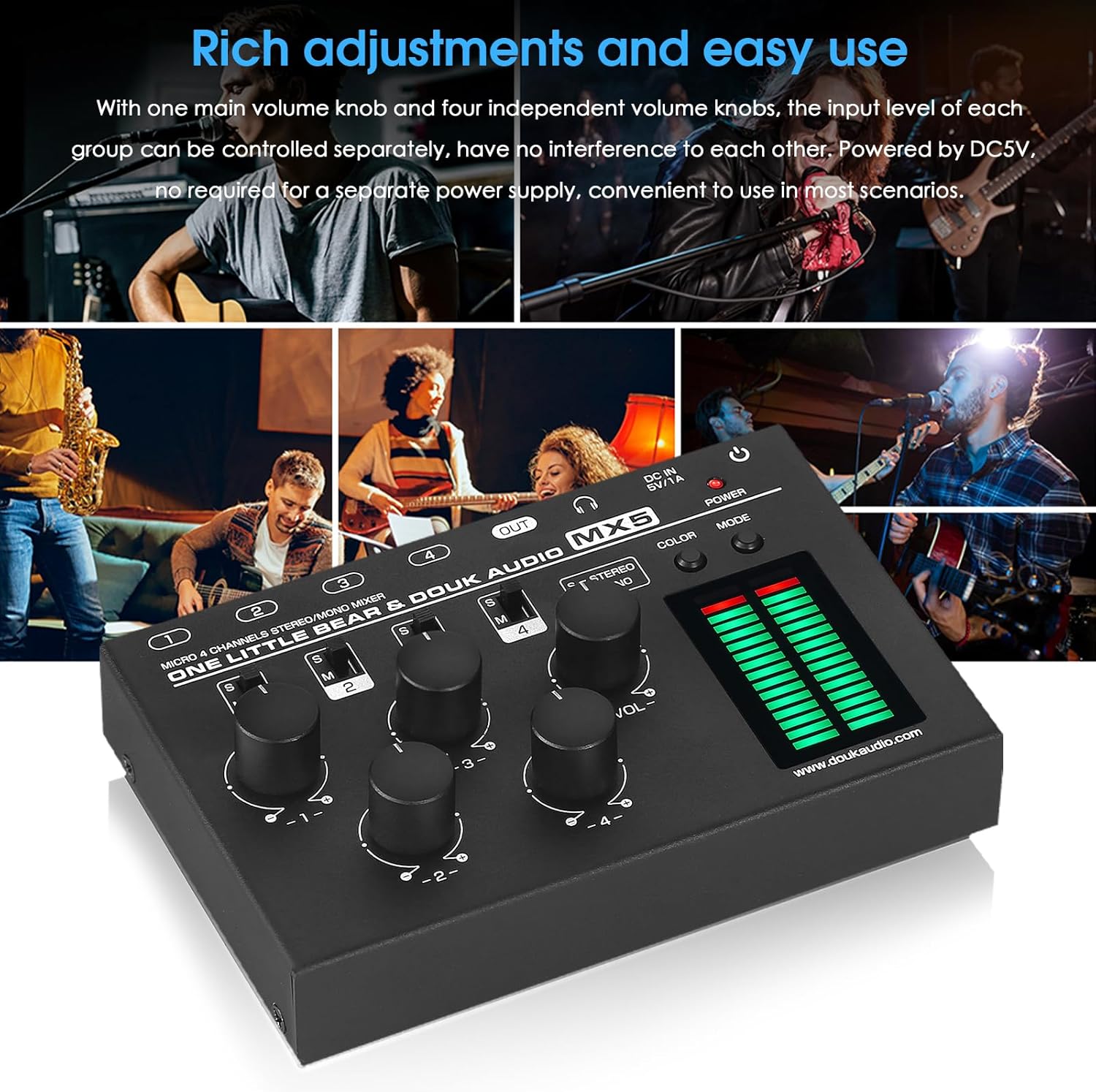
Image: The Douk Audio MX5 mixer in use, demonstrating its multiple input channels and individual volume controls for easy adjustment of audio levels from various sources.

Image: The Douk Audio MX5 mixer showcasing its 16-bit stereo dual-color LED level meter with different display modes and color options, providing visual feedback on audio levels.
Maintenance
To ensure the longevity and optimal performance of your Douk Audio MX5 mixer, follow these maintenance guidelines:
- Cleaning: Use a soft, dry cloth to clean the exterior of the unit. Avoid using liquid cleaners, aerosols, or solvents, as these may damage the finish or internal components.
- Storage: When not in use for extended periods, store the mixer in a cool, dry place away from direct sunlight and extreme temperatures.
- Handling: Handle the unit with care to prevent physical damage. Avoid dropping or subjecting it to strong impacts.
- Ventilation: Ensure proper ventilation around the unit to prevent overheating. Do not block any ventilation openings.
Troubleshooting
If you encounter issues with your Douk Audio MX5 mixer, please refer to the following common solutions:
- No Sound Output:
- Ensure the mixer is powered on and the power indicator is lit.
- Check all audio cable connections to ensure they are secure and correctly inserted into the input and output jacks.
- Verify that the main volume knob (-VOL-) and individual channel volume knobs are turned up.
- If using headphones, remember that the 3.5mm headphone jack output takes priority over the 6.35mm OUT interface. If both are connected, the 6.35mm output will be muted.
- Confirm that your audio sources are active and producing sound.
- Distorted or Low-Quality Sound:
- Ensure input levels are not too high, causing clipping. Adjust individual channel volume knobs to prevent distortion.
- Check the quality of your audio cables. Faulty cables can introduce noise or distortion.
- Verify that your audio sources are compatible. The MX5 is designed for standard audio signals and does not directly support phono turntables or microphones without a dedicated preamplifier.
- LED Meter Not Displaying Correctly:
- Press the COLOR and MODE buttons to cycle through different display options and gain settings.
- Ensure there is an active audio signal being processed by the mixer.
- Unit Not Powering On:
- Verify that the DC5V power adapter is correctly connected and supplying power.
- Ensure the power adapter meets the minimum current requirement of 0.5A.
- Try a different Type-C USB cable and power adapter to rule out faulty accessories.
Specifications
| Brand | Douk Audio |
| Model | MX5 |
| Number of Channels | 4 |
| Audio Input | 4 groups of 6.35mm/3.5mm jacks |
| Audio Output | 1 group of 6.35mm/3.5mm jack |
| Headphone Impedance | 16-200Ω |
| Input Impedance | 50kΩ |
| Channel Mode | Stereo/Mono (switchable) |
| Display Color & Mode | Switchable, 16-bit stereo dual-color LED |
| Display Gain | Level 1-6 |
| Power Off Memory | Supported |
| Working Voltage | DC5V (≥0.5A) |
| Power Interface | Type-C USB |
| Dimensions (W*D*H) | 132*86*24mm / 5.20*3.39*0.94in |
| Net Weight | 350g / 0.77lb |

Image: The Douk Audio MX5 mixer shown with its physical dimensions and a visual representation of the included USB Type-C cable, along with net and package weights.
Warranty Information
The Douk Audio MX5 mixer comes with an 18-month limited warranty. This warranty covers manufacturing defects and ensures the product functions as intended under normal use. Please retain your proof of purchase for warranty claims. For specific terms and conditions, refer to the warranty documentation provided with your product or contact customer support.
Customer Support
For technical assistance, troubleshooting not covered in this manual, or warranty inquiries, please contact Douk Audio customer support. You can often find support contact information on the official Douk Audio website or through your retailer.
Visit the official Douk Audio Store for more information and product updates.
