1. Introduction
The nwm DOTS Wireless On-Ear Speakers are designed to provide a unique audio experience with an open-ear design, allowing you to stay aware of your surroundings while enjoying high-quality sound. These speakers incorporate advanced technologies such as PSZ (Personalized Sound Zone) for suppressed sound leakage and Magic Focus Voice for clear microphone functionality during calls. This manual provides essential information for the proper setup, operation, and maintenance of your nwm DOTS speakers.

Image 1.1: A user wearing the nwm DOTS Wireless On-Ear Speakers, demonstrating the comfortable and discreet fit.
2. Important Safety Information
Please read all safety instructions before using this product to ensure safe and proper operation. Keep this manual for future reference.
- Do not expose the device to extreme temperatures, humidity, or corrosive environments.
- Avoid dropping or subjecting the device to strong impacts.
- Do not disassemble, repair, or modify the device yourself. Refer all servicing to qualified personnel.
- Keep the device away from children and pets.
- Use only the charging cable provided or recommended by the manufacturer.
- Prolonged exposure to loud sounds may cause hearing damage. Adjust volume to a safe level.
- Be aware of your surroundings when using the speakers, especially in traffic or other potentially hazardous situations.
3. Package Contents
Verify that all items are present in your product package:
- nwm DOTS Wireless On-Ear Speakers (Left and Right)
- Charging Case
- USB Charging Cable
- User Manual
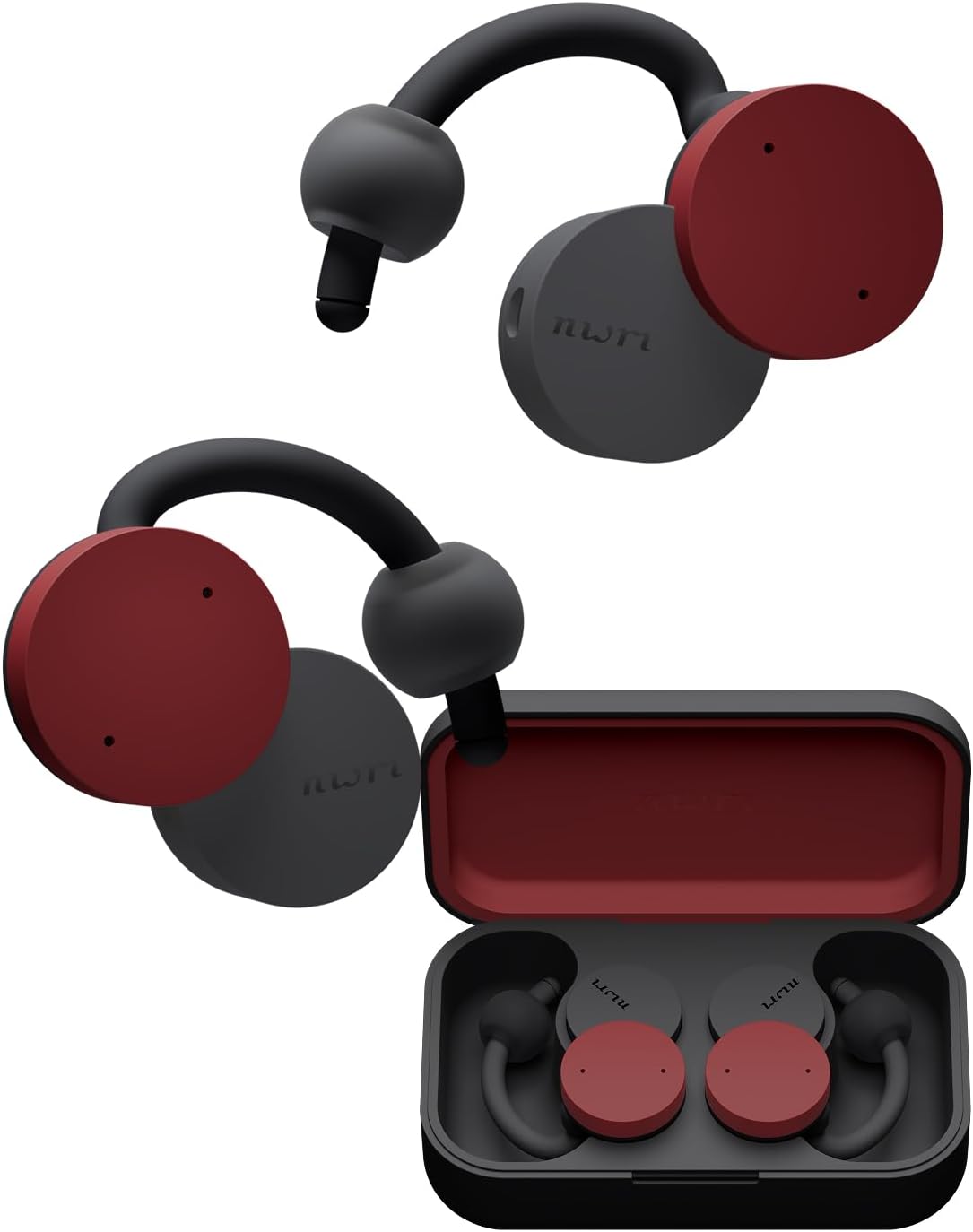
Image 3.1: The nwm DOTS Wireless On-Ear Speakers in Burgundy Red, showing the main product components.
4. Getting Started
4.1. Charging the Speakers
Before first use, fully charge your nwm DOTS speakers and the charging case.
- Place the left and right speakers into their respective slots in the charging case.
- Connect the USB charging cable to the charging port on the case and to a power source.
- The indicator lights on the case will show the charging status. Once fully charged, the lights will change or turn off.
- A full charge provides up to 8 hours of playback, with the charging case extending total playback to approximately 32 hours.
4.2. Pairing with a Device
The nwm DOTS use Bluetooth for wireless connection.
- Ensure the speakers are charged and placed in the charging case.
- Open the charging case. The speakers will automatically enter pairing mode, indicated by a flashing LED light.
- On your device (smartphone, laptop, tablet), go to Bluetooth settings and turn Bluetooth on.
- Select "nwm DOTS" from the list of available devices.
- Once connected, the LED indicator on the speakers will stop flashing.
4.3. Wearing the Speakers
The nwm DOTS are designed for a comfortable and secure open-ear fit.
- Gently hook the speaker over the top of your ear, positioning the sound unit near your ear canal without inserting it.
- Adjust the speaker until it rests comfortably and securely on your ear. The design allows for awareness of ambient sounds.

Image 4.1: A user demonstrating the correct placement of the nwm DOTS Wireless On-Ear Speakers on the ear.
5. Operating Instructions
5.1. Power On/Off
- Power On: Open the charging case, or remove the speakers from the case. They will power on automatically.
- Power Off: Place the speakers back into the charging case and close the lid. They will power off automatically.
5.2. Music Playback
- Play/Pause: Tap either speaker once.
- Next Track: Double-tap the right speaker.
- Previous Track: Double-tap the left speaker.
5.3. Call Management
- Answer/End Call: Tap either speaker once.
- Reject Call: Press and hold either speaker for 2 seconds.
5.4. Volume Control
- Increase Volume: Tap and hold the right speaker.
- Decrease Volume: Tap and hold the left speaker.
5.5. Multi-point Connection
The nwm DOTS support multi-point connection, allowing simultaneous connection to two devices (e.g., a smartphone and a laptop). To use this feature, pair the speakers with both devices individually. The speakers will intelligently switch between devices based on audio activity.
5.6. App Control
Download the dedicated nwm app for additional features and customization options, including equalizer settings and firmware updates. Refer to the app's instructions for detailed usage.

Image 5.1: Visual explanation of PSZ Technology for sound leakage suppression and Magic Focus Voice for clear microphone input.
6. Care and Maintenance
Proper care ensures the longevity and optimal performance of your nwm DOTS speakers.
- Cleaning: Use a soft, dry, lint-free cloth to clean the speakers and charging case. Do not use abrasive cleaners, alcohol, or chemical solvents.
- Storage: When not in use, store the speakers in their charging case to protect them from dust and damage. Store in a cool, dry place.
- Battery Care: To preserve battery life, avoid fully discharging the speakers frequently. Charge them regularly, even if not in constant use.
- Water Resistance: The speakers are IP54 rated for dust and water resistance. This means they are protected against limited dust ingress and water splashes from any direction. Do not submerge them in water or expose them to strong jets of water.
7. Troubleshooting
If you encounter issues with your nwm DOTS speakers, refer to the following common problems and solutions:
| Problem | Possible Solution |
|---|---|
| Speakers do not power on. | Ensure the speakers and charging case are fully charged. Place speakers in the case and close the lid, then open again. |
| Cannot pair with a device. | Make sure Bluetooth is enabled on your device. Ensure speakers are in pairing mode (flashing LED). Try forgetting the device in your Bluetooth settings and re-pairing. |
| No sound or low volume. | Check the volume levels on both the speakers and your connected device. Ensure speakers are properly positioned on your ears. |
| Sound cuts out or connection is unstable. | Ensure your device is within the Bluetooth range (typically 10 meters/33 feet) and there are no major obstructions. Disconnect and reconnect the Bluetooth connection. |
| Microphone not working during calls. | Ensure the speakers are selected as the audio input device on your phone/computer. Check for any obstructions near the microphone. |
8. Product Specifications
Key technical details of the nwm DOTS Wireless On-Ear Speakers:
| Feature | Detail |
|---|---|
| Model Name | MBE002RA |
| Brand | nwm |
| Connectivity Technology | Wireless (Bluetooth) |
| Bluetooth Version | 5.0 |
| Ear Placement | Open Ear |
| Form Factor | On Ear |
| Battery Life (Speakers) | Up to 8 Hours |
| Total Playback Time (with Case) | Up to 32 Hours |
| Control Type | Volume Control, App Control |
| Water Resistance Level | IP54 (Water Resistant) |
| Item Weight | 81 Grams (2.86 ounces) |
| Product Dimensions | 3.49 x 2.05 x 1.17 inches |
| Material | Metal, Plastic |
| Manufacturer | NTT sonority |
9. Warranty and Support
9.1. Warranty Information
nwm products are covered by a limited warranty from the date of purchase. This warranty covers manufacturing defects in materials and workmanship. It does not cover damage caused by misuse, accidents, unauthorized modifications, or normal wear and tear. Please retain your proof of purchase for warranty claims.
9.2. Customer Support
For technical assistance, warranty inquiries, or other support needs, please visit the official nwm website or contact their customer service department. Contact information can typically be found on the product packaging or the official brand website.


