
1. Introduction
This manual provides essential information for the safe and effective use of your BESTVA DC3000 LED Grow Light. Please read these instructions carefully before installation and operation. Keep this manual for future reference.
The BESTVA DC3000 LED Grow Light is designed with 1620 high-quality LEDs, offering a full spectrum light (3000K, 5000K, 460nm, and 660nm wavelengths) that closely mimics natural sunlight. It is suitable for various stages of plant growth, from seedling to flowering and fruiting, for indoor vegetable gardens, herbs, and leafy greens. The light consumes 300 watts and is ideal for a 3x3ft indoor growing area, with a maximum coverage of 4x4ft.
2. Safety Information
- Always disconnect power before installation, cleaning, or maintenance.
- Do not look directly at the LED lights when the unit is operating. This can cause eye damage.
- Ensure the grow light is installed in a well-ventilated area to prevent overheating.
- Keep the light away from water and other liquids. Do not operate in wet or damp conditions.
- Do not attempt to modify or disassemble the unit. This will void the warranty and may cause electrical hazards.
- Use only the provided power cord and hanging accessories.
- Ensure the hanging system is securely fastened and can support the weight of the light fixture.
3. Package Contents
Verify that all components are present in the package:
- BESTVA DC3000 LED Grow Light Unit
- Power Cord
- Adjustable Rope Hanger
- Stainless Steel Hanger Hooks
- Instruction Manual
4. Setup
- Unpacking: Carefully remove the grow light and all accessories from the packaging. Inspect for any damage.
- Hanging the Light:
- Attach the stainless steel hanger hooks to the four corners on the top of the light fixture.
- Connect the adjustable rope hanger to the stainless steel hooks.
- Hang the light fixture from a sturdy support structure (e.g., grow tent frame, ceiling hook) using the adjustable rope hanger. Ensure the light is level and secure.
- Connecting Power: Insert the provided power cord into the power input socket on the side of the grow light. Do not plug the other end into a power outlet yet.

Image: The BESTVA DC3000 Grow Light suspended inside a grow tent, illuminating several potted plants.
5. Operating Instructions
The DC3000 Grow Light features two independent switches for different growth stages: VEG and BLOOM.
- Power On: Once the light is securely hung and the power cord is connected to the fixture, plug the power cord into a suitable electrical outlet.
- Selecting Light Modes:
- VEG Mode: Activate the 'VEG' switch for the vegetative growth stage. This mode provides a spectrum optimized for seedling and leafy growth.
- BLOOM Mode: Activate the 'BLOOM' switch for the flowering and fruiting stages. This mode enhances the red spectrum to support bloom development.
- VEG & BLOOM Mode: For maximum light intensity and full spectrum coverage during the flowering and fruiting stages, activate both the 'VEG' and 'BLOOM' switches.
- Adjusting Hanging Height: Use the adjustable rope hanger to set the appropriate distance between the light and your plants. Recommended heights vary by plant stage and intensity requirements.

Image: Illustration of the VEG and BLOOM switches on the grow light, demonstrating their use for different plant growth stages: seedling, flowering, and fruiting.

Image: A detailed view of the LED array on the BESTVA DC3000, highlighting the different color temperature and wavelength LEDs (3000K, 5000K, 660nm Red, 460nm Blue) that create the full spectrum.
6. Maintenance
- Cleaning: Periodically clean the light fixture with a soft, dry cloth. Ensure the light is unplugged and cool before cleaning. Do not use liquid cleaners.
- Fan Inspection: Regularly check the cooling fans for dust buildup. Dust can impede airflow and reduce cooling efficiency. Clean gently with compressed air if necessary.
- Cable Check: Inspect the power cord and hanging cables for any signs of wear or damage. Replace immediately if damage is found.
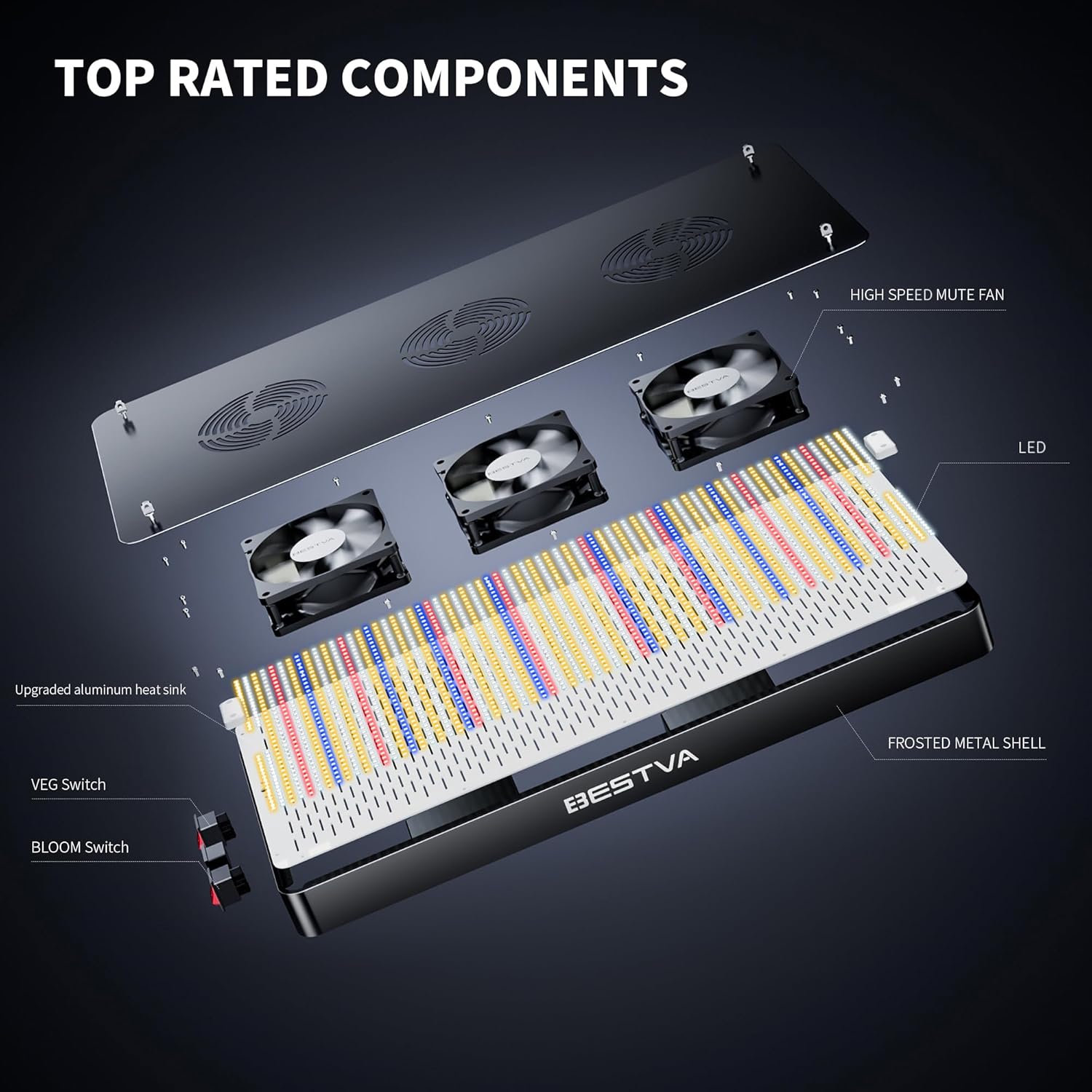
Image: An exploded diagram of the BESTVA DC3000 Grow Light, illustrating its internal components such as the high-speed mute fans, LED board, upgraded aluminum heatsink, and frosted metal shell.

Image: A close-up view of the built-in silent cooling fans of the BESTVA DC3000, emphasizing the advanced cooling technology.
7. Troubleshooting
| Problem | Possible Cause | Solution |
|---|---|---|
| Light does not turn on | No power, loose connection, switch off | Check power outlet, ensure power cord is securely plugged in, verify VEG/BLOOM switches are ON. |
| Some LEDs are not lit | Individual LED failure | Contact customer service for assistance. Do not attempt to repair. |
| Light is dim or flickering | Power supply issue, faulty wiring | Ensure stable power supply. If problem persists, contact customer service. |
| Excessive heat from the unit | Poor ventilation, blocked fans | Ensure adequate airflow around the unit. Clean fans if dusty. |
8. Specifications
- Model Number: DC3000
- Brand: BESTVA
- Light Source Type: Light Emitting Diode (LED)
- Wattage: 300 watts
- Spectrum: Full Spectrum (3000K, 5000K, 460nm, 660nm)
- Special Features: Two Cultivation Modes (VEG, BLOOM), Durable Cooling System
- Shape: Rectangular
- Finish Type: Brushed
- Mounting Type: Ceiling Mount
- Number of Light Sources: 1

Image: The BESTVA DC3000 LED Plant Light, showcasing its full spectrum capabilities with a detailed spectrum graph and PPFD (Photosynthetic Photon Flux Density) measurements at different heights.
9. Warranty and Support
BESTVA provides a 3-year professional service for the DC3000 LED Grow Light. Additionally, a 90-day free return policy is offered with US warehouse fulfillment.
Our dedicated after-sales team has over eight years of experience in design, sales, and production. For any questions or concerns regarding your product, please contact our customer service. We aim to reply within 24 hours with a satisfactory solution.
For support, please refer to the contact information provided with your purchase or visit the official BESTVA website.