
Motorola XT2313-6
Contents
User Manual: Motorola Moto G 5G 2023
Model: XT2313-6
1. Introduction
This manual provides comprehensive instructions for the safe and efficient use of your Motorola Moto G 5G 2023 smartphone. Please read this manual thoroughly before operating your device to ensure optimal performance and to prevent damage.
The Motorola Moto G 5G 2023 (XT2313-6) is a powerful smartphone featuring a 6.5-inch HD+ display with a 120Hz refresh rate, a 48MP dual camera system, and 5G connectivity powered by the Snapdragon 480+ 5G processor. It runs on Android 13 and is equipped with a 5000mAh battery.
2. Product Overview
Familiarize yourself with the physical components of your Motorola Moto G 5G 2023.
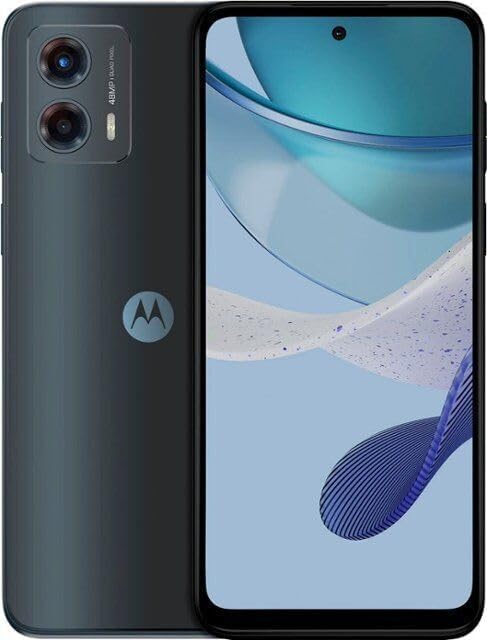
Figure 2.1: Front and Back View of the Motorola Moto G 5G 2023. Shows the phone from the front with its display and from the back with its camera module and Motorola logo.

Figure 2.2: Rear View of the Motorola Moto G 5G 2023. Highlights the 48MP Quad Pixel camera system and the Motorola batwing logo on the back panel.

Figure 2.3: Side View of the Motorola Moto G 5G 2023. Displays the right side of the phone, showing the volume rocker and power button (which also houses the fingerprint sensor).

Figure 2.4: Angled Rear View of the Motorola Moto G 5G 2023. Provides a perspective showing both the back panel and a glimpse of the side buttons.

Figure 2.5: Front Display of the Motorola Moto G 5G 2023. Shows the phone's screen displaying the time, date, and battery percentage, indicating an active display.

Figure 2.6: Multiple Views of the Motorola Moto G 5G 2023. Presents the phone from two angles, highlighting its sleek design and camera bump.

Figure 2.7: Bottom View of the Motorola Moto G 5G 2023. Shows the USB-C charging port, speaker grille, and microphone hole.

Figure 2.8: Top View of the Motorola Moto G 5G 2023. Displays the top edge of the phone, which typically houses the secondary microphone or SIM tray.

Figure 2.9: Front View of the Motorola Moto G 5G 2023. A clear shot of the phone's display, showcasing its full-screen design with a punch-hole camera.
3. Setup
3.1. Unboxing and Initial Charge
Carefully remove all components from the packaging. Before first use, it is recommended to fully charge your device.
- Connect the provided USB-C charging cable to the phone's charging port (Figure 2.7).
- Connect the other end of the cable to a compatible power adapter (not always included) and plug it into a wall outlet.
- The battery indicator on the screen will show charging progress.
3.2. Inserting SIM Card and microSD Card
Your Motorola Moto G 5G 2023 supports a single SIM card and a dedicated microSD card for expandable storage.
- Locate the SIM tray on the side of the phone (refer to your device's quick start guide for exact location, typically near the top or left side).
- Insert the SIM ejector tool (if provided) into the small hole on the SIM tray to open it.
- Carefully pull out the SIM tray.
- Place your Nano-SIM card into the designated SIM slot with the gold contacts facing down.
- If using a microSD card, place it into the dedicated microSD slot.
- Gently push the tray back into the phone until it clicks into place.
3.3. Powering On and Initial Configuration
To power on your device for the first time:
- Press and hold the Power button (Figure 2.3) until the Motorola logo appears.
- Follow the on-screen prompts to complete the initial setup, including language selection, Wi-Fi connection, Google account sign-in, and security settings (fingerprint, PIN, pattern).
4. Operating Your Device
4.1. Basic Navigation
- Home Screen: The main screen where you can access apps and widgets.
- Notifications Panel: Swipe down from the top of the screen to view notifications and quick settings.
- App Drawer: Swipe up from the bottom of the screen to access all installed applications.
- Recent Apps: Swipe up from the bottom and hold (or tap the square navigation button) to see recently used applications.
4.2. Camera Usage
The Motorola Moto G 5G 2023 features a 48MP main camera with Quad Pixel technology and a 2MP macro lens.
- Open the Camera app from your home screen or app drawer.
- Select your desired mode (Photo, Portrait, Video, Macro, etc.).
- Tap the shutter button to capture a photo or start/stop video recording.
- Use pinch-to-zoom for digital zoom or switch to the macro lens for close-up shots.
4.3. Connectivity
- Wi-Fi: Go to Settings > Network & internet > Internet to connect to Wi-Fi networks.
- Mobile Data (5G): Ensure your SIM card is active and mobile data is enabled in Settings > Network & internet > Mobile network.
- Bluetooth: Pair with other devices via Settings > Connected devices > Connection preferences > Bluetooth.
5. Maintenance
5.1. Battery Care
- Avoid extreme temperatures (hot or cold) as they can degrade battery life.
- Use only Motorola-approved chargers and cables.
- For optimal battery longevity, avoid frequently discharging the battery completely or keeping it at 100% for extended periods.
5.2. Software Updates
Regularly check for software updates to ensure your device has the latest features, security patches, and performance improvements.
- Go to Settings > System > System update.
- Follow the on-screen instructions to download and install any available updates.
5.3. Cleaning Your Device
- Use a soft, lint-free cloth to wipe the screen and back of the phone.
- For stubborn smudges, slightly dampen the cloth with water or a screen cleaner.
- Avoid harsh chemicals, abrasive materials, or excessive moisture.
6. Troubleshooting
6.1. Common Issues and Solutions
| Issue | Possible Solution |
|---|---|
| Device not powering on | Ensure the battery is charged. Press and hold the power button for at least 10-15 seconds to force a restart. |
| Apps crashing or freezing | Clear the app's cache (Settings > Apps > [App Name] > Storage & cache > Clear cache). Restart the device. Update the app from the Play Store. |
| Poor battery life | Check battery usage in Settings > Battery. Close background apps. Reduce screen brightness. Disable unnecessary features like GPS or Bluetooth when not in use. |
| No network connection | Check if Airplane mode is off. Reinsert SIM card. Reset network settings (Settings > System > Reset options > Reset Wi-Fi, mobile & Bluetooth). Contact your carrier. |
6.2. Factory Reset
A factory reset will erase all data from your phone's internal storage, including app data, photos, and system settings. Back up important data before proceeding.
- Go to Settings > System > Reset options > Erase all data (factory reset).
- Confirm your decision and enter your PIN/pattern if prompted.
- The device will restart and begin the reset process.
7. Specifications
Key technical specifications for the Motorola Moto G 5G 2023 (XT2313-6):
- Display: 6.5" HD+ LCD, 120Hz refresh rate, 1600 x 720px, 269ppi
- Processor: Qualcomm SM4350-AC Snapdragon 480+ 5G (8 nm), Octa-core
- GPU: Adreno 619
- RAM: 4GB
- Internal Storage: 64GB (expandable via microSDXC dedicated slot)
- Operating System: Android 13 (planned upgrade to Android 14)
- Rear Camera: 48MP, f/1.7 (wide) + 2MP, f/2.4 (macro)
- Front Camera: 8MP, f/2.0 (wide)
- Battery: 5000mAh Lithium Polymer (non-removable)
- Connectivity: 5G, 4G LTE, 3G, 2G, Wi-Fi, Bluetooth, GPS
- Sensors: Fingerprint (side-mounted)
- Dimensions: 6 x 4 x 2 inches (Product Dimensions)
- Weight: 14.9 ounces
- Model Number: XT2313-6
8. Warranty and Support
8.1. Warranty Information
Your Motorola Moto G 5G 2023 comes with a limited manufacturer's warranty. Please refer to the warranty card included in your product packaging or visit the official Motorola website for detailed terms and conditions. Keep your proof of purchase for warranty claims.
8.2. Customer Support
For technical assistance, troubleshooting, or service inquiries, please contact Motorola customer support.
- Motorola Support Website: www.motorola.com/us/support
- Phone Support: Refer to the Motorola support website for regional contact numbers.
When contacting support, please have your device's model number (XT2313-6) and serial number ready.
Documents and downloads
Ask a question about this manual
Ask about setup, troubleshooting, compatibility, parts, safety, or missing instructions. Manuals+ will review the question and use this page’s manual context to help answer it.