
Introduction
This manual provides essential information for the installation, operation, and maintenance of the Lift-Master LA500DC Primary Arm Replacement Kit. This product is designed as a replacement component for existing Lift-Master LA500, LA500DC, and LA500DCS swing gate operator systems. It is important to note that this kit contains the primary arm only and is not a complete gate operator system.
For comprehensive instructions regarding the complete gate operator system, please refer to the original Lift-Master LA500DC series gate operator manual.
Product Overview
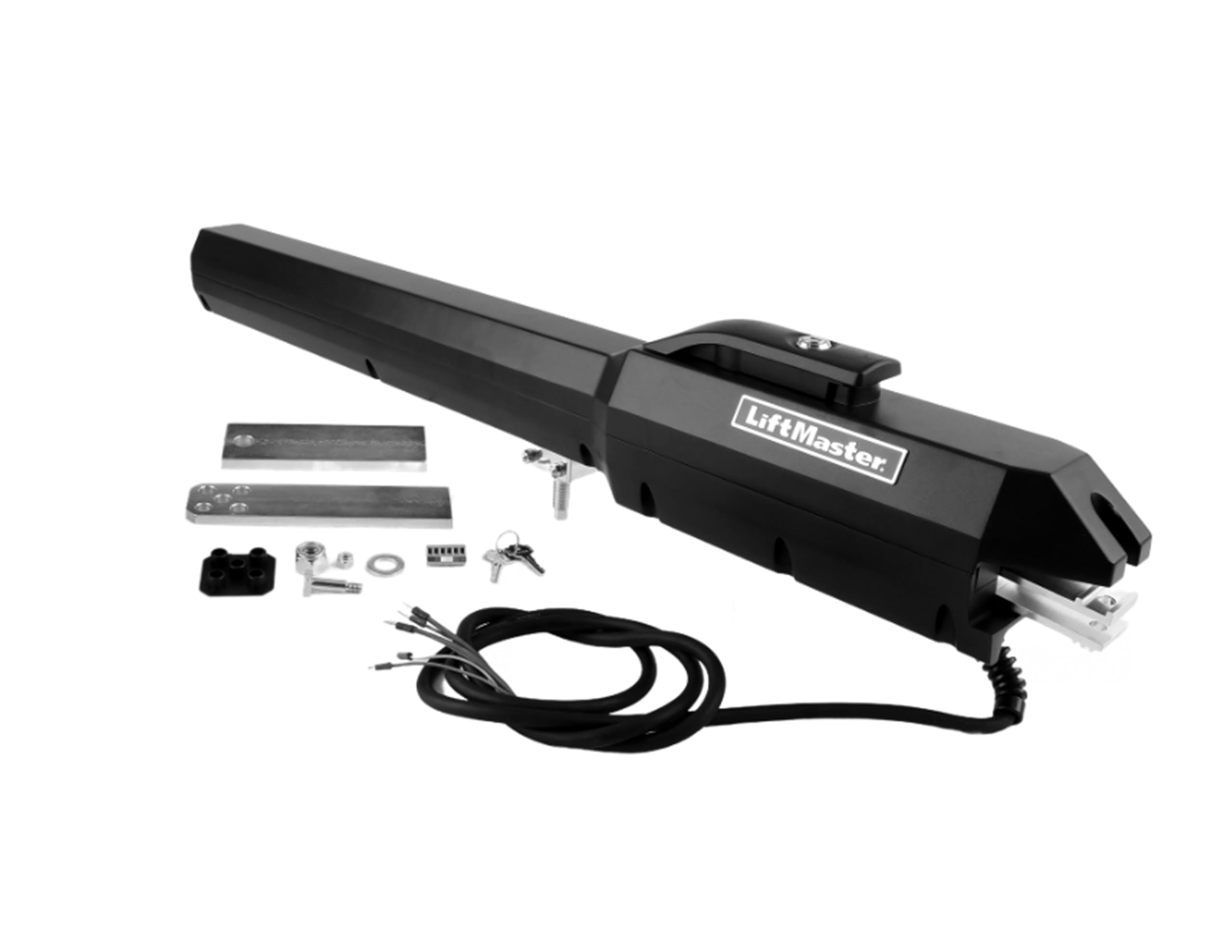
An image showing the black Lift-Master LA500DC primary arm, along with various components including metal mounting brackets, nuts, bolts, keys, and electrical wiring.
Key Features:
- Designed as a primary arm replacement for Lift-Master LA500, LA500DC, and LA500DCS gate operator systems.
- Features commercial-duty cast-aluminum housing for durability.
- Equipped with a heavy-duty DC motor suitable for demanding applications.
- Incorporates smooth start/stop operation and mid-travel reversal to extend the lifespan of the gate hardware and operator.
What's Included:
- LA500DC Primary Arm
- Brackets Kit
- Manual (this document)
Setup and Installation
Installation of the LA500DC Primary Arm Replacement Kit requires technical knowledge and should ideally be performed by a qualified professional. Incorrect installation can lead to system malfunction or safety hazards.
- Safety First: Ensure all power to the gate operator system is disconnected before beginning any installation work.
- Remove Existing Arm: Carefully detach the old primary arm from the gate and the operator housing, noting the connections and mounting points.
- Mount New Arm: Using the provided brackets and hardware, securely attach the new LA500DC primary arm to the gate and the gate operator system. Ensure all fasteners are tightened to the manufacturer's specifications.
- Electrical Connections: Connect the electrical wiring of the new arm to the gate operator control board. Refer to the wiring diagram in your main Lift-Master LA500DC series gate operator manual for correct connections.
- Test Operation: Once the arm is securely mounted and wired, restore power to the system. Perform initial tests at a slow speed, if possible, to ensure smooth movement and proper functionality before full operation.
Important: This arm is designed for gates up to 18 feet in length and weighing up to 1600 lbs. Verify your gate specifications meet these requirements.
Operating Instructions
The LA500DC Primary Arm functions as part of the larger Lift-Master LA500DC series gate operator system. Therefore, its operation is controlled by the main gate operator unit.
- Standard Operation: Refer to your main Lift-Master LA500DC series gate operator manual for instructions on how to open, close, and stop your gate using remote controls, keypads, or other access devices.
- Smooth Start/Stop: The arm is designed to provide smooth acceleration and deceleration, reducing wear and tear on the gate and operator components.
- Mid-Travel Reversal: The system is equipped with a safety feature that can reverse the gate's direction if an obstruction is detected during travel.
- myQ App Control: If your main gate operator system is configured with myQ technology, you can monitor and control your gate using the myQ smartphone application.
- Battery Backup: The LA500DC system supports a battery backup (sold separately) which can provide additional power for continued operation during power outages.
Maintenance
Regular maintenance ensures the longevity and optimal performance of your LA500DC Primary Arm and the entire gate operator system.
- Visual Inspection: Periodically inspect the arm, mounting brackets, and all connections for signs of wear, damage, or loose fasteners.
- Cleanliness: Keep the arm and its moving parts free from dirt, debris, and obstructions. The durable cast-aluminum housing is designed to withstand various environmental conditions.
- Lubrication: Consult your main gate operator manual for specific lubrication requirements for moving parts.
- Professional Service: Consider scheduling annual professional maintenance to ensure all components are functioning correctly and safely.
Troubleshooting
This section addresses common issues related to the primary arm. For comprehensive troubleshooting of the entire gate operator system, refer to your main Lift-Master LA500DC series gate operator manual.
- Arm Not Moving:
- Check power supply to the main operator unit.
- Verify all electrical connections to the arm are secure.
- Ensure there are no physical obstructions preventing arm movement.
- Unusual Noises:
- Inspect for loose hardware or components.
- Check for debris in the arm's path or internal mechanism.
- Consult a professional if noises persist, as it may indicate internal wear.
- Gate Reverses Unexpectedly:
- Check for obstructions in the gate's path.
- Ensure safety sensors (if installed) are clean and properly aligned.
If issues persist after basic troubleshooting, contact customer support or a certified technician.
Specifications
| Feature | Specification |
|---|---|
| Model Number | LA500DC Primary Arm Only |
| Product Dimensions | 39 x 8 x 6 inches |
| Item Weight | 65 pounds |
| Operator Duty Rating | 300 Cycles Per Day |
| Motor Voltage | 24VDC |
| Actuator Voltage | 110/115/120 AC (60 Hz, 1 Phase), 220/230/240 AC (60 Hz, 1 Phase) |
| Max Gate Length | 18 ft |
| Max Gate Weight | 1600 lbs |
| Housing Material | Cast-Aluminum |
Warranty and Support
Manufacturer's Warranty:
A 2-Year Warranty is included from the manufacturer for the LA500DC Primary Arm. Please retain your proof of purchase for warranty claims.
Customer Support:
For technical assistance, troubleshooting beyond this manual, or warranty inquiries, please contact the manufacturer's customer support. Refer to the contact information provided with your original Lift-Master LA500DC series gate operator system or visit the L.A Ornamental website.


