
1. Introduction
Thank you for purchasing the FAKJANK F417 GPS Drone. This drone is designed for aerial photography and videography, featuring a 4K camera with a 90° electric adjustable lens, GPS positioning, and intelligent flight functions. Please read this manual thoroughly before operating the drone to ensure safe and optimal performance.
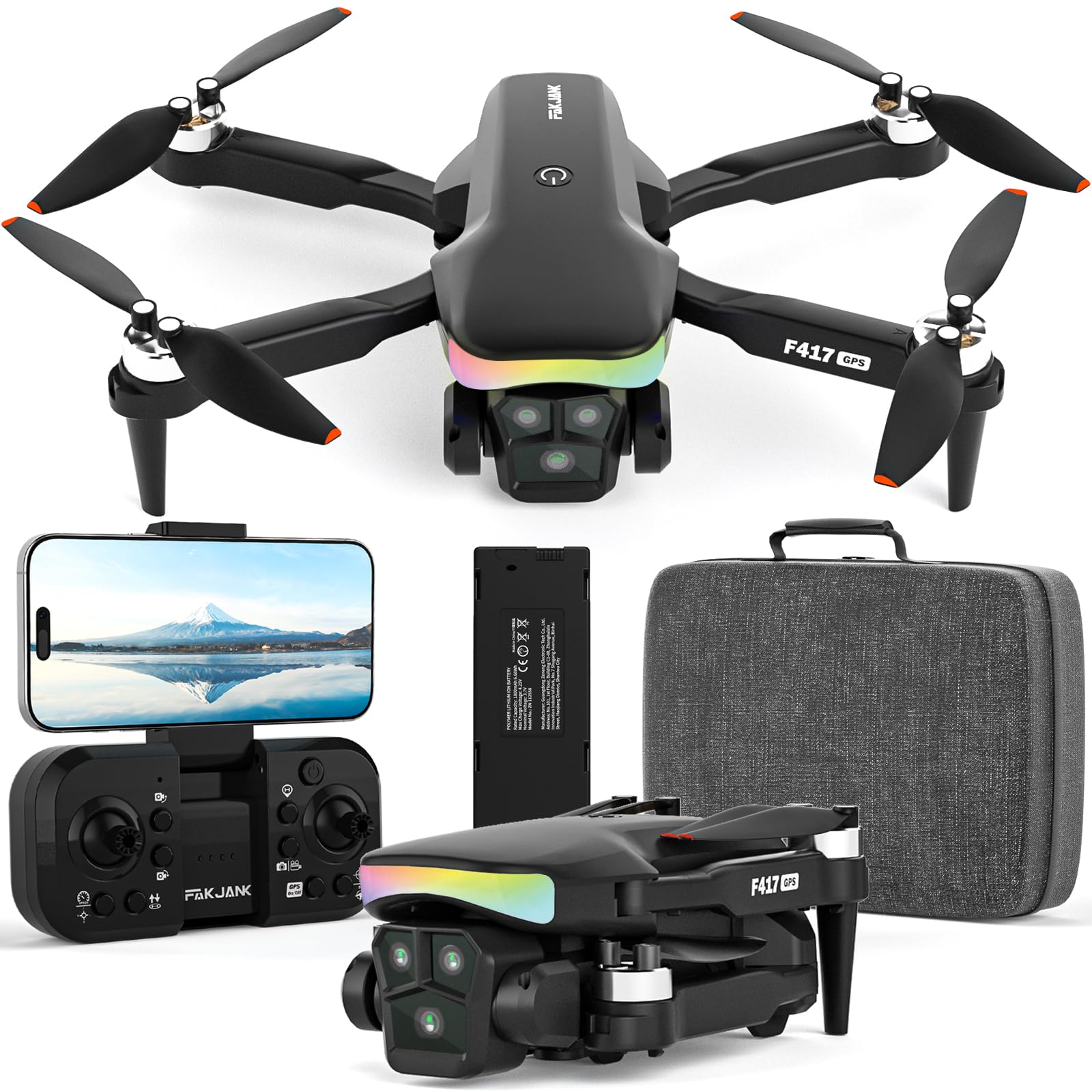
Image: The FAKJANK F417 GPS Drone, showcasing its compact design and camera.
2. Safety Guidelines
Operating a drone requires responsibility. Adhere to the following safety guidelines to prevent accidents and ensure legal compliance:
- Pre-Flight Check: Always inspect the drone, propellers, and battery before each flight.
- Environmental Conditions: Fly in open areas, away from people, animals, buildings, and power lines. Avoid flying in strong winds, rain, or fog.
- Battery Safety: Use only approved chargers and batteries. Do not overcharge or puncture batteries.
- Line of Sight: Maintain visual line of sight with the drone at all times.
- Altitude and Distance: Respect local regulations regarding maximum flight altitude and distance.
- Privacy: Be mindful of privacy when recording videos or taking photos.
- Emergency Procedures: Familiarize yourself with the Return to Home function and emergency landing procedures.
- Age Restriction: This drone is suitable for users aged 14 and above.
3. Package Contents
Verify that all items are present in your package:
- FAKJANK F417 GPS Drone
- Remote Controller (Note: Product specifications indicate "Includes Remote?: No", implying app control. If a physical remote is included, this item should be adjusted.)
- Rechargeable Battery (Lithium Ion)
- USB Charging Cable
- Spare Propellers
- User Manual
- Handbag (for storage and transport)
4. Product Overview
4.1 Drone Components
- Foldable Arms: For compact storage and portability.
- Propellers: Four main propellers for lift and thrust.
- Brushless Motors: Provide stable and powerful flight.
- 4K Camera: Front-facing camera for high-resolution photos and videos.
- 90° Electric Adjustable Lens: Allows remote adjustment of the camera angle during flight.
- RGB LED Lights: Integrated lights for visibility and aesthetic effects, especially during night flights.
- Battery Compartment: Houses the modular Lithium Ion battery.
- GPS Module: For precise positioning and intelligent flight functions.

Image: Illustration of the drone's powerful brushless motor, indicating its robust design for stable flight.
The F417 drone is equipped with powerful brushless motors, reaching up to 8,000 RPM, ensuring stable and efficient flight performance.

Image: Close-up of the FAKJANK F417 drone's camera, highlighting its 90-degree electric adjustable lens for multiple angle shooting.
The drone features a dual-lens 4K camera with a 90° electric adjustable lens, allowing for flexible shooting angles and high-quality image capture.
Image: The FAKJANK F417 drone displaying its vibrant RGB LED lights, which can change colors for enhanced visibility and aesthetics during flight.
The F417 GPS drone includes vivid RGB LED lights with seven color-changing options and 12 lamp beads, providing exceptional visibility for night flights.
4.2 Weight and Portability

Image: A hand placing the FAKJANK F417 drone into a pocket, illustrating its compact size and weight of less than 249g for easy portability.
Weighing less than 249g, the F417 drone is highly portable and may not require registration in some regions, depending on local regulations. Always check local drone laws.
5. Setup
5.1 Battery Installation and Charging
- Insert the fully charged Lithium Ion battery into the drone's battery compartment until it clicks into place.
- To charge the battery, remove it from the drone. Connect the USB charging cable to the battery and a suitable USB power adapter (5V/2A recommended).
- The charging indicator light will show the charging status. Ensure the battery is fully charged before each flight.
A fully charged 1800mAh battery provides approximately 20 minutes of flight time.
5.2 Propeller Installation
Ensure propellers are correctly installed according to their rotation direction (A and B markings). Incorrect installation can affect flight stability.
- Match the propeller type (A or B) with the corresponding motor arm.
- Securely attach the propellers.
5.3 App Download and Connection
- Download the official FAKJANK drone app from your device's app store (iOS/Android).
- Power on the drone.
- On your smartphone, connect to the drone's Wi-Fi network (e.g., "FAKJANK-F417-XXXX").
- Open the app. The drone's live video feed should appear, indicating a successful connection.
6. Operating Instructions
6.1 Pairing and Calibration
- After connecting via Wi-Fi, follow the in-app instructions to pair the drone.
- Perform GPS calibration and compass calibration as prompted by the app. This is crucial for stable flight and accurate GPS functions.
6.2 Take-off and Landing
- Automatic Take-off: Tap the "One-Key Take-off" button in the app. The drone will ascend to a safe altitude and hover.
- Manual Take-off: (If applicable via virtual joysticks in app) Push both virtual joysticks to the bottom-outer corners to start motors, then push the left joystick up to ascend.
- Automatic Landing: Tap the "One-Key Landing" button in the app. The drone will descend and land automatically.
- Emergency Stop: In an emergency, use the emergency stop function in the app to immediately cut power to the motors.
6.3 Flight Controls (via App)
The app provides virtual joysticks and buttons for controlling the drone:
- Left Joystick: Controls altitude (up/down) and rotation (left/right).
- Right Joystick: Controls forward/backward and left/right movement.
- Trim Buttons: Adjust drone stability if it drifts.
6.4 Camera Operation
- Photo/Video: Use the dedicated buttons in the app to take photos or start/stop video recording.
- 90° Electric Adjustable Lens: Adjust the camera angle up or down using the corresponding control in the app to capture different perspectives.
6.5 Intelligent Flight Functions
The F417 drone offers several intelligent flight modes:
- GPS Positioning: Provides stable hovering and precise flight path control.
- Follow Me: The drone will automatically follow the subject (user with smartphone) at a set distance and altitude.
- Tap Fly (Waypoint Flight): Draw a path on the map in the app, and the drone will fly along the specified route.
- Intelligent Surround Flight: The drone can orbit a point of interest.
- Trajectory Fixed-point Flight: Similar to Tap Fly, allowing the drone to follow a pre-defined trajectory.

Image: The FAKJANK F417 drone demonstrating GPS Smart Follow, Intelligent Surround Flight, and Trajectory Fixed-point Flight capabilities.
Utilize GPS Smart Follow and other intelligent flight modes for dynamic and hands-free aerial photography.

Image: The FAKJANK F417 drone initiating its GPS intelligent return to home function, automatically planning a safe return route.
The GPS intelligent return to home function ensures the drone automatically plans a safe route and returns to its take-off point when activated or in case of low battery/signal loss.
6.6 3D Flips

Image: The FAKJANK F417 drone performing a multi-dimensional 3D flip maneuver in the air.
The drone supports 3D flip maneuvers. Activate this function via the app and perform flips by moving the right joystick in the desired direction. Ensure sufficient altitude and clear surroundings before attempting.
7. Maintenance
7.1 Cleaning
- Wipe the drone body with a soft, dry cloth.
- Remove any dust or debris from motors and propellers.
- Do not use harsh chemicals or solvents.
7.2 Storage
- Store the drone and accessories in a cool, dry place, away from direct sunlight.
- Remove the battery from the drone if storing for extended periods.
7.3 Battery Care
- Charge batteries fully before storage if they will not be used for a long time.
- Do not store fully discharged batteries.
- Avoid exposing batteries to extreme temperatures.
8. Troubleshooting
| Problem | Possible Cause | Solution |
|---|---|---|
| Drone does not power on | Battery not installed correctly or discharged. | Ensure battery is fully charged and properly inserted. |
| No video feed in app | Wi-Fi not connected or app not open. | Verify Wi-Fi connection to drone. Restart app. |
| Unstable flight/Drifting | Improper calibration or strong winds. | Perform GPS and compass calibration. Avoid flying in strong winds. Adjust trim settings. |
| GPS functions not working | Poor GPS signal or calibration issue. | Fly in an open area with clear sky. Re-calibrate GPS. |
| Propellers not spinning | Motors not armed or obstruction. | Ensure motors are armed (e.g., by pushing joysticks). Check for obstructions. |
9. Specifications
| Brand | FAKJANK |
| Model Number | FJMY2024102901 (F417) |
| Color | Black |
| Connectivity Technology | Wi-Fi (5GHz for FPV transmission) |
| Camera | 4K with 90° Electric Adjustable Lens |
| Motor Type | Brushless (up to 8,000 RPM) |
| Battery Type | Lithium Ion |
| Battery Capacity | 1800mAh (approx. 20 minutes flight time) |
| Includes Remote | No (App-controlled) |
| Item Dimensions (L x W x H) | 20L x 15W x 5H Centimeters |
| Weight | Under 250g |
10. Warranty and Support
For warranty information and technical support, please refer to the documentation provided with your purchase or contact FAKJANK customer service through their official channels. Keep your proof of purchase for warranty claims.