1. Introduction
This instruction manual provides detailed information for the installation and operation of the RED WOLF RCA Wiring Harness Cable Connector. This product is designed to integrate audio and video signals with compatible Alpine stereo radio units, enhancing your in-car entertainment and utility features.
2. Product Overview and Features
The RED WOLF RCA Wiring Harness Cable Connector is a specialized adapter designed for seamless integration with Alpine stereo radios. It facilitates connections for various audio and video components.
- Part Number: Replaces OME E2703004590.
- Material: Constructed with professional copper cord and high-quality plastic for durability and optimal signal transfer.
- Functionality: Provides an all-in-one solution for audio and video connections, including speakers, subwoofers, and camera integration.
- Integrated Wiring: Supports connections for front and rear speakers, subwoofer, and interfaces for front and rear view camera installation.
- Ease of Installation: Features a plug-and-play design, simplifying the installation process without requiring special tools.

Figure 2.1: Overview of the RED WOLF RCA Wiring Harness Cable Connector.
3. Compatibility
This RCA wiring harness is compatible with Alpine stereo radio units featuring a 20-pin connector, specifically designed for the following models:
- Alpine ILXW650
- Alpine ILX-W650
- Alpine ILX-W650E
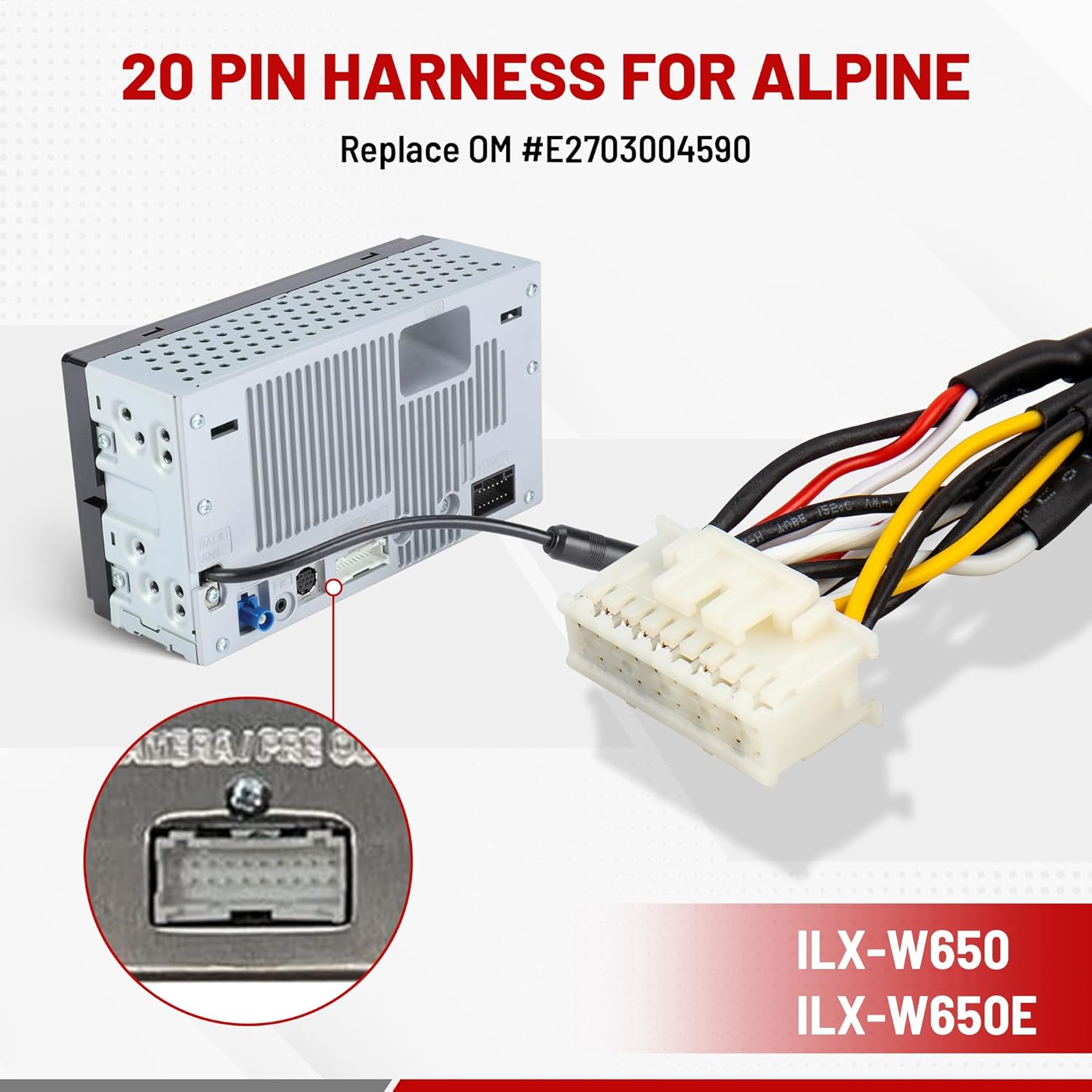
Figure 3.1: The 20-pin harness connecting to an Alpine head unit.
4. Package Contents
The package includes the following item:
- 1x RCA Wiring Harness Cable Connector
5. Setup and Installation Instructions
Follow these steps for proper installation of the RCA Wiring Harness Cable Connector:
- Preparation: Ensure the vehicle's power is disconnected from the stereo unit to prevent electrical damage.
- Locate Stereo Connector: Identify the 20-pin connector port on the back of your Alpine ILX-W650 series stereo radio.
- Connect Harness: Plug the 20-pin connector of the RED WOLF wiring harness into the corresponding port on your Alpine stereo. Ensure a secure connection.
- Connect RCA Cables: Connect your external audio and video devices (speakers, subwoofer, front/rear cameras) to the appropriate RCA outputs on the harness. The harness includes labeled connections for:
- Front Out: For front speakers.
- Rear Out: For rear speakers.
- SubW (Subwoofer): For subwoofer connection.
- Front View Camera: For front camera video input.
- Rear View Camera: For rear camera video input.
- Cable Management: Route the cables neatly and secure them to prevent interference or damage.
- Reconnect Power: Once all connections are made and secured, reconnect power to the stereo unit.
- Test Functionality: Power on your Alpine stereo and test all connected components (speakers, subwoofer, cameras) to ensure proper operation.

Figure 5.1: Detail of the 20-pin connector.

Figure 5.2: Detail of RCA audio outputs (Front Out, Rear Out).

Figure 5.3: Detail of RCA video outputs (SubW, Front/Rear View Camera).

Figure 5.4: High-quality copper wiring for optimal signal transfer.
6. Operation
Once the RED WOLF RCA Wiring Harness is correctly installed, the connected audio and video components will function through your Alpine stereo radio. The harness ensures stable audio signal transmission to your speakers and subwoofer, and enables video input from your front and rear view cameras for improved visibility and safety.
Refer to your Alpine stereo radio's instruction manual for specific details on how to access and control the connected audio and video inputs.
7. Troubleshooting
If you encounter issues after installation, consider the following troubleshooting steps:
- No Audio/Video: Verify all connections are secure and correctly plugged into their respective ports on both the harness and the stereo unit. Check the Alpine stereo's settings to ensure the correct input source is selected.
- Distorted Audio: Ensure all RCA connections are fully seated and free from corrosion or damage. Check for any kinks or damage in the wiring.
- Camera Not Displaying: Confirm the camera is powered correctly and its video output is connected to the designated camera input on the harness. Check the Alpine stereo's settings for camera activation.
- Intermittent Functionality: Re-check all wiring for loose connections. Ensure no wires are pinched or exposed, which could cause short circuits.
If problems persist, consult a professional car audio installer or contact RED WOLF customer support.
8. Specifications
| Specification | Detail |
|---|---|
| Model Number | RW-XC02-2422 |
| Part Number (Replaces) | OME E2703004590 |
| Connector Type | 20-pin to RCA |
| Cable Type | RCA |
| Compatible Devices | Alpine ILX-W650, ILX-W650E, ILXW650 Stereo Radios, Cameras, Speakers, Subwoofers |
| Package Dimensions | 9.25 x 3.62 x 0.75 inches |
| Item Weight | 2.08 ounces |
| Manufacturer | RED WOLF |
9. Warranty and Support
For warranty information and customer support, please refer to the official RED WOLF website or contact the seller directly. Keep your purchase receipt for warranty claims.
You can visit the RED WOLF Store on Amazon for more products and support information.


