
AHENOD G15
AHENOD 160GB MP3 Player User Manual
Model: G15
Introduction
Thank you for choosing the AHENOD 160GB MP3 Player. This device is a versatile 5-inch Android MP4 player equipped with Bluetooth and WiFi, designed for an enhanced audio and visual experience. It features an Android 9 OS, an MTK 8-core 1.92GHz processor, 3GB RAM, and 32GB ROM, expandable up to 512GB. This manual provides detailed instructions for setting up, operating, maintaining, and troubleshooting your device to ensure optimal performance.

Figure 1: The AHENOD MP3 Player's 5-inch screen, showcasing its Android interface with pre-installed applications such as Spotify, Amazon Music, YouTube, Kindle, Audible, and the Google Play Store.
What's in the Box
Please check the package contents to ensure all items are present:
- 1 x AHENOD 160GB MP3 Player
- 1 x 128GB SD card (pre-installed or included separately)
- 1 x User Manual (this document)
- 1 x Type-C USB Cable
- 1 x Earphone
- 1 x Silicone Case
- 1 x Protective Film (pre-applied or included separately)
Setup
1. Charging the Device
Before first use, fully charge the MP3 player. Connect the included Type-C USB cable to the device's charging port and the other end to a USB power adapter (not included) or a computer's USB port.
- A full charge typically takes approximately 2-3 hours.
- The battery indicator on the screen will show charging status.

Figure 2: The device features a built-in 2500mAh Li-ion battery, offering up to 50 hours of continuous music playback (with wired earbuds) or 8 hours of video playback.
2. Powering On/Off
- To power on: Press and hold the Power button until the screen lights up.
- To power off: Press and hold the Power button, then select "Power off" from the options.
3. Inserting the SD Card
The device supports expandable storage up to 512GB via a microSD card. A 128GB SD card is included.
- Locate the SD card slot on the side of the device.
- Gently insert the microSD card into the slot until it clicks into place.
- To remove, push the card inward until it pops out slightly, then pull it out.

Figure 3: The device has 32GB of internal storage (ROM) and 3GB of RAM, with support for an additional 128GB SD card included in the package, allowing for expandable storage up to 512GB.
4. Connecting to Wi-Fi
Connect to a Wi-Fi network to access online streaming services and the Google Play Store.
- Go to Settings > Network & Internet > Wi-Fi.
- Toggle Wi-Fi On.
- Select your desired Wi-Fi network from the list.
- Enter the password if prompted and tap Connect.
Operating Instructions
1. Basic Navigation
- Touch Screen: Navigate the interface by tapping, swiping, and pinching on the 5-inch IPS touch screen.
- Home Button: Tap the virtual home button at the bottom of the screen to return to the home screen.
- Back Button: Tap the virtual back button to go back to the previous screen.
- Recent Apps: Tap the virtual recent apps button to view and switch between recently used applications.
2. Music Playback
The player supports various music formats including MP3, WAV, APE, FLAC, AAC, OGG, WMA. It comes preloaded with popular online music apps.
- Open a music application (e.g., Spotify, Amazon Music, or the default Music player).
- Browse your music by title, folder, artist, or album.
- Tap on a song to begin playback.
- Use the on-screen controls for play/pause, skip, volume adjustment, and playback modes (sequential, loop single, list loop, random).
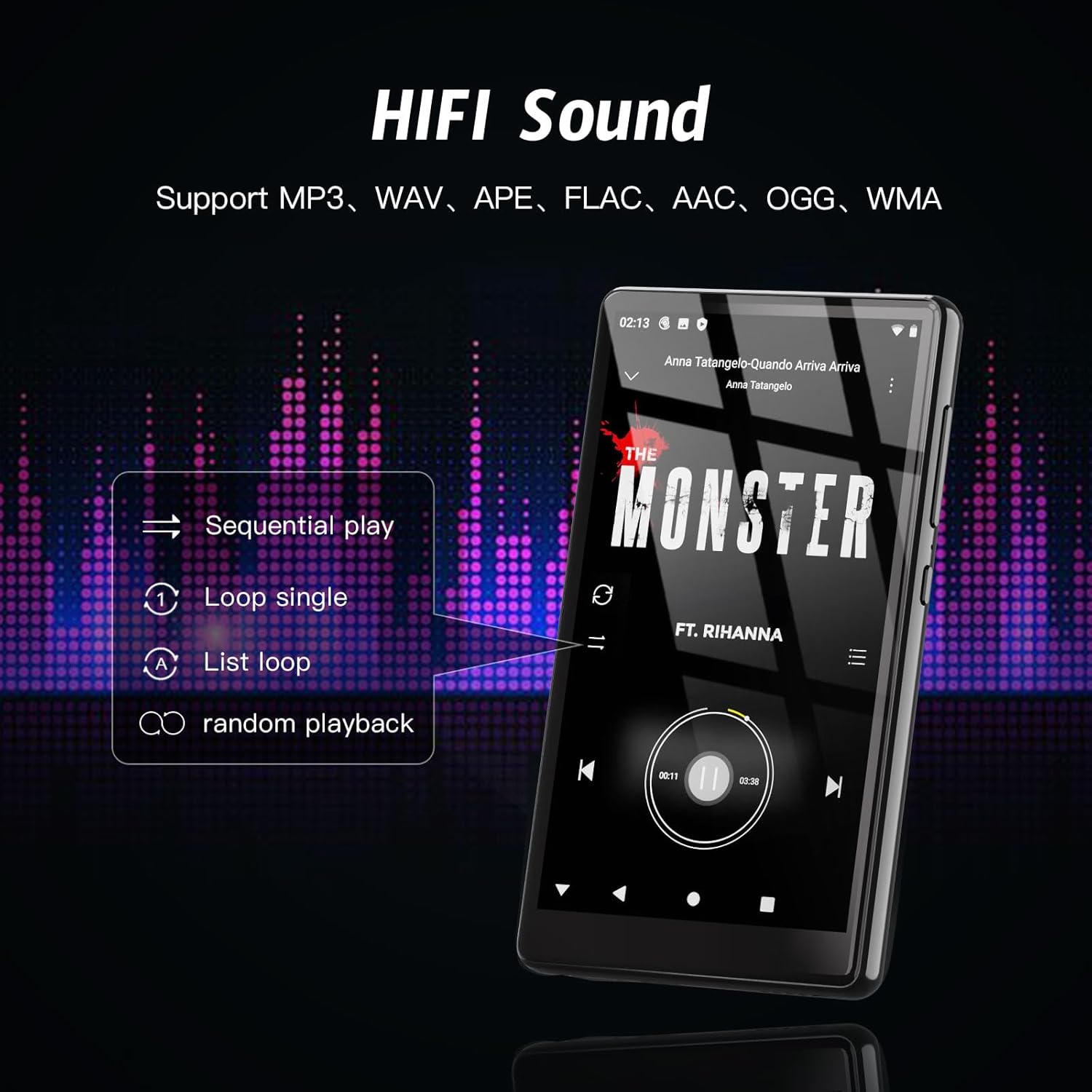
Figure 4: The music player supports various audio formats and offers multiple playback modes for a customized listening experience.
3. Video Playback
The device supports 1080P HD video playback and various video formats such as AVI, MKV, RMVB, MP4, MPG, MOV, FLV, RM without the need for conversion.
- Open a video application (e.g., YouTube or a local video player).
- Select a video to play.
- Use the on-screen controls for play/pause, fast forward/rewind, and full-screen mode.

Figure 5: The 5-inch IPS touch screen provides a superior visual experience with 1080P HD resolution for movies and videos.
4. Bluetooth Connectivity
The device features a Bluetooth 4.1 chip with bi-directional connection technology for stable pairing with various Bluetooth devices.
- Go to Settings > Connected devices > Bluetooth.
- Toggle Bluetooth On.
- Ensure your Bluetooth headphones, speakers, or car stereo are in pairing mode.
- Select your device from the list of available devices to pair.

Figure 6: Connect your MP3 player to Bluetooth headphones, home speakers, or car stereos for a wireless audio experience.
5. App Management (Google Play Store)
The built-in Google Play Store allows you to install or uninstall applications to meet your diverse needs.
- Installing Apps: Open the Play Store app, search for your desired application, and tap Install.
- Uninstalling Apps:
- From the home screen, long-press the app icon you wish to uninstall.
- Drag the icon to the "Uninstall" option that appears at the top of the screen.
- Confirm the uninstallation.

Figure 7: The device comes with the Google Play Store pre-installed, allowing for easy download and installation of various applications.

Figure 8: Demonstrating the process of uninstalling an application by dragging its icon to the uninstall area.
6. FM Radio
The device includes a built-in FM radio for listening to local broadcasts.
- Connect the included earphones, as they act as the antenna for the FM radio.
- Open the FM Radio app.
- Use the scan function to find available stations or manually tune to a frequency.

Figure 9: The FM radio interface on the MP3 player, allowing access to local radio stations.
Maintenance
- Cleaning: Use a soft, dry, lint-free cloth to clean the screen and body of the device. Avoid using harsh chemicals or abrasive materials.
- Storage: Store the device in a cool, dry place away from direct sunlight and extreme temperatures.
- Battery Care: To prolong battery life, avoid fully discharging the battery frequently. Charge the device regularly, even if not in use for extended periods.
- Software Updates: Periodically check for system updates in Settings to ensure optimal performance and security.
- Protective Accessories: Use the included silicone case and protective film to guard against scratches and minor impacts.
Troubleshooting
| Problem | Possible Cause | Solution |
|---|---|---|
| Device does not power on. | Low battery; System crash. | Charge the device for at least 30 minutes. If unresponsive, press and hold the Power button for 10-15 seconds to force a restart. |
| Cannot connect to Wi-Fi. | Incorrect password; Out of range; Router issue. | Double-check the Wi-Fi password. Move closer to the Wi-Fi router. Restart your router and the MP3 player. |
| Bluetooth connection unstable. | Interference; Device too far from paired accessory. | Ensure no strong interference sources are nearby. Keep the device within Bluetooth range (typically 10 meters). Re-pair the Bluetooth device. |
| Apps are slow or unresponsive. | Too many apps running in background; Low storage. | Close unnecessary background apps. Clear app caches. Check available storage and free up space if needed. Restart the device. |
| SD card not recognized. | Improper insertion; Corrupted card; Incompatible format. | Re-insert the SD card correctly. Try a different SD card to rule out card issues. Ensure the card is formatted to a compatible file system (e.g., FAT32, exFAT). |
Specifications
| Feature | Detail |
|---|---|
| Model Name | G15 |
| Brand | AHENOD |
| Operating System | Android 9 OS |
| Processor | MTK 8-core 1.92GHz |
| RAM | 3GB |
| Internal Storage (ROM) | 32GB |
| Expandable Storage | Up to 512GB via Micro SD card (128GB included) |
| Screen Size | 5 Inches |
| Display Type | IPS Touch Screen |
| Resolution | 1080P HD (1920x1080) |
| Connectivity | Bluetooth 4.1 (Duplex Wireless), Wi-Fi (2.4G & 5G) |
| Battery | 2500mAh Li-ion (Built-in) |
| Music Playback Time | Up to 50 hours (wired earbuds) |
| Video Playback Time | Up to 8 hours |
| Supported Audio Formats | MP3, WAV, APE, FLAC, AAC, OGG, WMA, and more |
| Supported Video Formats | AVI, MKV, RMVB, MP4, MPG, MOV, FLV, RM, etc. |
| Special Features | Built-In Speaker, FM Radio, Google Play Store access |
| Dimensions | 5.91 x 3.82 x 1.26 inches |
| Item Weight | 11.7 ounces |
| Color | Black |
Warranty and Support
AHENOD provides a 1-year warranty for this MP3 player. If you encounter any problems during use, please contact our customer service team for assistance.
- Warranty Period: 1 year from the date of purchase.
- Customer Service: We offer 24-hour customer service. Please refer to the contact information provided with your purchase or on the official AHENOD website for support.
- Support Scope: Our team is ready to help with operational issues, technical queries, and warranty claims.
Thank you for your trust and support!
Related documentsG15

Ask a question about this manual
Ask about setup, troubleshooting, compatibility, parts, safety, or missing instructions. Manuals+ will review the question and use this page’s manual context to help answer it.