
1. Product Overview
This Sungale Bluetooth Transmitter & Receiver is a versatile audio device designed to enhance your audio experience. It functions as both a wireless receiver and a transmitter, allowing you to stream audio wirelessly to or from various devices. It supports Bluetooth 5.3 technology, offering low distortion, low power consumption, low latency, and high-fidelity stereo sound.
Key features include:
- Dual Mode Functionality: Easily switch between Transmitter (TX) and Receiver (RX) modes.
- Bluetooth 5.3: For stable, high-quality wireless audio streaming.
- Intelligent Noise Reduction: CVC8.0 noise cancellation and DSP technology for clear audio.
- Hands-free Calling: Built-in microphone and multi-function button for convenient call management.
- Long Battery Life: Up to 6-12 hours of usage on a single charge.
- Wide Compatibility: Connects to TVs, home stereos, car speakers, headphones, MP3 players, computers, and more via a 3.5mm Aux jack.

Image 1.1: The Sungale Bluetooth Transmitter & Receiver, showcasing its compact design and 3.5mm audio jack.
2. Product Components
Familiarize yourself with the various parts of your device:
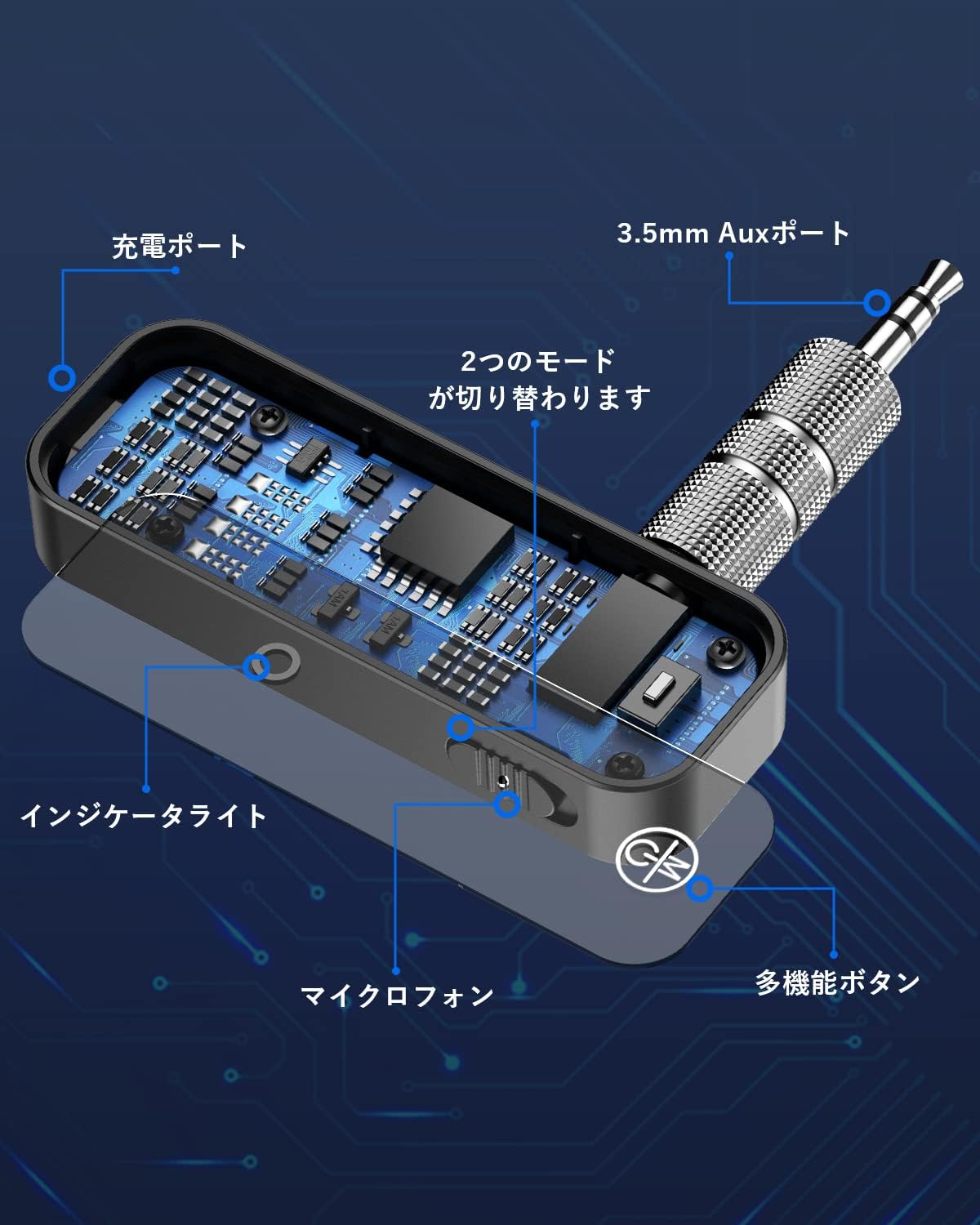
Image 2.1: Detailed diagram illustrating the device's components, including the charging port, 3.5mm Aux port, indicator light, microphone, multi-function button, and mode switch.
- 3.5mm Aux Port: For audio input/output.
- Charging Port: USB port for charging the device.
- Indicator Light: Displays connection and battery status.
- Microphone: For hands-free calling.
- Multi-function Button: Controls power, play/pause, answer/end calls.
- Mode Switch: Toggles between Transmitter (TX) and Receiver (RX) modes.
3. Charging the Device
The device has a built-in rechargeable lithium battery. Before first use, fully charge the device.
- Connect the charging cable (not explicitly listed but implied) to the charging port on the device.
- Connect the other end of the charging cable to a USB power source (e.g., computer USB port, USB wall adapter).
- The indicator light will show the charging status. Once fully charged, the light may change color or turn off.
A full charge provides approximately 6-12 hours of usage. The device can be used while charging.

Image 3.1: An internal view of the device highlighting its battery capacity, indicating approximately 6 hours of operation.
4. Setup and Pairing
4.1 Power On/Off
- To Power On: Press and hold the Multi-function Button until the indicator light illuminates.
- To Power Off: Press and hold the Multi-function Button until the indicator light turns off.
4.2 Mode Selection
Use the Mode Switch to select between Transmitter (TX) and Receiver (RX) modes before connecting to your audio source/device.
4.3 Pairing in Receiver (RX) Mode
In RX mode, the device receives audio from a Bluetooth-enabled source (e.g., smartphone, tablet) and outputs it to a non-Bluetooth audio system (e.g., car stereo, home speakers).
- Switch the device to RX mode.
- Connect the 3.5mm Aux port of the device to the AUX input of your non-Bluetooth audio system (e.g., car stereo, wired headphones, home speaker).
- The indicator light will flash, indicating it is in pairing mode.
- On your Bluetooth audio source (e.g., smartphone), enable Bluetooth and search for available devices.
- Select "Sungale BT Adapter" (or similar name) from the list to pair.
- Once paired, the indicator light will become solid, and audio from your source will play through your connected audio system.

Image 4.1: Illustration of the device operating in Bluetooth Receiver (RX) mode, connecting a smartphone to a speaker system.
4.4 Pairing in Transmitter (TX) Mode
In TX mode, the device takes audio from a non-Bluetooth source (e.g., TV, CD player) and transmits it wirelessly to a Bluetooth-enabled receiving device (e.g., Bluetooth headphones, Bluetooth speaker).
- Switch the device to TX mode.
- Connect the 3.5mm Aux port of the device to the audio output of your non-Bluetooth source (e.g., TV headphone jack, CD player audio out).
- The indicator light will flash, indicating it is in pairing mode.
- Put your Bluetooth receiving device (e.g., headphones, speaker) into pairing mode.
- The Sungale device will automatically search for and connect to nearby Bluetooth receiving devices.
- Once paired, the indicator light will become solid, and audio from your source will be transmitted to your Bluetooth receiving device.

Image 4.2: The device in Transmitter (TX) mode, connected to a TV to send audio wirelessly to headphones.

Image 4.3: The device in Transmitter (TX) mode, connected to a speaker to send audio wirelessly.
5. Operating the Device
5.1 Music Playback (RX Mode)
- Play/Pause: Short press the Multi-function Button.
- Next Track: Double press the Multi-function Button.
- Previous Track: Triple press the Multi-function Button.
5.2 Hands-free Calling (RX Mode)
When connected to a smartphone in RX mode, you can manage calls using the built-in microphone and Multi-function Button.
- Answer Call: Short press the Multi-function Button.
- End Call: Short press the Multi-function Button during a call.
- Reject Call: Press and hold the Multi-function Button for 2 seconds.
- Redial Last Number: Double press the Multi-function Button when not on a call.
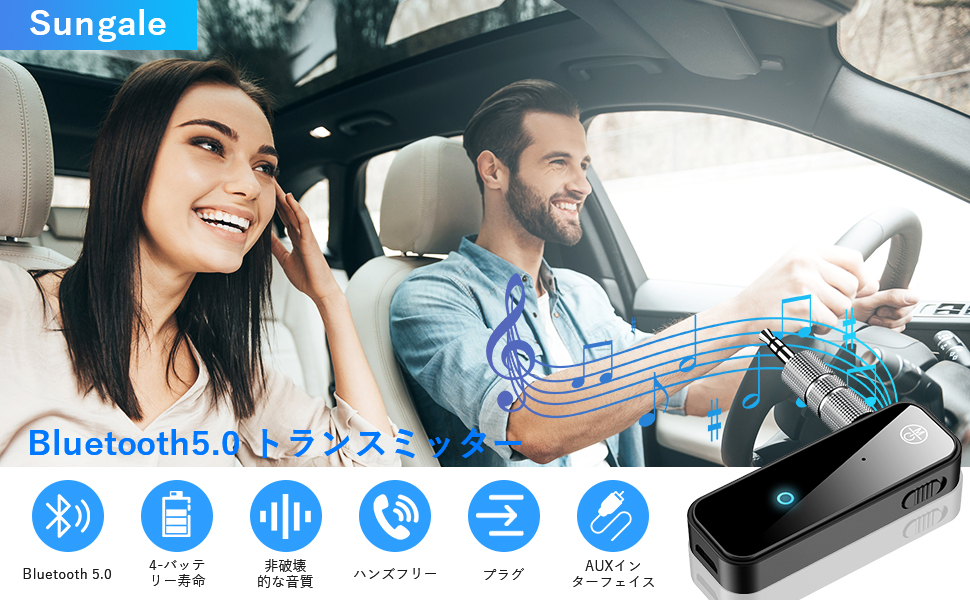
Image 5.1: A couple in a car utilizing the device for hands-free communication and music streaming, demonstrating its car compatibility.
5.3 Navigation Broadcasts (RX Mode)
When connected to your car audio system via RX mode, the device supports broadcast voice announcements from existing navigation applications on your smartphone.

Image 5.2: The device integrated into a car's dashboard, illustrating its use for streaming music and potentially navigation audio.
6. Maintenance
To ensure the longevity and optimal performance of your Sungale Bluetooth Transmitter & Receiver, follow these maintenance guidelines:
- Cleaning: Use a soft, dry cloth to clean the device. Avoid using harsh chemicals, solvents, or abrasive cleaners.
- Storage: Store the device in a cool, dry place away from direct sunlight and extreme temperatures.
- Avoid Water: This device is not waterproof. Keep it away from water and other liquids.
- Handle with Care: Avoid dropping or subjecting the device to strong impacts.
- Battery Care: For long-term storage, charge the battery to about 50% every few months to prevent deep discharge.
7. Troubleshooting
If you encounter issues with your device, refer to the following troubleshooting steps:
| Problem | Possible Cause | Solution |
|---|---|---|
| Device does not power on. | Low battery. | Charge the device fully. |
| Cannot pair with a device. | Incorrect mode selected (TX/RX). Device not in pairing mode. Bluetooth device too far away. | Ensure correct mode is selected. Restart the device and put it into pairing mode. Move devices closer (within 10 meters). |
| No audio output/input. | 3.5mm Aux cable not connected properly. Volume too low. Incorrect audio source/output selected on connected device. | Ensure the 3.5mm Aux cable is securely connected. Increase volume on both the device and connected audio system. Verify audio settings on your source/receiving device. |
| Poor audio quality or static. | Interference. Device too far from connected device. Low battery. | Move away from other wireless devices. Reduce distance between devices. Charge the device. |
If the problem persists after trying these solutions, please contact customer support.
8. Specifications
| Feature | Detail |
|---|---|
| Model Number | 1029T6824JSQA2 |
| Brand | Sungale |
| Bluetooth Version | 5.3 |
| Modes | Transmitter (TX), Receiver (RX) |
| Noise Cancellation | CVC8.0, DSP Technology |
| Battery Type | Rechargeable Lithium Battery |
| Battery Life | 6-12 hours (approx.) |
| Battery Weight | 10 grams |
| Dimensions | 10 x 6.7 x 1.9 cm |
| Weight | 30 grams |
| Connectivity | 3.5mm Aux Jack |
9. Safety Information
Please read and follow these safety precautions to prevent damage to the device or injury to yourself:
- Do not disassemble, repair, or modify the device.
- Keep the device away from extreme temperatures, humidity, and corrosive substances.
- Do not expose the device to fire or dispose of it in fire, as the battery may explode.
- Keep out of reach of children.
- Use only approved charging cables and adapters.
10. Warranty and Support
For warranty information or technical support, please refer to the documentation included with your purchase or contact Sungale customer service through their official website or the retailer where the product was purchased.