
Introduction
The PULIVIA Digital Stopwatch (Model YS-802C) is a professional-grade, user-friendly timing device designed for various sports and activities. Its primary function is a simple stopwatch mode, making it ideal for children, coaches, athletes, and referees. This lightweight and compact stopwatch features a clear digital display, 1/100-second accuracy, and a convenient ON/OFF function to conserve battery life. It operates silently, without bells or whistles, ensuring a focused environment.
Product Features
- Only Stopwatch Mode: Dedicated stopwatch functionality without additional clock, calendar, or alarm features, simplifying operation.
- Single Lap/Split Timing: Capable of timing single lap and split events with precision.
- Large Digital Display: Features a clear and large digit display for easy readability.
- ON/OFF Function: Includes a power ON/OFF function to help extend battery life.
- Silent Operation: Designed to operate without audible bells or whistles, providing a quiet timing experience.
- Durable Design: Constructed with an ABS plastic shell for shockproof and durable performance.
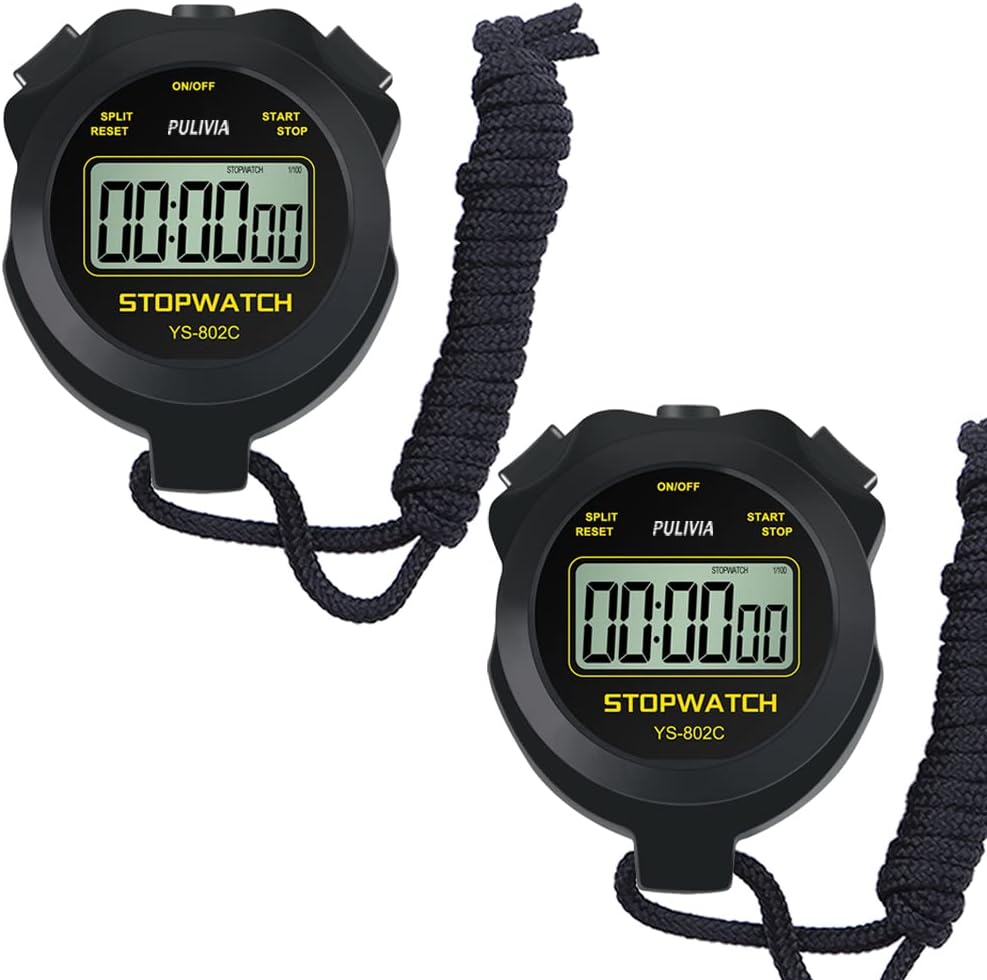
Figure 1: Two PULIVIA Digital Stopwatches, showcasing the product's design and included lanyard.

Figure 2: The stopwatch features a simple, dedicated stopwatch mode, making it easy to use for all ages.

Figure 3: The ON/OFF function helps conserve battery life. To activate or deactivate, press and hold the ON/OFF button.

Figure 4: The compact and lightweight design (approximately 40g / 1.4oz) ensures comfortable handheld use.

Figure 5: Built with a durable ABS plastic shell, the stopwatch is designed to be shockproof and withstand regular use.

Figure 6: This multi-purpose stopwatch is suitable for a variety of activities including football training, toy games, running, and swimming.
Package Contents
Upon opening the package, please verify that all items are present and in good condition:
- 1 x PULIVIA Digital Stopwatch
- 1 x Black Nylon Lanyard (47 inches)
- 1 x User Manual (this document)
Setup
- Remove Screen Protector: A protective film is attached to the stopwatch screen. Gently peel it off for optimal display clarity.
- Attach Lanyard: Thread the provided black nylon lanyard through the designated loop on the stopwatch for convenient carrying around the neck or wrist.
- Power On: Press and hold the ON/OFF button located at the top of the stopwatch until the display illuminates.
Operating Instructions
The PULIVIA Digital Stopwatch is designed for straightforward operation with three main buttons:
- ON/OFF Button: Located at the top-center. Press and hold to turn the stopwatch on or off.
- START/STOP Button: Located on the top-right.
- Press once to start the timer.
- Press again to stop the timer.
- SPLIT/RESET Button: Located on the top-left.
- While the timer is running, press to record a split time. The main timer continues to run in the background.
- When the timer is stopped, press to reset the display to 00:00:00.
Maintenance
To ensure the longevity and optimal performance of your PULIVIA Digital Stopwatch, please follow these maintenance guidelines:
- Cleaning: Wipe the stopwatch with a soft, dry cloth. Avoid using abrasive cleaners or solvents.
- Water Exposure: This stopwatch is not waterproof. Do not use it in rain or immerse it in water.
- Storage: Store the stopwatch in a cool, dry place away from direct sunlight and extreme temperatures.
- Battery: The stopwatch is designed for long battery life with its ON/OFF function. If the display becomes dim or unresponsive, the battery may need replacement. (Note: Battery type not specified in provided data, typically button cell.)
Troubleshooting
If you encounter any issues with your stopwatch, please refer to the following common solutions:
- Display is Blank:
- Ensure the stopwatch is turned ON by pressing and holding the ON/OFF button.
- The battery may be depleted. While specific battery replacement instructions are not provided, consult a professional if you suspect a dead battery.
- Buttons Not Responding:
- Ensure the stopwatch is powered on.
- Check for any debris or obstruction around the buttons.
- Inaccurate Timing:
- Ensure you are pressing the START/STOP button firmly and clearly.
- The stopwatch is designed for 1/100-second accuracy. External factors like user reaction time can affect perceived accuracy.
For issues not covered here, please contact PULIVIA customer service.
Specifications
| Feature | Detail |
|---|---|
| Brand | PULIVIA |
| Model Name | stopwatch only (YS-802C) |
| Color | Black (also available in Yellow, Blue variants) |
| Material | ABS Plastic Shell, Nylon Lanyard |
| Product Dimensions (LxWxH) | 0.78"D x 3.74"W x 2.75"H (approx. 7.5cm x 5.8cm x 2cm) |
| Item Weight | 1.6 ounces (approx. 40g) |
| Screen Size | 3.74 Inches (display area) |
| Accuracy | 1/100-Second |
| UPC | 763971490262 |
| Manufacturer | ShenZhen YiSheng Technology Co., Ltd |
Warranty and Support
PULIVIA is committed to providing high-quality products and customer satisfaction. This product is covered by a standard return policy, typically 30 days from the date of purchase, allowing for refunds or replacements for eligible issues.
For any questions, concerns, or technical support regarding your PULIVIA Digital Stopwatch, please do not hesitate to contact our customer service team. We offer 7 days a week, 24 hours a day customer service via Amazon email.
Contact Information:
- Via Amazon messaging system (recommended for prompt service).