
1. Introduction
Thank you for choosing SOBERNA S24 Wireless Earbuds. This manual provides detailed instructions on how to set up, operate, maintain, and troubleshoot your new earbuds. Please read this manual carefully before use to ensure optimal performance and longevity of your device.
2. What's in the Box
- SOBERNA S24 Wireless Earbuds (Left & Right)
- Charging Case
- USB Charging Cable
- Multiple Sizes of Ear Tips (S, M, L)
- User Manual
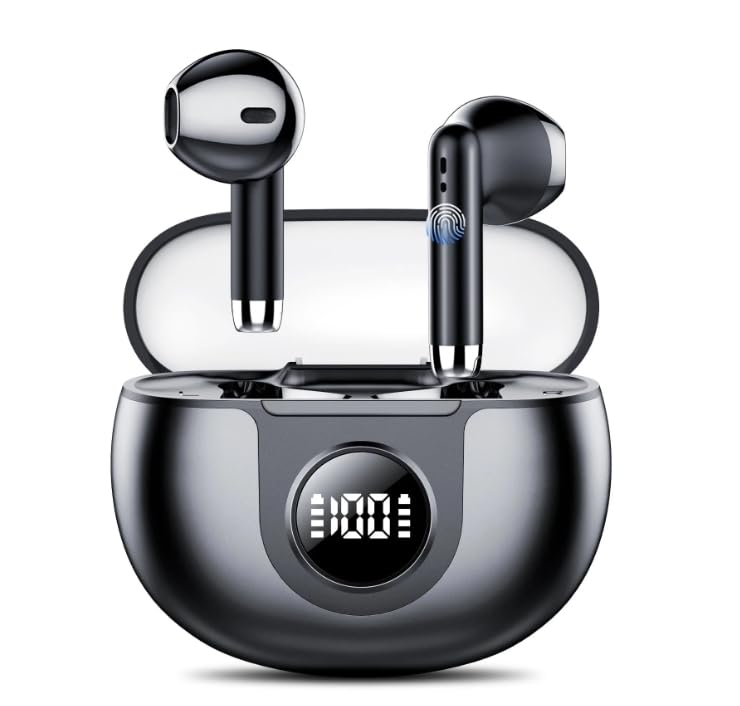
Image 1: SOBERNA S24 Wireless Earbuds and Charging Case. The image displays the two earbuds nestled within their compact charging case, alongside a USB charging cable and various ear tip sizes.
3. Setup
3.1 Charging the Earbuds and Case
- Initial Charge: Before first use, fully charge the charging case and earbuds. Connect the USB charging cable to the charging port on the case and a power source. The LED power display on the case will indicate the charging status.
- Charging Earbuds: Place the earbuds into the charging case. They will automatically begin charging. The LED indicators on the earbuds will show charging status, typically turning off when fully charged.
3.2 Pairing with Your Device
- Power On: Open the charging case, and the earbuds will automatically power on and enter pairing mode. The indicator light on one earbud will flash, indicating it's ready to pair.
- Activate Bluetooth: On your device (smartphone, tablet, laptop), go to the Bluetooth settings and enable Bluetooth.
- Select Device: Look for "SOBERNA S24" in the list of available devices and select it to connect.
- Confirmation: Once connected, you will hear an audio prompt, and the earbud indicator lights will turn off or flash slowly.
Note: The earbuds will automatically reconnect to the last paired device when taken out of the case, if Bluetooth is enabled on the device.
3.3 Wearing the Earbuds
- Choose the ear tips that provide the most comfortable and secure fit for your ears.
- Insert the earbuds into your ear canals and gently twist them to ensure a snug fit. This helps optimize sound quality and noise isolation.
4. Operating Instructions
4.1 Power On/Off
- Power On: Open the charging case, or long-press the touch control area on both earbuds for 3 seconds.
- Power Off: Place the earbuds back into the charging case and close the lid, or long-press the touch control area on both earbuds for 5 seconds.
4.2 Music Playback
- Play/Pause: Single tap the touch control area on either earbud.
- Next Track: Double tap the right earbud.
- Previous Track: Double tap the left earbud.
- Volume Up: Triple tap the right earbud.
- Volume Down: Triple tap the left earbud.
4.3 Call Management
- Answer/End Call: Single tap the touch control area on either earbud.
- Reject Call: Long-press the touch control area on either earbud for 2 seconds.
4.4 Voice Assistant
- Activate Voice Assistant: Long-press the touch control area on either earbud for 2 seconds (when not on a call).
5. Maintenance
5.1 Cleaning
- Regularly clean the earbuds and charging case with a soft, dry, lint-free cloth.
- Remove ear tips and clean any earwax or debris from the earbud nozzles using a small brush or cotton swab.
- Ensure charging contacts on both earbuds and case are clean and dry.
5.2 Storage
- When not in use, store the earbuds in their charging case to protect them and keep them charged.
- Store in a cool, dry place away from extreme temperatures and direct sunlight.
5.3 Battery Care
- Avoid fully discharging the battery frequently. Charge the case when the LED display indicates low power.
- If not used for an extended period, charge the earbuds and case at least once every three months to maintain battery health.
5.4 Water Resistance (IPX7)
- The SOBERNA S24 earbuds are IPX7 waterproof, meaning they can withstand immersion in water up to 1 meter for 30 minutes.
- Important: The charging case is not waterproof. Do not expose the charging case to water or moisture.
- Ensure earbuds are completely dry before placing them back into the charging case to prevent damage.
6. Troubleshooting
| Problem | Possible Cause | Solution |
|---|---|---|
| Earbuds not pairing with device. | Bluetooth is off; earbuds are out of range; earbuds not in pairing mode; previously paired device interfering. | Ensure Bluetooth is on. Place earbuds closer to device. Put earbuds back in case, close, then reopen to re-enter pairing mode. Turn off Bluetooth on other devices. |
| No sound from earbuds. | Volume too low; earbuds not connected; media source paused. | Increase device volume. Check Bluetooth connection. Ensure media is playing. |
| One earbud not working. | Low battery; connection issue; earbud not properly seated in case. | Charge both earbuds fully. Re-pair the earbuds. Ensure earbud contacts are clean and making proper connection in the case. |
| Charging case not charging. | Faulty cable; power source issue; charging port dirty. | Try a different USB cable and power adapter. Clean the charging port gently. |
7. Specifications
- Model: S24
- Bluetooth Version: V5.3
- Earbud Playtime: Up to 60 hours (with charging case)
- Charging Case Battery: 500mAh
- Water Resistance: IPX7 (earbuds only)
- Ear Placement: In-Ear
- Connectivity: Wireless
- Features: Deep Bass, LED Power Display, Built-in Microphone
8. Warranty and Support
8.1 Manufacturer's Warranty
The SOBERNA S24 Wireless Earbuds come with a 2-Year Manufacturer's Warranty from the date of purchase. This warranty covers manufacturing defects and workmanship under normal use. It does not cover damage caused by misuse, accidents, unauthorized modifications, or normal wear and tear.
8.2 Customer Support
For any questions, technical assistance, or warranty claims, please contact SOBERNA customer support. Please have your product model (S24) and proof of purchase ready when contacting support.
Email: support@soberna.com
Website: www.soberna.com/support