1. Introduction
This instruction manual provides essential information for the proper installation, operation, and maintenance of your JHXRBZR DX5 Printhead. Designed for compatibility with Mutoh ValueJet 1604, 1614, 1204, and 1304 inkjet printers, this printhead ensures reliable performance and vibrant print quality. Please read this manual thoroughly before installation and use to ensure optimal results and prolong the life of your equipment.
2. Safety Information
Observe the following safety precautions to prevent damage to the product or injury to yourself:
- Always disconnect the printer from the power source before installing or removing any components.
- Handle the printhead with care, avoiding contact with the nozzle plate and electronic connectors.
- Wear appropriate protective gear, such as gloves, to prevent ink contact and static discharge.
- Keep the printhead away from dust, direct sunlight, and extreme temperatures.
- Do not attempt to disassemble or modify the printhead.
3. Package Contents
Verify that all items are present in the package:
- 1 x JHXRBZR DX5 Printhead with Green Connector
- (Additional items, if any, would be listed here by the manufacturer)
4. Product Overview
The JHXRBZR DX5 Printhead is a critical component for inkjet printers, responsible for precisely ejecting ink onto the printing medium. This model features a green connector for specific Mutoh ValueJet series printers.

Figure 4.1: Front-side view of the JHXRBZR DX5 Printhead. This image displays the main body of the printhead, including the metallic nozzle plate and the general housing structure.
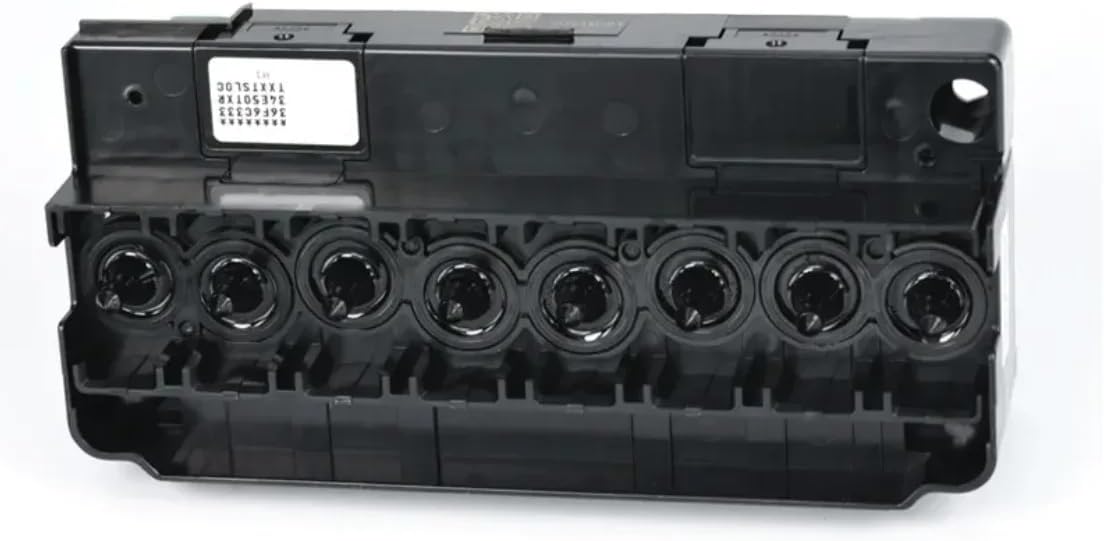
Figure 4.2: Underside view of the DX5 Printhead. This image highlights the eight circular ports where ink dampers connect, ensuring proper ink delivery to the printhead nozzles.

Figure 4.3: Top view of the DX5 Printhead. This perspective clearly shows the green electronic connector, which interfaces with the printer's main board to transmit print data and power.
5. Compatibility
This JHXRBZR DX5 Printhead (Model: JHXRBZR111) is compatible with the following Mutoh ValueJet printer models:
- Mutoh ValueJet 1604
- Mutoh ValueJet 1614
- Mutoh ValueJet 1204
- Mutoh ValueJet 1304
Ensure your printer model matches one of the listed compatible models before installation.
6. Setup and Installation
The following steps outline the general procedure for installing the DX5 printhead. Refer to your specific Mutoh ValueJet printer's service manual for detailed, model-specific instructions.
- Preparation:
- Turn off the printer and disconnect it from the power supply.
- Open the printer's access cover to expose the printhead carriage.
- Wear anti-static gloves to prevent damage from static electricity.
- Remove Old Printhead (if applicable):
- Carefully disconnect the ink tubes from the dampers on the old printhead.
- Unplug the ribbon cables from the printhead's electronic connector.
- Unscrew any retaining screws or release clips holding the printhead in place.
- Gently lift and remove the old printhead. Dispose of it according to local regulations.
- Install New Printhead:
- Carefully unpack the new JHXRBZR DX5 Printhead. Avoid touching the nozzle plate.
- Position the new printhead into the carriage, ensuring it seats correctly.
- Secure the printhead with the retaining screws or clips. Do not overtighten.
- Connect the ribbon cables to the green electronic connector on the printhead, ensuring they are fully seated and oriented correctly.
- Connect the ink tubes to the dampers on the new printhead. Ensure each tube is connected to the correct color damper.
- Initial Ink Charging:
- Close the printer's access cover.
- Reconnect the printer to the power supply and turn it on.
- Follow your printer's on-screen prompts or service manual instructions to perform an initial ink charge or head cleaning cycle. This primes the printhead with ink and removes air bubbles.
- Test Print:
- Perform a nozzle check pattern print to verify proper ink ejection from all channels.
- If the nozzle check is incomplete or shows missing lines, perform additional cleaning cycles until the pattern is perfect.
7. Operating Instructions
Once the printhead is installed and primed, operate your printer as usual. For optimal performance and longevity of the printhead:
- Use high-quality, compatible inks recommended for your Mutoh ValueJet printer.
- Avoid leaving the printer unused for extended periods. If the printer will be idle, perform a small print or cleaning cycle periodically to prevent ink from drying in the nozzles.
- Ensure the printer's environment is stable, avoiding significant temperature fluctuations or excessive dust.
8. Maintenance
Regular maintenance helps ensure consistent print quality and extends the life of your printhead.
- Daily/Weekly Cleaning: Perform routine automatic head cleaning cycles through your printer's control panel.
- Manual Cleaning (if necessary): If print quality issues persist after automatic cleaning, consult your printer's service manual for instructions on manual printhead cleaning. This typically involves using a lint-free swab and specialized cleaning solution. Exercise extreme caution to avoid damaging the nozzle plate or electronics.
- Capping Station Maintenance: Regularly clean the capping station and wiper blade in your printer carriage to prevent dried ink buildup, which can lead to nozzle clogs.
- Storage: If the printhead needs to be stored for an extended period, ensure it is properly flushed with cleaning solution and stored in an airtight, dark container to prevent drying and contamination.
9. Troubleshooting
Refer to the table below for common issues and their potential solutions.
| Problem | Possible Cause | Solution |
|---|---|---|
| Missing lines or streaks in print. | Clogged nozzles, air bubbles in ink lines, low ink. | Perform a nozzle check and head cleaning. Check ink levels. Ensure dampers are properly seated. |
| Incorrect colors or color shifts. | Incorrect ink type, clogged nozzles for specific colors, color profile issues. | Verify ink compatibility. Perform head cleaning. Check printer's color calibration settings. |
| Printhead not recognized by printer. | Improper installation, loose ribbon cable, faulty printhead. | Turn off printer, reseat ribbon cables and printhead. Restart printer. If issue persists, contact support. |
| Ink leakage. | Damaged damper, loose ink tube connection, overfilled ink system. | Inspect dampers and ink tube connections. Ensure ink levels are appropriate. |
For issues not listed here, consult your Mutoh ValueJet printer's comprehensive troubleshooting guide or contact technical support.
10. Specifications
| Feature | Detail |
|---|---|
| Model Number | JHXRBZR111 |
| Printing Type | Inkjet Printer Component |
| Compatibility | Mutoh ValueJet 1604, 1614, 1204, 1304 |
| Connector Type | Green Connector |
| Package Dimensions | 1.18 x 0.79 x 0.39 inches |
| Item Weight | 14.1 ounces |
| Manufacturer | JHXRBZR |
11. Warranty and Support
Specific warranty information for the JHXRBZR DX5 Printhead (Model: JHXRBZR111) is not provided in this manual. Please refer to the product packaging or contact the manufacturer, JHXRBZR, directly for warranty details and technical support inquiries.
For general printer operation and troubleshooting, consult the official Mutoh ValueJet printer manual or Mutoh's customer support resources.