
1. Introduction
This manual provides essential information for the safe and effective operation of your Beurer BM59 Elite 900 Upper Arm Blood Pressure Monitor. Please read these instructions thoroughly before first use and keep them for future reference. This device is designed for non-invasive measurement and monitoring of arterial blood pressure in adults. It is intended for home use and allows for quick and easy measurement of your blood pressure, storage of the measured values, and display of the average values.
2. Safety Information
Important: Please read the instruction manual in full before first use.
- This device is intended for measuring blood pressure on the upper arm.
- Do not use the device on infants, children, or pregnant women.
- Consult your physician before using the device if you have any medical conditions, including but not limited to diabetes, liver or kidney disease, severe hypertension, or peripheral circulatory disorders.
- Self-measurement is not a substitute for medical examination and treatment. Always discuss your blood pressure readings with your doctor.
- Keep the device away from water, moisture, and extreme temperatures.
- Do not disassemble or attempt to repair the device yourself.
3. Package Contents
Verify that all components are present and undamaged upon unpacking:
- Beurer BM59 Blood Pressure Monitor (integrated cuff)
- USB-C cable
- 1 Lithium Ion battery (pre-installed or included separately)
- Instruction Manual (this document)
4. Device Overview
The Beurer BM59 features a compact, tubeless, one-piece design for ease of use. Key components include the main unit with an LED display and the integrated upper arm cuff.

Image: The Beurer BM59 Blood Pressure Monitor, showcasing its sleek design with the main unit and integrated cuff. The LED display is visible, showing example readings.
The device includes an LED display for clear readings, control buttons for operation, and a universal cuff designed to fit upper arm circumferences from 8.7 inches to 16.5 inches.
5. Setup
5.1 Battery Installation
The Beurer BM59 requires 1 Lithium Ion battery, which is typically included. If not pre-installed, open the battery compartment on the device and insert the battery, ensuring correct polarity as indicated. Close the compartment securely.
5.2 App Installation and Pairing (Bluetooth)
To utilize the full features of your BM59 monitor, including unlimited data storage and detailed tracking, download the Beurer HealthManager Pro app on your smartphone or tablet.
- Download the "Beurer HealthManager Pro" app from your device's app store (iOS or Android).
- Ensure Bluetooth is enabled on your smartphone.
- Open the Beurer HealthManager Pro app and follow the on-screen instructions to create an account or log in.
- Navigate to the device pairing section within the app and select the Beurer BM59.
- Follow the app's prompts to complete the pairing process. Your monitor will automatically sync measurements to the app once paired.

Image: A user viewing their blood pressure data on the Beurer HealthManager Pro app, demonstrating the smart health tracking capabilities via Bluetooth connectivity.
6. Operating Instructions
6.1 Preparing for Measurement
For accurate readings, follow these guidelines:
- Consistency: Measure at the same time each day for consistent results.
- Avoid Distractions: Wait at least 30 minutes after eating, drinking, smoking, or exercising before measuring.
- Rest: Rest for 5 minutes in a calm environment before your first measurement.
- Spacing: If taking multiple measurements, wait at least 1 minute between consecutive measurements.
- Proper Position: Sit comfortably with your feet flat on the floor, your back supported, and your arm at heart level. Avoid talking or moving during the measurement.
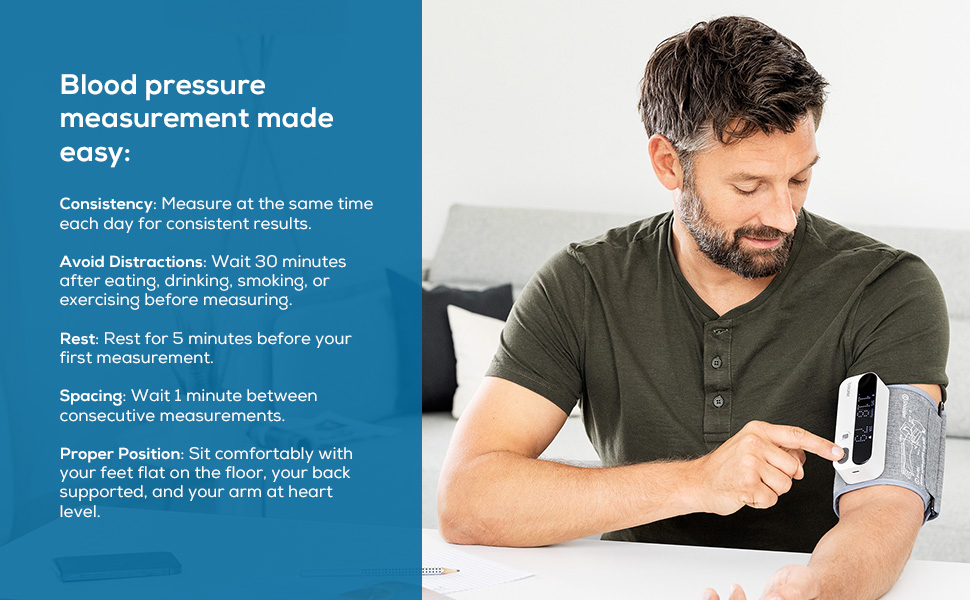
Image: A man demonstrating the correct posture for blood pressure measurement, emphasizing proper arm placement and relaxed body position for accurate readings.
6.2 Applying the Cuff
The Beurer BM59 features a tubeless, one-piece cuff for simplified application.
- Slide your left arm through the cuff opening.
- Position the cuff on your upper arm, approximately 0.8-1.2 inches (2-3 cm) above your elbow joint. The display unit should be on the inside of your arm, facing upwards.
- Ensure the cuff is snug but not too tight. You should be able to insert two fingers between the cuff and your arm.

Image: A user applying the Beurer BM59's one-piece cuff to their upper arm, highlighting the tubeless design for easy and accurate placement.
6.3 Taking a Measurement
- Once the cuff is correctly positioned and you are in a relaxed state, press the START/STOP button to begin the measurement.
- The cuff will inflate automatically. Remain still and silent during inflation and deflation.
- Your systolic and diastolic blood pressure readings, along with your pulse rate, will be displayed on the LED screen once the measurement is complete.
- The device will automatically store the reading and, if paired, sync it to the Beurer HealthManager Pro app.
6.4 Interpreting Results
The Beurer BM59 includes an LED risk indicator and irregular heartbeat detection for easy interpretation of your readings.
LED Risk Indicator Scale
The color-coded scale on the device helps you quickly assess your blood pressure category according to World Health Organization (WHO) guidelines:
- Green: Normal blood pressure
- Yellow: Mild high blood pressure
- Orange: Moderate high blood pressure
- Red: Severe high blood pressure

Image: The Beurer BM59 displaying its LED Risk Indicator Scale, which uses color-coding to help users quickly interpret their blood pressure results based on WHO guidelines.
Irregular Heartbeat Detection
The device is equipped with irregular heartbeat detection. If an irregular heart rhythm is detected during the measurement, a specific symbol will appear on the display. This may indicate a potential arrhythmia. If this symbol appears frequently, consult your physician for further evaluation.

Image: A user with the Beurer BM59 on their arm, illustrating the device's irregular heartbeat detection feature, which alerts if an abnormal heart rate is identified.
7. Memory Functions
The Beurer BM59 can store up to 240 readings directly on the device for one user. For unlimited storage and comprehensive health management, sync your measurements via Bluetooth to the Beurer HealthManager Pro app. The app provides detailed graphs, trends, and allows you to share data with your healthcare provider.

Image: A visual summary of the Beurer BM59's key features, including irregular heartbeat detection, tubeless design, LED risk indicator, cuff size, on-device memory, and Bluetooth synchronization with the app.
8. Maintenance and Care
- Clean the device and cuff with a slightly damp cloth. Do not use abrasive cleaners or immerse the device in water.
- Store the device in a cool, dry place, away from direct sunlight and extreme temperatures.
- Remove batteries if the device will not be used for an extended period.
9. Troubleshooting
| Problem | Possible Cause | Solution |
|---|---|---|
| No display/Device does not turn on | Low or depleted battery; Incorrect battery installation. | Replace or recharge battery; Check battery polarity. |
| Inaccurate readings | Improper cuff placement; Movement or talking during measurement; Incorrect body posture. | Re-position cuff correctly; Remain still and silent; Ensure proper posture (feet flat, back supported, arm at heart level). |
| Bluetooth pairing issues | Bluetooth not enabled on phone; Device too far from phone; App not updated. | Ensure Bluetooth is on; Keep device close to phone; Update Beurer HealthManager Pro app. |
| Error message on display | Cuff not applied correctly; Excessive movement; Air leakage. | Refer to the specific error code in the full manual (if available) or re-apply cuff and re-measure. |
10. Specifications
- Model: BM59
- Product Dimensions: 4.9"L x 1.9"W x 1.1"Th (12.4 cm x 4.8 cm x 2.8 cm)
- Weight: Approximately 11.46 ounces (325 grams)
- Power Source: Battery Powered (1 Lithium Ion battery required, included)
- Display Type: LED
- Cuff Size: Universal, fits upper arm circumferences from 8.7" to 16.5" (22 cm to 42 cm)
- Memory: 240 readings on device (unlimited via Beurer HealthManager Pro app)
- Connectivity: Bluetooth
- Measurement Method: Oscillometric, non-invasive blood pressure measurement on the upper arm
- Measurement Range: Systolic: 60-250 mmHg, Diastolic: 40-180 mmHg, Pulse: 40-199 beats/minute
- Operating Conditions: 10°C to 40°C (50°F to 104°F), 15% to 90% relative humidity (non-condensing)
- Storage Conditions: -20°C to 55°C (-4°F to 131°F), 15% to 90% relative humidity (non-condensing)
11. Warranty and Support
Your Beurer BM59 Blood Pressure Monitor comes with a manufacturer's warranty. Please refer to the warranty card included in your package or visit the official Beurer website for detailed warranty terms and conditions. For technical support, troubleshooting assistance, or inquiries about your device, please contact Beurer customer service through their official channels. Contact information can typically be found on the Beurer website or in the product packaging.