1. Introduction
The Canon EOS R5 Mark II is a high-performance full-frame mirrorless camera designed for professional photographers and videographers. It features a completely new Canon-designed 45MP back-illuminated stacked CMOS sensor, offering exceptional image quality and speed. This manual provides essential information for setting up, operating, and maintaining your camera to ensure optimal performance.
Video 1: Canon EOS R5 Mark II Overview. This short video provides a quick visual overview of the Canon EOS R5 Mark II camera body and its key features.
2. What's in the Box
Upon opening your Canon EOS R5 Mark II package, please verify that all the following items are included:
- Canon EOS R5 Mark II Camera Body
- Canon LP-E6P Lithium-Ion Battery (2 TOTAL BATTERIES)
- Battery Charger
- USB-C Cable
- Camera Body Cap
- Strap

Image 1: Included Accessories. This image displays the Canon EOS R5 Mark II camera body alongside its standard accessories, including two LP-E6P batteries, a charger, USB-C cable, and body cap.
3. Camera Overview
3.1 Front View
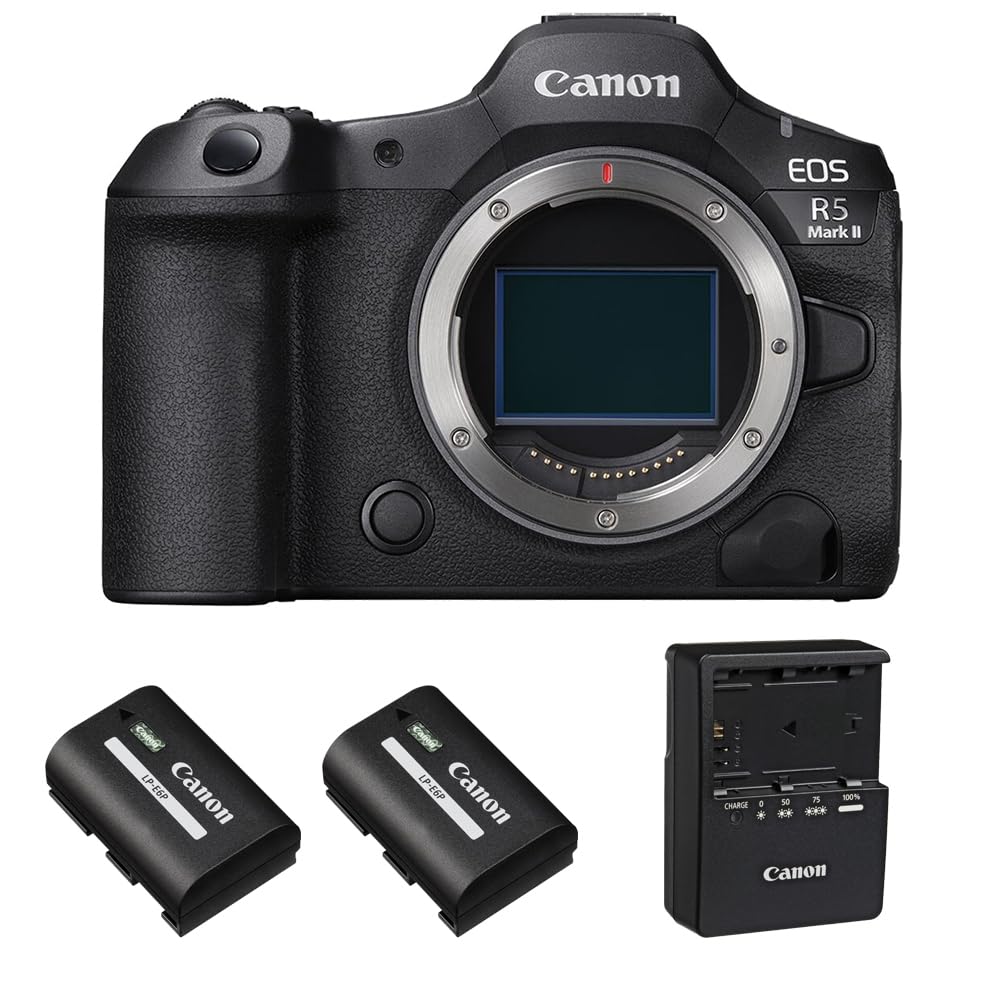
Image 2: Front View of EOS R5 Mark II. This image highlights the front of the camera, featuring the Canon RF lens mount, the ergonomic grip, and the Canon branding.
3.2 Top View

Image 3: Top View of EOS R5 Mark II. This perspective shows the camera's top plate, including the mode dial, shutter button, hot shoe, and the small LCD information panel.
3.3 Side Views (Ports and Card Slots)

Image 4: Side Ports. This image details the various connectivity ports on the side of the camera, including microphone input, USB-C, and HDMI output.

Image 5: Memory Card Slot Door. This image shows the side of the camera where the memory card compartment is located, with the door closed.
3.4 Rear View (Screen and Viewfinder)

Image 6: Rear View with Open Card Slots. The back of the camera is shown with the vari-angle LCD screen and the memory card door open, revealing the dual card slots.

Image 7: Electronic Viewfinder. A close-up of the electronic viewfinder, demonstrating its clear display of the scene being captured.
4. Setup
4.1 Battery Installation and Charging
The Canon EOS R5 Mark II uses LP-E6P Lithium-Ion batteries. Ensure your batteries are fully charged before use.
- Insert the battery into the included charger.
- Connect the charger to a power outlet. The charging indicator will show the charging status.
- Once fully charged, remove the battery from the charger.
- Open the battery compartment cover on the bottom of the camera.
- Insert the charged battery, ensuring it clicks into place. Close the cover securely.

Image 8: LP-E6P Battery. A detailed view of the Canon LP-E6P battery, which powers the EOS R5 Mark II.
4.2 Memory Card Installation
The EOS R5 Mark II supports dual memory card slots for CFexpress and SD cards.
- Open the memory card compartment cover on the side of the camera (refer to Image 6).
- Insert the CFexpress card into Slot 1 and/or the SD card into Slot 2, ensuring they are oriented correctly.
- Push the cards in until they click into place.
- Close the memory card compartment cover securely.
4.3 Attaching a Lens
While this product is body-only, the EOS R5 Mark II is compatible with Canon RF lenses. To attach a lens:
- Remove the body cap from the camera and the rear cap from the lens.
- Align the red index mark on the lens with the red index mark on the camera's lens mount.
- Rotate the lens clockwise until it clicks into place.
4.4 Initial Power On
After installing the battery and memory card, turn the camera on using the power switch. Follow any on-screen prompts for initial setup, such as setting the date, time, and language.
5. Operating the Camera
5.1 Basic Photography Modes
The mode dial on the top of the camera allows you to select various shooting modes:
- Program AE (P): Camera automatically sets aperture and shutter speed.
- Shutter-Priority AE (Tv): You set the shutter speed, camera sets aperture.
- Aperture-Priority AE (Av): You set the aperture, camera sets shutter speed.
- Manual Exposure (M): You set both aperture and shutter speed.
- Custom Shooting Modes (C1, C2, C3): Save your preferred settings for quick recall.
5.2 Focusing System
The EOS R5 Mark II features advanced autofocus capabilities:
- Eye Control Focus: Allows you to select the focus point by looking at it through the viewfinder.
- Action Priority: Utilizes data to interpret the scene and predict the main subject, locking focus in action scenarios.
- The new focus system upgrades include the ability to maintain focus on a subject even when obscured briefly.
5.3 Video Recording
The camera offers robust video features, including the ability to capture video and stills simultaneously with no interruption. It supports 4K video recording at up to 60 frames per second and includes C-Log 2 for enhanced grading flexibility.
5.4 Image Stabilization
The EOS R5 Mark II features optical image stabilization, which helps to reduce camera shake for sharper images and smoother video, especially in low light or when using longer focal lengths.

Image 9: Sensor and Processor Diagram. This diagram illustrates the camera's full-frame back-illuminated stacked CMOS 45MP sensor and the DIGIC X processor, highlighting their role in fast sensor read-out speeds.
6. Advanced Features
- New 45MP Sensor: Completely new Canon designed full-frame back-illuminated stacked CMOS 45MP sensor.
- High-Speed Electronic Shutter: Fast sensor read-out speeds allow for up to 30 fps electronic shutter performance.
- Enhanced Focus System: Upgrades include eye control focus and the ability to maintain focus on a subject even when obscured briefly.
- Action Priority: Uses data to interpret the scene and predict the main subject to lock focus on it in action scenarios.
7. Maintenance
7.1 Cleaning the Camera
Regular cleaning helps maintain your camera's performance and longevity.
- Use a blower brush to remove dust from the sensor and lens surfaces.
- Wipe the camera body with a soft, lint-free cloth. For stubborn smudges, use a slightly damp cloth with mild soap, then dry thoroughly.
- Avoid using harsh chemicals or abrasive materials.
7.2 Battery Care
To maximize battery life and performance:
- Store batteries in a cool, dry place when not in use.
- Avoid fully discharging batteries regularly.
- Charge batteries using only the official Canon charger.
7.3 Storage
When storing the camera for extended periods, remove the battery and memory cards. Store the camera in a dry, dust-free environment, preferably with desiccant packs to prevent moisture buildup.
8. Troubleshooting
8.1 Overheating
The Canon EOS R5 Mark II, like many high-performance cameras, can experience overheating during extended video recording, especially in high-resolution modes (e.g., 4K 24fps nonstop recording for 20-30 minutes). If an overheating warning appears:
- Stop recording and turn off the camera to allow it to cool down.
- Consider using an external fan grip for prolonged video sessions to dissipate heat more effectively.
- Reduce video resolution or frame rate if continuous recording is essential.
8.2 Corrupted Files
In rare instances, files may become corrupted, particularly if the camera is powered off unexpectedly during recording or if overheating occurs. To minimize this risk:
- Always ensure the camera has sufficient battery power before starting important recordings.
- Use high-quality, reputable memory cards.
- Avoid turning off the camera while it is actively writing data to the card.
8.3 Focus Issues
If you experience issues with autofocus accuracy:
- Ensure your lens is clean and free of dust or smudges.
- Check your autofocus mode settings to ensure they are appropriate for your subject and shooting conditions.
- Calibrate your lens if necessary (refer to advanced camera settings or Canon support).
9. Specifications
| Feature | Detail |
|---|---|
| Model Name | EOS R5 Mark II |
| Brand | Canon |
| Item Model Number | 6536C002-003 |
| Photo Sensor Technology | Full-Frame Stacked BSI CMOS |
| Image Stabilization | Optical |
| Compatible Mountings | Canon RF |
| Supported File Format | HEIF, JPEG, Raw |
| Aspect Ratio | 3:2 |
| Optical Zoom | 1 x |
| Expanded ISO Minimum | 100 |
| Metering Description | Manual |
10. Warranty and Support
Your Canon EOS R5 Mark II Mirrorless Camera comes with a manufacturer's warranty. Please refer to the warranty card included in your product packaging for specific terms and conditions. For technical support, service, or additional information, please visit the official Canon support website or contact their customer service.
Online resources and firmware updates may also be available on the Canon website to enhance your camera's performance and features.


