
Introduction
This manual provides detailed instructions for the safe and efficient operation, maintenance, and troubleshooting of your Sencor SES 4910SS Semi-Automatic Espresso Machine. Please read this manual thoroughly before first use and keep it for future reference.
The Sencor SES 4910SS is designed to prepare various coffee beverages, including espresso, cappuccino, and latte, with its 20-bar Italian pump and dual thermoblock system for rapid heating. It features a OneTouch panel for ease of use and an integrated milk frothing system.
Important Safety Instructions
- Read all instructions before using the appliance.
- Do not immerse the appliance, power cord, or plug in water or any other liquid.
- Ensure the voltage indicated on the appliance corresponds to your local mains voltage before connecting.
- Close supervision is necessary when the appliance is used by or near children.
- Unplug from the outlet when not in use and before cleaning. Allow to cool before putting on or taking off parts, and before cleaning the appliance.
- Do not operate any appliance with a damaged cord or plug, or after the appliance malfunctions or has been damaged in any manner.
- The use of accessory attachments not recommended by the appliance manufacturer may result in fire, electric shock, or injury to persons.
- Do not use outdoors.
- Do not let the cord hang over the edge of a table or counter, or touch hot surfaces.
- Do not place on or near a hot gas or electric burner, or in a heated oven.
- Always attach the plug to the appliance first, then plug the cord into the wall outlet. To disconnect, turn any control to "off", then remove the plug from the wall outlet.
- Do not use the appliance for other than intended use.
- Exercise extreme caution when disposing of hot steam.
- The appliance is equipped with a pre-infusion system for intense coffee flavor.
- The transparent milk container with a removable frothing device is designed for easy cleaning.
- The stainless steel filter is suitable for 1 or 2 cups of coffee.
- A heating plate is included for pre-warming cups.
- The electronic control unit with sensor ensures precise beverage temperature.
- The machine features an automatic self-cleaning function and a descaling program.
Product Overview and Components
Familiarize yourself with the main parts of your Sencor SES 4910SS espresso machine.

Figure 1: Front view of the Sencor SES 4910SS Semi-Automatic Espresso Machine, showing the control panel, portafilter, and milk container.
- Control Panel: OneTouch panel for selecting Espresso, Cappuccino, Latte, and XL sizes.
- Water Tank: Removable 1-liter tank for fresh water.
- Milk Container: 500 ml transparent container with removable frothing device.
- Portafilter: Holds ground coffee.
- Filter Baskets: Stainless steel filters for 1 or 2 cups.
- Drip Tray: Collects excess liquid.
- Cup Warming Plate: Located on top of the machine.
- Steam Wand/Milk Frother: Integrated with the milk container.
- Power Cord: 85 cm length.
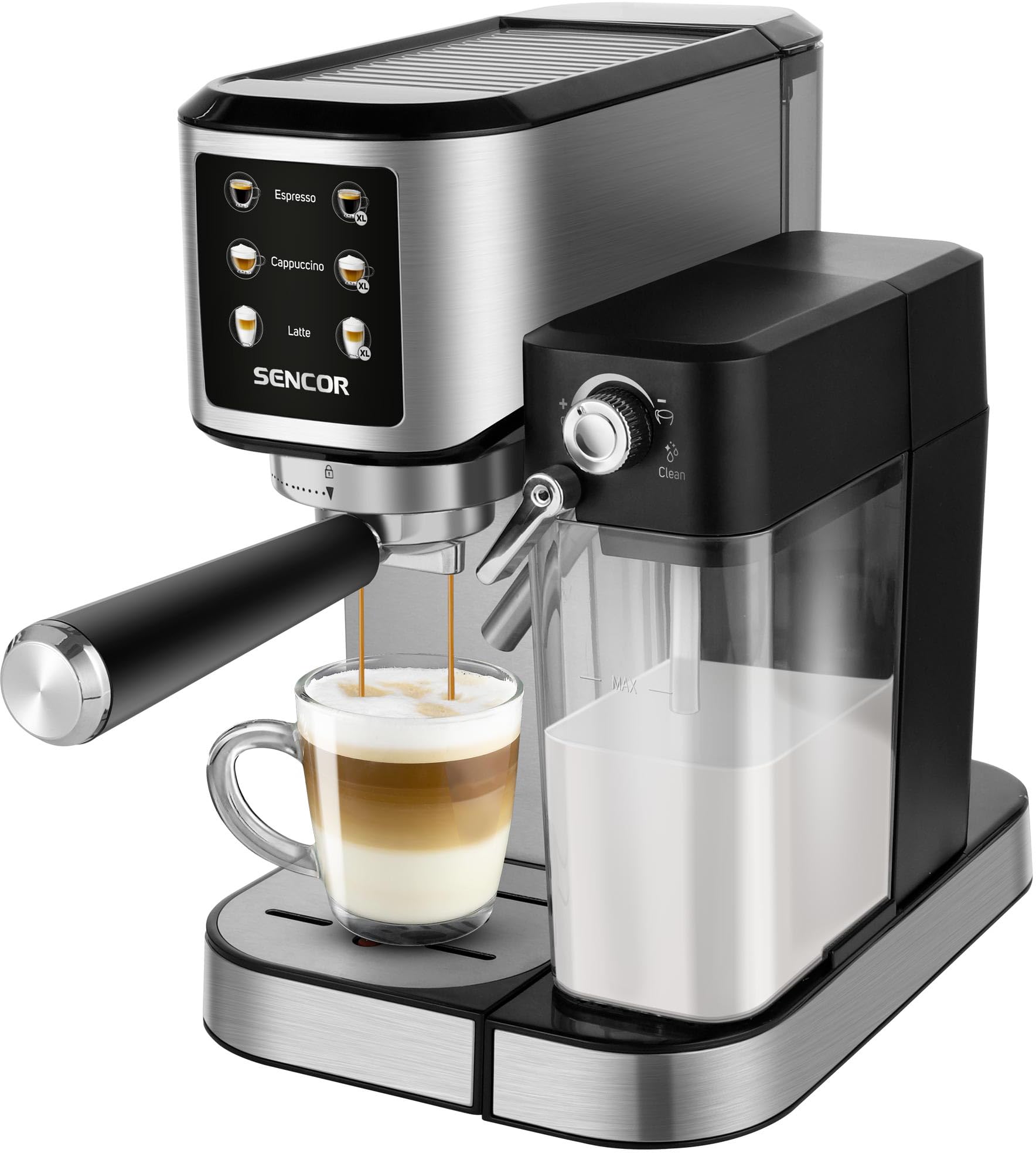
Figure 2: Close-up of the control panel, displaying options for Espresso, Cappuccino, and Latte, each with standard and XL size selections.
Setup
1. Unpacking
- Carefully remove all packaging materials.
- Check that all accessories are present: portafilter, measuring scoop, and two filter baskets (for 1 and 2 cups).
- Place the machine on a stable, flat, heat-resistant surface.
2. Initial Cleaning
- Wash the water tank, milk container, portafilter, and filter baskets with warm soapy water. Rinse thoroughly and dry.
- Wipe the exterior of the machine with a damp cloth.
3. Filling the Water Tank
- Remove the 1-liter water tank from the back of the machine.
- Fill it with fresh, cold drinking water up to the MAX level indicator.
- Place the water tank back into the machine, ensuring it is seated correctly.
4. Priming the Machine (First Use)
- Plug the power cord into a grounded electrical outlet (220-240V, 50-60Hz).
- Place a large cup or container under the coffee outlet.
- Press the power button to turn on the machine. It will start heating up.
- Once the machine is ready (indicator light stops flashing), press the Espresso button (without coffee in the portafilter) to run water through the system. This primes the pump and cleans the internal components.
- Repeat this process for the milk frothing system by filling the milk container with water and running a milk-based program (e.g., Cappuccino) to flush the system.
Operating Instructions
1. Preparing Espresso
- Ensure the water tank is filled.
- Select the appropriate filter basket (1 or 2 cups) and place it into the portafilter.
- Fill the filter basket with finely ground coffee. Use the measuring scoop provided.
- Tamp the coffee firmly and evenly. Wipe any excess coffee from the rim of the portafilter.
- Attach the portafilter to the brewing head by aligning it and twisting it firmly to the right until it locks.
- Place your cup(s) on the drip tray, or on the cup warming plate if desired.
- Press the "Espresso" button for a single shot or "Espresso XL" for a larger volume. The machine will automatically brew and stop.
- After brewing, carefully remove the portafilter and discard the used coffee grounds.

Figure 3: The Sencor SES 4910SS machine actively brewing an espresso into a glass cup, demonstrating the coffee extraction process.
2. Preparing Cappuccino or Latte
- Prepare your espresso shot as described above, but do not remove the portafilter yet.
- Fill the milk container with cold milk (dairy or non-dairy) up to the MAX level.
- Attach the milk container to the machine. Ensure the frothing nozzle is positioned over your cup.
- Press the "Cappuccino" or "Latte" button (or their XL versions). The machine will first brew the espresso, then automatically froth and dispense milk into your cup.
- Once complete, remove your beverage.
- After each milk-based drink, rotate the milk frother knob to the "Clean" position to flush the system with hot water. This prevents milk residue buildup.

Figure 4: The Sencor SES 4910SS machine with the milk container attached, ready for preparing milk-based beverages. A hand is shown pressing a button on the control panel.
3. Cup Warming
Place cups on the stainless steel warming plate located on top of the machine. This helps maintain the temperature of your coffee.
Maintenance and Cleaning
1. Daily Cleaning
- Drip Tray: Empty and rinse the drip tray daily or when the indicator floats up.
- Portafilter and Filter Baskets: After each use, remove coffee grounds and rinse thoroughly under running water.
- Milk Container and Frothing Device: After each milk-based drink, perform the "Clean" cycle for the milk frother. For thorough cleaning, disassemble the frothing device from the milk container and wash all parts with warm soapy water. Rinse and dry.
- Exterior: Wipe the machine's exterior with a soft, damp cloth. Do not use abrasive cleaners or solvents.
2. Descaling Program
The machine has an indicator for descaling necessity and an automatic descaling program. The frequency of descaling depends on water hardness and usage. Refer to the machine's display or indicator lights for prompts.
- Empty the water tank and fill it with a descaling solution mixed according to the manufacturer's instructions.
- Place a large container (at least 1 liter) under the coffee and milk outlets.
- Initiate the descaling program as per the machine's specific instructions (usually by pressing and holding a combination of buttons or selecting from a menu).
- The machine will run through a cycle, dispensing the descaling solution.
- Once the descaling cycle is complete, rinse the water tank thoroughly and fill it with fresh water.
- Run several cycles with fresh water to flush out any remaining descaling solution.
3. Automatic Self-Cleaning Function
The Sencor SES 4910SS features an automatic self-cleaning function. This typically activates upon startup or shutdown, or can be manually initiated. Follow the on-screen prompts or refer to the specific button combinations in your machine's quick start guide for details on activating this function.
Troubleshooting
| Problem | Possible Cause | Solution |
|---|---|---|
| No coffee dispenses. | Water tank empty; machine not primed; coffee too finely ground/tamped too hard; clogged filter. | Fill water tank; prime the machine; use coarser grind/less pressure; clean filter. |
| Coffee is too weak. | Coffee too coarsely ground; not enough coffee; brewing too fast. | Use finer grind; increase coffee amount; tamp more firmly. |
| Milk not frothing properly. | Milk container/frothing device dirty; milk too warm; wrong type of milk. | Clean milk system thoroughly; use cold milk; try different milk types (e.g., whole milk). |
| Machine leaks water. | Water tank not seated correctly; drip tray full; seal issues. | Ensure water tank is firmly in place; empty drip tray; contact service if seals are damaged. |
| Descaling indicator is on. | Machine requires descaling. | Perform the descaling program as described in the Maintenance section. |
Specifications
| Model Number | SES 4910SS |
| Brand | SENCOR |
| Type | Semi-Automatic Espresso Machine |
| Pump Pressure | 20 bars |
| Heating System | Dual Thermoblock |
| Power | 1350 Watts |
| Voltage & Frequency | 220-240 V, 50-60 Hz |
| Water Tank Capacity | 1 Liter |
| Milk Container Capacity | 500 ml |
| Dimensions (W x D x H) | 21.5 x 40.7 x 31.5 cm |
| Weight | 4.8 kg |
| Noise Level | Max. 75 dB |
| Power Cord Length | 85 cm |
| Material | High-quality Stainless Steel and Black body |
| Special Features | One Touch Espresso, Double Thermoblock System, Automatic Self-Cleaning, Descaling Program, Cup Warming Plate, Pre-infusion System. |
Warranty and Support
For warranty information and customer support, please refer to the warranty card included with your product or visit the official Sencor website. Keep your proof of purchase for any warranty claims.
Information regarding spare parts availability is not provided in the product details. For service or spare parts inquiries, please contact Sencor customer service directly.


