
1. Introduction
Thank you for choosing the jely Weather Station. This device provides accurate indoor and outdoor temperature and humidity readings, barometric pressure, and weather forecasts, along with an atomic clock and alarm functions. This manual will guide you through the setup, operation, and maintenance of your new weather station to ensure optimal performance.
2. Package Contents
Please check the package contents to ensure all items are present:
- 1 x jely Weather Station Main Unit
- 3 x Wireless Outdoor Sensors
- 1 x Power Adapter
- 1 x User Manual

Image: The jely Weather Station main unit with its vibrant color display, accompanied by three wireless outdoor sensors.
3. Product Overview
The jely Weather Station consists of a main display unit and three remote wireless sensors. The main unit features a large color screen displaying various environmental data and time information. The compact outdoor sensors transmit data wirelessly to the main unit.
Main Unit Display Layout

Image: A detailed diagram illustrating the various sections of the weather station's display, including time, date, indoor temperature, indoor humidity, outdoor temperatures (1, 2, 3), outdoor humidity, barometric pressure, and weather forecast icons.
Dimensions
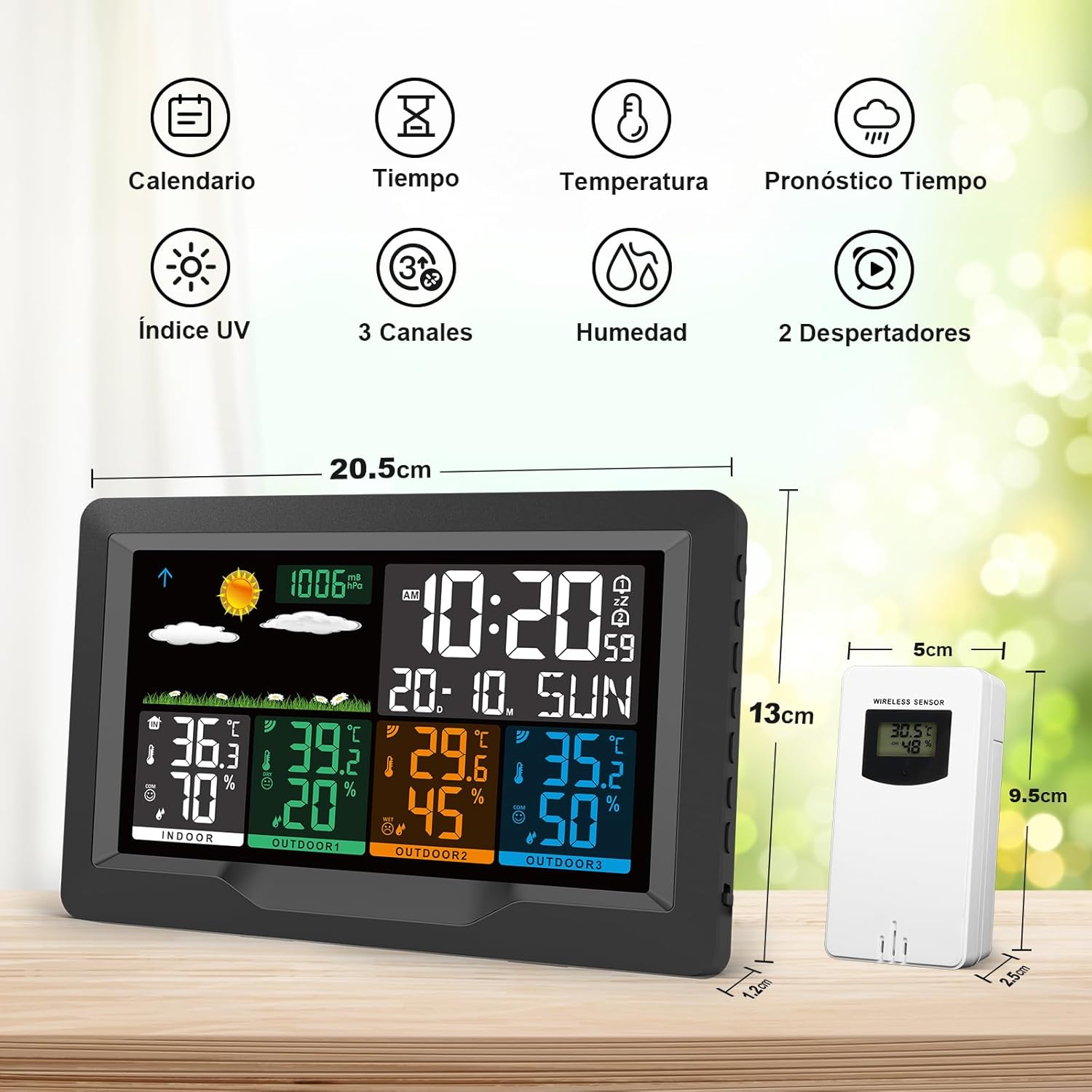
Image: Visual representation of the main unit and sensor dimensions. The main unit measures approximately 20.5cm in width and 13cm in height. Each sensor is about 5cm wide and 9.5cm tall.
4. Setup
4.1 Powering the Devices
The main weather station unit and the outdoor sensors require power to operate.
- Main Unit: Can be powered by the included AC adapter for continuous display, or by 2 x AA batteries (not included) for portable use. When battery-powered, the backlight will turn off after 15 seconds to conserve energy. Press any button to reactivate the screen.
- Outdoor Sensors: Each sensor requires 2 x AA batteries (not included).

Image: Illustration of the power options, showing the USB socket for the main receiver and the battery compartment for the remote sensor, both requiring AA batteries.
4.2 Sensor Placement
Place the outdoor sensors in locations where they can accurately measure temperature and humidity, away from direct sunlight and rain. The transmission range for the sensors is up to 60 meters (200 feet) in open areas. Ensure the sensors are installed in a dry environment.

Image: Example placements of the three remote sensors in various locations such as a bedroom, a nursery, and an outdoor patio, demonstrating their versatility.
4.3 Initial Synchronization (Atomic Clock)
The weather station is designed to automatically receive DCF signals in most European regions to set the correct date and time. After powering on, the device will attempt to synchronize within approximately 3 minutes. You may need to select your specific time zone. The station supports seven languages for display.

Image: The weather station displaying the current time and date, highlighting its automatic synchronization feature via DCF signal.
4.4 Mounting Options
The main unit can be placed on a tabletop using its integrated stand or mounted on a wall.

Image: The weather station displayed in two configurations: wall-mounted for space-saving and on a tabletop stand for easy viewing.
5. Operating Instructions
5.1 Display Functions
The large color screen provides a comprehensive overview of environmental data:
- Time and Date: Automatically set via DCF signal.
- Indoor Temperature & Humidity: Current readings from the main unit.
- Outdoor Temperature & Humidity: Readings from up to three wireless sensors.
- Barometric Pressure: Displays current atmospheric pressure.
- Weather Forecast: Icons predict weather conditions for the next 12 hours.
- Comfort Level Indicator: Shows indoor and outdoor comfort levels based on temperature and humidity.
- Ice Alert: Notifies of potential ice conditions.
5.2 Adjusting Display Brightness
When powered by the AC adapter, the screen remains continuously lit. You can adjust the brightness to one of four levels (100%, 50%, 10%, and 0%) by repeatedly pressing the snooze button located on the top of the unit.

Image: The weather station display demonstrating four distinct brightness settings, from full illumination to completely off, for user preference.
5.3 Setting Alarms
The weather station includes two independent alarm clocks with a snooze function. Refer to the detailed instructions in the included manual for specific steps on setting and managing alarms.
5.4 Weather Forecast
The weather station analyzes barometric pressure trends to provide a forecast for the next 12 hours. The display will show intuitive icons representing various weather conditions.

Image: The weather station's display showing a range of weather forecast icons, from sunny to snowy, indicating predictions for the next 12 hours.
6. Maintenance
To ensure the longevity and accuracy of your jely Weather Station, follow these simple maintenance guidelines:
- Cleaning: Wipe the main unit and sensors with a soft, dry cloth. Avoid abrasive cleaners or solvents.
- Placement: Ensure outdoor sensors remain in a dry location, protected from direct heavy rain or prolonged moisture exposure.
- Battery Replacement: Replace batteries in both the main unit (if battery-powered) and sensors when the low battery indicator appears on the display.
7. Troubleshooting
If you encounter issues with your weather station, please refer to the following common solutions:
- No Sensor Readings:
- Ensure batteries are correctly inserted and not depleted in both the main unit and sensors.
- Verify sensors are within the 60-meter transmission range and free from major obstructions.
- Try re-pairing the sensors with the main unit (refer to the full manual for pairing instructions).
- Incorrect Time/Date:
- Ensure the weather station is in an area where it can receive DCF atomic clock signals.
- Manually set the time zone if automatic detection is incorrect.
- Allow sufficient time (up to several minutes) for initial synchronization.
- Display Not Lit (Battery Power):
- When running on batteries, the backlight automatically turns off after 15 seconds to save power. Press any button to illuminate the screen temporarily.
- Inaccurate Forecast:
- Weather forecasts are based on barometric pressure trends and are predictions for the next 12 hours, not real-time conditions.
8. Specifications
| Model Number | 3390F |
| Brand | jely |
| Product Dimensions | 7.4 x 22.7 x 15.3 cm (Main Unit) |
| Weight | 680 grams |
| Power Source (Main Unit) | AC Adapter (included) or 2 x AA Batteries (not included) |
| Power Source (Sensors) | 2 x AA Batteries (not included) per sensor |
| Special Features | 2 Alarm functions with snooze, DCF function, Weather forecast, 3 External wireless sensors, Temperature and humidity display |
| Recommended Uses | Living room, Bedroom, Study, Basement, Garden |
9. Warranty and Support
jely is committed to providing high-quality products and customer satisfaction. Your jely Weather Station comes with the following:
- 30-Day Full Refund Guarantee: If you are not completely satisfied with your purchase, you may return it for a full refund within 30 days.
- One-Year Replacement Guarantee: In case of any product issues within one year of purchase, we offer a free replacement.
For any questions or assistance regarding your product, please do not hesitate to contact our customer support team. We aim to respond to all inquiries within 24 hours.
