
Bonacell A
Bonacell 60V 9Ah Flexvolt Battery User Manual
Model: A
1. Product Overview
The Bonacell 60V 9Ah Flexvolt Battery is a high-capacity lithium-ion replacement battery designed for compatibility with a wide range of Dewalt 20V and 60V cordless power tools. This battery provides extended runtime and consistent power output for demanding applications.

Image: Two Bonacell 60V 9Ah Flexvolt batteries, showcasing their design and 20V/60V dual voltage capability.
Key features include a 9000mAh capacity for long-lasting performance, no memory effect, and low self-discharge. The integrated 3-LED power indicator allows for easy monitoring of remaining charge levels. The battery is constructed with an APS+PC case for durability and features a precise interface design for secure connection to tools and chargers.

Image: Close-up view highlighting the battery's premium APS+PC case, precise interface design, and the 3-LED power indicator displaying charge levels.
2. Specifications
| Capacity | 9000mAh (9.0Ah) |
| Voltage | 20V/60V (Flexvolt) |
| Battery Type | Lithium-ion |
| Model Number | A |
| Dimensions (L x W x H) | 3.7 x 3.7 x 5.6 inches |
| Weight | 4.44 pounds |
| Compatibility | Dewalt 20V/60V cordless tools (e.g., DCB609, DCB606, DCB612, DCB206, DCB205, DCB204, DCB203, DCB201, DCB180) and original/fast chargers (e.g., DCB115, DCB118, DCB104, DCB107, DCB112). |

Image: Visual representation of the 9000mAh Lithium Battery and its compatibility with a charger and power tool.
3. Safety Information
Always observe the following safety precautions when handling, charging, or using the Bonacell Flexvolt battery:
- Do not immerse the battery in water or other liquids.
- Do not store or use the battery in extreme temperatures (above 104°F / 40°C or below 32°F / 0°C).
- Do not short-circuit the battery terminals.
- Do not disassemble, crush, or incinerate the battery.
- Keep the battery away from children and pets.
- Use only compatible chargers specified for Dewalt 20V/60V Flexvolt batteries.
- If the battery shows signs of damage, leakage, or overheating, discontinue use immediately and dispose of it properly.
- Avoid dropping the battery or subjecting it to strong impacts.
The Bonacell battery incorporates multiple safety protection features, including:
- Over-Voltage Protection: Prevents charging beyond safe voltage levels.
- Over-Current Protection: Safeguards against excessive current draw.
- Over-Heat Protection: Monitors temperature to prevent overheating during use or charging.
- Short-Circuit Protection: Automatically cuts off power in case of a short circuit.
- Over-Discharge Protection: Prevents the battery from being discharged too deeply, preserving battery life.
- Over-Charge Protection: Ensures the battery is not overcharged.
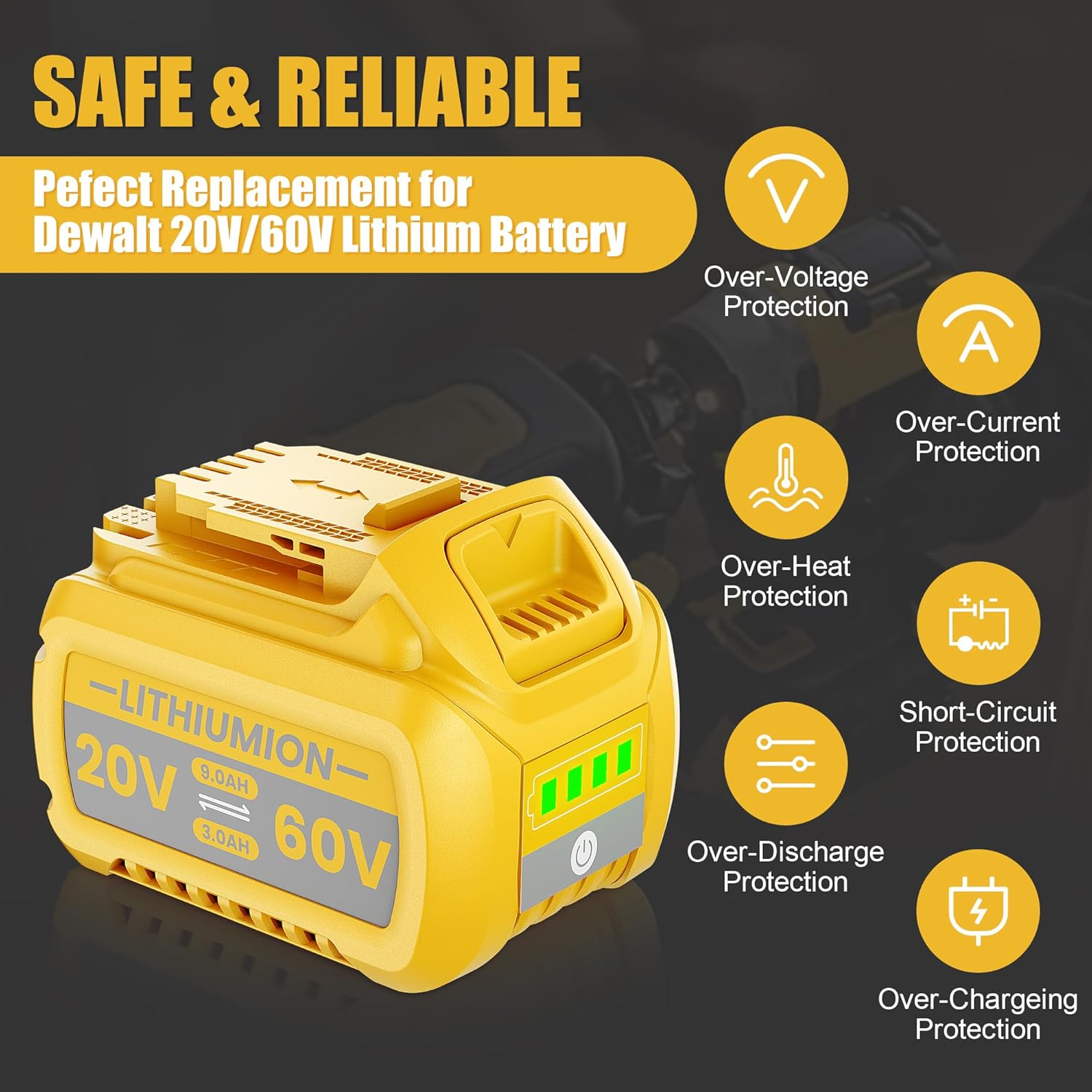
Image: A Bonacell battery surrounded by icons representing its multiple safety features, such as over-voltage, over-current, over-heat, short-circuit, over-discharge, and over-charge protection.
4. Setup and Installation
Installing the Bonacell Flexvolt battery into your compatible Dewalt power tool is a straightforward process.
- Ensure the power tool is turned off and disconnected from any power source.
- Align the battery with the battery slot on your Dewalt tool. The battery is designed for a precise fit.
- Slide the battery firmly into the tool until it clicks securely into place. A click indicates proper installation.
- To remove the battery, press the battery release button(s) on the tool and slide the battery out.

Image: A two-part diagram illustrating the ease of installation: top shows the battery sliding into a drill, bottom shows the battery connected to a charger.
5. Operating Instructions
5.1 Charging the Battery
Before first use, fully charge the battery. Use only compatible Dewalt 20V/60V battery chargers.
- Connect the charger to a power outlet.
- Slide the Bonacell battery onto the charger until it clicks into place.
- The charger's indicator lights will show the charging status. Refer to your charger's manual for specific light patterns.
- Once fully charged, remove the battery from the charger.
The 3-LED indicator on the battery provides a visual representation of the remaining charge:
- 3 Green LEDs: 75% - 100% charge
- 2 Green LEDs: 50% - 75% charge
- 1 Green LED: 25% - 50% charge
- 1 Flashing Green LED: 0% - 25% charge (recharge soon)
5.2 Using the Battery with Power Tools
Once installed, the battery powers your compatible Dewalt 20V or 60V cordless tools. The Flexvolt technology automatically adjusts the voltage output based on the tool's requirements.
- Ensure the battery is fully charged for optimal performance.
- Operate your power tool according to its specific user manual.
- Monitor the battery's LED indicator during prolonged use to anticipate when a recharge is needed.
- For heavy-duty applications, the 9.0Ah capacity provides extended runtime compared to lower capacity batteries.

Image: A Bonacell battery shown alongside various Dewalt 20V/60V cordless power tools, including a circular saw, blower, drill, grinder, and reciprocating saw, illustrating its wide compatibility.
6. Maintenance
Proper maintenance extends the life and performance of your Bonacell Flexvolt battery.
- Cleaning: Keep the battery terminals clean and free of dust and debris. Use a dry, soft cloth to wipe the battery. Do not use solvents or abrasive cleaners.
- Storage:
- Store batteries in a cool, dry place, away from direct sunlight and moisture.
- For long-term storage, it is recommended to store the battery at approximately 50% charge to optimize battery health.
- Avoid storing batteries in extreme temperatures.
- Charging Cycles: While lithium-ion batteries do not suffer from memory effect, regular charging and discharging within their operational limits contribute to longevity.
- Inspection: Periodically inspect the battery for any signs of physical damage, cracks, or swelling. If any damage is observed, discontinue use.

Image: A comparative graph illustrating the superior capacity retention of Bonacell batteries over multiple charge cycles compared to other batteries, emphasizing long duration and good safety performance.
7. Troubleshooting
This section addresses common issues you might encounter with your Bonacell Flexvolt battery.
| Problem | Possible Cause | Solution |
|---|---|---|
| Battery not charging. |
|
|
| Tool not operating with battery. |
|
|
| Battery overheating during use/charging. |
|
|
If you experience issues not covered here, or if solutions do not resolve the problem, please contact Bonacell customer support.
8. Warranty and Support
Bonacell stands behind the quality of its products. If you are not satisfied with your purchase for any reason, please contact us. Our primary goal is customer satisfaction, and we are committed to resolving any issues you may encounter.
For support inquiries, please refer to the contact information provided with your purchase or visit the official Bonacell store on Amazon:
Ask a question about this manual
Ask about setup, troubleshooting, compatibility, parts, safety, or missing instructions. Manuals+ will review the question and use this page’s manual context to help answer it.