1. Introduction
The Fuceter Portable Sonar Fish Finder is a versatile and rechargeable device designed to enhance your fishing experience across various environments, including kayak, shore, sea, and ice fishing. This wireless fish finder accurately detects and displays crucial underwater information such as water depth, water temperature, fish size, fish depth, and bottom contour. Equipped with a 105° sonar beam angle and a depth range of 2.6-164 feet (0.8-50 meters), it provides comprehensive data to help locate fish effectively.

Image 1.1: The Fuceter Portable Sonar Fish Finder, showing the main display unit and the wireless sonar sensor.
Its compact and lightweight design, coupled with a 3.5-inch TFT LCD sunlight screen, ensures ease of use and clear visibility even in bright conditions. The device includes features like fish alarms, water depth alarms, and adjustable sonar background settings to optimize your fishing strategy.
2. What's in the Box
Please verify that all the following components are included in your package:
- Portable Wireless Fish Finder Host x1
- Fish Finder Wireless Probe Sonar Ball x1
- Antenna x1
- Mounting bracket x1
- Mounting bracket screws x3
- Lanyard x1
- Host charging cable x1
- Probe charging cable x1
- Charging plug x1
- User manual x1
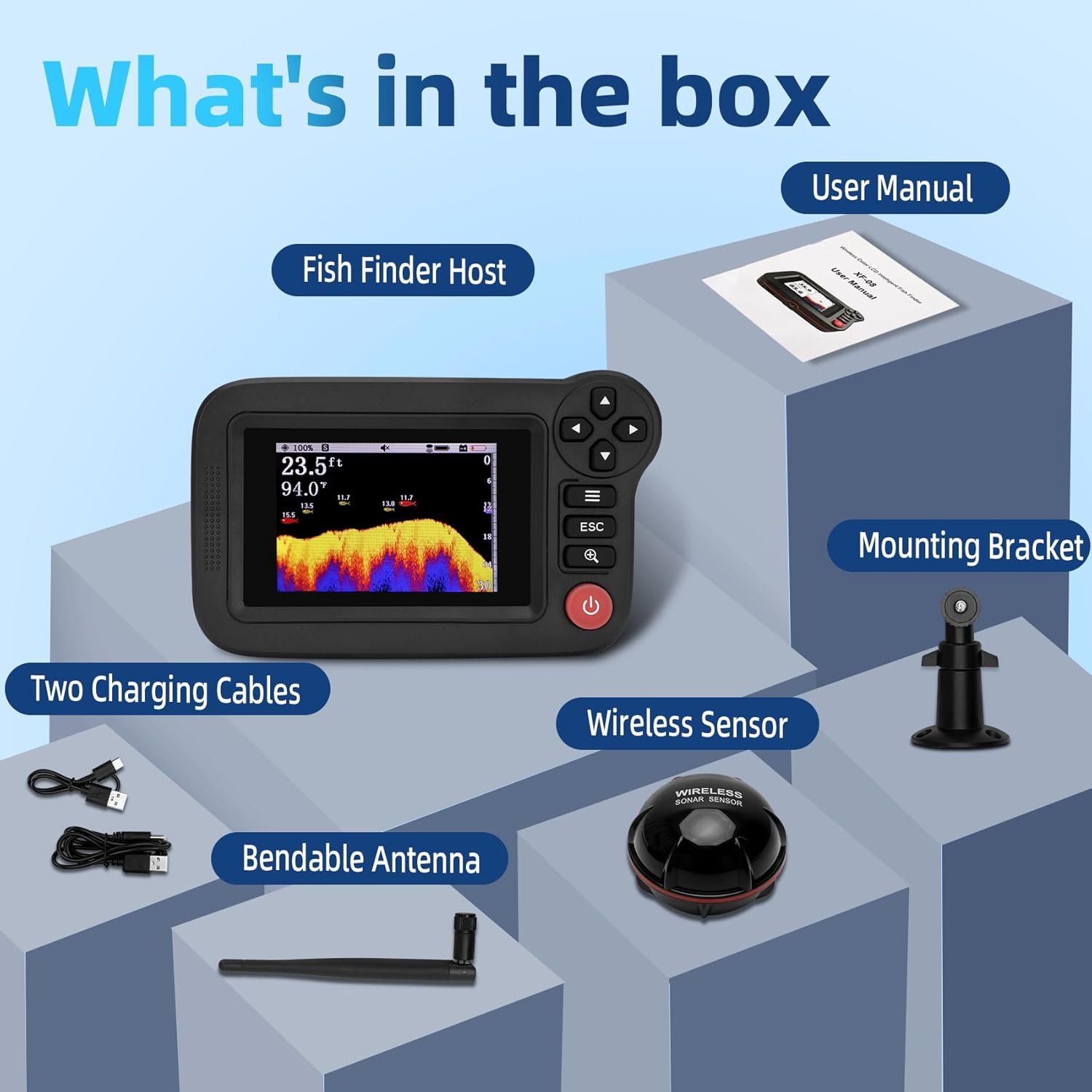
Image 2.1: All included accessories: Fish Finder Host, Wireless Sensor, Bendable Antenna, Two Charging Cables, Mounting Bracket, and User Manual.
3. Product Features
The Fuceter Portable Sonar Fish Finder offers a range of features designed for optimal performance:
- Accurate Detection: Detects and displays water depth, water temperature, fish size, fish depth, and bottom contour.
- Sonar Beam Angle: 105° wide sonar beam for extensive coverage.
- Depth Range: Effective depth detection from 2.6 feet (0.8 meters) to 164 feet (50 meters).
- Wireless Range: Transducer to screen distance up to 656 feet (200 meters).
- Display: 3.5-inch TFT LCD display with 3 backlight adjustment modes (black, blue, white) for clear visibility in various lighting conditions, including bright sunlight.
- Alarms: Features fish alarm and water depth alarm functions.
- Customizable Settings: Adjustable sonar sensor sensitivity, depth range, noise filter, and sonar background switch.
- Portability: Compact and lightweight wireless castable design.
- Mounting Options: Host comes with a mounting bracket and lanyard for versatile use (boat, neck, handheld).
- Rechargeable: Host (5V/12V) and wireless probe (5V) are rechargeable, offering extended endurance.

Image 3.1: Diagram illustrating the display elements (Sound Volume, Sensitivity, Water Depth, Temperature, Fish Icon, Bottom Contour) and sensor components (Waterproof Case, Sensor Charging Port, Signal Receiver).

Image 3.2: Overview of the host's non-slip rubber keys, TFT LCD sunlight screen, waterproof outer shell, collapsible antenna, and the 105-degree wireless sonar sensor beam.
4. Setup
4.1 Charging the Device
Before first use, fully charge both the Fish Finder Host and the Wireless Probe Sonar Ball.
- Connect the host charging cable to the host and the charging plug.
- Connect the probe charging cable to the wireless probe and the charging plug.
- Charging typically takes 2 hours. The charging indicator will turn off once fully charged.
- Ensure to use the correct power adapter (5V for probe, 5V/12V for host).

Image 4.1: Illustration of the host and wireless sonar sensor being charged via their respective charging cables.
4.2 Assembling the Antenna
Screw the bendable antenna onto the designated port on the Fish Finder Host. Ensure it is securely fastened but do not overtighten.
4.3 Mounting Options
The host can be used in several ways:
- Handheld Use: Simply hold the device in your hand.
- Halter Use: Attach the lanyard to the host and wear it around your neck for hands-free operation.
- Stationary Use: Use the included mounting bracket and screws to secure the host to a boat or other stable surface.

Image 4.2: Examples of how the fish finder can be used: mounted for stationary use, held in hand, or worn around the neck with a lanyard.
5. Operating Instructions
5.1 Powering On/Off
Press and hold the power button (usually red) on the host to turn the device on or off.
5.2 Deploying the Wireless Sensor
The wireless sensor can be deployed in several ways:
- Casting: Tie your fishing line to the small hole on the transducer and cast it into the water.
- Trolling: Attach the sensor to the end of a fishing rod or a bait boat and allow it to float on the surface.
- Ice Fishing: Place the sensor directly into a hole in the ice.
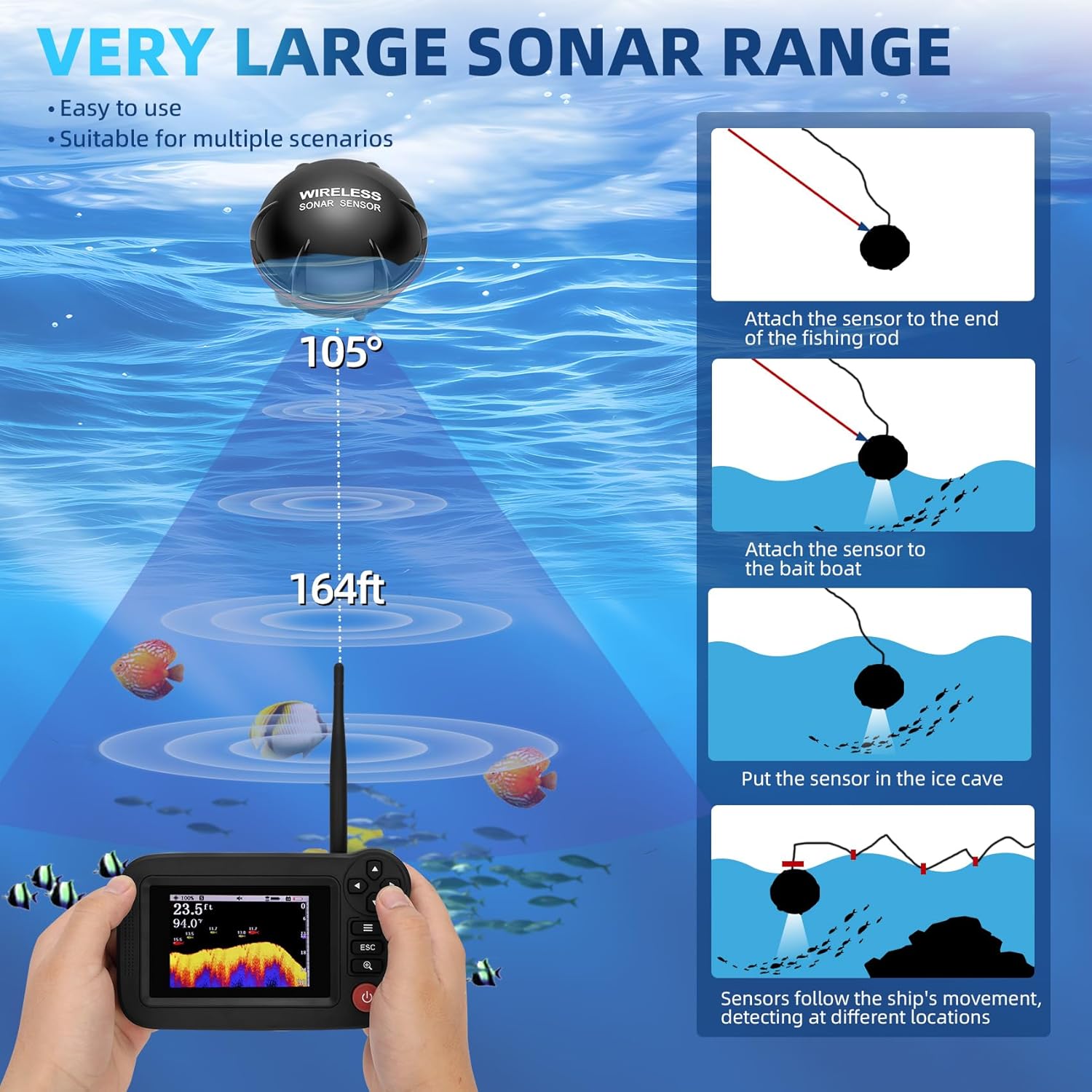
Image 5.1: Illustration of the 105-degree sonar beam and 164ft depth range, along with methods for deploying the wireless sensor: attaching to a fishing rod, attaching to a bait boat, and placing in an ice hole.
5.3 Understanding the Display
The 3.5-inch TFT LCD display provides real-time information:
- Water Depth: Numerical reading of the current water depth.
- Water Temperature: Current water temperature.
- Fish Icons: Displays fish symbols, often color-coded or sized to indicate relative fish size (e.g., red for large, purple for medium, yellow for small).
- Fish Depth: Indicates the depth at which fish are detected.
- Bottom Contour: Graphical representation of the seabed structure.
- Battery Indicators: Shows battery levels for both the host and the wireless probe.

Image 5.2: The fish finder display highlighting key information: Water Depth, Water Temperature, Fish Icon and Depth, and Bottom Contour.
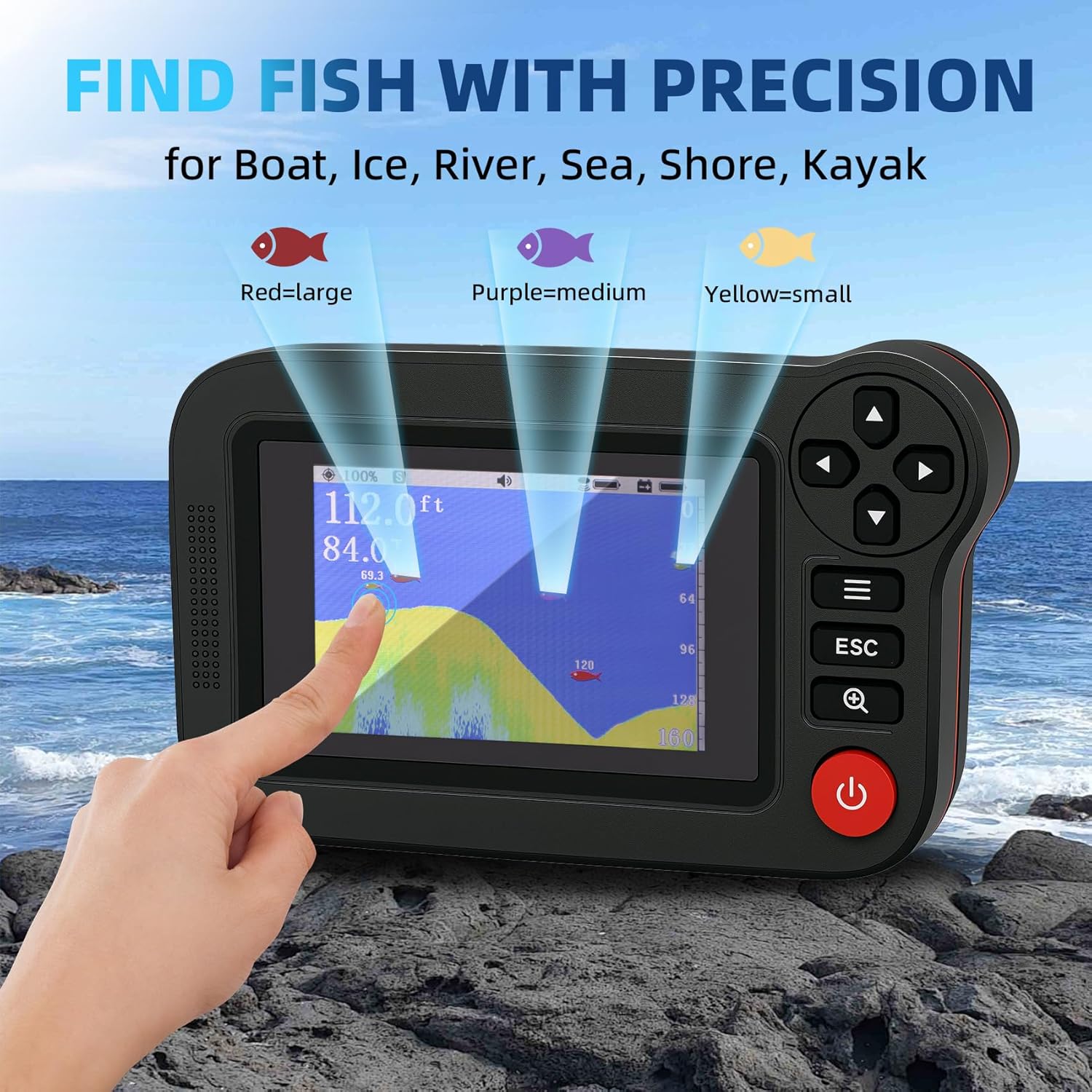
Image 5.3: The display showing fish icons with different colors indicating size: Red=large, Purple=medium, Yellow=small.
5.4 Adjusting Settings
Navigate through the menu using the directional buttons and the 'Menu' button (often represented by three horizontal lines) to access and adjust various settings:
- Sensitivity: Adjusts the sonar's ability to detect objects. Higher sensitivity detects smaller objects but may also pick up more noise.
- Depth Range: Sets the maximum depth displayed on the screen.
- Noise Filter: Reduces interference from external sources.
- Fish Alarm: Activates an audible alert when fish are detected.
- Water Depth Alarm: Sets an alarm for specific shallow or deep water conditions.
- Sonar Background: Choose from black, blue, or white display backgrounds for optimal viewing.
- Unit Settings: Switch between feet/meters and Fahrenheit/Celsius.
- Brightness: Adjust screen brightness.

Image 5.4: Screenshots of the fish finder's menu interface, showing options for Sonar (Sensitivity, Depth Range, Noise Filter, Fish Depth, Fish Icon), Setup (Unit Settings, Refresh Speed, Brightness, Fish Alarm, Shallow Alarm, Deep Alarm, Restore Settings), and Advanced (Sonar Background, Volume Settings, Depth Offset, Temp. Offset, Simulator, Language).
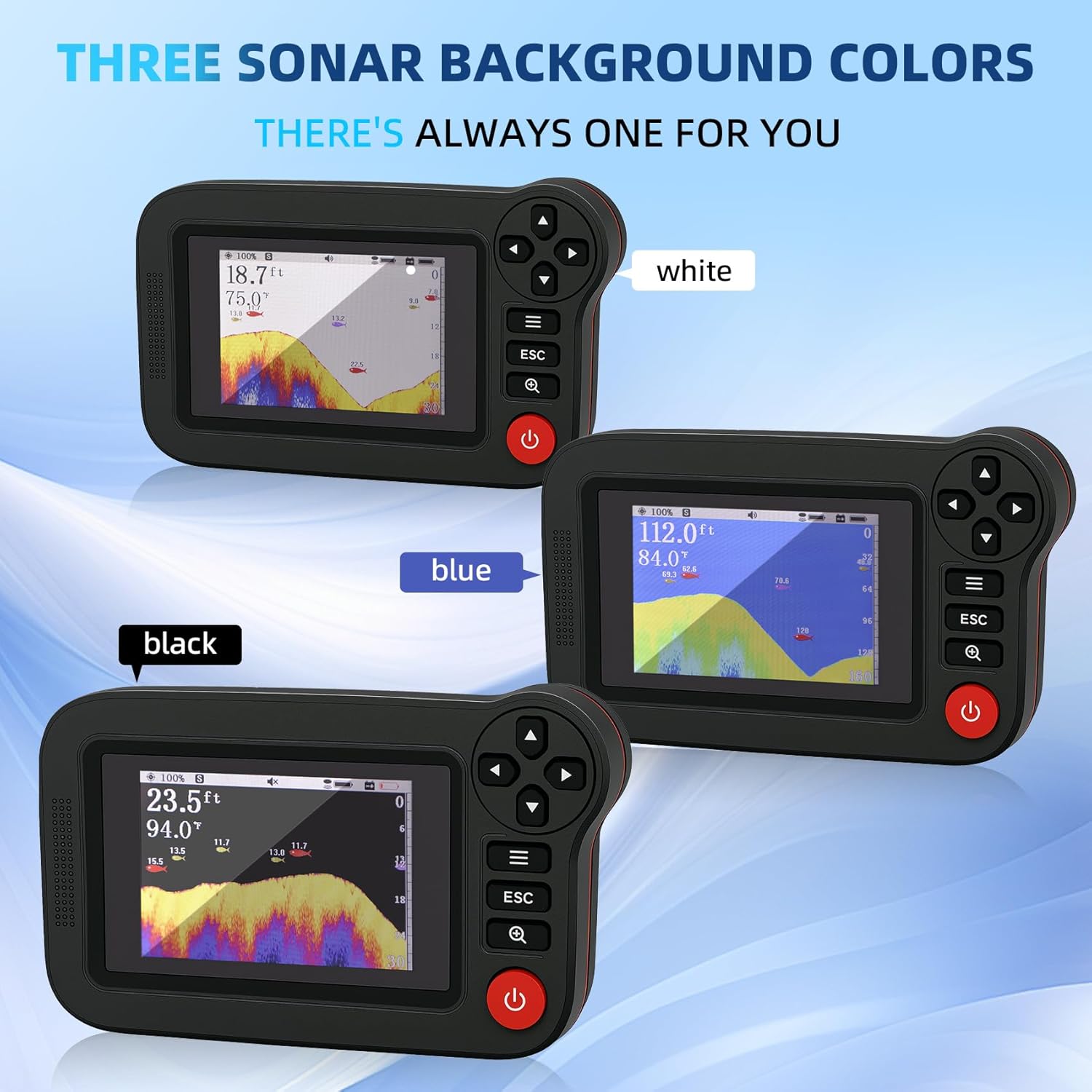
Image 5.5: The fish finder display demonstrating the three available sonar background colors: white, blue, and black.
6. Maintenance
6.1 Charging
Regularly charge both the host and the wireless probe. If the probe battery indicator on the main unit's LCD shows empty, the probe will cease functioning and requires immediate recharging. Always use the provided charging cables and plug.
6.2 Cleaning
After each use, especially in saltwater, rinse the wireless probe with fresh water to prevent corrosion. Wipe the host and probe with a soft, dry cloth. Do not use abrasive cleaners or solvents.
6.3 Storage
Store the device in a cool, dry place away from direct sunlight and extreme temperatures. Ensure both units are fully charged before long-term storage to preserve battery life.
7. Troubleshooting
- Device not powering on: Ensure the host battery is charged. Connect to the charger and try again.
- No sonar readings:
- Check if the wireless probe is powered on and charged.
- Ensure the probe is in the water and within the 656 ft (200 m) wireless range of the host.
- Verify that the antenna is securely attached to the host.
- Adjust sensitivity settings.
- Inaccurate depth readings: Ensure the probe is floating correctly and not obstructed. Check for debris on the transducer.
- Screen difficult to read in sunlight: Adjust the backlight settings (black, blue, or white) for better contrast.
- Short battery life: Ensure both units are fully charged before use. Avoid extreme temperatures during operation.
8. Specifications
| Specification | Detail |
|---|---|
| Brand | Fuceter |
| Model Name | XF-08 Portable Wireless Sonar Fish Finder |
| Power Source | Battery Powered |
| Screen Size | 3.5 Inches |
| Display Type | TFT LCD |
| Item Weight | 1.5 Pounds |
| Product Dimensions (Host) | 6.2"L x 3.9"W x 1.6"H |
| Maximum Measuring Depth | 164 ft (50 m) |
| Sonar Beam Angle | 105° |
| Wireless Range | Up to 656 ft (200 m) |
| Host Power | 5V/12V |
| Wireless Probe Power | 5V |
| Charging Time | Approx. 2 hours |
| Material | Plastic |
| Color | Black |
9. Warranty and Support
For specific warranty information and customer support, please refer to the documentation included with your purchase or contact Fuceter customer service directly. Details regarding warranty periods and claims procedures are typically provided by the manufacturer.


