
1. Safety Information
Please read and understand all safety instructions before installing, operating, or maintaining this hybrid inverter. Failure to follow these instructions may result in electric shock, fire, serious injury, or death. Keep this manual for future reference.
- Installation must be performed by qualified personnel in accordance with all local electrical codes.
- Ensure the inverter is disconnected from all power sources (PV, battery, utility) before performing any maintenance or wiring.
- Do not disassemble the inverter. There are no user-serviceable parts inside.
- Avoid contact with live terminals.
- Ensure proper grounding of the inverter.
- Do not operate the inverter in wet conditions or near flammable materials.
2. Introduction
The PowMr POW-SunSmart L3 series is a 48V hybrid solar inverter designed for both single-phase and three-phase applications. This advanced inverter integrates solar energy storage, AC power charging, energy storage, and pure sine wave AC output functionalities. It is engineered to provide reliable power for residential and commercial renewable energy systems, offering flexibility and high efficiency.

3. Features
The PowMr 12 kW Hybrid Inverter offers a comprehensive set of features for advanced solar power management:
- High Power Output: Rated output power of 12000 W continuous, with a surge capacity of 24000 W.
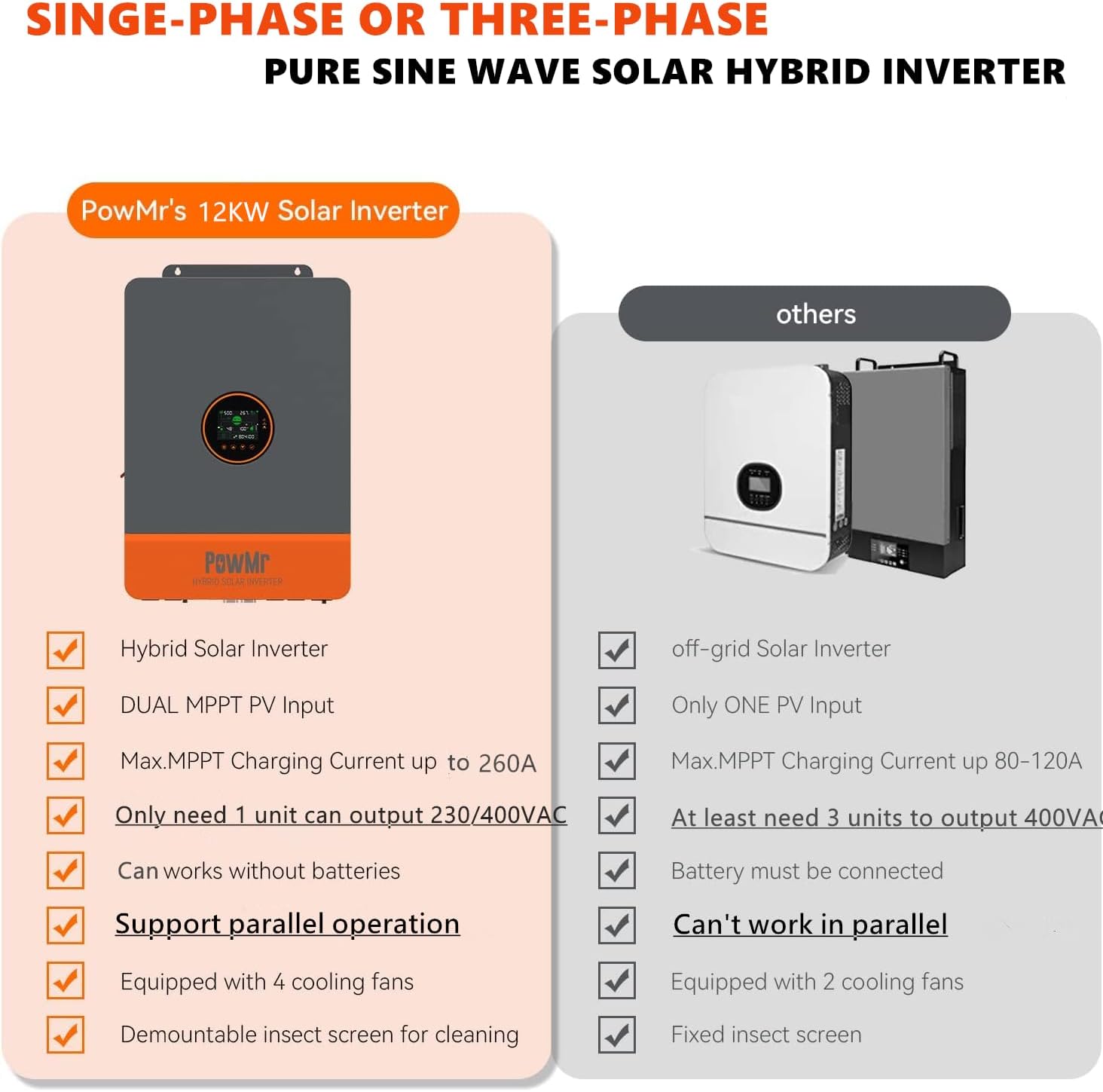
- Flexible Output: Supports both single-phase and three-phase output at 230/400 V AC.
- Advanced Charging: Integrated dual MPPT charge controller with a maximum charging current of 260 A.
- Wide Battery Compatibility: Compatible with AGM, Gel, Lead-acid, Lithium, and LiFePO4 batteries. Also supports batteryless operation.
- Scalable System: Supports parallel operation of up to 6 inverters, allowing for a total system output of up to 72 kW.
- High PV Input: Maximum PV input power of 9 kW, with a maximum PV input voltage of 650 Vdc and maximum input current of 22 A per MPPT.
- Communication Interfaces: Equipped with CAN, USB, and RS485 communication ports for monitoring and control.
- Multiple Operating Modes: Features four charging modes (Solar First, Utility First, Solar and Utility, Only Solar) and three load output working modes (Utility First, Solar First, SBU First).
- Comprehensive Protection: Includes 360° protection against short circuits, over current, over voltage, under voltage, overload, backfill, over-temperature, and overcharge.

4. Setup and Installation
This section provides an overview of the installation process. For detailed step-by-step instructions, wiring diagrams, and safety precautions, please refer to the complete PDF user manual available in English, German, Italian, French, and Spanish.
4.1 Unpacking and Inspection
- Carefully unpack the inverter and inspect it for any shipping damage.
- Verify that all included components, such as the parallel communication cable, are present.
4.2 Mounting the Inverter
Choose a suitable mounting location that is dry, well-ventilated, and protected from direct sunlight and extreme temperatures. Ensure adequate clearance around the inverter for proper airflow.
4.3 Electrical Connections
All electrical connections must be made by a certified electrician. Ensure all circuit breakers are off before making any connections.
- Battery Connection: Connect the 48V DC battery bank to the inverter's battery terminals. Observe correct polarity.
- PV Input Connection: Connect the solar panel arrays to the PV input terminals. The dual MPPT allows for two independent PV inputs. Ensure PV input voltage and current are within specified limits.
- AC Input/Output Connection: Connect the utility grid (if applicable) to the AC input and your loads to the AC output terminals. The inverter supports both single-phase and three-phase configurations.
- Grounding: Connect the inverter to a reliable earth ground.

4.4 Parallel Operation (Optional)
For increased power output, up to 6 units of the PowMr 12 kW Hybrid Inverter can be connected in parallel. Use the provided parallel communication cable to link the inverters. Refer to the detailed manual for specific wiring diagrams and configuration steps for parallel systems.

5. Operating Instructions
Once installed, the inverter can be configured and operated via its integrated display and control buttons. The inverter supports various charging and output modes to optimize energy management.
5.1 Initial Power-Up
- Ensure all connections are secure and correct.
- Switch on the battery breaker, then the PV breaker, and finally the AC input breaker (if connected to utility).
- The inverter will perform a self-test and the display will illuminate.

5.2 Configuration Settings
Navigate through the display menu using the control buttons to set parameters such as:
- Battery Type: Select the type of battery connected (AGM, Gel, Lead-acid, Lithium, LiFePO4, or User-defined). The inverter also supports batteryless operation.
- Charging Current: Adjust the battery charging current within the 0-260A range.
- Charging Source Priority: Choose one of the four charging modes:
- Solar First: Prioritizes solar power for charging.
- Utility First: Prioritizes utility grid for charging.
- Solar and Utility: Uses both solar and utility for charging.
- Only Solar: Charges exclusively from solar power.
- Output Source Priority: Select one of the three load output working modes:
- Utility First: Prioritizes utility grid for powering loads.
- Solar First: Prioritizes solar power for powering loads.
- SBU First (Solar-Battery-Utility): Prioritizes solar, then battery, then utility for powering loads.
- Output Voltage: Adjust the AC output voltage (200, 208, 220, 230, 240 V AC).

6. Maintenance
Regular maintenance ensures optimal performance and longevity of your PowMr Hybrid Inverter.
- Cleaning: Periodically clean the inverter's exterior with a dry cloth. Ensure ventilation openings are free from dust and debris.
- Connection Checks: Annually inspect all electrical connections for tightness and signs of corrosion.
- Environmental Check: Ensure the operating environment remains within specified temperature and humidity ranges.
- Firmware Updates: Check the manufacturer's website for any available firmware updates to improve performance or address known issues.
7. Troubleshooting
This section provides guidance on common issues. For detailed troubleshooting steps and error codes, refer to the comprehensive user manual.
| Problem | Possible Cause / Action |
|---|---|
| Inverter not powering on | Check battery connections, battery voltage, and all input breakers (PV, utility). Ensure the inverter's power switch is ON. |
| No AC output | Verify AC output breaker, load connections, and inverter's operating mode. Check for overload conditions. |
| Display anomalies or incorrect readings | Consult the detailed manual for display error codes. A firmware update might be required. |
| Unusual noises or immediate load shedding under high load | This could indicate an internal component issue or an excessive surge from the connected load. Reduce load or consult technical support. |
| MPPT charging issues (e.g., voltage collapse, frequent restarts) | Ensure PV array sizing is appropriate for the MPPT. Check for shading or panel issues. Verify MPPT settings. |
| Inability to deactivate the built-in battery charger | Some models may not allow full deactivation. Refer to the manual for available charging source priority settings, such as 'Only Solar' mode. |
8. Specifications
Technical specifications for the PowMr 12 kW Hybrid Inverter POW-SunSmart 12KPL3:
| Specification | Value |
|---|---|
| Brand | PowMr |
| Model Name | POW-SunSmart 12KPL3 |
| Recommended Uses | Residential, Commercial, Renewable Energy, Generator, Backup |
| Power Source | Solar Power |
| Input Voltage | 48 V (DC) |
| Output Power | 12000 Watts |
| Peak Output Power | 24000 Watts |
| Output Voltage | 230 V (AC) / 400 V (AC) |
| Electrical Waveform | Pure Sine Wave |
| Efficiency | 99.9% |
| Max. PV Input Power | 9 kW |
| Max. PV Input Voltage | 650 Vdc |
| Max. PV Input Current | 22 A |
| Max. Hybrid Charging Current | 260 A |
| Switching Time | 10 ms |
| Product Dimensions (L x W x H) | 62 cm x 44.5 cm x 13 cm |
| Product Weight | 27 Kilograms |
| Included Components | 1 x Parallel Communication Cable |
| Specification Met | CE |
9. Warranty and Support
9.1 Warranty Information
The PowMr 12 kW Hybrid Inverter POW-SunSmart 12KPL3 comes with a 2-year warranty from the date of purchase. This warranty covers defects in materials and workmanship under normal use. Please retain your proof of purchase for warranty claims.
9.2 Technical Support
For technical assistance, troubleshooting beyond this manual, or warranty claims, please contact PowMr customer support. Refer to the official PowMr website for the most up-to-date contact information and support resources.
- Online Resources: Visit the PowMr official website for FAQs, updated manuals, and support forums.
- Contact Information: Find email addresses or phone numbers for customer service on the PowMr website.


