
1. Introduction
This manual provides instructions for the MoKo Rechargeable Headlamp, Model MK2515. This device is a versatile 3-in-1 lighting solution, functioning as a primary headlamp, a work light, and a portable multipurpose light. It features high brightness, multiple lighting modes, and a rechargeable battery, suitable for various outdoor activities and maintenance tasks.
2. Product Overview
The MoKo Headlamp MK2515 integrates several lighting components and controls for diverse illumination needs.

Figure 2.1: MoKo Rechargeable Headlamp MK2515 showing the main headlamp unit and the detachable multipurpose light.
Components:
- Main Headlamp Unit: Equipped with XPE and COB lamp beads for various lighting modes.
- Adjustable Headband: Elastic and adjustable for comfortable wear.
- Multipurpose Light (Detachable): Functions as a work light, portable torch, camping light, and power bank. Features a digital display for battery level.
- Helmet Hooks: Included for secure attachment to hard hats.
Controls:
- Power Button: Controls power on/off and cycles through lighting modes.
- Sensor Switch: Activates or deactivates the motion sensor mode.
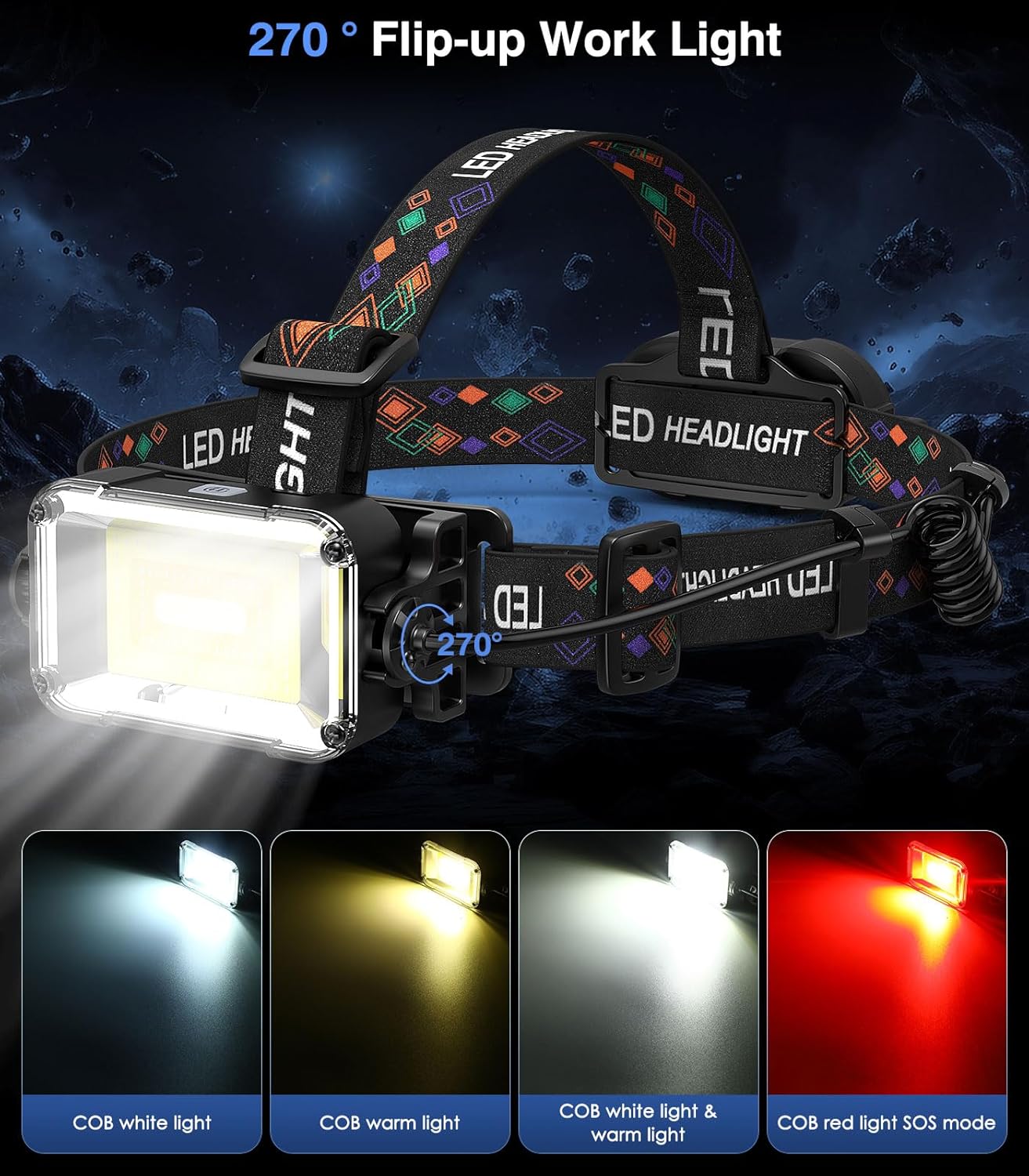
Figure 2.2: The headlamp's work light can be adjusted up to 270 degrees for directional illumination.

Figure 2.3: The multipurpose light can be easily detached and used independently.
3. Setup
3.1 Charging the Headlamp
- Locate the USB-C charging port on the multipurpose light unit.
- Connect the provided USB-C cable to the port and the other end to a compatible USB power source (e.g., wall adapter, computer).
- The digital display on the multipurpose light will show the charging progress. A full charge typically takes 2-3 hours.
- Once fully charged, disconnect the cable.

Figure 3.1: Charging the headlamp's multipurpose light unit.
3.2 Wearing the Headlamp
- Place the headlamp on your head with the main light unit positioned at the front.
- Adjust the elastic headband using the buckle to ensure a snug and comfortable fit. The headband should be secure but not overly tight.
- If attaching to a helmet, use the included helmet hooks to secure the headband to the helmet's edge.

Figure 3.2: Adjusting the elastic headband for a secure fit.

Figure 3.3: Using the included helmet hooks to attach the headlamp to a hard hat.
4. Operating Instructions
4.1 Main Headlamp (XPE LEDs) Operation
Press the Power Button to cycle through the following modes:
- XPE Center Light On: Illuminates the central XPE LED.
- XPE 5 Main Lights On: Activates the five primary XPE LEDs.
- XPE 4 Auxiliary Lights On: Activates the four auxiliary XPE LEDs.
- XPE 5 Main Lights & 4 Auxiliary Lights On: All XPE LEDs are active for maximum brightness.
- SOS Mode: Flashing light for emergency signaling.

Figure 4.1: Various XPE lighting modes of the main headlamp.
4.2 Work Light (COB LED) Operation
The work light is integrated into the multipurpose light unit. When attached to the headlamp, it can be adjusted 270 degrees. Press the Power Button on the multipurpose light to cycle through these modes:
- COB White Light: Standard white illumination.
- COB Warm Light: Softer, warmer illumination.
- COB White Light & Warm Light: Combines both white and warm COB lights.
- COB Red Light SOS Mode: Flashing red light for emergencies or signaling.
Figure 4.2: COB work light modes and 270-degree rotation capability.
4.3 Sensor Mode
To activate the sensor mode, press the dedicated Sensor Switch. In this mode, you can turn the light on or off by waving your hand in front of the sensor, providing hands-free operation.
4.4 Multipurpose Light Functions
The multipurpose light unit can be detached from the headlamp for independent use:
- Portable Torch/Camping Light: Use it as a handheld light source.
- Power Bank Function: The 3000 mAh battery can be used to charge other small electronic devices via its USB output port.

Figure 4.3: The multipurpose light can function as a portable power bank.
5. Maintenance
5.1 Cleaning
- Wipe the headlamp and headband with a soft, damp cloth.
- Do not use abrasive cleaners or solvents, as these may damage the device.
- Ensure the charging port cover is securely closed to maintain IP44 water resistance.
5.2 Storage
- Store the headlamp in a cool, dry place away from direct sunlight and extreme temperatures.
- If storing for an extended period, fully charge the battery before storage and recharge it every 3-6 months to maintain battery health.
6. Troubleshooting
- Light not turning on: Ensure the battery is charged. Press the power button firmly.
- Light is dim: The battery level may be low. Recharge the headlamp.
- Sensor mode not responding: Ensure the sensor switch is activated. Check for obstructions in front of the sensor.
- Water ingress: Although IP44 waterproof, avoid prolonged submersion. Ensure all port covers are sealed.
7. Specifications
| Feature | Specification |
|---|---|
| Brand | MoKo |
| Model Number | MK2515 |
| Color | Black Orange |
| Style | Square |
| Special Feature | Weatherproof |
| Power Source | Battery Powered |
| Light Source Type | LED (XPE, COB) |
| Material | ABS |
| White Brightness | 2500 Lumens |
| Brightness (Overall) | Up to 50000 Lumens (as per some specifications) |
| Illumination Distance | Up to 500 m / 1640 ft |
| Battery Capacity | 3000 mAh |
| Battery Type | Lithium Ion (9V) |
| Charging Time | 2-3 hours |
| Operating Time | 5-15 hours (depending on mode) |
| Water Resistance Level | IP44 Waterproof |
| Product Dimensions | 3.66"D x 1.81"W x 1.97"H |
| Item Weight | 6.91 Ounces |
| Included Components | Headlamp, Battery, USB-C Cable, Helmet Hooks |
| UPC | 840401441640 |
8. Warranty and Support
8.1 Warranty Information
This MoKo Headlamp comes with a limited warranty of 2 months from the date of purchase. Please retain your proof of purchase for warranty claims.
8.2 Customer Support
For any questions, technical assistance, or warranty claims, please contact the seller, Know White, through the Amazon platform where the product was purchased. Provide your order details for efficient support.