
Introduction
This manual provides essential instructions for the safe and effective use of your Lumos Ultra Helmet and Firefly Mini Signal Light Kit. Please read this manual thoroughly before using the product to ensure proper setup, operation, and maintenance. This kit is designed to enhance your visibility and safety during cycling activities.
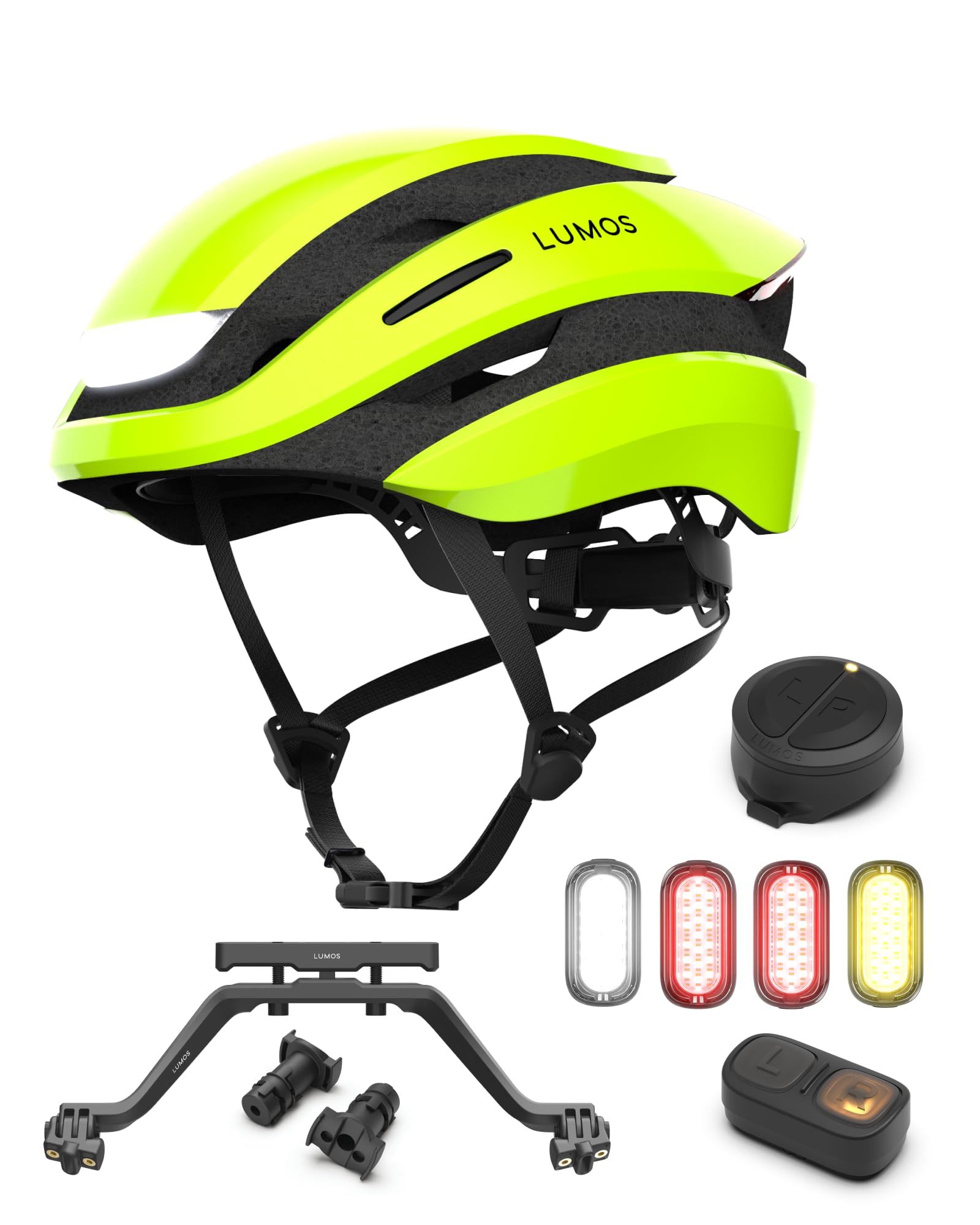
Image: The Lumos Ultra Helmet and Firefly Mini Signal Light Kit, showcasing the helmet, remote, and multiple Firefly lights.
What's in the Box
Your Lumos Ultra Helmet and Firefly Mini Signal Light Kit includes the following components:
- 1x Lumos Ultra Helmet
- 1x Remote Lite
- 1x Turn Signal Mount
- 1x Handlebar-End Mounts
- 4x Lumos Firefly Mini Lights
- 4x Universal Mounts for Firefly Mini
- 4x Silicone Straps for Firefly Mini
- 4x Low Profile Padding for Firefly Mini
- 4x Seat Post Padding for Firefly Mini
- 8x Clips
- 1x User Guide (this document)
- 4x Stickers
- 4x Velcro Straps
Setup
1. Helmet Fitting
Ensure the helmet fits snugly and comfortably. Adjust the straps and retention system so the helmet sits level on your head, covering your forehead without obstructing your vision. The chin strap should be tightened so that no more than two fingers can fit between the strap and your chin.
2. Charging the Devices
- Lumos Ultra Helmet: Connect the helmet to a USB power source using the provided charging cable. A full charge typically takes approximately 2 hours.
- Lumos Firefly Mini Lights: Each Firefly Mini light is charged via USB-C. Connect them to a USB-C power source. Ensure all lights are fully charged before first use.

Image: Close-up of the Lumos Ultra Helmet highlighting its features, including the charging time of 2 hours and battery life of up to 10 hours.
3. Mounting the Firefly Mini Lights
The Firefly Mini lights can be mounted using the universal mounts, silicone straps, or clips provided. Choose the most suitable method for your bicycle or gear to ensure secure attachment and optimal visibility.

Image: A Lumos Firefly Mini light demonstrating its compact design, super brightness, weatherproof construction, and magnetic mounting capability.
4. Mounting the Remote Lite
Attach the Remote Lite to your handlebars using the Turn Signal Mount or Handlebar-End Mounts. Position it within easy reach for safe operation while cycling.
5. Connecting to the Lumos App
Download the Lumos App from your device's app store. Follow the in-app instructions to pair your Lumos Ultra Helmet and Firefly Mini lights. The app allows for customization of light flashing patterns and checking battery life.

Image: A smartphone screen displaying the Lumos App, illustrating options to customize light flashing patterns and check the battery status of connected devices.
Operating Instructions
1. Helmet Light Modes
The Lumos Ultra Helmet features multiple light modes for varying visibility needs. Cycle through these modes by pressing the power button on your helmet or via the Lumos App.
- Mode 01: Always On White Light (Front), Always On Red Light (Rear)
- Mode 02: Slow Flashing White Light (Front), Slow Flashing Red Light (Rear)
- Mode 03: Flashing White Light (Front), Flashing Red Light (Rear)

Image: A visual representation of the Lumos Ultra Helmet's front and rear LED design, detailing three distinct light modes: Always On, Slow Flashing, and Flashing.
2. Turn Signals
Activate turn signals wirelessly using the included Lumos Remote Lite mounted on your handlebars. The helmet and Firefly Mini lights will display the corresponding turn signal. The system is also compatible with Apple Watch for turn signal activation.

Image: A cyclist demonstrating the wirelessly activated turn signals, with the Lumos helmet's lights indicating a turn, controlled by the Lumos Remote Lite on the handlebar.
3. Smart Signaling (Brake Lights)
The Lumos Ultra Helmet and Firefly Mini lights can function as automatic brake lights when paired with the Lumos Remote or Lumos App. This feature enhances safety by signaling your deceleration to other road users.

Image: An illustration of the Smart Signaling feature, showing how the Lumos helmet and Firefly lights communicate intentions to drivers through automatic brake lights and turn signals, activated via the Lumos Remote or App.
4. Team Sync
For group cycling, the Team Sync feature allows multiple Lumos lights to synchronize their light patterns, creating a coordinated and highly visible presence on the road.

Image: Two cyclists with Lumos helmets and lights, illustrating the 'Team Sync' feature where multiple lights synchronize patterns for enhanced group visibility.
5. Firefly Mini Light Modes and Runtime
The Firefly Mini lights offer various modes with different battery runtimes:
- High Visibility Mode: 9+ hours runtime
- Slow Flashing Mode: 13+ hours runtime
- Slow Flashing Eco Mode: 14+ hours runtime

Image: Three Lumos Firefly Mini lights displaying their respective runtimes for High Visibility, Slow Flashing, and Slow Flashing Eco modes, indicating up to 14 hours of operation.
Maintenance
1. Cleaning
Clean the helmet and lights with a soft, damp cloth and mild soap. Avoid abrasive cleaners or solvents, as these can damage the materials and electronic components. Ensure all charging ports are dry before charging.
2. Battery Care
To prolong battery life, charge your Lumos Ultra Helmet and Firefly Mini lights regularly, even when not in frequent use. Avoid fully discharging the batteries for extended periods. Store devices in a cool, dry place.
3. Weatherproofing
The Lumos Ultra Helmet and Firefly Mini lights are designed to be fully sealed and weatherproof. However, avoid submerging them in water. If exposed to heavy rain, wipe them dry before storing or charging.
Troubleshooting
Lights Not Turning On/Off
- Ensure the devices are fully charged.
- Check if the power button is functioning correctly.
- Attempt a reset by holding the power button for 10-15 seconds.
Pairing Issues with App or Remote
- Ensure Bluetooth is enabled on your smartphone.
- Restart the Lumos App and the devices.
- Ensure devices are within close proximity during pairing.
- Consult the Lumos App for specific pairing instructions.
Short Battery Life
- Verify that devices are fully charged before use.
- Operating in high-brightness or always-on modes will consume battery faster. Consider using flashing modes for extended runtime.
- Ensure proper charging practices as outlined in the Maintenance section.
Specifications
Lumos Ultra Helmet
| Feature | Detail |
|---|---|
| Model Name | Lumos Ultra |
| Outer Material | Polycarbonate (PC) |
| Color | Electric Lime |
| Charge Time | Approximately 2 hours |
| Battery Life | Up to 10 hours (depending on mode) |
| Weather Resistance | Fully sealed & weatherproof |
Lumos Firefly Mini Lights
| Feature | Detail |
|---|---|
| Charging Port | USB-C |
| Runtime (High Visibility Mode) | 9+ hours |
| Runtime (Slow Flashing Mode) | 13+ hours |
| Runtime (Slow Flashing Eco Mode) | 14+ hours |
| Mounting | Magnetic, Universal Mount, Silicone Strap, Clips |
| Weather Resistance | Weatherproof, sealed construction |
Warranty and Support
For warranty information and customer support, please refer to the official Lumos website or contact Lumos customer service directly. Keep your proof of purchase for warranty claims.


