
1. Introduction
This manual provides detailed instructions for the safe and effective use of your ANENG TH202 Infrared Thermometer and ANENG B15 Electric Tester. This 2-in-1 set is designed for various applications, including industrial temperature measurement and electrical system testing. Please read this manual thoroughly before operating the devices and retain it for future reference.
2. Safety Information
Important Safety Warnings:
- Infrared Thermometer (TH202): This device measures surface temperature only. It is not intended for human or animal body temperature measurement. Using it for medical purposes may lead to inaccurate readings and misdiagnosis.
- Laser Safety: The TH202 uses a Class 2 laser. Do not stare directly into the laser beam or point it at people or animals. Avoid direct eye exposure.
- Electric Tester (B15): Exercise extreme caution when working with electrical systems. Always assume circuits are live until proven otherwise. Do not use the tester if it appears damaged.
- Battery Safety: Ensure batteries are inserted with correct polarity. Do not mix old and new batteries or different types of batteries. Dispose of used batteries responsibly.
- Keep both devices away from water, high humidity, and extreme temperatures.
- Do not attempt to disassemble or modify the devices. Repairs should only be performed by qualified personnel.
3. Product Features
3.1 ANENG TH202 Infrared Thermometer
- Non-Contact Measurement: Safely measure surface temperatures from a distance.
- Wide Temperature Range: Measures from -50°C to 600°C (-58°F to 1112°F).
- High Accuracy & Fast Response: Provides readings in approximately 0.5 seconds.
- Distance-to-Spot Ratio (D:S): 12:1 for accurate measurements from a safe distance.
- Laser Pointer: For precise targeting of the measurement area.
- Backlit LCD Display: Clear readings even in low-light conditions.
- Unit Switching: Easily switch between Celsius (°C) and Fahrenheit (°F).
- Temperature Alarm: Configurable high and low temperature alarms.
- Adjustable Emissivity: For improved accuracy on various surfaces.
- Automatic Power-Off: Extends battery life by shutting down after 15 seconds of inactivity.

Figure 1: Key components and features of the ANENG TH202 Infrared Thermometer, including its smart circuit board, laser spot, and backlit display.
3.2 ANENG B15 Electric Tester
- AC Voltage Detection: Automatically detects AC voltage in wires, circuit breakers, and outlets.
- Wide Voltage Range: Detects voltages from 24V to 250V.
- LCD Display: For clear voltage readings.
- Flashlight: Integrated for use in dark environments.
- Self-Test Function: Verifies the tester's functionality.
- Line Breakpoint Lookup: Helps locate breaks in wires.
- Battery Detection: Can test battery status.
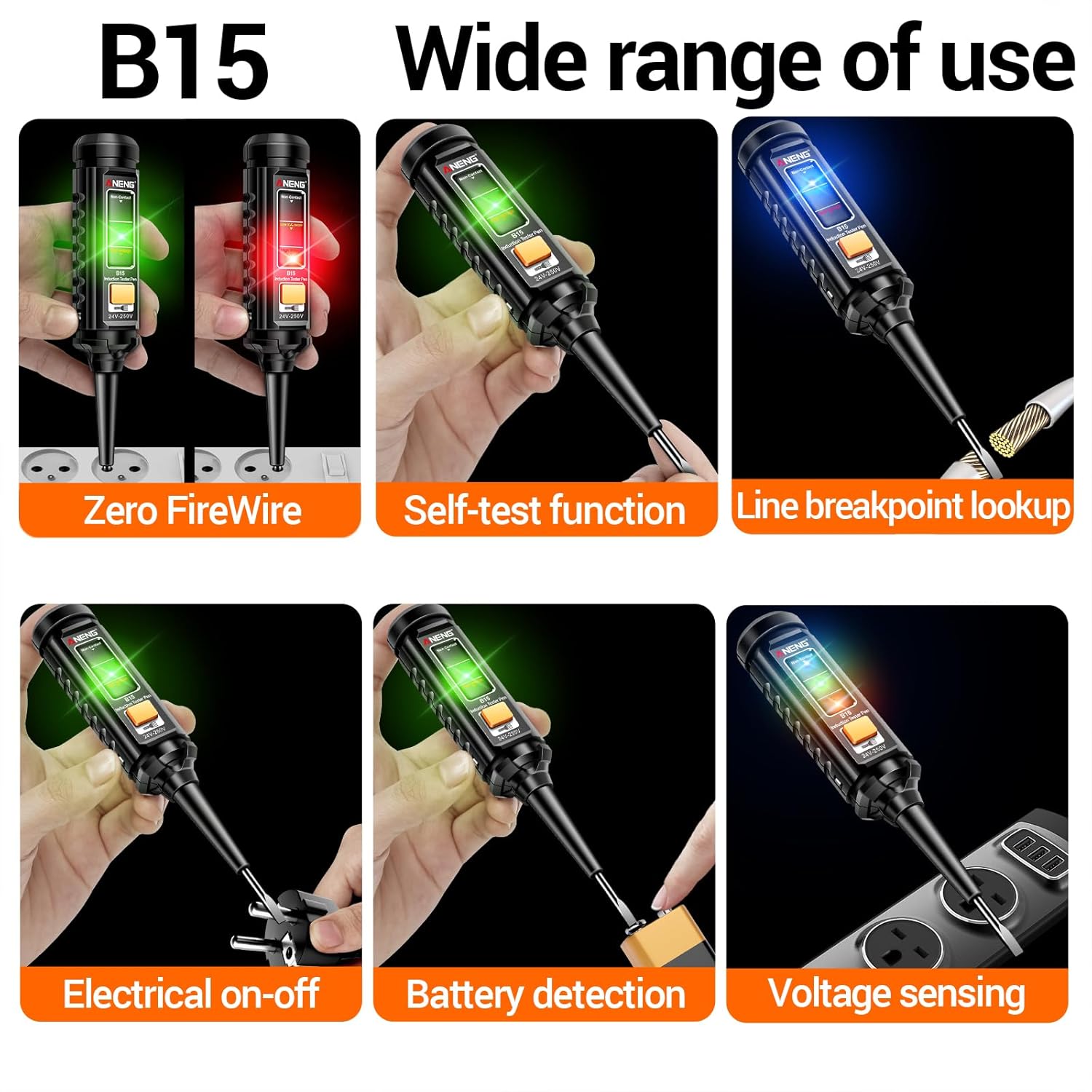
Figure 2: The ANENG B15 Electric Tester in action, illustrating its diverse functionalities for electrical testing.
4. Setup
4.1 Battery Installation (TH202 Infrared Thermometer)
- Locate the battery compartment cover on the handle of the TH202.
- Slide or open the cover according to the indicator.
- Insert two AAA batteries, ensuring correct polarity (+/-) as indicated inside the compartment.
- Close the battery compartment cover securely.
4.2 Battery Installation (B15 Electric Tester)
- The B15 tester typically uses button cell batteries. Locate the battery compartment, usually at the top or side.
- Open the compartment and insert the required batteries, observing correct polarity.
- Close the compartment securely.
Note: Both devices come with pre-installed batteries. Remove any protective tabs before first use if present.
5. Operation
5.1 Operating the ANENG TH202 Infrared Thermometer
- Power On: Press the trigger to turn on the device. The LCD display will illuminate.
- Taking a Measurement:
- Point the thermometer at the target object. The laser pointer will indicate the center of the measurement area.
- Press and hold the trigger. The temperature reading will appear on the display.
- For accurate readings, maintain a distance of approximately 14 inches (35 cm) from the object, considering the 12:1 distance-to-spot ratio. This means at 12 inches distance, the measurement spot diameter is 1 inch.
- Release the trigger to hold the reading on the display. The device will automatically power off after 15 seconds of inactivity.
- Unit Switching (°C/°F): Press the "°C/°F" button to toggle between Celsius and Fahrenheit.
- Temperature Alarm:
- Press the "MODE" button repeatedly until "HI" or "LOW" appears on the display.
- Use the up/down arrow buttons to set the desired high or low temperature alarm threshold.
- When the measured temperature exceeds the "HI" setting or falls below the "LOW" setting, an alarm will sound (if enabled) and the display may flash.
- Emissivity Adjustment:
- Press the "MODE" button until "EMS" (Emissivity) appears.
- Use the up/down arrow buttons to adjust the emissivity value (typically between 0.10 and 1.00). Refer to a standard emissivity table for common materials for best accuracy. Default is usually 0.95.

Figure 3: The ANENG TH202 display highlighting its 12:1 distance-to-spot ratio and various measurement features.
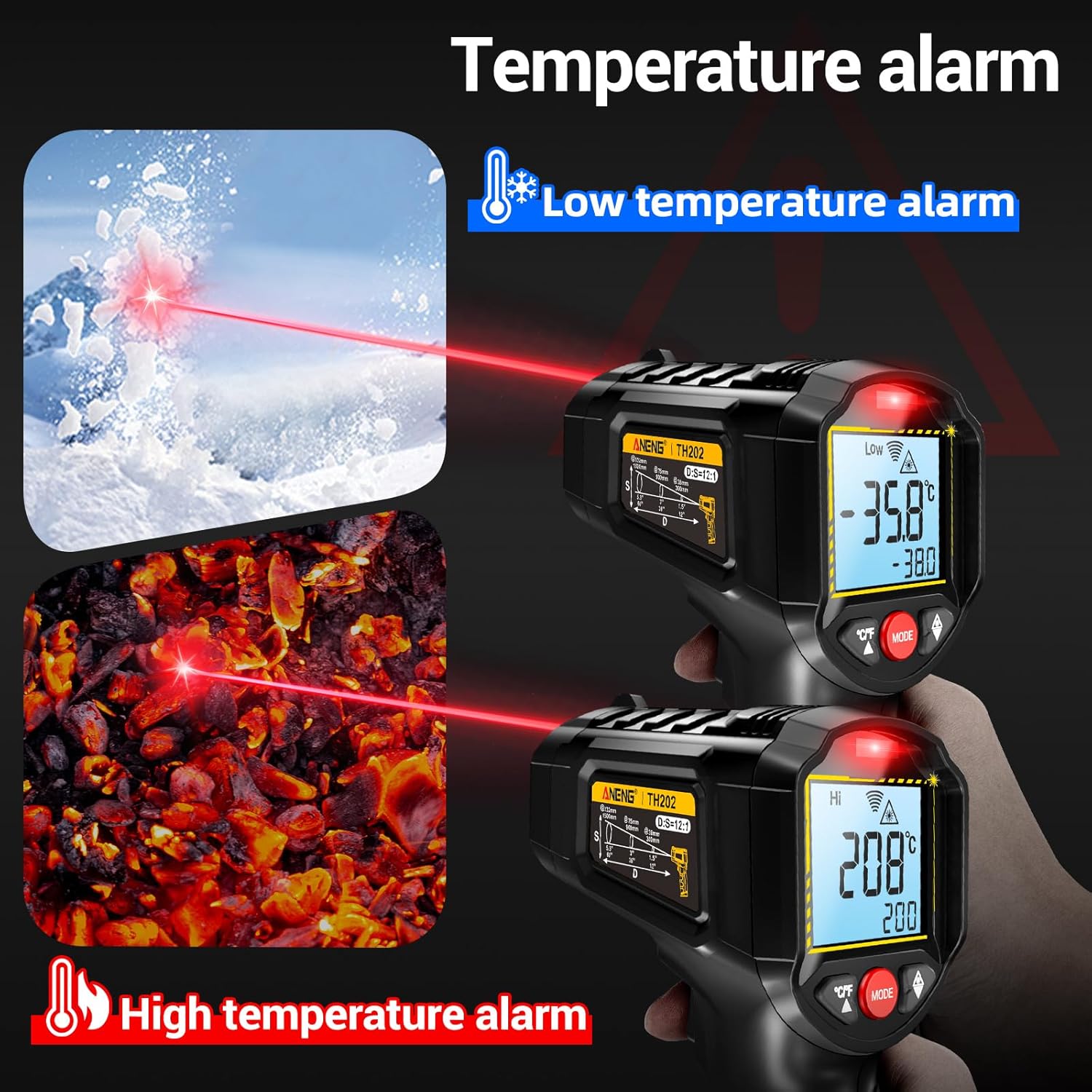
Figure 4: Illustration of the ANENG TH202's temperature alarm feature, showing both low and high temperature alerts.

Figure 5: Examples of the ANENG TH202's versatile applications across various environments, from industrial to kitchen use.
5.2 Operating the ANENG B15 Electric Tester
- Power On/Off: The device typically powers on automatically when a button is pressed or when it detects voltage. It may have a dedicated power button or auto-off feature.
- AC Voltage Detection:
- Touch the tip of the tester to the wire, outlet, or circuit breaker you wish to test.
- If AC voltage is present, the tester will indicate it visually (e.g., flashing LED, LCD reading) and/or audibly.
- For electric fences, insert the probe into the ground or connect to a ground wire, then tap the hook to the wire for an instant voltage reading.
- Self-Test Function: Press the designated self-test button to confirm the tester is functioning correctly.
- Line Breakpoint Lookup: Move the tester along a wire. A change in indication (e.g., loss of signal) can pinpoint a break in the line.
- Battery Detection: Some models allow testing of battery voltage by touching the probe to the battery terminals.
- Flashlight: Activate the flashlight function via its dedicated button for illumination in dark areas.
6. Maintenance
- Cleaning: Wipe the devices with a soft, damp cloth. Do not use abrasive cleaners or solvents. Ensure the devices are dry before storage or next use.
- Battery Replacement: Replace batteries when the low battery indicator appears on the display or when the device fails to power on. Refer to Section 4.1 and 4.2 for battery installation.
- Storage: Store the devices in a cool, dry place, away from direct sunlight and extreme temperatures. If storing for extended periods, remove the batteries to prevent leakage.
7. Troubleshooting
| Problem | Possible Cause | Solution |
|---|---|---|
| TH202: Device does not power on. | Dead or incorrectly installed batteries. | Check battery polarity. Replace batteries if necessary. |
| TH202: Inaccurate temperature readings. | Incorrect distance-to-spot ratio; incorrect emissivity setting; dirty lens. | Ensure proper distance (approx. 14 inches for 12:1 D:S). Adjust emissivity for the target material. Clean the lens with a soft cloth. |
| TH202: Laser not visible. | Laser function disabled; bright ambient light. | Check if the laser is enabled (refer to device specific controls). Use in less bright conditions if possible. |
| B15: No voltage detection. | Dead batteries; circuit is not live; device malfunction. | Replace batteries. Test on a known live circuit. If still no detection, the device may be faulty. |
| B15: Inconsistent readings. | Poor contact; interference. | Ensure firm contact with the conductor. Avoid strong electromagnetic fields. |
8. Specifications
8.1 ANENG TH202 Infrared Thermometer
| Feature | Detail |
|---|---|
| Model Number | TH202 |
| Temperature Range | -50°C to 600°C (-58°F to 1112°F) |
| Response Time | 0.5 seconds |
| Distance-to-Spot Ratio (D:S) | 12:1 |
| Emissivity | Adjustable (0.10 - 1.00) |
| Display Type | Backlit LCD |
| Power Source | Battery Powered (Alkaline) |
| Batteries Required | Yes (AAA) |
| Automatic Power-Off | 15 seconds of inactivity |
| Item Weight | 222 g |
| Material | Plastic |
| Indoor/Outdoor Usage | Indoor |
8.2 ANENG B15 Electric Tester
| Feature | Detail |
|---|---|
| Voltage Detection Range | 24V to 250V AC |
| Display Type | LCD |
| Additional Features | Flashlight, Self-test, Line breakpoint lookup, Battery detection |
9. Warranty and Support
Specific warranty information for the ANENG TH202 Infrared Thermometer and B15 Electric Tester is not provided in this manual. For details regarding warranty coverage, returns, or technical support, please refer to the documentation included with your purchase or contact ANENG customer service directly through their official website or the retailer where the product was purchased.
You can visit the ANENG Store for more information: ANENG Official Store


