
ForeverPRO DE94-03610C
Instruction Manual
ForeverPRO DE94-03610C Assy Pcb Eeprom Eep_05 De92-03959C Nx700
Model: DE94-03610C | Brand: ForeverPRO
1. Safety Information
Warning: This product is an electronic component. Installation and handling should only be performed by qualified technicians or individuals with extensive experience in appliance repair and electrical systems. Improper installation can lead to electric shock, fire, or damage to the appliance.
- Always disconnect power to the appliance before attempting any installation, repair, or maintenance.
- Wear appropriate personal protective equipment (PPE), such as insulated gloves and safety glasses.
- Ensure the work area is well-lit and free from obstructions.
- Do not attempt to modify or repair the PCB itself. Replace the entire assembly if it is faulty.
- Keep the PCB away from moisture and extreme temperatures.
2. Product Overview
The ForeverPRO DE94-03610C Assy Pcb Eeprom Eep_05 De92-03959C Nx700 is a replacement printed circuit board assembly designed for specific Samsung appliances. This component is crucial for the electronic control and operation of the appliance. It is manufactured by ForeverPRO as a compatible replacement part and is not an original equipment manufacturer (OEM) product from Samsung.
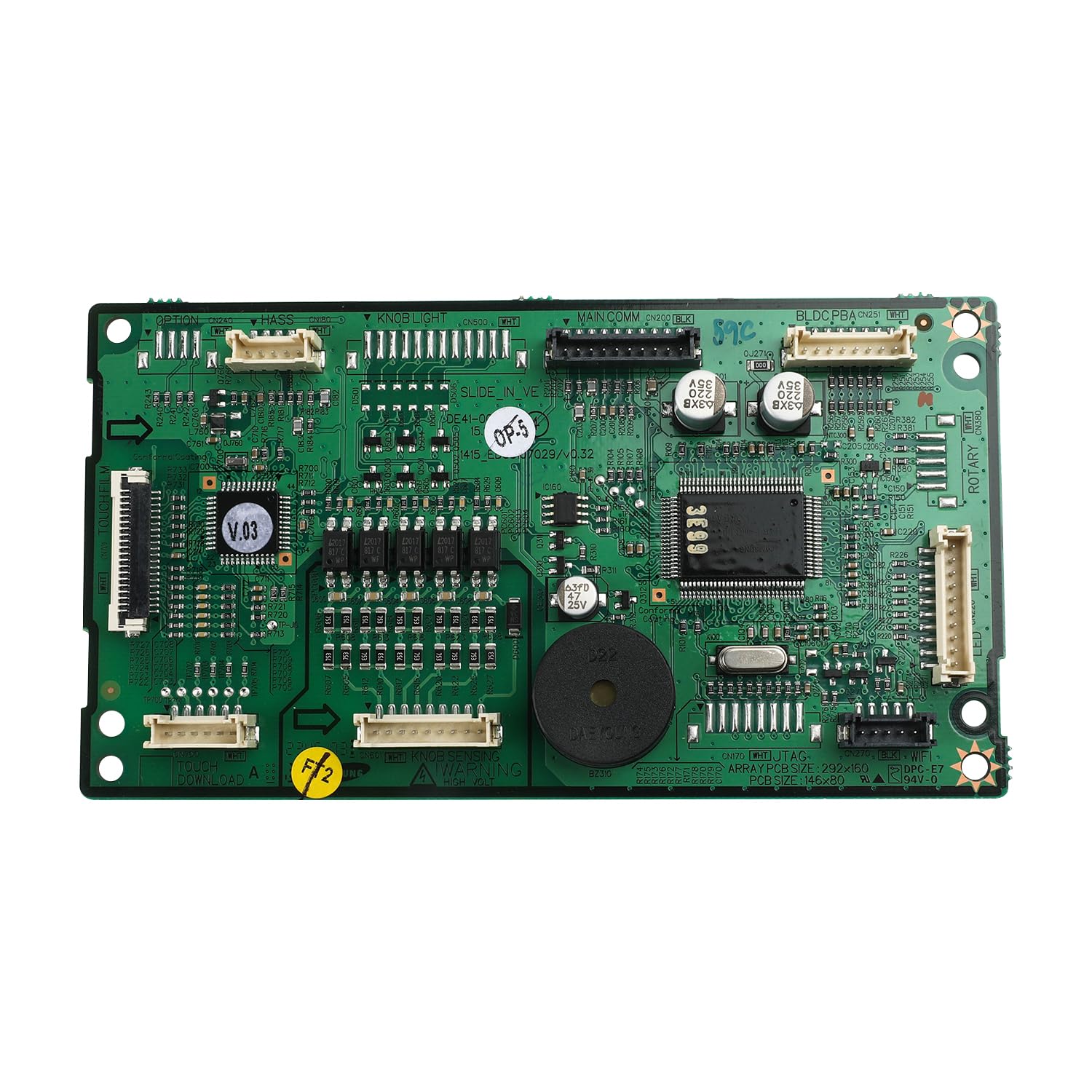
Image: The ForeverPRO DE94-03610C PCB assembly, showing various electronic components and connectors. This board is a critical control unit for compatible Samsung appliances.
3. Compatibility
This ForeverPRO DE94-03610C PCB assembly is designed to be compatible with various Samsung appliance models. Please verify your appliance's model number against the list below to ensure proper fit and function.
Compatible Samsung Appliance Models:
- NX58K7850SG/AA
- NX58K7850SS/AA
- NX58M6850SG/AA
- NX58M6850SS/AA
- And other models as specified by the manufacturer.
Note: This product is a compatible replacement part and is not manufactured by Samsung.
4. Installation (Setup)
Installation of the DE94-03610C PCB assembly requires technical knowledge and should be performed with extreme caution. It is highly recommended that installation be carried out by a certified appliance repair technician.
General Installation Guidelines (for qualified personnel only):
- Disconnect Power: Before beginning, ensure the appliance is completely disconnected from its power source (unplugged or circuit breaker turned off).
- Access the Existing PCB: Carefully locate and access the existing PCB within the appliance. This may involve removing panels or covers. Refer to your appliance's specific service manual for detailed access instructions.
- Document Connections: Before disconnecting any wires or connectors from the old PCB, take clear photographs or make detailed diagrams of all connections. This will aid in reassembly.
- Remove Old PCB: Disconnect all wires, ribbon cables, and mounting screws securing the old PCB. Handle the old board carefully.
- Install New PCB: Position the new ForeverPRO DE94-03610C PCB assembly in the same location as the old one. Secure it with the appropriate mounting screws.
- Reconnect Wiring: Using your documented connections, carefully reconnect all wires and ribbon cables to the new PCB. Ensure all connections are secure and correctly seated.
- Reassemble Appliance: Replace any panels or covers that were removed to access the PCB.
- Test Functionality: Once fully reassembled, reconnect power to the appliance and test its functionality to ensure the new PCB is operating correctly.
If you are unsure about any step, consult a professional technician.
5. Operation
The ForeverPRO DE94-03610C PCB assembly is an internal control component and does not have direct user-operable functions. Its operation is integrated into the overall functionality of the Samsung appliance it is installed in. Once correctly installed, the PCB enables the appliance to perform its intended functions as designed by the original manufacturer. Refer to your appliance's user manual for instructions on its operation.
6. Maintenance
The DE94-03610C PCB assembly requires minimal maintenance. As an electronic component, it is designed to be self-contained and durable within the appliance's environment.
- Keep Dry: Ensure the appliance environment remains dry to prevent moisture damage to the PCB.
- Avoid Physical Damage: Protect the PCB from physical impact or bending during handling and installation.
- Professional Inspection: If the appliance requires professional servicing, the technician may inspect the PCB for signs of wear or damage.
Do not attempt to clean the PCB with liquids or abrasive materials.
7. Troubleshooting
If your appliance is not functioning correctly after installing the ForeverPRO DE94-03610C PCB, consider the following general troubleshooting steps. Due to the complex nature of appliance electronics, professional diagnosis is often required.
- Power Check: Ensure the appliance is receiving power and that the circuit breaker has not tripped.
- Connection Verification: Double-check all connections to the new PCB. Ensure they are secure and correctly seated according to your documentation from removal.
- Component Integrity: Visually inspect the new PCB for any signs of damage, such as bent pins, scorch marks, or loose components, which may have occurred during shipping or installation.
- Appliance Specific Diagnostics: Consult your appliance's service manual for specific error codes or diagnostic procedures related to the control board.
- Professional Assistance: If the issue persists, it is strongly recommended to contact a qualified appliance repair technician for further diagnosis and repair.
8. Specifications
| Attribute | Detail |
|---|---|
| Manufacturer | ForeverPRO |
| Part Number | FP-DE94-03610C |
| Item Model Number | DE94-03610C |
| Included Components | Assy Pcb Eeprom Eep_05 De92-03959C Nx700 |
| Product Dimensions | 9 x 6 x 4 inches |
| Item Weight | 8 ounces |
| Country of Origin | China |
9. Warranty Information
This ForeverPRO DE94-03610C PCB assembly comes with a 90 Days Manufacturer Warranty. Please retain your proof of purchase for any warranty claims. For specific details regarding warranty coverage and procedures, please contact the manufacturer directly.
10. Customer Support
For technical assistance, compatibility questions, or warranty inquiries regarding your ForeverPRO DE94-03610C PCB assembly, please contact ForeverPRO customer support. Refer to the product packaging or the vendor's website for the most current contact information.
Ask a question about this manual
Ask about setup, troubleshooting, compatibility, parts, safety, or missing instructions. Manuals+ will review the question and use this page’s manual context to help answer it.