
1. Product Overview
The DALY Smart Active Balance BMS (Battery Management System) R24TS-250A is designed to manage and protect Li-ion, LiFePO4, and LTO battery packs ranging from 8 to 17 series (8S-17S) with a 250A charge/discharge current capability. This BMS features integrated Bluetooth for smart monitoring, along with RS485 and CAN communication interfaces. It provides essential protection functions to ensure battery longevity and safety.
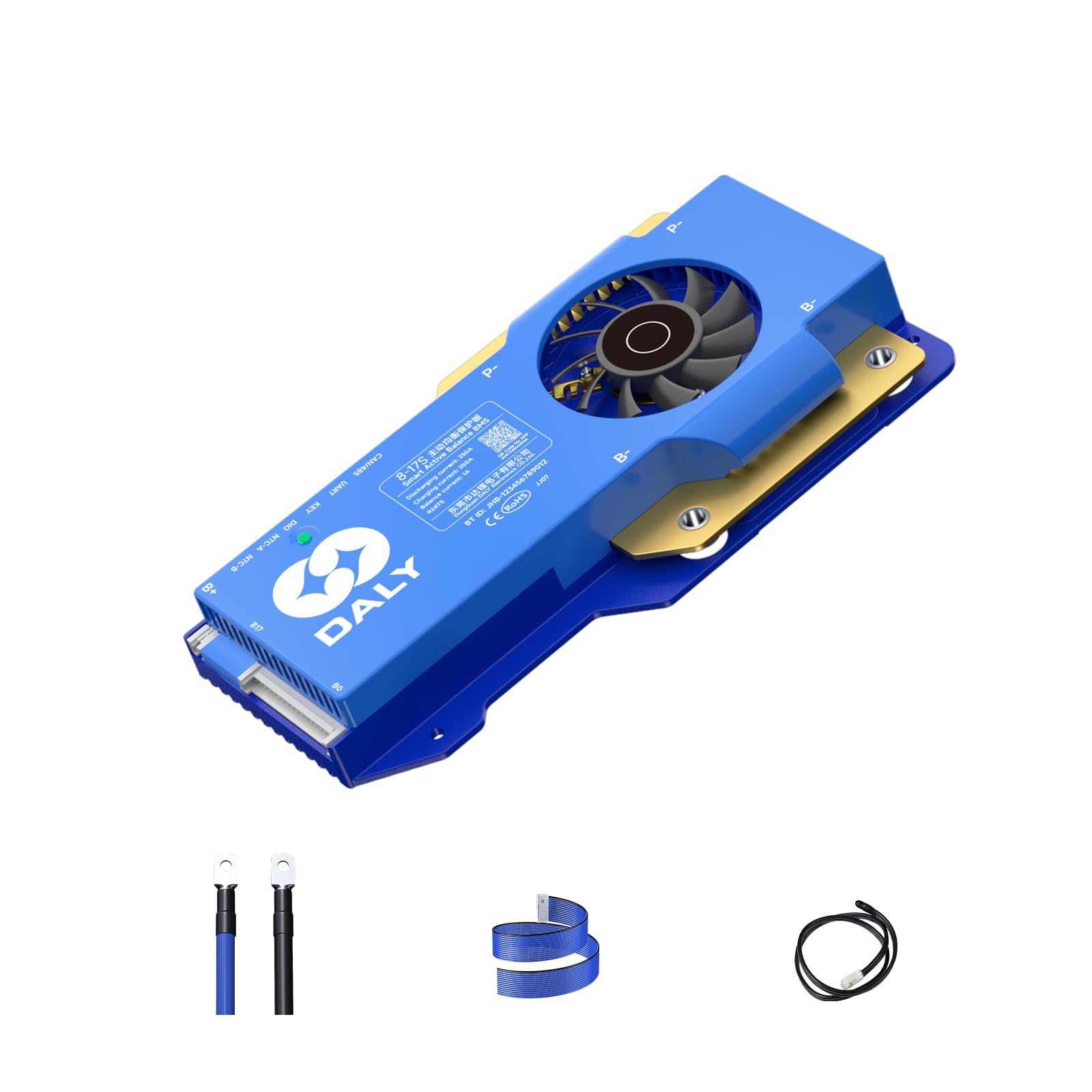
Image 1.1: DALY Smart Active Balance BMS R24TS-250A unit.
2. Key Features
- Wide Compatibility: Supports LiFePO4, Li-ion, and LTO battery packs from 8S to 17S configurations.
- High Current Rating: Capable of handling 250A charge and discharge currents.
- Active Balancing: Features 1A active balance to equalize cell voltages, extending battery life and performance.
- Smart Monitoring: Built-in Bluetooth for real-time monitoring of cell voltages, temperatures, and other parameters via a mobile application.
- Multiple Communication Interfaces: Includes RS485 and CAN for advanced system integration and data logging.
- Comprehensive Protection: Protects against overcharge, over-discharge, overcurrent, short circuits, and high-temperature conditions.
- Parallel Connection Support: Designed to support parallel battery pack configurations.

Image 2.1: Illustration of comprehensive protection features.
3. Setup and Installation
3.1. Packing List
Before installation, verify that all components are present in the package:

Image 3.1: Contents of the DALY BMS package.
- Smart Active Balance BMS Unit
- P-&B- cable
- Screws (2 Pcs)
- Sampling cable (Balance wires)
- B+ cable
- NTC (Temperature Sensor)
- User Manual
- Packaging box
- RS485/CAN port cable
3.2. Wiring Instructions
Proper wiring is crucial for the safe and correct operation of the BMS. Refer to the following diagrams and instructions:
- Balance Wires: Connect the sampling cable (balance wires) to each cell of your battery pack in the correct sequence, starting from B- (negative terminal of the first cell) up to B+ (positive terminal of the last cell). Ensure each wire corresponds to its respective cell voltage tap.
- Main Power Cables: Connect the main B- cable from the BMS to the negative terminal of the battery pack. Connect the P- cable from the BMS to the negative terminal of your load/charger. The B+ cable connects directly to the positive terminal of the battery pack.
- Temperature Sensor (NTC): Connect the NTC sensor to the designated port on the BMS and place the sensor on the battery pack to monitor temperature.
- Communication Ports: Connect the RS485/CAN cable to the respective ports on the BMS for external communication devices.

Image 3.2: Wiring for Pre-Charge Protection.

Image 3.3: Wiring for Misconnection Protection.

Image 3.4: Example of parallel connection wiring.
3.3. Compatibility Check
Ensure the BMS is compatible with your battery type and configuration. Using a mismatched BMS can damage your battery or cause a fire.

Image 3.5: Guide for selecting the appropriate BMS.
- Battery Cell Type: Confirm your battery is Li-ion, LiFePO4, or LTO.
- Series Connection (Strings): Verify the number of cells in series (8S-17S).
- Current Rating: Ensure the BMS current rating (250A) meets or exceeds your application's maximum load current.
4. Operation and Monitoring
4.1. Mobile Application Monitoring
The DALY Smart Active Balance BMS features built-in Bluetooth for wireless monitoring via a dedicated mobile application. Download the "BalanceBMS" app from your device's app store (iOS & Android).
- Connection: Enable Bluetooth on your mobile device and open the "BalanceBMS" app. The app will scan for nearby DALY BMS devices. Select your BMS from the list to connect.
- Real-time Data: Once connected, you can monitor various parameters including:
- Individual cell voltages
- Total battery pack voltage
- Charge/discharge current
- Battery temperature
- State of Charge (SOC)
- Balance status
- Settings Adjustment: The app allows for customization of certain BMS parameters. Refer to the app's internal guide for detailed instructions on adjusting settings.
4.2. RS485 and CAN Communication
For advanced integration with other systems or PC monitoring, the BMS supports RS485 and CAN communication protocols. These interfaces allow for more detailed data logging and control options.
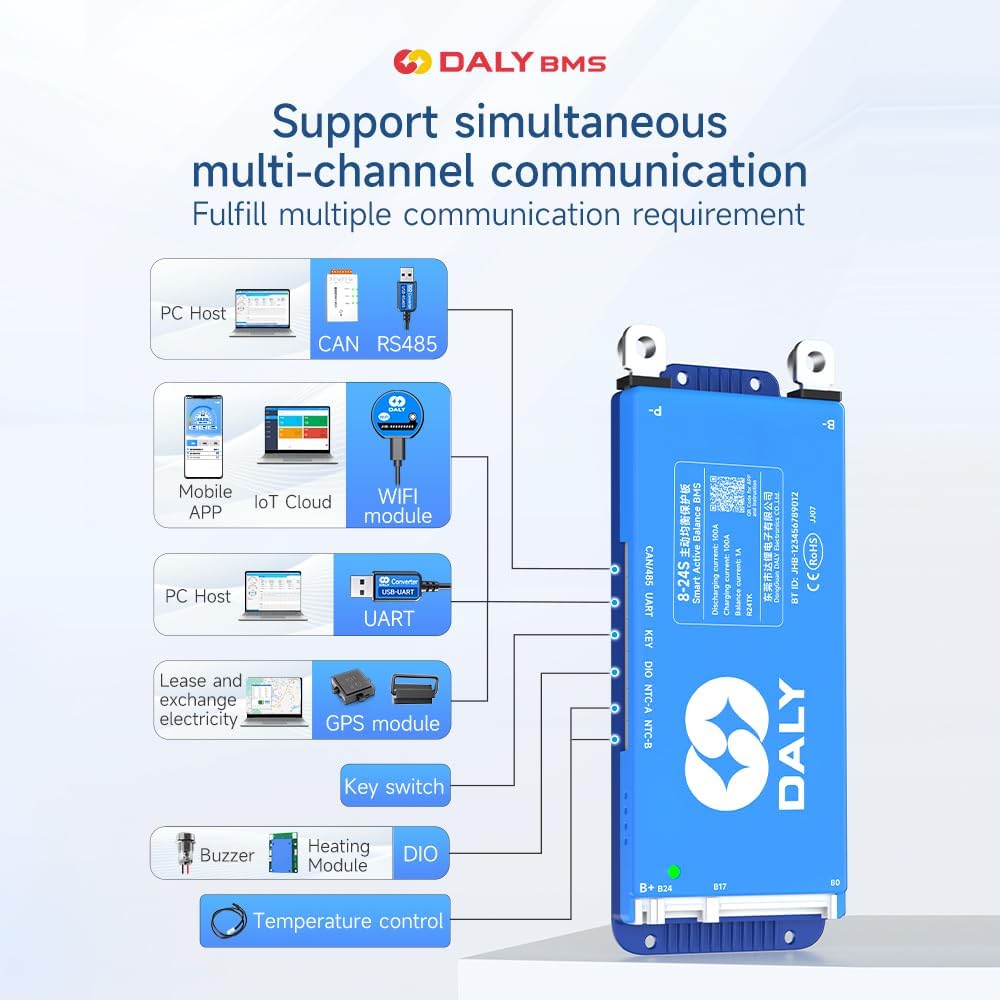
Image 4.1: Illustration of multi-channel communication options including RS485, CAN, and Bluetooth.
- PC Host: Connect the BMS to a PC using a compatible RS485 or CAN adapter for monitoring and configuration via DALY's PC software.
- IoT Cloud/WiFi Module: With an optional WiFi module, the BMS can connect to IoT cloud platforms for remote monitoring and data analysis.
5. Maintenance
The DALY Smart Active Balance BMS is designed for minimal maintenance. However, regular checks can help ensure optimal performance and battery longevity:
- Regular Monitoring: Periodically check battery cell voltages and temperatures via the mobile app to identify any anomalies early.
- Connection Integrity: Ensure all wiring connections, especially balance wires and main power cables, are secure and free from corrosion.
- Firmware Updates: Check the DALY website or app for any available firmware updates for your BMS model. Follow instructions carefully for any update procedures.
- Environmental Conditions: Operate the BMS within its specified temperature and humidity ranges to prevent damage.
6. Troubleshooting
This section addresses common issues you might encounter with your DALY Smart Active Balance BMS.
- BMS Not Powering On / No Output:
- Verify all main power connections (B-, P-, B+) are correctly wired and secure.
- Check the battery pack voltage to ensure it is within the operational range of the BMS.
- Inspect the balance wires for correct sequence and secure connection to each cell. A single misconnected balance wire can prevent the BMS from operating.
- App Connection Issues (Bluetooth):
- Ensure Bluetooth is enabled on your mobile device.
- Confirm the BMS is powered on.
- Try restarting the app and rescanning for devices.
- Ensure no other device is currently connected to the BMS via Bluetooth.
- Cell Voltage Imbalance:
- The active balance feature should work to equalize cells. If significant imbalance persists, verify the balance wire connections.
- Ensure the battery pack has undergone a full charge cycle to allow the balancing function to operate effectively.
- For new or significantly imbalanced packs, allow extended time for the active balance to work.
- BMS Shutting Down Unexpectedly:
- This often indicates a protection trigger (e.g., overcurrent, over-discharge, over-temperature).
- Check the load current to ensure it does not exceed the BMS's continuous discharge current rating (250A).
- Monitor battery cell voltages to ensure no cell is dropping below its minimum safe voltage during discharge.
- Check battery temperature. If it's too high or too low, the BMS may shut down for protection.
- Inaccurate Readings:
- Verify all wiring, especially the balance wires, for proper connection and absence of damage.
- Ensure the NTC temperature sensor is correctly placed and connected.
If you encounter issues not covered here or require further assistance, please contact DALY customer service.
7. Technical Specifications
| Feature | Specification |
|---|---|
| Model Number | R24TS-250A |
| Battery Type Compatibility | Li-ion, LiFePO4, LTO |
| Series Configuration | 8S-17S |
| Charge/Discharge Current | 250A |
| Active Balance Current | 1A |
| Communication Interfaces | Bluetooth, RS485, CAN |
| Product Dimensions (L x W x H) | 7.72 x 4.29 x 1.02 inches (19.6 x 10.9 x 2.6 cm) |
| Item Weight | 1.46 pounds (660 Grams) |
| Input Voltage | 24V (for 8S LiFePO4) - 60V (for 17S Li-ion) |

Image 7.1: Detailed dimensions and current specifications for various DALY BMS models.
8. Warranty and Support
The DALY Smart Active Balance BMS R24TS-250A comes with an 18-month warranty from the date of purchase. This warranty covers manufacturing defects and malfunctions under normal use conditions.
For technical support, warranty claims, or any questions regarding the product, please contact DALY customer service. Have your purchase details and model number ready for faster assistance.
You can find the "BalanceBMS" app on iOS and Android app stores for product monitoring and support resources.
9. Application Scenarios
The DALY Smart Active Balance BMS is versatile and suitable for a variety of applications requiring robust battery management:

Image 9.1: Various applications for DALY BMS, including electric vehicles and energy storage.
- Electric two-wheelers (e.g., scooters, motorcycles)
- Electric bicycles
- Electric tricycles
- Electric wheelchairs
- Home energy storage systems
- Outdoor energy storage solutions
- Automated Guided Vehicles (AGV)
- Lead-Acid battery upgrades to Lithium
- Lease battery swapping stations
- RV energy storage
- Forklifts
- Marine energy systems


