
1. Introduction
This manual provides detailed instructions for the installation, operation, and maintenance of the DALY 100A 4S-8S Smart Battery Management System (BMS). This BMS is designed for 4S-8S (12V-24V) lithium battery packs, including NCM, LFP, and LTO chemistries, and features a 1A active balancer, integrated Bluetooth, RS485, and CAN communication capabilities.
The DALY Smart BMS ensures the safe and efficient operation of your battery pack by monitoring cell voltages, temperatures, and other critical parameters, while providing essential protection against various electrical issues.
2. Key Features
- Versatile Compatibility: Supports 4S-8S (12V-24V) battery strings and is compatible with Lifepo4, Li-ion, and LTO battery chemistries. Also supports parallel battery pack configurations.
- Smart Active Balancing: Features a 1A active balancer to equalize the state of charge/discharge across battery cells, extending battery life and performance.
- Comprehensive Monitoring: Integrated Bluetooth (with optional WiFi) allows monitoring of cell voltages, temperatures, and other parameters. Includes cloud monitoring and data logging capabilities.
- Advanced Protection: Protects batteries from overcharge, overdischarge, overcurrent, short circuits, and high-temperature shutdown.
- Communication Interfaces: Equipped with UART, RS485, and CAN communication ports for flexible integration and control.
3. Packing List
Verify that all items are present in the package:

Image: Contents of the DALY Smart BMS package, including the BMS unit, cables, and accessories.
- Smart Active Balance BMS Unit
- P-&-B- Cable
- Screws (2 Pcs)
- Sampling Cable
- B+ Cable
- NTC (Temperature Sensor - one standard, two optional)
- User Manual (this document)
- Packaging Box
- RS485/CAN Port Cable
4. Installation Guide
Follow these steps carefully to install your DALY Smart BMS. For visual guidance, refer to the installation video below.
Video: A step-by-step installation guide for the DALY Smart Active Balancing BMS, demonstrating wiring connections and verification procedures.
4.1. Battery Preparation
- Identify the total positive terminal (B+) and total negative terminal (B-) of your battery pack.
- Ensure all individual cells are properly connected in series.
4.2. Sampling Cable Connection
The metal ring terminals for the sampling cables are user-supplied.
- Connect the first black cable (B-) and the blue B- wire from the sampling cable to the total negative terminal of the battery pack.
- Connect the remaining sampling cables in order, from B1 to B+ (or B8 for an 8S pack), to the positive terminals of each cell.
- Caution: If using fewer series than the maximum supported by the BMS, do not short-circuit the excess wires. Instead, securely tape them up with insulation tape to prevent accidental contact.
- Connect the B+ wire (red) from the sampling cable to the total positive terminal of the battery pack.
4.3. Wiring Verification
Before connecting the sampling cable to the BMS, verify the wiring using a multimeter:
- Place the black probe of the multimeter on B0 (the first pin of the sampling cable, connected to the total negative terminal).
- Place the red probe on B1, then B2, B3, and so on, sequentially.
- Observe the multimeter readings. If the multimeter displays positive voltage readings that increase step by step (approximately 3-4V per step for typical lithium cells), the wiring is correct.
- Important: During this testing, do not let the two multimeter probes touch each other, as this may cause a short circuit in the cable.
4.4. BMS Connection
- Connect the main B- wire from the battery pack to the B- terminal on the BMS.
- Insert the temperature sensor (NTC) into the designated NTC port on the BMS.
- Carefully plug the sampling cable connector into the corresponding port on the BMS.
- Connect the main B+ wire from the battery pack to the B+ terminal on the BMS.
- Once all connections are secure, check the BMS. If the green light on the BMS is illuminated, the BMS is working properly.
5. Operation and Monitoring
The DALY Smart BMS allows for convenient monitoring and configuration via a mobile application.
5.1. Mobile Application
- Download the "BalanceBMS" application from the iOS App Store or Android Play Store.
- Connect to the BMS via Bluetooth (or optional WiFi module) to access real-time data.
- The app displays individual cell voltages, overall pack voltage, current, temperature, and state of charge.
- Advanced settings and data logging features are available through the application.
5.2. Communication Interfaces
The BMS supports multiple communication protocols for integration with other systems:
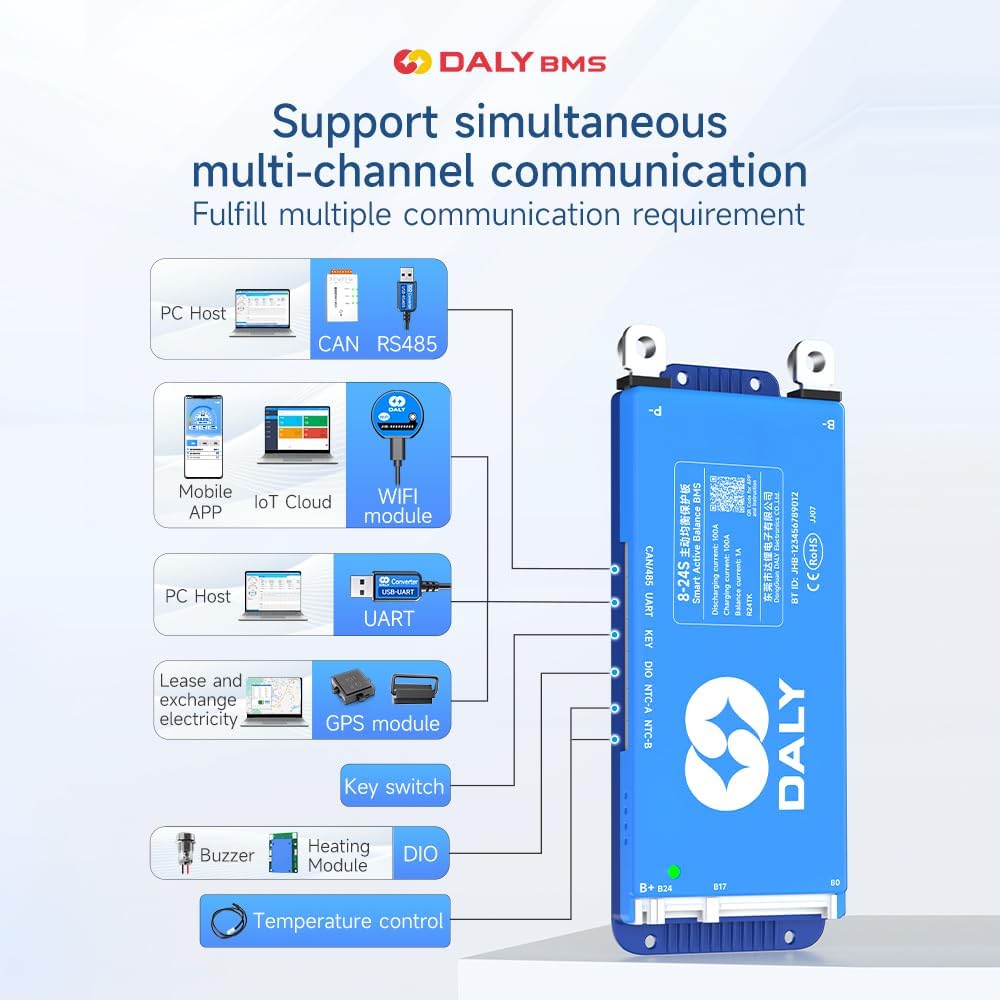
Image: Diagram illustrating the multi-channel communication capabilities of the DALY Smart BMS, including PC Host (CAN/RS485, UART), Mobile APP (IoT Cloud, WiFi module), GPS module, Key switch, Buzzer, Heating Module, and DIO for temperature control.
- UART: Universal Asynchronous Receiver-Transmitter for serial communication.
- RS485: Robust serial communication standard for industrial applications.
- CAN: Controller Area Network for reliable communication in automotive and industrial environments.
6. Application Scenarios
The DALY Smart BMS is suitable for a wide range of multi-purpose and intelligent multi-string applications:

Image: Various application scenarios for the DALY Smart BMS, including electric two-wheelers, home energy storage, electric tricycles, outdoor energy storage, electric wheelchairs, lead-acid to lithium upgrades, AGV, lease battery swapping, and RV energy storage.
- Electric Two-wheelers and Tricycles
- Electric Bicycles and Wheelchairs
- Home Energy Storage Systems
- Outdoor Energy Storage Solutions
- Lead-Acid Battery Upgrades to Lithium
- Automated Guided Vehicles (AGV)
- Lease Battery Swapping Stations
- RV Energy Storage
7. Specifications
| Feature | Detail |
|---|---|
| Model Number | R24TK-100A |
| Product Dimensions (L x W x H) | 6.57 x 2.56 x 0.59 inches (167 x 65 x 15 mm) |
| Item Weight | 7.4 ounces (210 Grams) |
| Input Voltage | 12 Volts (compatible with 4S-8S configurations) |
| Current Rating | 100A (Charge/Discharge) |
| Active Balance Current | 1A |
| Battery Type Compatibility | NCM, LFP, LTO |
| Communication Interfaces | Bluetooth, RS485, CAN, UART |
| Color | Blue |
| Manufacturer | Dongguan Daly Electronics Co., Ltd |

Image: Visual representation of key specifications for the DALY Smart Active Balance BMS, including battery strings (4~8S), charge/discharge current (100A), balance current (1A), built-in Bluetooth, battery type (Li-ion/LiFePO4/LTO), and communication (UART+RS485+CAN).

Image: Table showing product dimensions and cable specifications for various current ratings (40-100A, 150A, 200A, 250-500A) of DALY BMS units. This specific model is 100A.
8. Maintenance and Troubleshooting
8.1. General Maintenance
- Regularly check all cable connections for tightness and corrosion.
- Keep the BMS unit clean and free from dust and moisture.
- Monitor battery cell voltages and temperatures via the "BalanceBMS" app to ensure optimal performance.
8.2. Troubleshooting
If you encounter issues, consider the following:
- BMS Not Powering On: Verify all power connections (B- and B+ main wires) and ensure the sampling cable is correctly plugged in. Check the green indicator light on the BMS.
- Incorrect Voltage Readings: Re-check the sampling cable connections to each cell and ensure they are in the correct sequence. Use a multimeter to verify individual cell voltages as described in the installation section.
- Balancing Issues: Ensure the active balancer is enabled in the app settings. Check for significant voltage differences between cells that might indicate a faulty cell or connection.
- Communication Problems: Ensure Bluetooth is enabled on your device and the BMS. For RS485/CAN, verify cable connections and communication settings.
- Over-protection Triggered: The BMS protects against overcharge, overdischarge, overcurrent, and high temperature. Identify the cause of the trigger (e.g., excessive load, faulty charger, high ambient temperature) and rectify it. The BMS will typically resume normal operation once the condition is resolved.
For persistent issues, please contact customer support.
9. Warranty and Support
The DALY 100A 4S-8S Smart BMS comes with an 18-month warranty. For any questions, technical assistance, or warranty claims, please contact our customer service. Our friendly customer service team is available to provide support.
You can find the "BalanceBMS" app on iOS and Android for monitoring and control.


