
Introduction
This manual provides detailed instructions for the setup, operation, maintenance, and troubleshooting of your XIWBSY T08-FR Projector. Please read this manual thoroughly before using the projector to ensure proper function and to maximize your viewing experience. Keep this manual for future reference.

Image: The XIWBSY T08-FR Projector displaying a high-definition image, highlighting its 4K support, 180° rotation, 30000 Lumen brightness, and Android 12 operating system.
Product Overview
Key Features
- 180° Rotatable Stand: Features an innovative, detachable stand allowing projection from various angles (wall, table, ceiling, outdoor).
- Android 12 OS: Integrated operating system providing access to over 8,000 applications, including Netflix, YouTube, Prime Video, and Hulu.
- WiFi Mirroring: Supports screen mirroring for iOS and Android devices.
- High Definition Display: Native 1080P resolution, 4K supported, 30000 Lumen brightness, 20000:1 contrast ratio, and HDR10+ for enhanced image quality.
- Large Projection Size: Up to 300 inches with 50% to 100% zoom function.
- Immersive Audio: Equipped with dual 15W stereo speakers for 360° 3D stereo Hi-Fi audio. Can connect to external Bluetooth speakers.
- Advanced Connectivity: Dual-band 5G+2.4G WiFi and Bluetooth 5.2 for stable and fast connections.
- Office Suite: Integrated software for viewing PPT, Excel, and Word documents.
- Versatile Mounting: Supports 360° image flip for front, rear, and ceiling projection.

Image: This visual highlights the projector's advanced 8-layer lens system, 30000 Lumen brightness, 50000-hour lamp life, and superior contrast, contributing to its high-definition image quality.
Components and Ports
Familiarize yourself with the projector's components and connection ports.
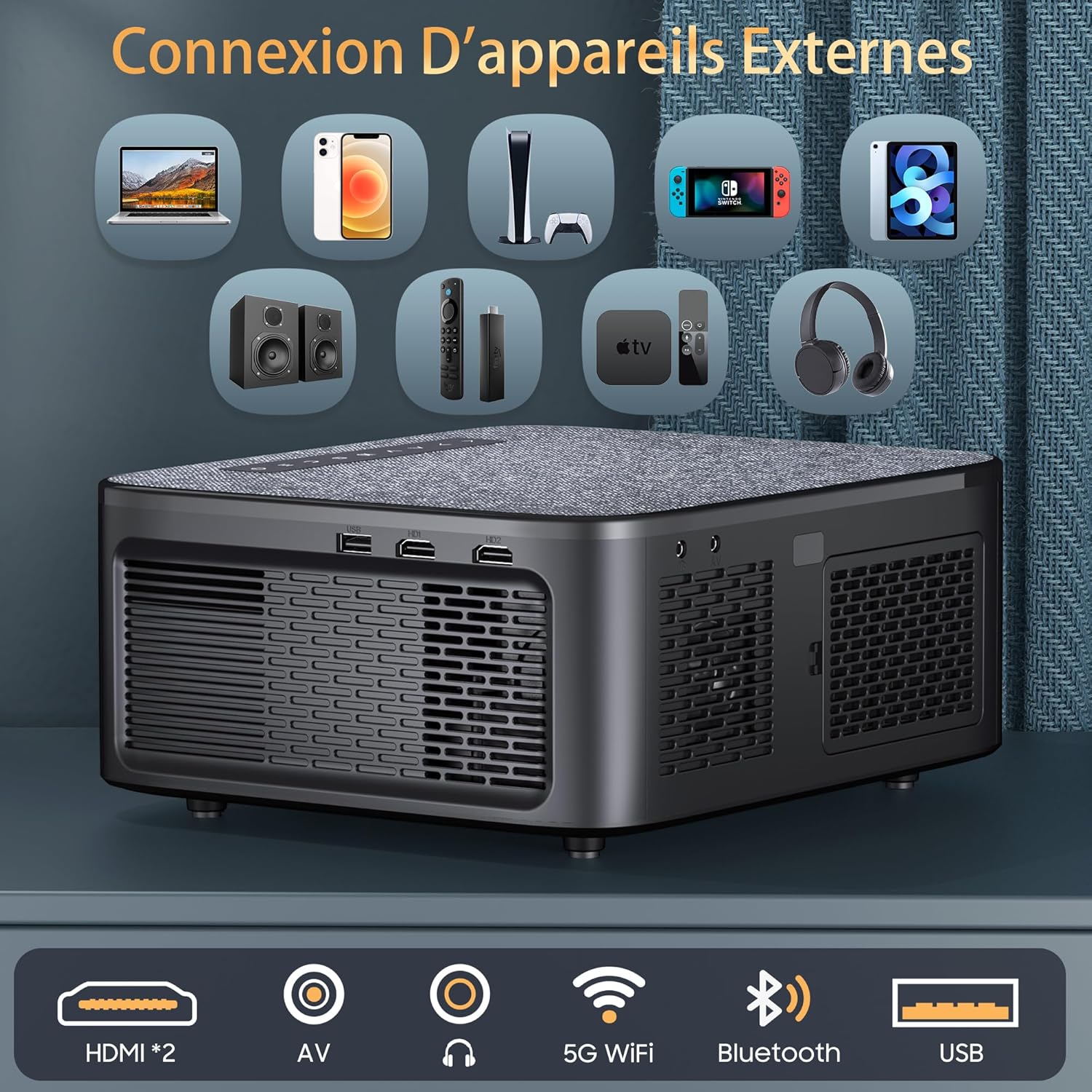
Image: Rear panel of the projector, illustrating the available connectivity options including two HDMI ports, AV input, audio output, 5G WiFi, Bluetooth, and USB port.
- HDMI Ports (x2): For connecting devices such as laptops, game consoles, and streaming sticks.
- USB Port: For connecting USB drives to play media files.
- AV Input: For connecting older devices with composite video and stereo audio output.
- Audio Out: For connecting external audio systems or headphones.
- Power Input: For connecting the power adapter.
- Focus Ring: Manual adjustment for image clarity.
- Keystone Correction: Manual or automatic adjustment for image shape.
Setup
1. Physical Placement
Place the projector on a stable, flat surface or mount it using a compatible ceiling mount. Ensure adequate ventilation around the projector.

Image: The projector positioned on a bedside table, utilizing its 180-degree rotatable stand to project an image onto the ceiling, demonstrating flexible viewing angles.
- The 180° rotatable and detachable stand allows for flexible projection angles, including walls, tables, and ceilings.
- For ceiling mounting, the projector supports 360° image flip.
2. Power Connection
- Connect the power adapter to the projector's power input port.
- Plug the power adapter into a wall outlet.
- Press the power button on the projector or remote control to turn it on.
3. Initial Configuration
- Upon first power-on, follow the on-screen prompts to select your preferred language.
- Connect to a Wi-Fi network: Navigate to Settings > Network > Wi-Fi and select your network. Enter the password if required.
Operating Instructions
1. Basic Operation
- Power On/Off: Press the power button on the projector or remote control.
- Focus Adjustment: Rotate the focus ring on the projector lens until the image is clear.
- Keystone Correction: Use the remote control or on-screen menu to adjust the image shape (4D/4P keystone correction, auto-vertical correction up to ±50°).

Image: Visual representation of the projector's keystone correction capabilities, including 4D/4P correction, auto-vertical adjustment, and zoom function, showing how the image can be adjusted for various screen sizes and angles.
2. Input Sources
- HDMI: Connect your device (laptop, game console, etc.) to an HDMI port. Select the corresponding HDMI input from the projector's source menu.
- USB: Insert a USB drive into the USB port. The projector will typically prompt you to open the media player.
- AV: Connect devices using an AV cable. Select AV input from the source menu.
3. Wireless Connectivity
- Wi-Fi (5G+2.4G): For internet access and streaming. Configure in Settings > Network > Wi-Fi.
- Bluetooth 5.2: For connecting external audio devices (headphones, speakers). Go to Settings > Bluetooth, enable Bluetooth, and pair with your device. Note: Bluetooth only supports audio transmission, not video.

Image: The projector showcasing its Bluetooth 5.2 bidirectional connectivity for external audio devices and its internal dual Hi-Fi speakers, emphasizing sound quality.
4. Smart Features (Android 12 & Apps)
The projector runs on Android 12, providing access to a variety of applications.

Image: A projected display showing the Android 12 interface with various streaming and utility applications such as YouTube, Netflix, Hulu, and Aptoide, indicating the projector's smart capabilities.
- Accessing Apps: From the home screen, navigate to the desired application (e.g., Netflix, YouTube).
- Screen Mirroring: To mirror your smartphone screen, activate the WiFi mirroring function on the projector and connect your iOS/Android device. Note: Due to HDCP copyright protection, some protected content may not have sound or image during screen mirroring.
- Office Suite: Use the integrated office suite to open and view PPT, Excel, and Word documents directly.

Image: The projector wirelessly mirroring content from a smartphone, illustrating its 5G+2.4G dual-band WiFi capability for stable and fast screen sharing across Android, iOS, and Windows devices.
5. Projection Settings
- Zoom: Adjust the projection size from 50% to 100% via the menu settings.
- Aspect Ratio: Supports 4:3 and 16:9 aspect ratios. Adjust in the display settings.
- Image Flip: For different mounting orientations (front, rear, ceiling), adjust the image flip setting in the menu.
Maintenance
1. Cleaning
- Lens: Use a soft, lint-free cloth specifically designed for optical lenses. Do not use abrasive cleaners.
- Exterior: Wipe the projector's exterior with a soft, dry cloth. Avoid using liquid cleaners directly on the device.
- Ventilation: Ensure the ventilation openings are clear of dust and obstructions to prevent overheating.
2. Storage
When not in use, store the projector in a cool, dry place, away from direct sunlight and extreme temperatures. Use the lens cap to protect the lens from dust and scratches.
Troubleshooting
- No Power:
- Check if the power cable is securely connected to the projector and the power outlet.
- Ensure the power outlet is functional.
- No Image:
- Verify that the correct input source (HDMI, USB, AV) is selected.
- Check the connection cables between the projector and the source device.
- Ensure the source device is powered on and outputting a signal.
- Blurry Image:
- Adjust the focus ring on the projector lens.
- Ensure the projection surface is flat and the projector is at an optimal distance.
- Adjust keystone correction if the image is distorted.
- No Sound:
- Increase the volume on the projector and the source device.
- Check if external speakers are properly connected or paired via Bluetooth.
- Ensure the audio output setting is correct in the projector's menu.
- Note: Some copyrighted content mirrored from smartphones may not transmit audio due to HDCP.
- Wi-Fi Connection Issues:
- Ensure the Wi-Fi password is entered correctly.
- Restart the projector and your Wi-Fi router.
- Move the projector closer to the Wi-Fi router to improve signal strength.
Specifications
| Brand | XIWBSY |
| Model Number | T08-FR |
| Display Technology | LCD |
| Native Resolution | 1920 x 1080 (1080P Full HD) |
| Max Display Resolution | 4096 x 2160 (4K Supported) |
| Brightness | 30000 Lumens |
| Contrast Ratio | 20000:1 |
| HDR Support | HDR10+ |
| Operating System | Android 12 |
| Wireless Connectivity | 5G+2.4G Wi-Fi, Bluetooth 5.2 |
| Wired Connectivity | 2x HDMI, 1x USB, AV, Audio Out |
| Built-in Speakers | Dual 15W Stereo Speakers |
| Projection Size | Up to 300 inches |
| Zoom Function | 50% - 100% |
| Keystone Correction | 4D/4P, Auto-vertical (±50°) |
| Dimensions (L x W x H) | 25.7 cm x 22 cm x 11.5 cm |
| Compatible Devices | Game Console, Speaker, Laptop, Smartphone, Tablet |
Warranty and Support
For any questions or assistance, our customer service team is available 24 hours a day, 7 days a week. Please do not hesitate to contact us at:
Please refer to your purchase documentation for specific warranty terms and conditions.