
1. Introduction
Thank you for choosing the Candy Rapido' CP 8F9FFW Compact Dishwasher. This appliance is designed to provide efficient and convenient dishwashing, especially in smaller kitchen spaces. Its compact size and intelligent features aim to simplify daily tasks. Please read this manual carefully before using the appliance to ensure safe operation, optimal performance, and proper maintenance. Keep this manual for future reference.
2. Safety Information
Always follow basic safety precautions when using electrical appliances to reduce the risk of fire, electric shock, or injury.
- Read all instructions before using the dishwasher.
- Ensure the appliance is properly grounded.
- Do not operate the dishwasher if it is damaged or malfunctioning.
- Keep children away from the dishwasher, especially when it is operating.
- Use only detergents and rinse aids specifically designed for automatic dishwashers.
- Do not touch the heating element during or immediately after use.
- Load sharp items so they are not likely to damage the door seal or interior.
- Do not overload the dishwasher.
- Disconnect the appliance from the power supply before cleaning or performing maintenance.
3. Product Overview and Features
The Candy Rapido' CP 8F9FFW is a compact dishwasher designed for efficiency and convenience.

Figure 3.1: Front view of the Candy Rapido' CP 8F9FFW Compact Dishwasher, highlighting its compact design, control panel, and key features like 8 place settings and 35-minute wash and dry cycle.
Key Features:
- WASH&DRY 35: A rapid cycle capable of washing and drying a daily load of tableware in just 35 minutes.
- MAXI TUB: A spacious interior tray designed to accommodate larger items such as baking sheets, chopping boards, and salad bowls.
- SOIL SENSOR: Automatically detects the level of dirt and adjusts water and energy consumption accordingly for optimal cleaning.
- EXPRESS OPTION: Reduces the duration of the selected wash program by 10%.
- hOn App Connectivity: Allows remote management of your dishwasher and provides useful tips and functionalities via a smartphone application.
- FLEX System: Optimizes the internal space for flexible loading of various items, including plates and wine glasses.
- Smart Sensors: Adjust wash cycle duration and temperature based on load configuration and dirt volume.
- Compact Size: Dimensions of 595mm (H) x 550mm (W) x 501mm (D) make it suitable for smaller spaces, yet it can hold up to 8 place settings.
- Late Departure (Delay Start): Allows scheduling the wash cycle up to 24 hours in advance.
- HALLOAD OPTION: Reduces energy and water consumption by up to 10% for partially loaded dishwashers without compromising performance.
- Low Noise Level: Operates at 49 Decibels.

Figure 3.2: The dishwasher interior with racks, highlighting its 49dB low noise operation.

Figure 3.3: Interior view demonstrating loading capacity with various dishes and the Maxi Ladle accessory for long utensils.

Figure 3.4: The Flex System accessory, designed to optimize and modulate the dishwasher's internal space for diverse dish sizes.

Figure 3.5: Illustration of the hOn app connectivity, allowing users to manage the dishwasher remotely and access smart functionalities.
4. Setup and Installation
The Candy Rapido' CP 8F9FFW is a freestanding dishwasher. Proper installation is crucial for its performance and safety.
4.1 Unpacking
- Carefully remove all packaging materials.
- Inspect the dishwasher for any damage incurred during transit. Report any damage immediately to your retailer.
- Ensure all included components are present (e.g., engine room).
4.2 Placement
- Place the dishwasher on a flat, stable surface.
- Ensure there is adequate space around the unit for ventilation and door opening.
- Avoid placing the dishwasher near heat sources or in direct sunlight.
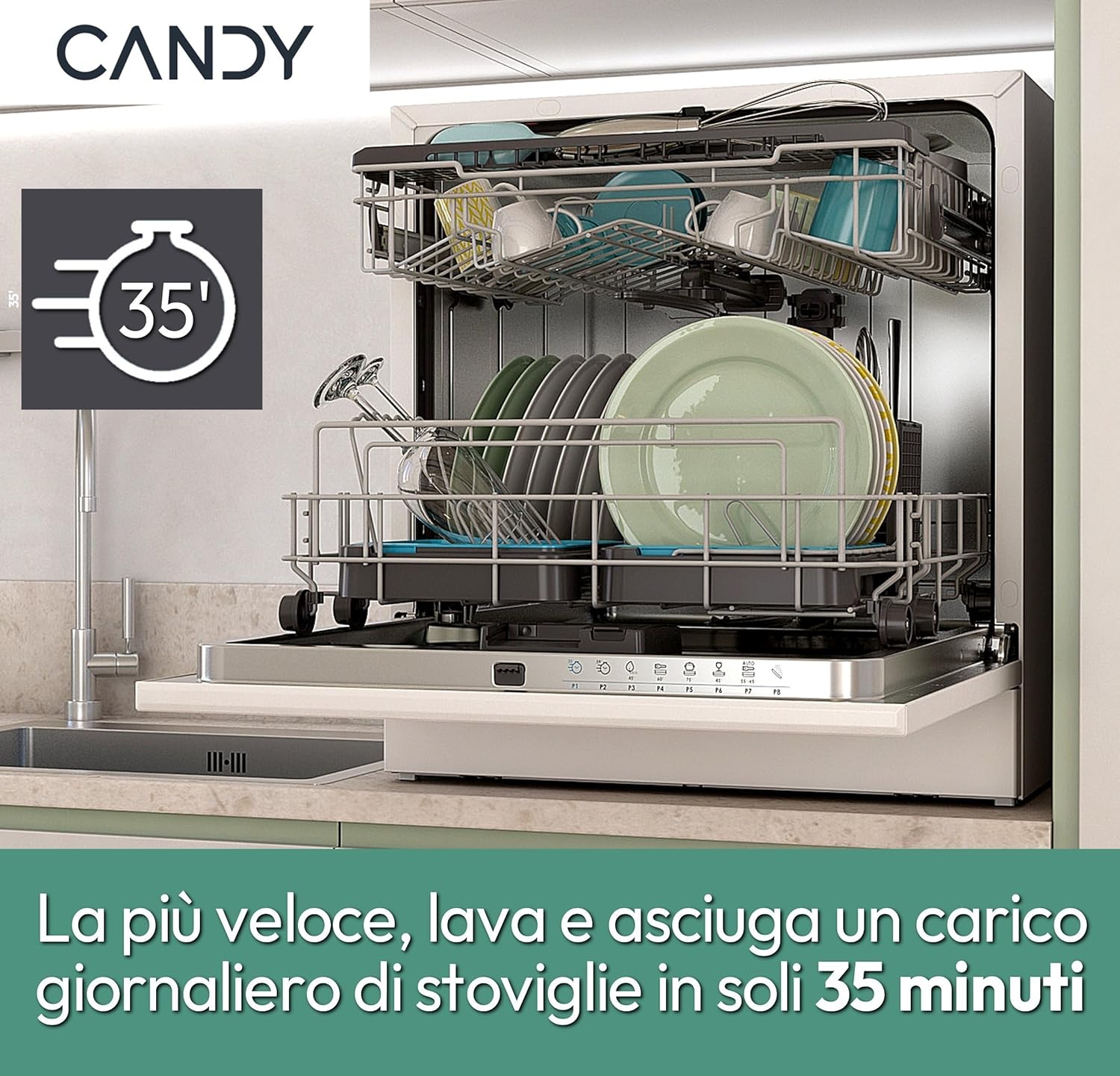
Figure 4.1: Technical drawing illustrating the dimensions of the Candy Rapido' CP 8F9FFW dishwasher (Height: 595mm, Width: 550mm, Depth: 501mm).
4.3 Electrical Connection
- Connect the dishwasher to a properly grounded electrical outlet.
- Ensure the voltage matches the appliance's requirements (Note: The provided specification of '72 Kilovolts' is highly unusual for a household appliance and is likely a data entry error. Please refer to the product label or official documentation for the correct operating voltage, typically 120V or 230V).
- Do not use extension cords or adapters.
4.4 Water Connection
- Connect the water inlet hose to a cold water supply with a minimum pressure of 0.04 MPa and a maximum of 1 MPa.
- Connect the drain hose to a suitable drain pipe, ensuring it is securely fastened and free from kinks.
- Check for leaks after connecting both hoses.
5. Operating Instructions
This section guides you through the daily operation of your Candy Rapido' CP 8F9FFW dishwasher.
5.1 Loading the Dishwasher
- Scrape off large food particles from dishes before loading.
- Place dishes securely in the racks, ensuring water spray can reach all surfaces.
- Use the FLEX System and Maxi Ladle accessory for optimal space utilization and placement of long utensils.
- Avoid blocking the spray arms.
5.2 Adding Detergent and Rinse Aid
- Fill the detergent dispenser with appropriate dishwasher detergent.
- Check the rinse aid indicator and refill if necessary.
5.3 Program Selection
The dishwasher offers 8 programs to suit various washing needs. Select the desired program using the control panel.

Figure 5.1: The dishwasher's control panel displaying the range of wash programs and additional options.
| Program | Description | Temperature |
|---|---|---|
| Rapido Lava&Asciuga (35') | Quick wash and dry for daily loads. | Not specified (optimized for speed) |
| Rapido Pieno Carico (59') | Fast full load wash. | Not specified |
| ECO | Energy-efficient program for normal soiled dishes. | 42°C |
| Universale | Standard program for everyday use. | 60°C |
| Intensivo | For heavily soiled dishes and pots. | 75°C |
| Bicchieri | Gentle wash for delicate glassware. | 45°C |
| AUTO WASH | Automatic program that adjusts based on soil level (using SOIL SENSOR). | Variable |
| Prelavaggio | Pre-wash cycle for rinsing dishes before a main wash. | Cold |
5.4 Additional Options
- Mezzo Carico (Half Load): Use this option for smaller loads to save water and energy.
- Partenza Ritardata (Delay Start): Set a delay for the program to start up to 24 hours later.
- EXPRESS OPTION: Reduces the program duration by 10%.
- HALLOAD OPTION: For partially loaded dishwashers, reduces energy and water consumption by up to 10%.
5.5 Using the hOn App
The hOn app allows you to control your dishwasher remotely, access additional programs, and receive maintenance tips.
- Download the hOn app from your smartphone's app store.
- Follow the in-app instructions to connect your dishwasher to your home Wi-Fi network.
- Once connected, you can start/stop cycles, monitor progress, and customize settings from your device.
6. Maintenance and Cleaning
Regular maintenance ensures the longevity and optimal performance of your dishwasher.
6.1 Cleaning the Filters
- The filter system prevents food particles from recirculating and clogging the drain.
- Clean the filters regularly (e.g., once a week or as needed) by removing them and rinsing under running water.
- Reassemble the filters correctly after cleaning.
6.2 Cleaning the Spray Arms
- Check the spray arm nozzles for blockages.
- If blocked, remove the spray arms and clear the nozzles with a thin object.
6.3 Exterior and Interior Cleaning
- Wipe the exterior with a damp cloth and mild detergent.
- Clean the door seal regularly to remove food residue.
- Run a dishwasher cleaning cycle periodically using a specialized dishwasher cleaner.
7. Troubleshooting
Before contacting customer service, refer to this section for common issues and their solutions.
| Problem | Possible Cause | Solution |
|---|---|---|
| Dishwasher does not start | Power cord not plugged in; door not closed properly; fuse blown. | Check power connection; ensure door is latched; check household fuse/breaker. |
| Dishes are not clean | Improper loading; clogged spray arms; insufficient detergent; incorrect program selected; dirty filters. | Reload dishes correctly; clean spray arms; add more detergent; select appropriate program; clean filters. |
| Water not draining | Clogged drain hose or filter; drain pump malfunction. | Clean drain hose and filters; contact service if pump is faulty. |
| Excessive noise | Dishes rattling; foreign object in pump; improper installation. | Rearrange dishes; check for foreign objects; ensure proper leveling. |
| White spots on dishes | Hard water; insufficient rinse aid; too much detergent. | Adjust rinse aid dispenser; use less detergent; consider water softener if water is very hard. |
8. Specifications
Detailed technical specifications for the Candy Rapido' CP 8F9FFW Compact Dishwasher.
| Feature | Detail |
|---|---|
| Brand | Candy |
| Model Name | CP 8F9FFW |
| Item Model Number | 32002574 |
| Form Factor | Freestanding |
| Installation Type | Freestanding |
| Product Dimensions (D x W x H) | 21.65"D x 19.72"W x 23.43"H (550mm x 501mm x 595mm) |
| Item Weight | 30 Kilograms / 66 pounds |
| Capacity | 8 Place Settings (Note: The specification lists '8 Liters' for capacity, which is likely a typo. The product is designed for 8 place settings.) |
| Number of Settings | 8 (Note: While '9' is listed in some specifications, the product title and general description refer to 8 place settings.) |
| Option Cycles | 8 |
| Water Consumption | 10 Liters (1E+1 Liters) |
| Annual Energy Consumption | 72 Kilowatt Hours per 100 cycles |
| Efficiency (10 classes) | A to G (Energy Class F) |
| Noise Level | 49 Decibels |
| Color | White |
| Controls Type | Push Button |
| Special Features | Intelligent connection and remote control, customizable wash cycles |
| Included Components | Engine room (This is a generic term; typically includes racks, cutlery basket, hoses, etc.) |
| Finish Type | White finish |
| Recommended Uses | Daily tableware, glasses and various tableware |
| Voltage | 72 Kilovolts (Note: This is highly unusual for a household appliance and is likely a data entry error. Please refer to the product label for the correct operating voltage.) |
9. Warranty and Support
For warranty information and customer support, please refer to the documentation provided with your purchase or visit the official Candy website.
In case of issues not covered in the troubleshooting section, or for spare parts and technical assistance, contact Candy customer service.
Manufacturer: Candy
Brand Store: Visit the Candy Store on Amazon


