Introduction
This manual provides essential instructions for the assembly, operation, maintenance, and troubleshooting of your COUGAR Defensor Ergonomic Office/Gaming Chair. Please read this manual thoroughly before use to ensure proper function and longevity of your product.
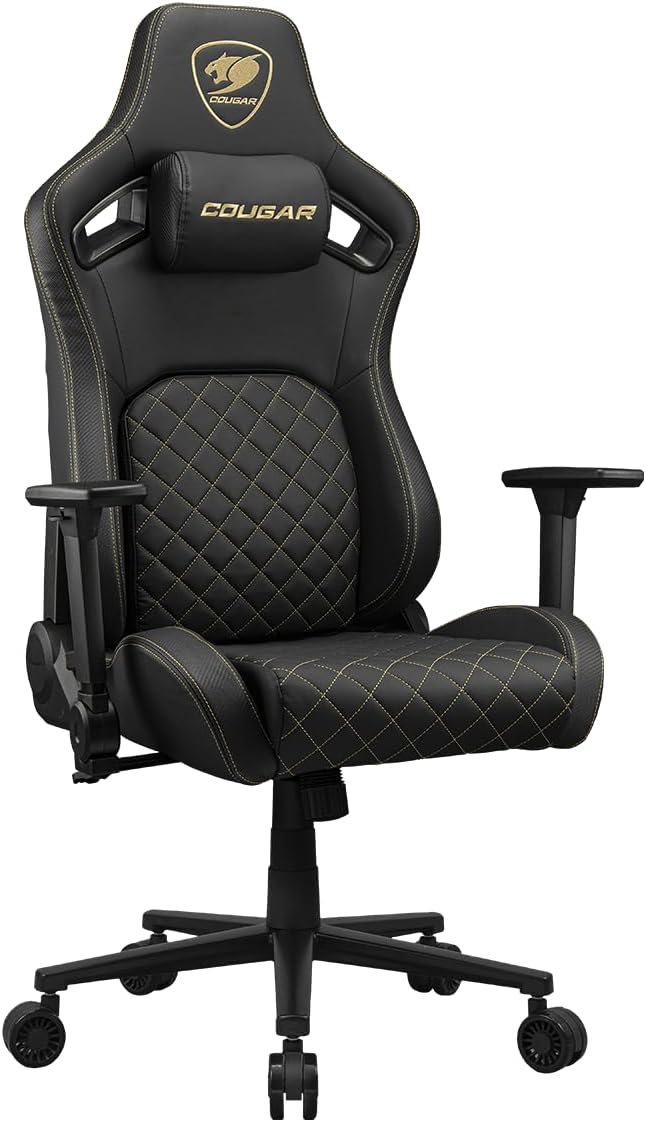
Image: Front view of the COUGAR Defensor Ergonomic Office/Gaming Chair in Gold (black with gold stitching).
Safety Information
- Ensure all components are securely fastened before use.
- Do not stand on the chair.
- Do not use the chair if any parts are damaged or missing.
- Keep hands and fingers clear of moving parts during adjustment.
- Maximum weight recommendation: 120 Kilograms (264.5 lbs).
Package Contents
Verify that all the following items are included in your package:
- COUGAR Defensor Chair components
- Assembly Kit (screws, tools, etc.)
- Instruction Manual (this document)
Setup and Assembly
Detailed assembly instructions are typically provided in a separate guide included with your chair. Please refer to that guide for step-by-step assembly. The following provides a general overview:
- Unpack all components and verify against the package contents list.
- Attach the casters to the chair base.
- Insert the gas lift cylinder into the chair base.
- Assemble the seat and backrest according to the specific instructions.
- Attach the assembled seat and backrest to the gas lift cylinder.
- Install the armrests.
- Attach the magnetic memory foam neck pillow.
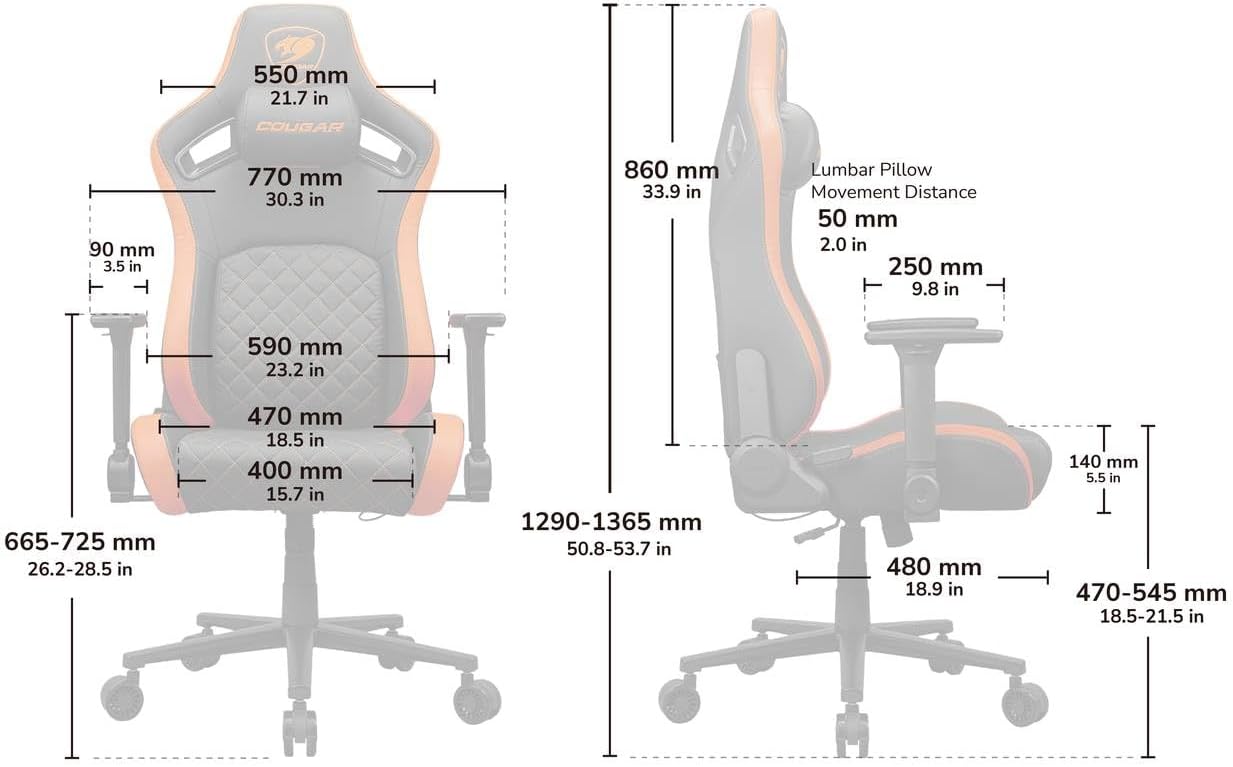
Image: Dimensional diagram of the COUGAR Defensor chair, showing various measurements in millimeters and inches.
Operating Instructions
1. Piston Lift Height Adjustment
To adjust the chair's height, locate the lever on the right side, beneath the seat. Pull the lever upwards while seated to lower the chair, or pull the lever upwards while standing to raise the chair. Release the lever at the desired height.
2. 155° Reclining Function
The chair allows for reclining from 90° to 155°. To recline, pull the recline lever located on the right side of the chair, near the backrest. Lean back to the desired angle and release the lever to lock it in place. To return to an upright position, pull the lever and lean forward.

Image: Illustration of the chair's 155° reclining, piston lift height adjustment, and rocking capabilities. Note: The chair shown in this illustration is orange, while the product is Gold (black with gold stitching).
3. PushBack Advanced Lumbar Support System
The integrated PushBack system allows you to adjust the pressure applied to your lower back for optimal spinal support.
- To retract the lumbar support: Locate the paddle on the side of the chair. Lift the paddle to unlock the mechanism, then push against the lumbar support to retract it.
- To extend the lumbar support: Lift the paddle to unlock, then allow the lumbar support to extend outwards. Release the paddle to lock it at the desired position.

Image: Diagram illustrating the operation of the PushBack lumbar support system, showing the unlock paddle and the direction of adjustment.
4. 4D Folding Armrests
The armrests offer four-dimensional adjustment and can also be folded away for increased mobility.
- Height Adjustment: Press the button on the side of the armrest support and move the armrest up or down.
- Forward/Backward Adjustment: Slide the armrest pad forward or backward.
- Left/Right Adjustment: Slide the armrest pad left or right.
- Pivot Adjustment: Rotate the armrest pad inwards or outwards.
- Folding Function: Lift the armrest upwards to fold it back, clearing space.

Image: Illustration detailing the various adjustments of the 4D folding armrests, including height, depth, width, and pivot. Note: The chair shown in this illustration is orange, while the product is Gold (black with gold stitching).
5. Magnetic Memory Foam Neck Pillow
The neck pillow is magnetic, allowing for easy positioning and adjustment to your preferred height and angle for maximum neck support. Simply detach and reattach to the desired location on the backrest.

Image: Close-up view of the magnetic memory foam neck pillow being positioned on the chair. Note: The chair shown in this illustration is orange, while the product is Gold (black with gold stitching).
Maintenance
Proper care will extend the life and appearance of your COUGAR Defensor chair.
- Cleaning: Wipe clean with a damp cloth. For deeper cleaning, dry clean only. Avoid harsh chemicals or abrasive cleaners.
- Inspection: Periodically check all screws and bolts to ensure they are tight. Re-tighten if necessary.
- Avoid Direct Sunlight: Prolonged exposure to direct sunlight can cause fading and material degradation.
Troubleshooting
If you encounter issues with your chair, refer to the following common solutions:
- Chair not adjusting height: Ensure the gas lift lever is fully engaged and the gas lift cylinder is properly seated in the base. Check for any obstructions.
- Chair wobbles: Verify that all assembly screws are securely tightened. Ensure the chair is on a flat, even surface.
- Recline mechanism not locking: Ensure the recline lever is fully released after adjusting the angle. Check for any obstructions in the mechanism.
- Armrests are loose: Check the screws securing the armrests to the chair and tighten if necessary.
If problems persist, contact COUGAR customer support for further assistance.
Specifications
| Feature | Specification |
|---|---|
| Brand | COUGAR |
| Model Name | Defensor |
| Item Model Number | CGR-DFL-GLB |
| Color | Gold (Black with Gold Stitching) |
| Product Dimensions | 29.53"D x 25.98"W x 50.79"H |
| Back Style | Solid Back |
| Special Features | Adjustable Backrest, Arm Rest, Back Support, Ergonomic, Reclining |
| Recommended Uses | Gaming, Office, Video Game |
| Maximum Weight Recommendation | 120 Kilograms (264.5 lbs) |
| Fill Material | Memory Foam |
| Upholstery Material | Hyper-Dura Leatherette |
| Reclining Position Count | 3 (90°, 130°, 155°) |
| Item Weight | 55.4 pounds |
| UPC | 192554007816 |
Warranty and Support
For warranty information and customer support, please refer to the warranty card included with your product or visit the official COUGAR website. Keep your proof of purchase for warranty claims.


