
1. Introduction
This manual provides detailed instructions for the UltraPro Rechargeable Magnetic Task Light, Model 68572. This versatile light offers up to 300 lumens of bright white light, full-range dimming capabilities, and multiple mounting options, making it suitable for various applications such as under-cabinet lighting, workshops, camping, and emergency use.
2. Important Safety Instructions
Please read and understand all safety instructions before using this product. Failure to follow these instructions may result in electric shock, fire, or serious injury.
- Read all instructions thoroughly before initial use.
- Do not disassemble, modify, or attempt to repair the device. This will void the warranty.
- Keep the device away from water, moisture, and extreme temperatures.
- Use only the provided Micro-USB cable for charging. Do not use damaged cables or chargers.
- Dispose of the product and its internal battery responsibly according to local regulations. Do not incinerate.
- Avoid direct eye exposure to the light source when it is at maximum brightness.
3. Package Contents
Verify that all items listed below are included in your package:
- UltraPro Rechargeable Magnetic Task Light (Quantity: 2 for 2-pack)
- Micro-USB Charging Cable (Quantity: 2 for 2-pack)
- Adhesive Metal Strips (for mounting)

Image: The UltraPro Rechargeable Magnetic Task Light and its packaging, highlighting key features like magnet mount, 6500K daylight, full-range dimming, blinking SOS light, and micro-USB charging cable.
4. Features
The UltraPro Rechargeable Magnetic Task Light is equipped with the following features:
- 300 Lumens Output: Provides bright, efficient illumination.
- 6500K Daylight: Offers a crisp, clear white light color temperature.
- Full-Range Dimming: Adjust brightness seamlessly from low to high.
- Blinking SOS Light: An emergency signaling mode for added safety.
- Rechargeable Battery: Features a long-lasting internal battery, eliminating the need for disposable batteries.
- Magnetic Mount: Built-in magnets allow for easy attachment to ferrous metal surfaces.
- Collapsible Hook: Provides a convenient option for hanging the light.
- Portable Design: Lightweight and compact for easy transport and handheld use.
- Memory Function: Remembers the last brightness setting used when turned off and on.

Image: An overview of the UltraPro Rechargeable Task Light's features, including 6500K Daylight, full-range dimming, blinking SOS light, ON/OFF button, magnet mount, and hanging clip.
5. Setup and Installation
5.1 Charging the Device
Before initial use, it is recommended to fully charge your UltraPro Task Light.
- Locate the Micro-USB charging port on the side of the task light.
- Connect the included Micro-USB cable to the light's charging port.
- Plug the other end of the USB cable into a standard USB-A power source (e.g., wall adapter, computer USB port, power bank). A USB-A power adapter is not included.
- The charging indicator light (if present) will illuminate to show charging status. Once fully charged, the indicator may change color or turn off.
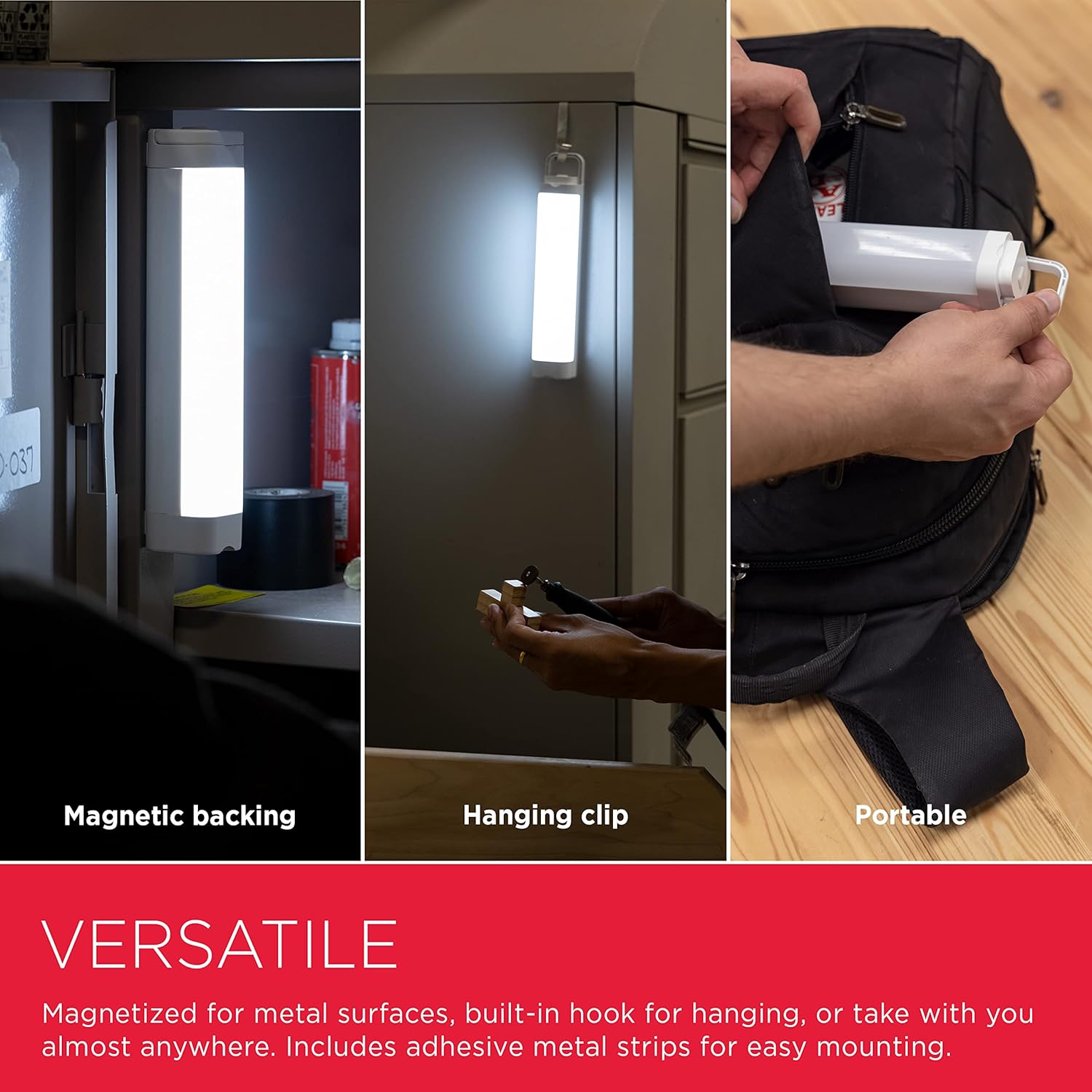
Image: A hand plugging the Micro-USB charging cable into the UltraPro Task Light, demonstrating its USB rechargeable feature in a workshop setting.
5.2 Mounting Options
The UltraPro Task Light offers versatile mounting solutions to suit various needs:
- Magnetic Mounting: The light features strong built-in magnets. Simply attach it to any ferrous metal surface, such as toolboxes, metal shelves, or electrical panels.
- Hanging: Utilize the collapsible hook located at one end of the light to hang it from hooks, ropes, or other suitable fixtures for overhead or temporary lighting.
- Adhesive Metal Strips: For non-metallic surfaces (e.g., wood cabinets, plastic), attach the provided adhesive metal strips to the desired location. Once secured, the light can be magnetically attached to these strips.
- Portable Use: The compact and lightweight design allows for easy handheld use or placement on flat surfaces for directional lighting.

Image: A collage of three images demonstrating the versatility of the UltraPro Task Light: magnetic mounting on a metal cabinet, hanging from a hook under a cabinet, and being placed into a backpack for portable use.
6. Operating Instructions
6.1 Power On/Off
To turn the light ON, press the power button once. To turn the light OFF, press the power button again.
6.2 Adjusting Brightness (Dimming)
While the light is ON, press and hold the power button. The brightness will cycle smoothly from low to high. Release the button when the desired brightness level is achieved.
6.3 SOS Mode
To activate the blinking SOS signal for emergencies, quickly double-press the power button. Double-press the button again to return to the previous lighting mode or to turn the light off.
6.4 Memory Function
The UltraPro Task Light is equipped with a memory function. It will recall and activate at the last brightness setting used when it is turned off and then back on.

Image: An illustration detailing the lighting control features of the UltraPro Task Light, including bright white daylight, full-range dimming, and blinking SOS mode, with the light emitting different levels of brightness.
7. Maintenance
Proper care ensures the longevity and optimal performance of your task light.
- Cleaning: Clean the exterior of the light with a soft, dry, lint-free cloth. Do not use abrasive cleaners, solvents, or harsh chemicals, as these can damage the finish or internal components.
- Charging Port: Periodically check the Micro-USB charging port for dust or debris and gently clean if necessary to ensure proper connection.
- Storage: When not in use for extended periods, store the light in a cool, dry place away from direct sunlight and extreme temperatures.
8. Troubleshooting
If you encounter any issues with your UltraPro Task Light, refer to the following table for common problems and solutions:
| Problem | Solution |
|---|---|
| Light does not turn on | Ensure the battery is charged. Press the power button firmly. |
| Light is dim or flickers | Adjust brightness using the dimming function. Recharge the battery fully. |
| Light does not hold a charge | Ensure the charging cable is securely connected to both the light and the power source. Try a different USB power source or cable. If the issue persists, the internal battery may need service. |
| Light falls from magnetic surface | Ensure the mounting surface is clean, flat, and made of a ferrous metal. For non-metallic surfaces, use the provided adhesive metal strips. |
9. Specifications
Technical details for the UltraPro Rechargeable Magnetic Task Light, Model 68572:
- Model: 68572
- Light Output: Up to 300 Lumens
- Color Temperature: 6500K (Daylight)
- Power Source: Rechargeable Internal Battery
- Charging Port: Micro-USB
- Dimensions: Approximately 1.75 x 2.25 x 9 inches (4.45 x 5.72 x 22.86 cm)
- Item Weight: Approximately 14.4 ounces (408 grams)
- Brand: UltraPro
- Manufacturer: Jasco Products
10. Warranty and Customer Support
UltraPro products are designed and manufactured to the highest quality standards. For detailed warranty information, product registration, or technical assistance, please visit the official UltraPro website or contact their customer support directly.
Please retain your purchase receipt as proof of purchase for any warranty claims.
UltraPro Official Store: https://www.amazon.com/stores/UltraPro/page/4F0A9551-420F-42EA-8CEA-3F2E4D6353F5