
Introduction
The Positive Grid Spark 2 is a 50W smart guitar practice amplifier and Bluetooth speaker designed for electric, acoustic, and bass guitars. This bundle includes the swappable and rechargeable Spark Battery, offering up to 12 hours of portable playtime. It features Sonic IQ Computational Audio, premium angled FRFR speakers, a built-in Creative Groove Looper with drum patterns, exclusive HD amp models powered by an upgraded DSP with new tube emulation, and AI features that suggest tones based on your desired sound. This manual provides essential information for setting up, operating, maintaining, and troubleshooting your Spark 2 amplifier.

Image: The Positive Grid Spark 2 amplifier shown with a smartphone displaying its companion app, highlighting the smart features.
Setup
1. Powering On and Charging
The Spark 2 can be powered via the included AC adapter or the Spark Battery. To install the Spark Battery, locate the battery compartment on the side of the amplifier and insert the battery as shown. Ensure it clicks securely into place. Connect the AC adapter to charge the battery or for continuous power.

Image: Proper insertion of the swappable Spark Battery into the amplifier's dedicated slot.
2. Instrument Connection
Connect your electric, acoustic, or bass guitar to the 1/4-inch input jack on the top panel of the Spark 2 amplifier. Ensure the cable is securely connected.
3. App Installation and Bluetooth Pairing
Download the Spark app from your device's app store (iOS or Android). Once installed, turn on your Spark 2 amplifier. Open the Spark app on your smartphone or tablet and follow the on-screen instructions to pair your device via Bluetooth. This connection enables access to the amplifier's smart features and controls.
Video: An overview of the Positive Grid Spark 2 amplifier, demonstrating its features and connectivity options.
Operating
1. Basic Controls
The top panel of the Spark 2 features physical knobs for essential controls:
- Preset: Selects one of the four onboard presets.
- Gain: Adjusts the input sensitivity and overdrive level.
- Bass, Mid, Treble: Equalizer controls to shape your tone.
- Master: Controls the overall output volume of the amplifier.
- Mod, Delay, Reverb: Adjusts the intensity of modulation, delay, and reverb effects.
- Output: Controls the output level to headphones or line out.
- Input: 1/4-inch jack for instrument connection.

Image: The control panel of the Spark 2, detailing the physical knobs for tone shaping and effects.
2. Using the Spark App
The Spark app unlocks the full potential of your amplifier:
- Amp Models & Effects: Access a vast library of HD amp models and effects pedals. Customize your signal chain and save your unique tones.
- AI Features: Describe your desired tone to Spark AI, and it will automatically suggest matching presets.
- Smart Jam: The app can listen to your playing and generate dynamic bass and drum backing tracks in real-time.
- Auto Chords: Automatically displays guitar chords for millions of songs.
- ToneCloud: Explore and download thousands of tones created by other Spark users worldwide.
- Tuner: Utilize the built-in tuner for accurate instrument tuning.
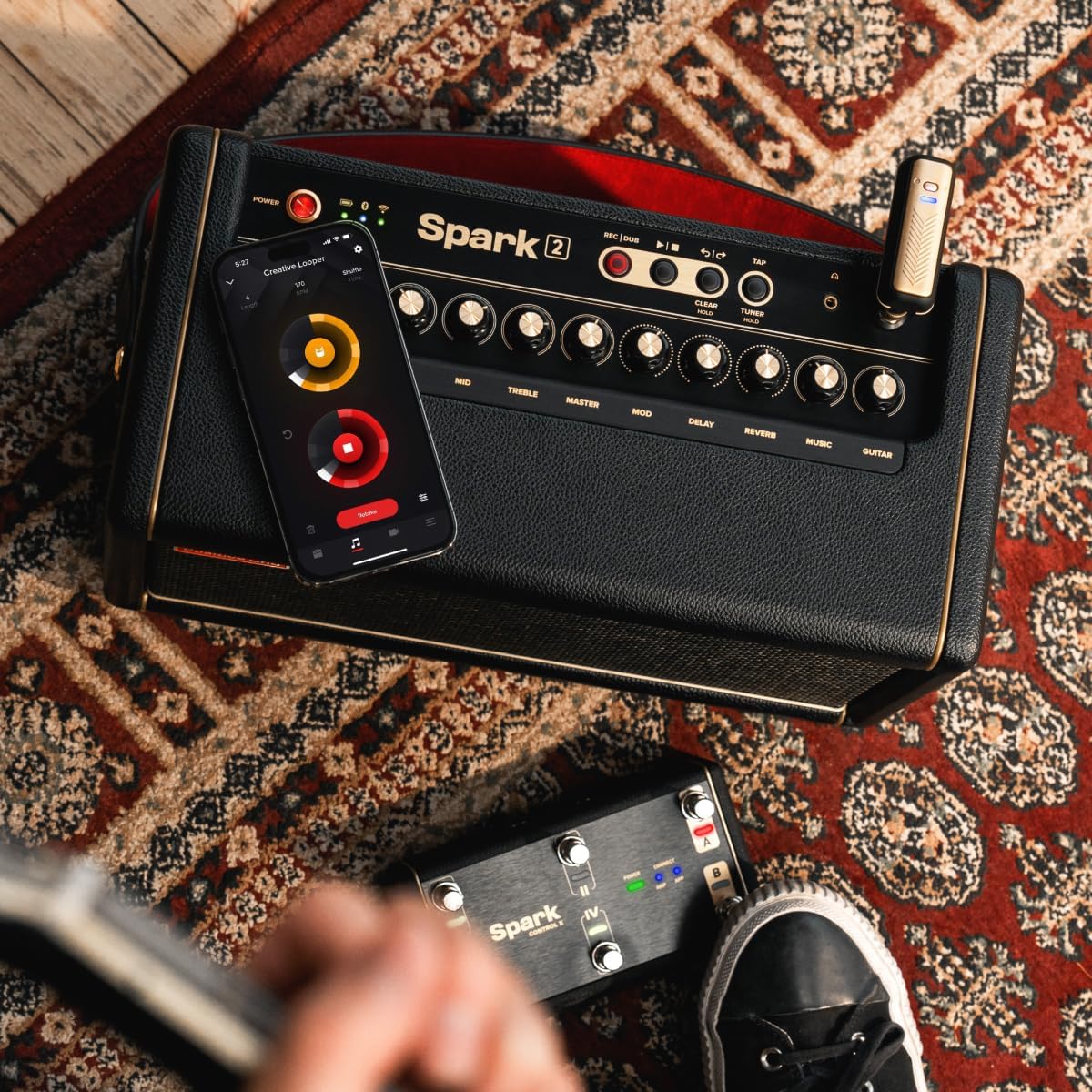
Image: The Spark 2 amplifier with the app showing detailed tone and effect settings.
3. Creative Groove Looper
The Spark 2 features a built-in Creative Groove Looper with hundreds of drum patterns. Activate the looper via the app or dedicated controls on the amplifier to record and layer your guitar parts over dynamic backing tracks.
4. Bluetooth Speaker Functionality
Connect your audio device via Bluetooth to use the Spark 2 as a high-quality Bluetooth speaker for music playback. Adjust the music volume using the dedicated knob on the amplifier or through your connected device.
Maintenance
Proper maintenance ensures the longevity and optimal performance of your Spark 2 amplifier:
- Cleaning: Use a soft, dry cloth to clean the exterior of the amplifier. Avoid abrasive cleaners or solvents.
- Storage: Store the amplifier in a cool, dry place away from direct sunlight, extreme temperatures, and humidity.
- Battery Care: For optimal battery life, avoid fully discharging the Spark Battery frequently. Charge it regularly, especially if storing the amplifier for extended periods.
- Ventilation: Ensure the amplifier has adequate ventilation to prevent overheating. Do not block any vents.
Troubleshooting
If you encounter issues with your Spark 2, try the following steps:
- No Sound: Check all cable connections (instrument, power). Ensure the amplifier is powered on and volume knobs are turned up. Verify the correct input is selected in the Spark app.
- Bluetooth Connectivity Issues: Ensure Bluetooth is enabled on both your device and the Spark 2. Try unpairing and re-pairing the devices. Restart both the amplifier and your smart device.
- App Not Responding: Close and restart the Spark app. Ensure your app is updated to the latest version.
- Distorted Sound: Check your gain settings on the amplifier and within the app. Ensure your instrument's output is not too high.
- Power Issues: If using the Spark Battery, ensure it is charged. If using the AC adapter, check the power outlet and cable connection.
Specifications
| Feature | Detail |
|---|---|
| Model Name | Spark 2 |
| Brand | Positive Grid |
| Output Wattage | 50 Watts |
| Power Source | Battery Powered |
| Compatible Devices | Guitar, Acoustic Guitar, Bass Guitar |
| Connector Type | 3.5mm Jack, 6.35mm Jack, USB |
| Color | Black |
Warranty and Support
For detailed warranty information, product registration, and technical support, please visit the official Positive Grid website or refer to the warranty card included with your product. You can also find FAQs and community forums for additional assistance.


