
1. Product Overview
The MekedeTech M6 Pro is an advanced Android 13 car radio system designed specifically for Honda Civic models from 2012 to 2015. It features an 8-core processor, 4GB RAM, 64GB internal storage, and a 1280x720 QLED full-fit touch screen. This unit integrates modern connectivity and entertainment features into your vehicle's dashboard.
Key Features:
- Android 13 Operating System
- 8-core UIS7862S 2.0GHz CPU
- 1280x720 QLED Full-Fit Screen
- Wireless CarPlay & Android Auto
- Bluetooth 5.1 (Qualcomm 3031 chip)
- Built-in DSP with 36-Band EQ and DTS 4.1/5.1 Surround Sound
- 4G LTE & 5GHz WiFi Connectivity
- Voice Control Support
- Integrated GPS/GLONASS/BDS Navigation
2. Setup and Installation
This Android car screen is designed for plug-and-play installation in Honda Civic models from 2012, 2013, 2014, and 2015. Ensure your vehicle is compatible before proceeding with installation.
2.1 Compatibility
The unit is exclusively compatible with Honda Civic vehicles manufactured between 2012 and 2015. It is not compatible with other vehicle models or years.
2.2 Installation Overview
The installation process involves removing the factory radio and dash kit, then connecting the new MekedeTech M6 Pro unit using the provided wiring harnesses. The design ensures a seamless fit into the existing dashboard.
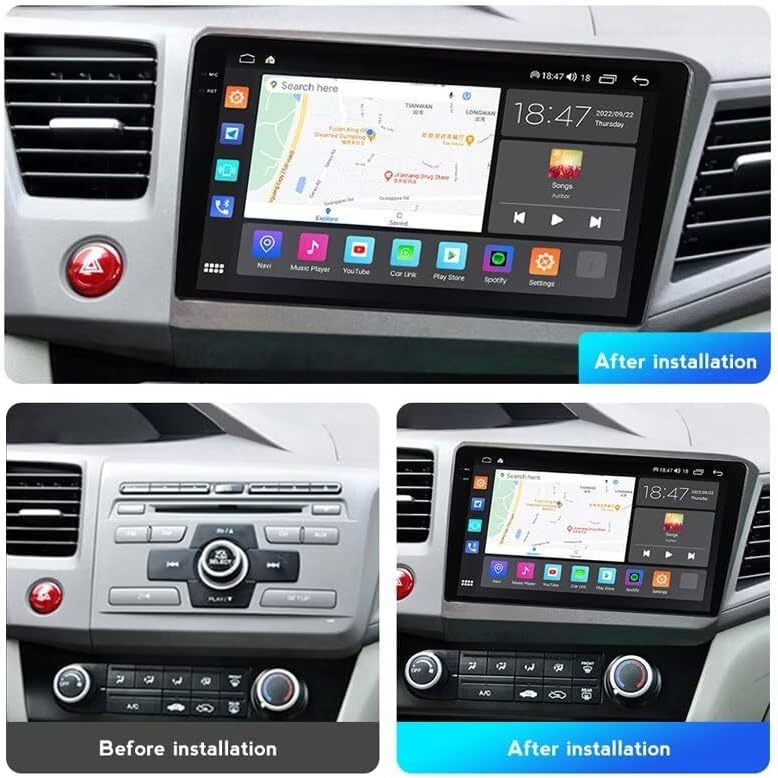
Image: Comparison of the car dashboard before and after the installation of the MekedeTech M6 Pro car radio. The top image shows the new unit installed, while the bottom left shows the original factory radio and the bottom right shows the new unit installed from a different angle.
2.3 Wiring Connections
Connect the main power harness, speaker wires, and any auxiliary inputs/outputs according to the vehicle's wiring diagram and the provided installation guide. Ensure all connections are secure to prevent intermittent issues.

Image: Detailed view of the MekedeTech M6 Pro motherboard, highlighting components like the Radio FM/AM/Fiber optic, Fakra GPS Antenna, and Fakra 4G Antenna connections. This illustrates the internal hardware and antenna setup.
The unit includes custom Fakra GPS and 4G antennas for enhanced signal stability and accurate positioning.
3. Operating Instructions
3.1 Initial Power On and System Setup
Upon first power-on, the system will boot into the Android 13 interface. Follow the on-screen prompts to set up language, time zone, and connect to a Wi-Fi network.
3.2 User Interface and Navigation
The QLED screen offers a clear and responsive touch interface. Navigate through applications and settings using intuitive gestures. The main interface is customizable, allowing you to arrange icons and widgets to your preference.

Image: A collage showing various UI display options (UI08, UI22, UI29, UI34) available on the MekedeTech M6 Pro, alongside a detailed view of the 36-band DSP equalizer interface for audio customization.
3.3 Wireless CarPlay and Android Auto
Connect your smartphone wirelessly to access CarPlay or Android Auto. This allows for seamless integration of navigation, music, calls, and messages directly on the car radio display.
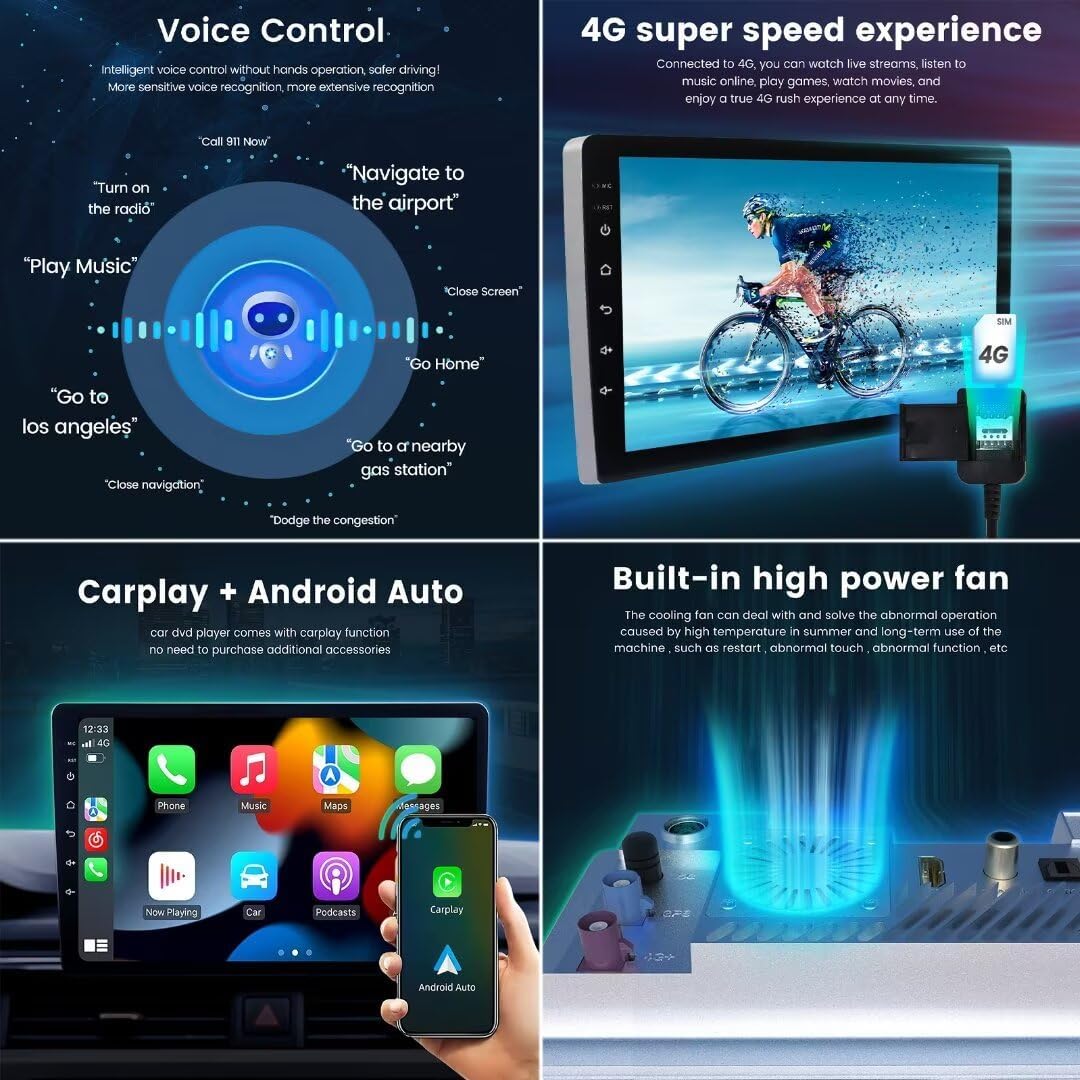
Image: This image displays four key features: the voice control interface with example commands, the 4G super speed experience showing internet connectivity, the CarPlay and Android Auto interface, and a diagram of the built-in high power cooling fan.
3.4 Bluetooth 5.1 Connectivity
The unit features a Qualcomm 3031 Bluetooth 5.1 chip, providing stable and fast wireless connections for hands-free calling and audio streaming. Pair your device through the Bluetooth settings menu.
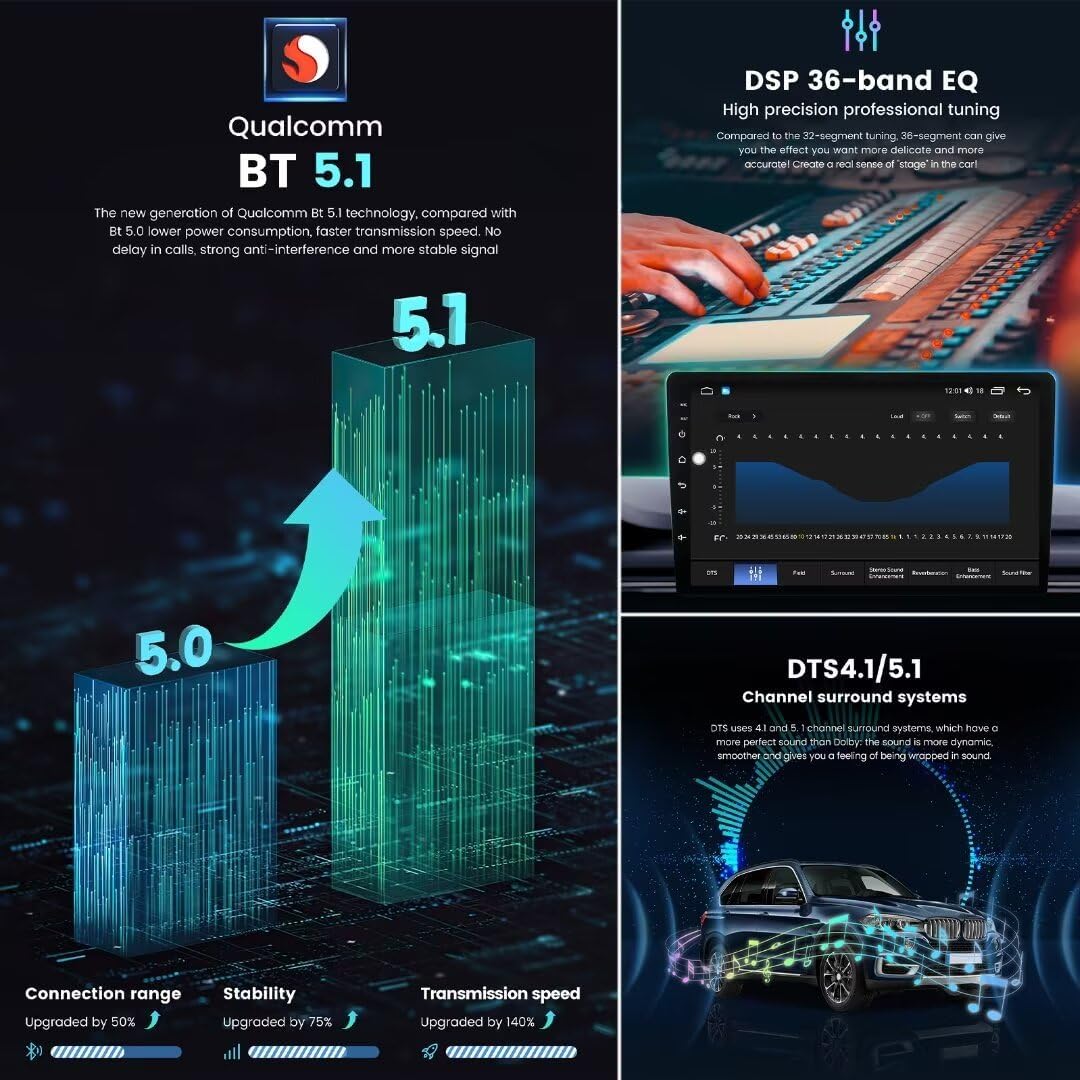
Image: Illustrates the upgrade from Bluetooth 5.0 to 5.1, highlighting improved connection range, stability, and transmission speed. Also shows the DSP 36-band EQ interface and a graphic representing DTS 4.1/5.1 channel surround sound in a car.
3.5 Audio Settings (DSP & EQ)
Utilize the built-in Digital Sound Processor (DSP) with a 36-band equalizer for precise audio tuning. The system also supports DTS 4.1/5.1 channel surround sound, offering an immersive audio experience.
3.6 Radio Functions
The unit includes an FM/AM RDS radio with a TDA7708 radio IC and TDA7850/7851 power amplifier. Scan for stations, save presets, and enjoy clear radio reception.

Image: Features the FM/AM RDS radio interface, options to customize the main interface, the split-screen functionality displaying two apps simultaneously, and a list of supported multiple languages in the settings menu.
3.7 Navigation and GPS
The integrated GPS, GLONASS, and BDS systems provide accurate positioning for navigation. Use pre-installed maps or download your preferred navigation applications from the Google Play Store.
3.8 Voice Control
The intelligent voice control feature allows for hands-free operation, enhancing driving safety. Use voice commands for navigation, music playback, calls, and more.
3.9 Split Screen Functionality
Run two applications simultaneously on the screen, such as navigation and music, for improved multitasking.
4. Maintenance
To ensure optimal performance and longevity of your MekedeTech M6 Pro car radio, consider the following:
- Cleaning: Use a soft, dry cloth to clean the screen and exterior. Avoid abrasive cleaners or solvents.
- Software Updates: Periodically check for system software updates to ensure you have the latest features and security patches.
- Cooling System: The unit features a built-in powerful cooling fan to manage heat. Ensure the fan vents are not obstructed to maintain proper airflow.
5. Troubleshooting
If you encounter issues with your MekedeTech M6 Pro unit, try the following basic troubleshooting steps:
- No Power: Check all power connections and vehicle fuses.
- No Sound: Verify speaker connections and audio settings (volume, mute, equalizer).
- Touch Screen Unresponsive: Try restarting the unit. If the issue persists, a factory reset might be necessary (note: this will erase all user data).
- GPS Signal Issues: Ensure the GPS antenna is properly installed and has a clear view of the sky.
- Bluetooth Pairing Problems: Delete previous pairings on both the unit and your phone, then attempt to pair again.
For persistent issues or complex problems, please refer to the support section for contact information.
6. Specifications
| Feature | Specification |
|---|---|
| Model Name | M6Pro-4+64GB-1280*720 |
| Operating System | Android 13 |
| CPU | UIS7862S 2.0GHz 8-core (2x ARM Cortex A75 + 6x ARM Cortex A55) |
| Memory (RAM+ROM) | 4GB RAM + 64GB Storage |
| Display Type | QLED Touch Screen |
| Display Resolution | 1280x720 |
| Bluetooth | BT 5.1 (Qualcomm 3031 chip) |
| Wi-Fi | 5GHz |
| Cellular Connectivity | 4G LTE |
| Power Amplifier IC | TDA7850/7851 |
| Radio IC | TDA7708 (with RDS) |
| DSP | 36-band Equalizer, DTS 4.1/5.1 Support |
| Special Features | Wireless CarPlay, Android Auto, Voice Control, ADAS DVR Support, AHD Rear Camera Support, Built-in Cooling Fan |
| Compatibility | Honda Civic 2012-2015 |

Image: Detailed infographic showcasing the 12NM 8-core 2.0GHz processor, 1280x720 resolution, and the benefits of the full-fit QLED screen design compared to non-full-fit screens, including improved light transmittance and reduced reflection.
7. Warranty Information
The MekedeTech M6 Pro car radio comes with a 1-Year Warranty from the date of purchase. This warranty covers manufacturing defects and malfunctions under normal use. Please retain your proof of purchase for warranty claims.
The warranty does not cover damage caused by improper installation, misuse, accidents, unauthorized repairs, or normal wear and tear.
8. Support
For technical assistance, warranty claims, or any questions regarding your MekedeTech M6 Pro car radio, please contact MekedeTech customer support. Refer to the contact information provided with your product packaging or visit the official MekedeTech website for support resources.
When contacting support, please have your product model number (M6Pro-4+64GB-1280*720) and proof of purchase readily available.
